1. Ievads
The Alpine X308U Mech-Less Navigation Receiver is designed to provide advanced smartphone integration and a reliable built-in navigation system for your vehicle. This manual provides essential information for the proper installation, operation, and maintenance of your device.
Galvenās funkcijas:
- 8-inch WVGA High-Resolution Capacitive Touch Display
- Compatibility with Apple CarPlay and Android Auto
- Embedded Navigation with 3D & 2D mapping and Pinch-to-Zoom interface
- Bluetooth brīvroku zvani un audio straumēšana
- Built-In HD Radio Tuner and SiriusXM Satellite Radio readiness
- Multiple connectivity options including HDMI input/output and USB
- Advanced audio tuning features: 9-band parametric EQ and 6-channel time correction
- Support for FLAC, AAC, MP3, WMA, HE-AC Playback
- Accessory Control Ready (KAC-001 Required) and iDatalink Maestro Module compatibility
2. Produkts beidziesview

2.1. attēls. Priekšpuse View with Navigation Display. This image shows the Alpine X308U unit with its 8-inch high-resolution capacitive touch display active, presenting a detailed 3D navigation map. The screen displays street names, distances, and navigation icons, demonstrating the unit's integrated GPS capabilities. Control buttons are visible along the bottom edge of the screen.

2.2. attēls. Priekšpuse View with Media Interface. This image illustrates the Alpine X308U's user interface for media playback and radio tuning. The display shows current FM radio frequency (105.8 MHz), preset stations, and options for HDMI, Music, Pandora, and Bluetooth Audio. Album art and song information are also visible, highlighting the unit's multimedia capabilities.

Figure 2.3: Audio Settings Interface. This image displays the "BASS ENGINE SQ" audio adjustment screen on the Alpine X308U. Users can select from various sound presets like Standard, Punch, Rich, Mid Bass, and Low Bass, and adjust levels for Bass Engine, Navi Audio, and Back Audio. This interface demonstrates the unit's comprehensive audio customization options.

2.4. attēls: Aizmugurējā paneļa savienojumi. Šis attēls sniedz detalizētu view of the rear panel of the Alpine X308U, highlighting its various input and output ports. Visible connections include GPS antenna input, USB ports, HDMI In, HDMI Out, and the main wiring harness connector. A cooling fan is also visible on the left side, indicating thermal management features.
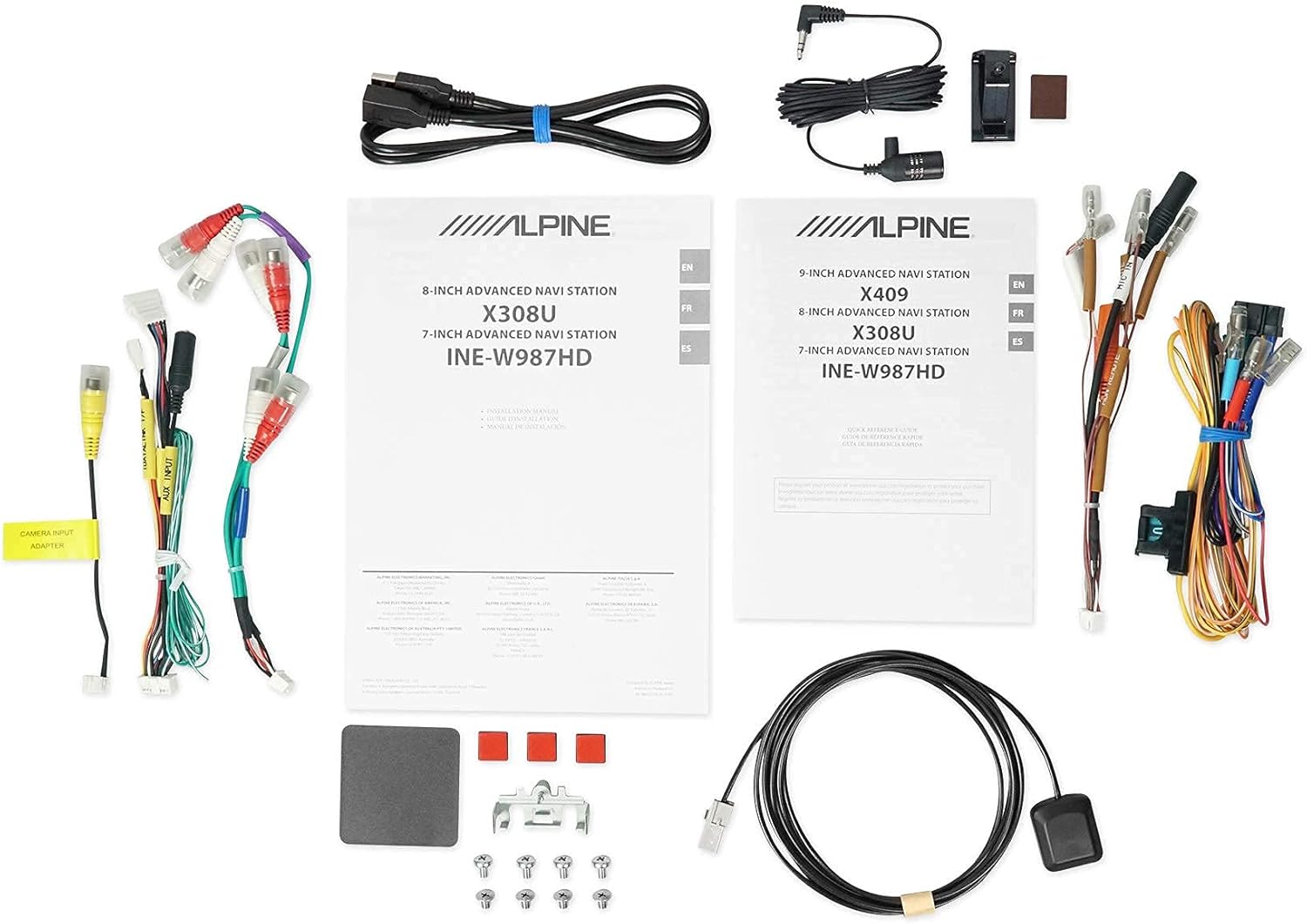
2.5. attēls: Iekļautie komponenti. This image displays a selection of cables and accessories that come with the Alpine X308U unit. These include various wiring harnesses, RCA cables for audio/video connections, a USB extension cable, and a GPS antenna. These components are essential for the proper installation and functionality of the receiver.
3. Iestatīšana un instalēšana
Proper installation is crucial for the optimal performance of your Alpine X308U. It is highly recommended that installation be performed by a qualified professional car audio installer.
3.1. Pirmsinstalācijas kontrolsaraksts:
- Pārliecinieties, vai ir visas sadaļā “Kas ir iepakojumā” uzskaitītās sastāvdaļas.
- Pirms jebkādu elektroinstalācijas darbu uzsākšanas atvienojiet transportlīdzekļa akumulatora negatīvo spaili.
- Review your vehicle's specific wiring diagrams and dash disassembly instructions.
3.2. Elektroinstalācijas savienojumi:
Connect the main wiring harness to the vehicle's power, ground, and speaker wires. Utilize the provided connectors for a secure fit. Refer to the wiring diagram included with your unit for specific color codes and pin assignments.
- Barošanas savienojumi: Pievienojiet dzelteno vadu (pastāvīgs 12 V), sarkano vadu (pārslēdzams 12 V) un melno vadu (zemējums).
- Skaļruņu izejas: Connect the speaker wires to the corresponding vehicle speakers. Ensure correct polarity.
- HDMI ieeja/izvade: Use the HDMI ports for connecting external video sources or outputting video to a rear entertainment system. Note that HDMI output functionality may be limited to specific Alpine accessories.
- USB ieeja: Connect USB devices for media playback or smartphone integration (CarPlay/Android Auto).
- Kameras ieeja: Pievienojiet aizmugurējoview camera to the dedicated input for enhanced safety. The unit supports up to 3 cameras with the optional KCX-C250MC Multi-camera selector.
- Iepriekšamp Izvades: Utilize the 6-channel pre-amp izejas ārējai pievienošanai ampglābēji.
- GPS antena: Uzstādiet GPS antenu vietā ar brīvu gaismu view of the sky for optimal navigation performance.
3.3. Iekārtas uzstādīšana:
Securely mount the X308U in your vehicle's dashboard using the provided mounting hardware. Ensure adequate ventilation around the unit to prevent overheating.
4. Lietošanas instrukcijas
4.1. Pamata darbība:
- Ieslēgšana/izslēgšana: Lai ieslēgtu vai izslēgtu ierīci, nospiediet un turiet ieslēgšanas/izslēgšanas pogu (parasti tā atrodas priekšējā panelī).
- Skaļuma kontrole: Adjust volume using the dedicated volume buttons or on-screen controls.
- Skārienekrāna interfeiss: Navigate through menus and select functions by tapping icons on the capacitive touch display. The unit supports 4-Way Swipe Action Control.
- Izvēlnes poga: Access the main menu to switch between different sources and settings.
4.2. Navigācijas sistēma:
- Accessing Navigation: Tap the "Navigation" icon on the main menu.
- Entering Destinations: Use the on-screen keyboard to input addresses, points of interest, or select from recent destinations.
- Karte View: Pārslēgšanās starp 2D un 3D karti views. Use pinch-to-zoom gestures to adjust the map scale.
- Balss norādes: Follow spoken turn-by-turn directions for guidance.
4.3. Smartphone Integration (CarPlay & Android Auto):
- Connecting Your Smartphone: Connect your compatible iPhone or Android phone to the unit's USB port using a certified USB cable.
- Activating CarPlay/Android Auto: Once connected, the respective interface will automatically launch or prompt you to activate it on the screen.
- Lietojumprogrammu izmantošana: Access supported navigation, music, messaging, and communication apps directly from the unit's display.
4.4. Bluetooth Functions:
- Ierīces savienošana pārī: Go to the Bluetooth settings menu, enable pairing mode on the X308U, and search for the unit on your smartphone. Select "Alpine X308U" and confirm the pairing code.
- Brīvroku zvani: Make and receive calls directly through the unit's microphone and vehicle speakers.
- Audio straumēšana: Straumējiet mūziku bezvadu režīmā no sava pārī savienotā viedtālruņa.
4.5. Audio iestatījumi:
- Equalizer: Access the 9-band parametric EQ to fine-tune audio frequencies.
- Laika korekcija: Adjust the sound stage for optimal listening position using the 6-channel time correction feature.
- TuneIt App: For advanced audio tuning and sharing settings, download and use the Alpine TuneIt App on your smartphone.
5. Apkope
Regular maintenance ensures the longevity and optimal performance of your Alpine X308U.
- Ekrāna tīrīšana: Use a soft, lint-free cloth specifically designed for electronic screens to gently wipe the display. Do not use abrasive cleaners or solvents.
- Vispārējā tīrīšana: Keep the unit free from dust and debris. Use a soft, dry cloth to wipe the exterior.
- Programmatūras atjauninājumi: Regulāri pārbaudiet Alpine website for firmware updates to ensure your unit has the latest features and bug fixes. Follow the instructions provided with the update carefully.
- Vides apstākļi: Nepakļaujiet ierīci ekstremālām temperatūrām, ilgstošai tiešai saules gaismai vai pārmērīgam mitrumam.
6. Traucējummeklēšana
If you encounter issues with your Alpine X308U, refer to the following common troubleshooting steps before contacting support.
| Problēma | Iespējamais cēlonis | Risinājums |
|---|---|---|
| Nav strāvas/Ierīce neieslēdzas. | Vaļīgs strāvas savienojums, izdedzis drošinātājs, problēma ar transportlīdzekļa akumulatoru. | Check all power wiring connections. Inspect and replace any blown fuses. Ensure vehicle battery is charged. |
| Nav skaņas no skaļruņiem. | Speaker wires disconnected, incorrect audio settings, unit in mute mode. | Verify speaker wire connections. Check audio settings (e.g., fader/balance, EQ). Ensure unit is not muted. |
| Navigācija nedarbojas vai ir neprecīza. | GPS antenna not properly connected or obstructed, outdated map data. | Pārliecinieties, vai GPS antena ir droši pievienota un tai ir brīvs view of the sky. Check for available map updates. |
| Bluetooth ierīce neizveido pāra savienojumu. | Device not in pairing mode, incorrect pairing procedure, interference. | Pārliecinieties, vai abas ierīces ir savienošanas pārī režīmā. Izdzēsiet iepriekšējos savienojumus pārī un mēģiniet vēlreiz. Pārvietojieties tuvāk ierīcei. |
| Skārienekrāns nereaģē. | Temporary software glitch, screen calibration needed. | Perform a soft reset (refer to manual for specific method). If issue persists, contact support. |
7. Specifikācijas
| Funkcija | Detaļas |
|---|---|
| Modeļa numurs | X308U |
| Ekrāna izmērs | 8 collas (21 cm pa diagonāli) |
| Displeja veids | WVGA High-Resolution Capacitive Touch Display |
| Maksimālā jauda | 50 Watts x 4 channels |
| CTA-2006 Power Rating | 18 Watts x 4 channels |
| Iepriekšamp Izejas | 3 (4-Volt) |
| Savienojamības tehnoloģija | Bluetooth, USB, HDMI |
| Kartes veids | Satellite, North America (Built-in 3D & 2D Navigation) |
| Produkta izmēri | 12 x 12 x 12 collas |
| Preces svars | 6.4 mārciņas |
| Iekļautie komponenti | HDMI input, USB input, composite A/V input, rear-view camera input, HDMI output, 6-channel preamp outputs, USB source |
8. Garantija un atbalsts
Šim produktam ir ražotāja garantija. Konkrētus noteikumus un nosacījumus, tostarp garantijas periodu un seguma informāciju, skatiet garantijas kartē, kas pievienota pirkumam.
Klientu atbalsts:
For technical assistance, troubleshooting beyond this manual, or warranty claims, please contact Alpine customer support. Visit the official Alpine webvietne, kurā ir pieejama visjaunākā kontaktinformācija un atbalsta resursi.
Piezīme: Saglabājiet pirkuma apliecinājumu garantijas apstiprināšanai.


