1. Ievads
Thank you for choosing the Kaidi KD-750 Bluetooth Headphones. This manual provides essential information for the proper setup, operation, and maintenance of your device. Please read it thoroughly before use to ensure optimal performance and longevity of your headphones.
2. Iepakojuma saturs
Pārliecinieties, vai iepakojumā ir visas preces:
- 1 x Kaidi KD-750 Bluetooth Headphones
- 1x USB uzlādes kabelis
- 1 x Reinforced 3.5mm Audio Cable with Microphone (P2 Cable)
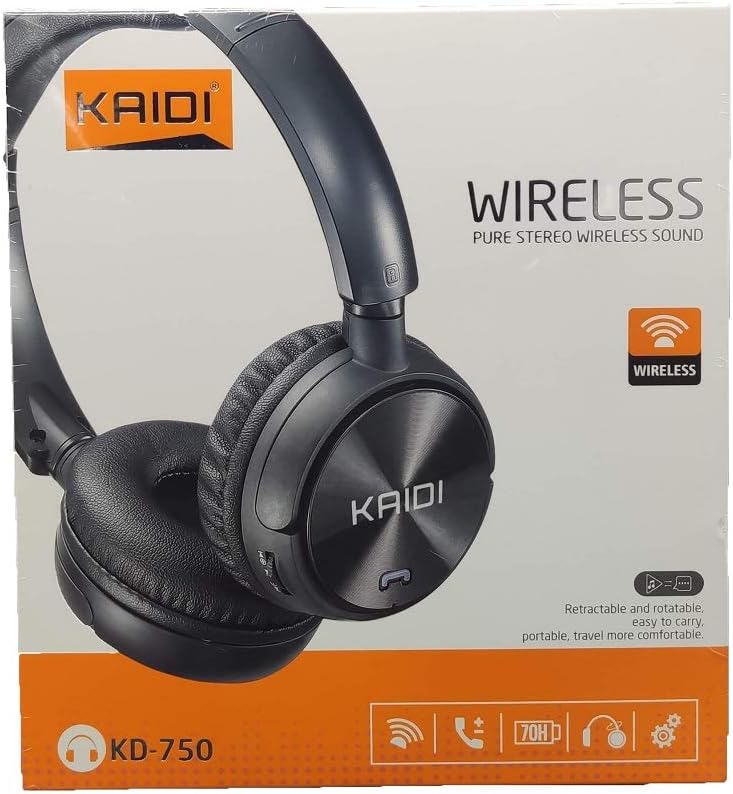
Attēls: priekšpuse view of the Kaidi KD-750 retail packaging, showing the headphones and branding.
3. Produkts beidziesview
Familiarize yourself with the various parts and controls of your Kaidi KD-750 headphones.

Attēls: priekšpuse view of the Kaidi KD-750 Bluetooth Headphones, showcasing the earcups with Kaidi logo and the adjustable headband.
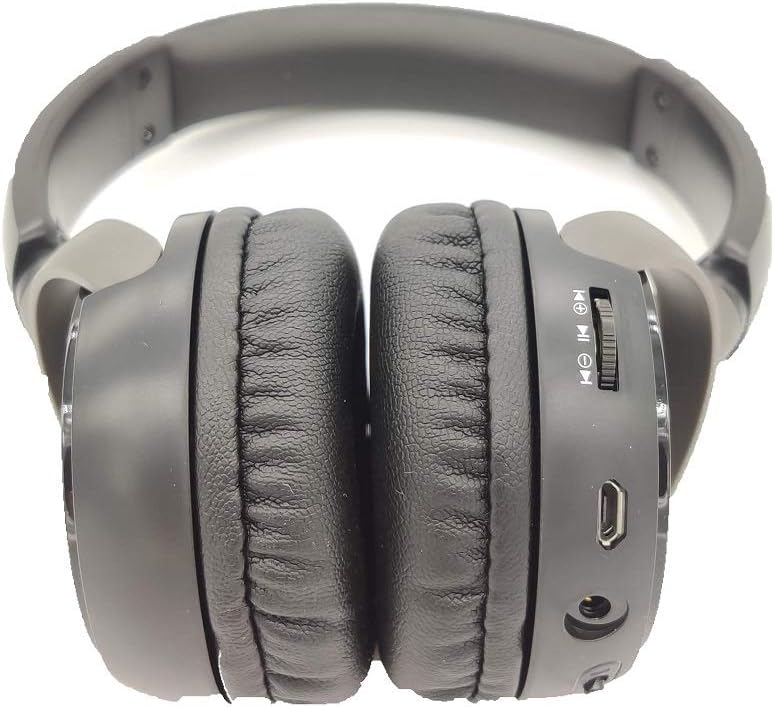
Attēls: Sāns view of the Kaidi KD-750 Bluetooth Headphones, highlighting the control buttons, charging port, and audio jack on the earcup.

Image: Back of the Kaidi KD-750 retail box, featuring a diagram of the headphone controls and key product features.
3.1. Vadības ierīces un porti
- Ieslēgšanas/izslēgšanas poga / daudzfunkciju poga: Ieslēgšana/izslēgšana, atskaņošana/pauze, atbildēšana/zvana beigšana.
- Skaļuma palielināšanas/nākamā celiņa poga: Īsi nospiediet, lai palielinātu skaļumu, ilgi nospiediet, lai pārietu uz nākamo dziesmu.
- Skaļuma samazināšanas/iepriekšējā celiņa poga: Īsi nospiediet, lai samazinātu skaļumu, ilgi nospiediet, lai pārietu uz iepriekšējo dziesmu.
- Režīma poga (M): Switch between Bluetooth, FM Radio, and SD Card modes.
- Mikro USB uzlādes ports: Austiņu uzlādēšanai.
- 3.5 mm AUX ieeja: Vadu savienojumam, izmantojot komplektā iekļauto audio kabeli.
- Micro SD kartes slots: Mūzikas atskaņošanai tieši no Micro SD kartes.
- Mikrofons: Brīvroku zvaniem.
4. Iestatīšana
4.1. Austiņu uzlādēšana
Pirms pirmās lietošanas reizes pilnībā uzlādējiet austiņas.
- Connect the Micro USB end of the charging cable to the charging port on the headphones.
- Pievienojiet uzlādes kabeļa USB-A galu USB strāvas adapterim (nav iekļauts komplektā) vai datora USB portam.
- The LED indicator will illuminate (usually red) during charging.
- Once fully charged (approximately 2 hours), the LED indicator will change color or turn off (refer to specific LED behavior in the specifications).
Piezīme: Akumulatora darbības laiks ar pilnu uzlādi ir aptuveni 5 stundas.
4.2. Bluetooth savienošana pārī
Savienojiet austiņas pārī ar ierīci, kurā iespējots Bluetooth.
- Pārliecinieties, vai austiņas ir izslēgtas.
- Press and hold the Power Button for approximately 3-5 seconds until the LED indicator flashes blue and red alternately, indicating pairing mode.
- Savā ierīcē (viedtālrunī, planšetdatorā, datorā) iespējojiet Bluetooth un meklējiet pieejamās ierīces.
- Select "KD-750" from the list of found devices.
- Once paired, the LED indicator will typically flash blue slowly or remain solid blue.
- Ja nepieciešama parole, ievadiet "0000".
Efektīvais Bluetooth diapazons ir aptuveni 10 metri (33 pēdas).
5. Lietošanas instrukcijas
5.1. Ieslēgšana/izslēgšana
- Ieslēgšana: Press and hold the Power Button for 2-3 seconds until the LED indicator lights up.
- Izslēgt: Press and hold the Power Button for 3-4 seconds until the LED indicator turns off.
5.2. Mūzikas atskaņošana (Bluetooth režīms)
- Atskaņot/pauzēt: Īsi nospiediet barošanas pogu.
- Nākamais ieraksts: Ilgi nospiediet skaļuma palielināšanas pogu.
- Iepriekšējais ieraksts: Ilgi nospiediet skaļuma samazināšanas pogu.
- Skaļāk: Īsi nospiediet skaļuma palielināšanas pogu.
- Skaļums uz leju: Īsi nospiediet skaļuma samazināšanas pogu.
5.3. Tālruņa zvani
- Atbildēt uz zvanu: Short press the Power Button when an incoming call rings.
- Beigt zvanu: Zvana laikā īsi nospiediet ieslēgšanas/izslēgšanas pogu.
- Noraidīt zvanu: Kad zvana ienākošais zvans, turiet nospiestu ieslēgšanas/izslēgšanas pogu.
- Atkārtoti sastādīt pēdējo numuru: Double-press the Power Button.
5.4. Mode Switching (FM Radio / SD Card / AUX)
Nospiediet pogu Režīma (M) poga to cycle through available modes: Bluetooth, FM Radio, and SD Card playback.
5.4.1. FM radio režīms
- Switch to FM mode using the Mode (M) Button.
- Long press the Power Button to automatically scan and save available FM stations.
- Short press the Volume Up/Down buttons to adjust volume.
- Long press the Volume Up/Down buttons to switch between saved stations.
5.4.2. Micro SD kartes atskaņošana
- Insert a Micro SD card (with MP3 files) into the SD card slot.
- Switch to SD Card mode using the Mode (M) Button. The headphones will automatically begin playing music from the card.
- Use the Play/Pause, Volume Up/Down, and Next/Previous Track controls as in Bluetooth mode.

Attēls: Tuvplāns view of the Micro SD card slot on the Kaidi KD-750 headphones.
5.4.3. AUX Wired Mode
- Connect one end of the included 3.5mm audio cable to the AUX input on the headphones.
- Pievienojiet otru galu ierīces 3.5 mm audio izejai.
- Austiņas automātiski pārslēgsies uz AUX režīmu.
- In AUX mode, controls on the headphones (volume, track control) may not function; use your connected device for control.
6. Apkope un kopšana
- Tīriet austiņas ar mīkstu, sausu drānu. Nelietojiet abrazīvus tīrīšanas līdzekļus vai šķīdinātājus.
- Nepakļaujiet austiņas ekstremālām temperatūrām, mitrumam vai tiešiem saules stariem.
- Neiegremdējiet austiņas ūdenī vai citos šķidrumos.
- Glabājiet austiņas vēsā, sausā vietā, kad tās nelietojat.
- Charge the headphones regularly, even if not used for extended periods, to maintain battery health.
7. Traucējummeklēšana
7.1. Headphones do not power on.
Risinājums: The battery may be depleted. Connect the headphones to a power source using the USB charging cable and allow them to charge for at least 30 minutes before attempting to power on again.
7.2. Nevar savienot pārī ar Bluetooth ierīci.
- 1. risinājums: Ensure the headphones are in pairing mode (LED flashing blue and red alternately).
- 2. risinājums: Make sure Bluetooth is enabled on your device and it is within 10 meters of the headphones.
- 3. risinājums: Izslēdziet Bluetooth savā ierīcē, pēc tam ieslēdziet to vēlreiz un mēģiniet meklēt vēlreiz.
- 4. risinājums: If previously paired, try "forgetting" or "unpairing" the headphones from your device's Bluetooth list and then re-pairing.
7.3. Nav skaņas vai kluss skaļums.
- 1. risinājums: Pārbaudiet skaļuma līmeņus gan austiņās, gan pievienotajā ierīcē.
- 2. risinājums: Ensure the headphones are properly connected via Bluetooth or the 3.5mm AUX cable.
- 3. risinājums: If using AUX mode, ensure the cable is fully inserted into both the headphones and the audio source.
7.4. FM radio reception is poor.
Risinājums: Move to an open area away from obstructions or electronic interference. The 3.5mm audio cable can sometimes act as an antenna; try connecting it even if not using AUX mode for improved reception.
8. Specifikācijas
| Bluetooth versija: | v4.2 |
| Atbalstītie protokoli: | AVRCP1.3, A2DP1.0, HFP1.5, HSP1.0 |
| Efektīvais diapazons: | 10 metri (33 pēdas) |
| Darba biežums: | 2.402 GHz–2.480 GHz |
| Akumulatora tips: | Iebūvēts 3.7 V 300 mAh uzlādējams litija akumulators |
| Uzlādes sējumstage: | Līdzstrāva 4.2–5.5 V |
| Uzlādes laiks: | Apmēram 2 stundas |
| Akumulatora darbības ilgums: | Approximately 5 hours (playback) |
| Skaļruņu pretestība: | 32 omi |
| Trokšņa kontrole: | Pasīvā trokšņa atcelšana |
| Savienojamības tehnoloģija: | Bluetooth, 3.5 mm ligzda |
| Saderīgas ierīces: | Any device supporting Bluetooth connectivity |
| Produkta svars: | 190 g |
| Krāsa: | Melns |
9. Garantija un atbalsts
The Kaidi KD-750 Bluetooth Headphones come with a standard manufacturer's warranty against defects in materials and workmanship. Please refer to the warranty card included with your purchase for specific terms and conditions, including the warranty period.
For technical support, troubleshooting assistance, or warranty claims, please contact your retailer or the official Kaidi customer service. Contact information can typically be found on the product packaging or the official Kaidi webvietne.
Lūdzu, saglabājiet pirkuma apliecinājumu garantijas vajadzībām.