1. Ievads
This manual provides essential information for the safe and efficient operation of your OMNITRONIC PM-322P 3-Channel DJ Mixer. Please read these instructions thoroughly before using the device to ensure proper functionality and to prevent damage.
The OMNITRONIC PM-322P is a robust and versatile 3-channel DJ mixer designed for various audio mixing applications, featuring integrated Bluetooth connectivity and a USB MP3 player.

1. attēls: Leņķveida view of the OMNITRONIC PM-322P DJ Mixer, showcasing its compact design and accessible controls.
2. Drošības instrukcijas
- Pirms ierīces lietošanas izlasiet visus norādījumus.
- Saglabājiet šo rokasgrāmatu turpmākai uzziņai.
- Nepakļaujiet ierīci lietus vai mitruma iedarbībai.
- Nodrošiniet atbilstošu ventilāciju; neaizsedziet ventilācijas atveres.
- Only connect to a grounded power outlet with the specified voltage (240 volti).
- Neatveriet ierīci casing; visu apkopi uzticiet kvalificētam personālam.
- Nenovietojiet ierīci siltuma avotu tuvumā vai tiešos saules staros.
- Tīriet tikai ar sausu drānu.
3. Galvenās iezīmes
- 3 ievades kanāli: Each channel features gain control, a 3-band equalizer (High, Mid, Low), a Cue button for pre-listening, and a smooth channel fader.
- Integrated Bluetooth Audio Streaming: Seamlessly stream music wirelessly from your Bluetooth-enabled portable devices directly to the mixer.
- DJ Microphone Channel: Dedicated microphone input with independent volume control and a 2-band equalizer for vocal adjustments.
- MP3 Player with USB Port: Atskaņot audio files directly from a USB storage device, with track information displayed on a clear blue LCD.
- Izturīga konstrukcija: Radīts izturībai un uzticamai veiktspējai.
4. Vadības elementi un savienojumi
4.1 Priekšējā paneļa vadīklas

2. attēls: Augšā view of the OMNITRONIC PM-322P DJ Mixer, highlighting the main control surface.
- USB ports: For connecting USB storage devices to the integrated MP3 player.
- MP3/Bluetooth Module: Includes LCD display, playback controls (Play/Stop, Skip), and Pairing button for Bluetooth.
- Channel Gain Controls (CH 1-3): Pielāgojiet katra kanāla ievades līmeni.
- 3-Band Equalizer (High, Mid, Low): Tone controls for each channel.
- Cue Buttons (CH 1-3): Activates pre-listening for the respective channel through headphones.
- Channel Faders (CH 1-3): Adjust the volume level of each channel in the mix.
- Microphone Level Control (MIC LEVEL): Regulē pievienotā mikrofona skaļumu.
- Microphone 2-Band Equalizer (MIC HIGH, MIC LOW): Tone controls for the microphone input.
- X-Fader Reverse Switch: Reverses the direction of the crossfader.
- X-Fader Curve Control: Adjusts the crossfader curve from sharp to smooth.
- Crossfader (CH 2/CH 3): Blends between channels 2 and 3.
- Master Level Control: Regulē kopējo izejas skaļumu.
- Cue Level Control: Regulē austiņu izejas skaļumu.
- Cue Mix/PGM Control: Blends between the Cued signal and the Program (Master) signal in the headphones.
- LED līmeņa mērītāji: Visual indication of output levels.
- Austiņu izeja (1/4" TRS): Austiņu pievienošanai monitoringam.
4.2 Aizmugurējā paneļa savienojumi
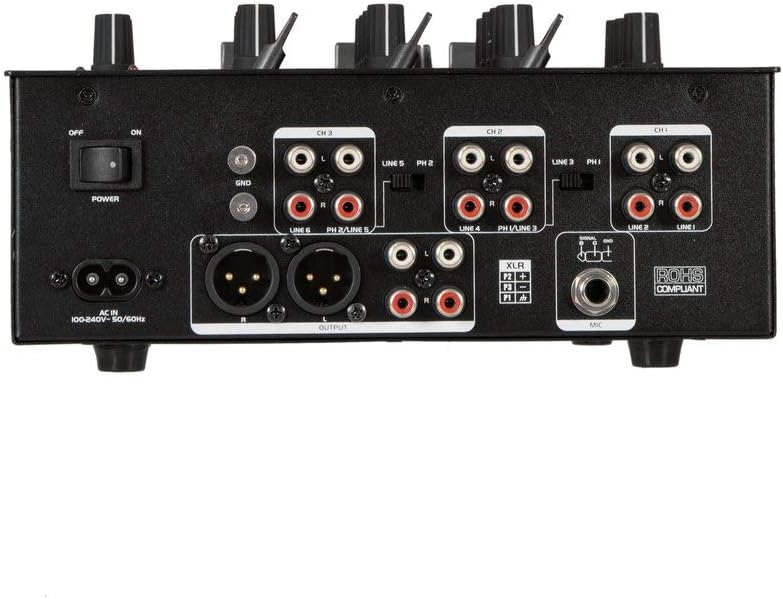
3. attēls: Rear panel of the OMNITRONIC PM-322P DJ Mixer, showing all input and output ports.
- Barošanas slēdzis (IESLĒGTS/IZSLĒGTS): Ieslēdz vai izslēdz maisītāju.
- AC IN: Power input for the included power cable (100-240V AC, 50/60Hz).
- Ground Terminal (GND): For connecting a turntable ground wire.
- Channel 3 Inputs (LINE 5/PH 2, LINE 6): RCA inputs for line-level devices (CD players, media players) and phono-level devices (turntables).
- Channel 2 Inputs (LINE 3/PH 1, LINE 4): RCA inputs for line-level devices and phono-level devices.
- Channel 1 Inputs (PLAYER/LINE 1, LINE 2): RCA inputs for line-level devices.
- Master Output (XLR, RCA): Balanced XLR and unbalanced RCA outputs for connecting to a power amppacēlājs vai aktīvie skaļruņi.
- Mikrofona ieeja (XLR): Līdzsvarota XLR ieeja dinamiska mikrofona pievienošanai.
5. Iestatīšana
- Strāvas pieslēgums: Connect the provided power cable to the AC IN socket on the rear panel and then to a suitable grounded power outlet (240V).
- Izvades savienojums: Connect the MASTER OUTPUT (XLR or RCA) to your amplifier or active speaker system.
- Ievades ierīces:
- Connect turntables to the PHONO inputs (CH 2 or CH 3) and ensure the PH/LINE switch is set to PH. Connect the turntable's ground wire to the GND terminal.
- Connect CD players, media players, or other line-level devices to the LINE inputs (CH 1, CH 2, or CH 3). Ensure the PH/LINE switch is set to LINE for channels 2 and 3.
- Connect a microphone to the XLR MIC input on the rear panel.
- Austiņas: Connect your headphones to the 1/4" TRS HEADPHONE output on the front panel.
- Sākotnējie iestatījumi: Before powering on, ensure all channel faders are down, gain controls are at minimum, and the Master Level is at minimum.
- Ieslēgšana: Pārslēdziet aizmugurējā paneļa POWER slēdzi ON pozīcijā.
6. Darbība
6.1 Playing Audio from Input Channels
- Select the desired input source (LINE or PHONO) using the switch on the rear panel for Channels 2 and 3. Channel 1 is LINE only.
- Start playback on your connected audio source (turntable, CD player).
- Slowly increase the GAIN control for the selected channel until the LED level meter shows a strong signal without clipping (red LEDs).
- Adjust the 3-band EQ (HIGH, MID, LOW) to shape the sound of the channel.
- Raise the channel fader to bring the audio into the main mix.
- Adjust the MASTER LEVEL control to set the overall output volume.
- Use the CUE button to pre-listen to a channel through your headphones before fading it into the mix. Adjust CUE LEVEL and CUE MIX/PGM as needed.
6.2 Using the MP3 Player (USB)
- Insert a USB storage device (formatted as FAT32) containing MP3 files USB portā.
- The LCD display will show track information.
- Use the PLAY/STOP button to start or pause playback.
- Use the SKIP buttons (<< / >>) to navigate between tracks.
- The MP3 player typically routes to Channel 1. Adjust Channel 1's GAIN, EQ, and FADER controls as described above.
6.3 Bluetooth audio straumēšana
- Press the PAIRING button on the MP3/Bluetooth module. The Bluetooth indicator will flash, indicating it's in pairing mode.
- On your Bluetooth-enabled device (smartphone, tablet), search for available Bluetooth devices and select "OMNITRONIC PM-322P".
- Kad ierīce ir savienota pārī, Bluetooth indikators nepārtraukti degs.
- Start playing audio on your connected device. The Bluetooth audio will route to Channel 1.
- Adjust Channel 1's GAIN, EQ, and FADER controls to mix the Bluetooth audio.
6.4 Mikrofona izmantošana
- Connect a dynamic microphone to the XLR MIC input on the rear panel.
- Speak into the microphone and slowly increase the MIC LEVEL control until the desired volume is achieved without distortion.
- Use the MIC HIGH and MIC LOW controls to adjust the tone of your voice.
7. Apkope
- Tīrīšana: Disconnect the device from power before cleaning. Use a soft, dry cloth to wipe the surface. Do not use liquid cleaners or solvents.
- Uzglabāšana: When not in use for extended periods, store the mixer in a dry, dust-free environment.
- Pakalpojums: Iekšpusē nav detaļu, kuras var apkalpot lietotājs. Visu apkopi uzticiet kvalificētam servisa personālam.
8. Traucējummeklēšana
| Problēma | Iespējamais cēlonis | Risinājums |
|---|---|---|
| Nav jaudas | Power cable disconnected; Power switch off; Outlet fault. | Check power cable connection; Ensure power switch is ON; Test outlet with another device. |
| Nav skaņas izvades | Master Level too low; Channel fader down; Gain too low; Amplifier/speakers off or disconnected. | Increase Master Level; Raise channel fader; Increase channel Gain; Check amplifier/speaker connections and power. |
| Izkropļota skaņa | Gain too high (clipping); Input signal too strong; Faulty cable. | Reduce channel Gain; Check input signal level; Replace cables. |
| Bluetooth netiek savienots pārī | Mixer not in pairing mode; Device too far; Device already paired to another unit. | Press PAIRING button; Move device closer; Disconnect from other Bluetooth devices. |
| USB MP3 player not working | USB device not formatted correctly (FAT32); No MP3 files; USB device faulty. | Ensure USB is FAT32 and contains MP3s; Try a different USB device. |
9. Specifikācijas
| Modelis: | PM-322P |
| Ražotājs: | Steinigke Showtechnic GmbH |
| Kanālu skaits: | 3 |
| Savienojamības tehnoloģija: | Bluetooth, USB |
| Barošanas avots: | Elektrības kabelis |
| Voltage: | 240 voltu maiņstrāva |
| Preces svars: | 3.18 kilogrami |
| Audio ieeja: | XLR (Microphone), RCA (Line/Phono) |
| Izvades savienotāja tips: | XLR, TRS 1/4", RCA |
| Model Number (Manufacturer): | 8283410 |
| UPC: | 04026397653403 |
10. Garantija un atbalsts
For warranty information and technical support, please contact the manufacturer, Steinigke Showtechnic GmbH, or your authorized dealer. Keep your proof of purchase for any warranty claims.
For further assistance, please visit the official OMNITRONIC webvietnē vai sazinieties ar vietējo izplatītāju.


