Ievads
This instruction manual provides detailed information on the installation, operation, and maintenance of your Blaupunkt DENVER 212 DAB BT car radio. Please read this manual thoroughly before using the device to ensure proper functionality and to prevent damage. Keep this manual for future reference.

Image: Blaupunkt DENVER 212 DAB BT product banner.
Drošības informācija
- Ensure proper installation by a qualified professional to avoid electrical hazards or damage to your vehicle.
- Nelietojiet ierīci tā, lai tā novērstu jūsu uzmanību no braukšanas. Vienmēr prioritāri pievērsiet uzmanību ceļu satiksmes drošībai.
- Nepakļaujiet ierīci ekstremālām temperatūrām, tiešiem saules stariem vai mitrumam.
- Use only approved accessories and parts.
- Disconnect the vehicle's battery before installation to prevent short circuits.
Iepakojuma saturs
Pārliecinieties, vai iepakojumā ir visi priekšmeti:
- Blaupunkt DENVER 212 DAB BT Car Radio Unit
- Montāžas rāmis
- Wiring Harness (ISO connector)
- DAB+ Antenna (if included with specific models)
- Ārējais mikrofons
- Disassembly Keys
- Lietotāja rokasgrāmata (šis dokuments)
Produkts beidziesview
The Blaupunkt DENVER 212 DAB BT is a 1-DIN car radio featuring DAB+ digital radio, Bluetooth hands-free calling, and media streaming. It offers a robust design and short installation depth for versatile vehicle compatibility.

Image: Front panel of the Blaupunkt DENVER 212 DAB BT, showing display, control knobs, and buttons.
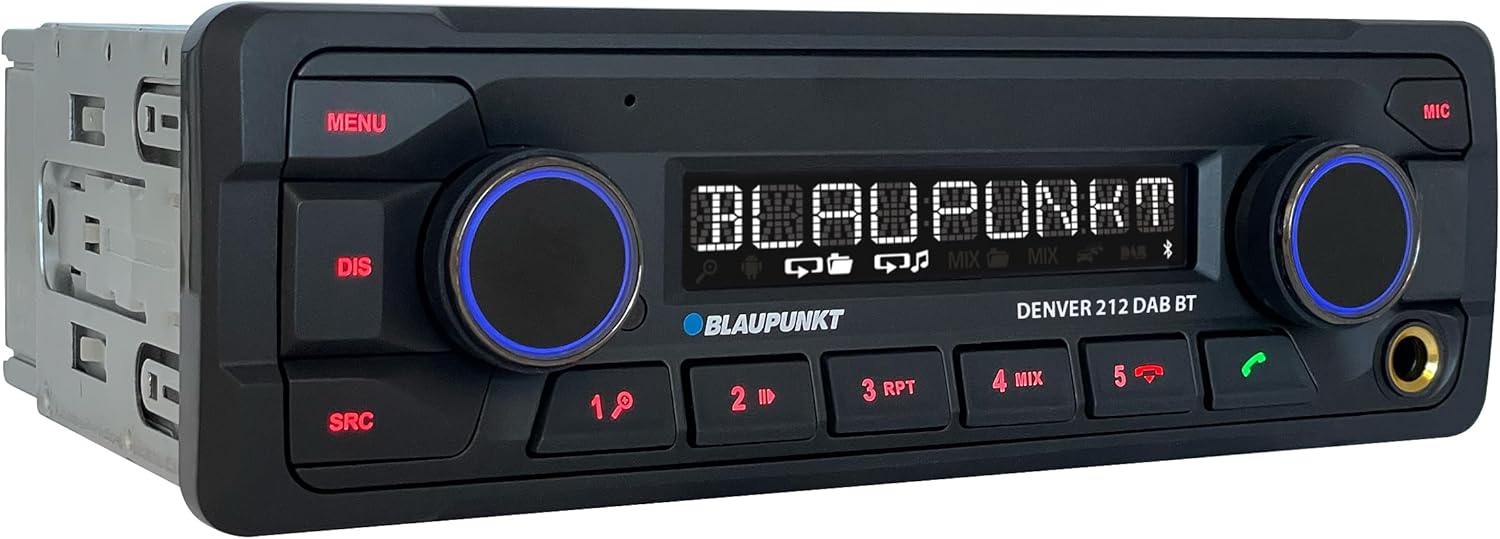
Attēls: Leņķis view of the Blaupunkt DENVER 212 DAB BT, highlighting its compact design.
Priekšējā paneļa vadības ierīces:
- Poga MENU: Piekļūst sistēmas iestatījumiem un opcijām.
- DIS Button: Maina attēlošanas informāciju.
- SRC Button: Selects audio source (Radio, DAB, Bluetooth, USB, AUX).
- Volume Knob (Left): Adjusts audio volume. Press to mute/unmute.
- Selection Knob (Right): Pārvieto izvēlnes un atlasa opcijas.
- Iepriekšiestatījumu pogas (1–6): Store and recall radio stations, control media playback.
- Zvanīšanas pogas (zaļas/sarkanas): Answer/end Bluetooth calls.
- USB ports: Pievienojiet USB atmiņas ierīces multivides atskaņošanai.
- AUX ieeja (3.5 mm ligzda): Pievienojiet ārējos audio avotus.
Uzstādīšana un uzstādīšana
Uzstādīšanas soļi:
- Sagatavošana: Atvienojiet sava transportlīdzekļa akumulatora negatīvo spaili.
- Montāža: Insert the supplied mounting frame into the vehicle's 1-DIN opening. Bend the tabs to secure it.
- Elektroinstalācija: Connect the wiring harness according to the diagram below. Ensure all connections are secure.
- Antenas savienojums: Connect the FM antenna and the DAB+ antenna (if applicable) to the corresponding inputs on the rear of the radio.
- Mikrofona savienojums: Connect the external microphone to the designated input for optimal hands-free call quality.
- Insert Unit: Slide the radio unit into the mounting frame until it clicks into place.
- Galīgā pārbaude: Pievienojiet transportlīdzekļa akumulatoru un pārbaudiet ierīci.
Wiring Diagram (General):
| Stieples krāsa | Funkcija |
|---|---|
| Dzeltens | Pastāvīgs 12 V (akumulators) |
| Sarkans | Ieslēgts 12V (aizdedze) |
| Melns | Zemējums |
| Zils | Strāvas antena / Amppacēlājs Tālvadības pults |
| Oranžs/Balts | Apgaismojums |
| Speaker Wires (e.g., White, Grey, Green, Purple pairs) | Connect to vehicle speakers (Front Left, Front Right, Rear Left, Rear Right) |
| Stūres vadības ieeja | Connect to vehicle's steering wheel control interface (if applicable) |
Note: Specific wire colors may vary. Always refer to your vehicle's wiring diagram and the radio's included diagram for precise connections.

Image: The Blaupunkt DENVER 212 DAB BT car radio seamlessly integrated into a vehicle's dashboard.
Lietošanas instrukcijas
1. Pamatfunkcijas:
- Ieslēgšana/izslēgšana: Press the volume knob (left) briefly to turn the unit on. Press and hold to turn off.
- Skaļuma kontrole: Rotate the volume knob (left) to adjust the sound level.
- Avota izvēle: Nospiediet pogu SRC button repeatedly to cycle through available audio sources (FM, DAB, Bluetooth Audio, USB, AUX).
- Navigācija izvēlnē: Nospiediet pogu IZVĒLNE button to enter the main menu. Use the right knob to navigate and select options.
2. Radio (FM/DAB+):
- Selecting Radio Mode: Nospiediet SRC until FM or DAB is selected.
- Automātiskā regulēšana: In FM/DAB mode, press and hold the right knob or seek buttons (if available) to automatically search for stations.
- Manuāla regulēšana: Briefly press the right knob or seek buttons to fine-tune frequencies.
- Presetu glabāšana: Tune to a desired station, then press and hold one of the numeric preset buttons (1-6) until you hear a confirmation beep.
- Sākotnējo iestatījumu atsaukšana: Īsi nospiediet ciparu iepriekš iestatītas stacijas pogu (1–6), lai izsauktu saglabātu staciju.
3. Bluetooth Operation:
- Ierīces savienošana pārī:
- Pārliecinieties, vai jūsu mobilajā ierīcē ir iespējots Bluetooth.
- Select "Bluetooth" as the source on the car radio. The display will show "PAIRING".
- On your mobile device, search for Bluetooth devices and select "BLAUPUNKT DENVER".
- Ja tiek prasīts, apstipriniet savienošanu pārī abās ierīcēs.
- Brīvroku zvani:
- Atbildēšana uz zvanu: Nospiediet zaļo zvanīšanas pogu.
- Zvana beigšana: Press the red call button.
- Zvanīšana: Dial from your phone; audio will transfer to the car radio.
- Bluetooth audio straumēšana: Once paired, select "Bluetooth Audio" as the source. Play music from your mobile device, and it will stream through the car radio. Use the preset buttons (e.g., 4 for MIX, 5 for RPT) for playback control (play/pause, skip tracks).
4. USB and AUX Input:
- USB atskaņošana: Insert a USB storage device into the front USB port. The unit will automatically switch to USB mode and begin playback.
- AUX ieeja: Connect an external audio device (e.g., MP3 player) to the 3.5mm AUX input jack using an audio cable. Select "AUX" as the source.
5. Sound Settings (Equalizer):
- Nospiediet pogu IZVĒLNE button, then navigate to "AUDIO" or "EQ" settings.
- Adjust bass, treble, balance, and fader settings to your preference.
- Pre-set equalizer modes (e.g., Pop, Rock, Classic) may be available.
Video: oversview of the Blaupunkt DENVER 212 DAB BT car radio's features and basic operation.
Apkope
- Tīrīšana: Ierīces priekšējā paneļa tīrīšanai izmantojiet mīkstu, sausu drānu. Nelietojiet abrazīvus tīrīšanas līdzekļus vai šķīdinātājus.
- USB ports: Turiet USB portu tīru no putekļiem un gružiem.
- Programmaparatūras atjauninājumi: Pārbaudiet oficiālo Blaupunkt webvietni, lai regulāri pārbaudītu visus pieejamos programmaparatūras atjauninājumus jūsu modelim.
Problēmu novēršana
| Problēma | Iespējamais cēlonis | Risinājums |
|---|---|---|
| Nav jaudas | Blown fuse; incorrect wiring (constant/switched 12V); loose connection. | Check vehicle fuses and the radio's fuse. Verify wiring connections, especially constant and ignition power. Ensure the unit is properly seated. |
| Nav skaņas | Pārāk zems skaļums; aktivizēta izslēgšana; nepareiza skaļruņu pieslēgšana; amppacēlāja problēmas. | Increase volume. Check if mute is active. Verify speaker connections. If an external ampJa tiek izmantots lifer, pārbaudiet tā barošanu un savienojumus. |
| Poor radio reception (FM/DAB) | Antenna not connected; damaged antenna; weak signal area. | Ensure antenna is securely connected. Check antenna for damage. Consider a stronger antenna or signal booster if in a weak signal area. For DAB+, ensure the DAB antenna is correctly installed and positioned. |
| Bluetooth savienojuma problēmas | Device not in pairing mode; incorrect wiring (ignition+ and constant+); interference. | Ensure both devices are in pairing mode. Delete previous pairings and try again. Verify that the constant 12V and switched 12V wires are correctly connected to the radio, as improper wiring can affect Bluetooth stability. Move away from other Bluetooth devices. |
| USB nav atpazīts | Neatbalstīts file format; USB drive not formatted correctly; damaged USB drive. | Nodrošiniet audio files are in supported formats (e.g., MP3, WMA). Format the USB drive to FAT32. Try a different USB drive. |
Specifikācijas
| Funkcija | Detaļas |
|---|---|
| Zīmols | BLAUPUNKT |
| Modeļa numurs | Denver 212 DAB BT |
| Krāsa | Melns |
| Savienojamības tehnoloģija | Bluetooth, USB |
| Savienotāja veids | 3.5 mm ligzda, USB |
| Īpašas funkcijas | DAB, RDS, Equalizer, Bluetooth Hands-free |
| Saderīgas ierīces | Viedtālrunis |
| Kopējais USB portu skaits | 1 |
| Audio izvades režīms | Stereo |
| Telpiskās skaņas kanālu konfigurācija | 4.0 |
| Produkta izmēri | 12D x 17.8W x 5.2H centimetri |
| Ražotājs | Blaupunkt |
| Rezerves daļu pieejamība | 1 gads |
Garantija un atbalsts
This Blaupunkt product comes with a manufacturer's warranty. For specific warranty terms and conditions, please refer to the warranty card included with your product or visit the official Blaupunkt website. For technical support, troubleshooting assistance, or spare parts inquiries, please contact Blaupunkt customer service through their official channels.
Spare parts are generally available for 1 year from the date of purchase.
Official Blaupunkt Webvietne: www.blaupunkt.com