1. Ievads
This manual provides essential information for the safe and efficient use of your MEDION P14371 (MD 30044) Full HD 43 inch Android Smart TV. Please read these instructions carefully before operating the device and retain them for future reference.
The MEDION P14371 is a 43-inch Full HD (1920x1080) Smart TV featuring Android TV, HDR support, PVR readiness, and integrated Google Chromecast and Assistant. It offers access to popular streaming services like Netflix and Amazon Prime Video, along with a triple HD tuner for DVB-T2 HD, cable, and satellite reception.
2. Drošības informācija
Lai novērstu elektriskās strāvas triecienu, ugunsgrēku vai traumas, vienmēr ievērojiet šādus drošības pasākumus:
- Nepakļaujiet televizoru lietus vai mitruma iedarbībai.
- Nodrošiniet atbilstošu ventilāciju; neaizsedziet ventilācijas atveres.
- Izmantojiet tikai televizora komplektācijā iekļauto strāvas vadu.
- Neatveriet televizora korpusuasing; visu apkopi uzticiet kvalificētam personālam.
- Sargājiet baterijas no bērniem un utilizējiet tās pareizi.
3. Iepakojuma saturs
Pārliecinieties, vai iepakojumā ir visas sastāvdaļas:
- MEDION LIFE Smart TV P14371 (MD 30044)
- Feet with screws for stand assembly
- Tālvadības pults ar AAA baterijām
- Lietotāja rokasgrāmata
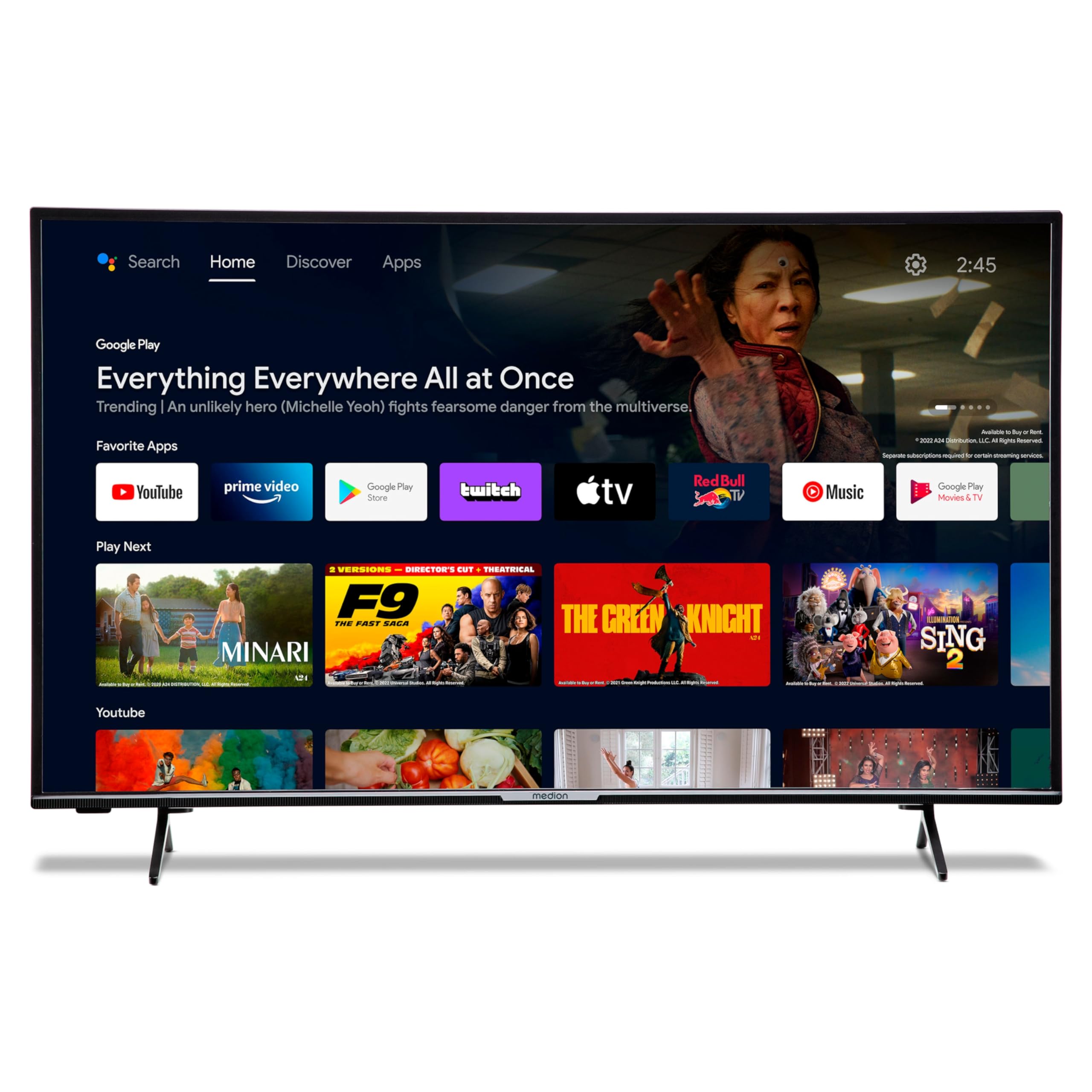
Image: The MEDION P14371 Smart TV with its remote control, illustrating the main components included in the package.
4. Iestatīšana
4.1. Fiziskā uzstādīšana
Statīva piestiprināšana:
- Uzmanīgi novietojiet televizoru ar ekrānu uz leju uz mīkstas, līdzenas virsmas, lai novērstu bojājumus.
- Align the TV feet with the corresponding screw holes on the bottom of the TV.
- Nostipriniet kājas, izmantojot komplektā esošās skrūves.

Image: The MEDION P14371 television securely placed on its stand, ready for use.
Sienas montāža: If wall mounting, ensure you use a VESA compatible bracket (100 x 100 mm) and follow the bracket manufacturer's instructions. Remove the stand feet before mounting.
4.2. Savienojumi
Pievienojiet ārējās ierīces televizora pieslēgvietām. Pieslēgvietu atrašanās vietas skatiet attēlā zemāk:
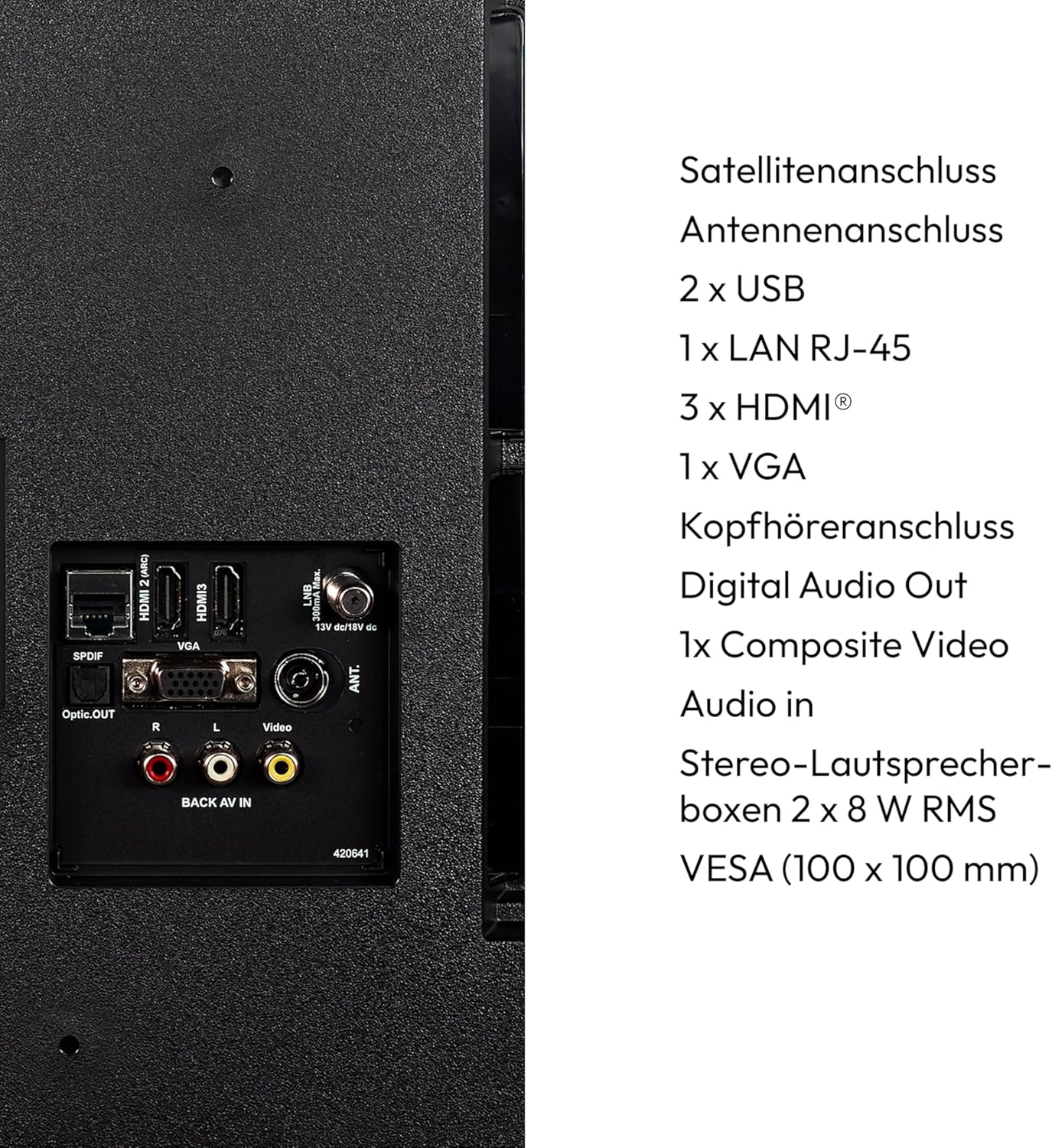
Attēls: Detalizēts view of the rear panel of the MEDION P14371 TV, showing various input and output ports including Satellite, Antenna, USB, LAN, HDMI, VGA, Headphone, Digital Audio Out, Composite Video, and Audio In.
- Satelīta savienojums: Connect your satellite dish cable.
- Antenas savienojums: Connect your terrestrial antenna cable.
- 2 x USB: For connecting USB storage devices for media playback or PVR functionality.
- 1 x LAN RJ-45: Vadu interneta pieslēgumam.
- 3 x HDMI®: Augstas izšķirtspējas ierīču, piemēram, Blu-ray atskaņotāju, spēļu konsoļu vai televizora pierīču, pievienošanai.
- 1 x VGA: Datora pieslēgšanai.
- Austiņu ligzda: Austiņu pievienošanai.
- Digitālā audio izeja (optiskā): Pieslēgšanai ārējai audio sistēmai.
- 1 x Composite Video (AV In): Vecāku ierīču savienošanai.
4.3. Sākotnējā ieslēgšana
- After all connections are made, plug the power cord into a wall outlet.
- Nospiediet ieslēgšanas/izslēgšanas pogu uz tālvadības pults vai televizora.
- Izpildiet ekrānā redzamos norādījumus sākotnējai iestatīšanai, tostarp valodas izvēlei, tīkla savienojuma izveidei un kanālu skenēšanai.
5. Televizora vadība
5.1. Tālvadības pults
Komplektā iekļautā tālvadības pults nodrošina piekļuvi visām televizora funkcijām. Ievietojiet divas AAA baterijas, kā norādīts bateriju nodalījumā.
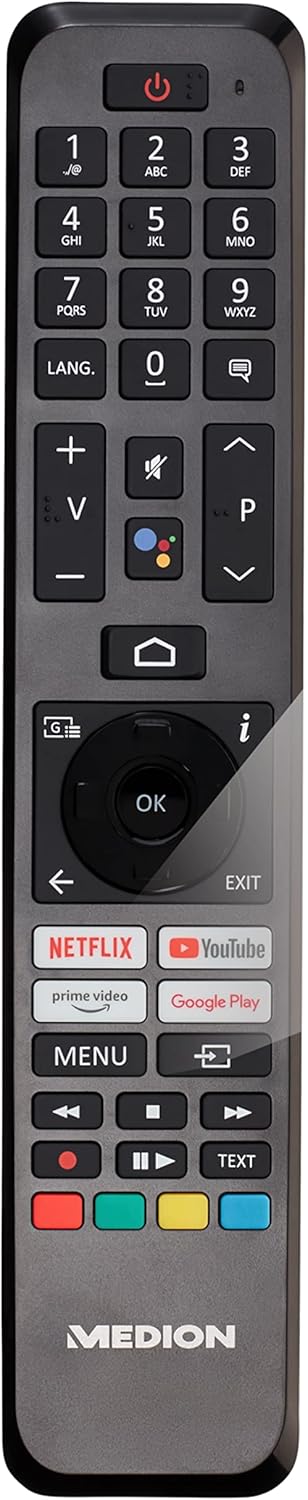
Image: The remote control for the MEDION P14371 TV, showing buttons for power, volume, channel, navigation, Netflix, Prime Video, Google Play, and Google Assistant.
- Barošanas poga: Ieslēdz/izslēdz televizoru vai pārslēdz to gaidstāves režīmā.
- Ciparu pogas (0-9): Tiešai kanālu izvēlei.
- Skaļums (+/-): Regulē skaļuma līmeni.
- Kanāls (P+/P-): Maina kanālus.
- Navigācijas pogas (augšup/lejup/pa kreisi/pa labi/labi): Izvēlnes navigācijai un atlasei.
- Mājas poga: Piekļūst Android TV sākuma ekrānam.
- Atpakaļ poga: Atgriežas iepriekšējā ekrānā.
- Google palīga poga: Activates voice control (Hey Google).
- Netflix, Amazon Prime Video, Google Play Buttons: Tieša piekļuve šiem straumēšanas pakalpojumiem.
5.2. Viedtelevizora funkcijas (Android TV)
Your TV runs on Android TV, providing access to a wide range of apps and services.

Image: The MEDION P14371 TV displaying the Google Play interface with various apps and games, highlighting its Smart TV capabilities.
- Google Play veikals: Download and install your favorite apps, games, and streaming services.
- Iebūvēta Chromecast ierīce: Pārraidiet saturu no viedtālruņa, planšetdatora vai datora tieši uz televizoru.
- Google palīgs: Izmantojiet balss komandas, izmantojot tālvadības pulti, lai meklētu saturu, vadītu viedās mājas ierīces un iegūtu informāciju.
- HDR (augsts dinamiskais diapazons): Enjoy enhanced contrast and color detail with compatible content.
5.3. Triple HD Tuner
The integrated triple tuner allows reception of digital television signals without an external receiver:
- DVB-T2 HD: Terrestrial digital television.
- DVB-C: Digitālā kabeļtelevīzija.
- DVB-S2: Digitālā satelīttelevīzija.
Perform a channel scan during initial setup or via the TV menu to find available channels.
5.4. PVR (Personal Video Recorder)
Connect a USB storage device to record TV programs. Access the PVR function through the TV menu to schedule recordings or record live TV.
5.5. Bezvadu savienojums
- Wi-Fi: Izveidojiet savienojumu ar mājas bezvadu tīklu, lai piekļūtu internetam un viedtelevizora funkcijām.
- Bluetooth: Pievienojiet bezvadu austiņas, skaņas joslas vai citas ierīces ar Bluetooth atbalstu.
6. Apkope
6.1. Tīrīšana
- Pirms tīrīšanas vienmēr atvienojiet televizoru no strāvas.
- Ekrāna un korpusa noslaukšanai izmantojiet mīkstu, sausu drānu.
- Noturīgiem traipiem izmantojiet nedaudz damp cloth with a mild, non-abrasive cleaner. Do not spray cleaner directly onto the screen.
6.2. Programmatūras atjauninājumi
The TV may receive software updates to improve performance and add new features. Ensure your TV is connected to the internet to receive these updates. You can check for updates manually in the TV's settings menu.
7. Traucējummeklēšana
Ja rodas problēmas ar televizoru, skatiet tālāk norādītos bieži sastopamos risinājumus.
| Problēma | Iespējamais risinājums |
|---|---|
| Nav jaudas | Pārbaudiet, vai strāvas vads ir droši pievienots televizoram un sienas kontaktligzdai. Izmēģiniet citu kontaktligzdu. |
| Nav attēla, bet ir skaņa | Check the input source. Ensure all video cables are securely connected. |
| Nav skaņas, bet attēls ir | Check the volume level and mute settings. Ensure audio cables are connected correctly. |
| Tālvadības pults nedarbojas | Nomainiet baterijas. Pārliecinieties, vai starp tālvadības pulti un televizora infrasarkano staru sensoru nav nekādu šķēršļu. |
| Viedtelevizora funkcijas darbojas lēni vai nereaģē | Check your internet connection. Restart the TV by unplugging it for a few minutes and plugging it back in. Clear app caches in settings. |
| Nevar izveidot savienojumu ar Wi-Fi | Ensure your router is on and working. Re-enter the Wi-Fi password. Try restarting your router and the TV. |
8. Specifikācijas
Detailed technical specifications for the MEDION P14371 (MD 30044) TV:
| Funkcija | Specifikācija |
|---|---|
| Zīmols | MEDIONS |
| Modeļa numurs | P14371 (MD 30044) |
| Ekrāna izmērs | 43 collas (108 cm) |
| Displeja tehnoloģija | LED-LCD |
| Izšķirtspēja | 1080p Full HD (1920 x 1080 pikseļi) |
| Malu attiecība | 1.77:1 (16:9) |
| Atsvaidzināšanas biežums | 60 Hz |
| Operētājsistēma | Android TV |
| Savienojamības tehnoloģija | Bluetooth, HDMI, USB, WLAN (Wi-Fi) |
| Kopējais USB portu skaits | 2 |
| Īpašas funkcijas | Bluetooth, USB Recording (PVR), HDR, Smart/Internet TV, Wi-Fi, Google Chromecast, Google Assistant |
| Atbalstītie interneta pakalpojumi | Netflix, Amazon Prime Video |
| Energoefektivitātes klase (SDR) | E |
| Enerģijas patēriņš (SDR) | 42.0 W/1000 h |
| Energoefektivitātes klase (HDR) | G |
| Enerģijas patēriņš (HDR) | 62.0 W/1000 h |
| Ražotājs | MEDIONS |
| Iekļautie komponenti | Viedtelevizors (MD30044) |
For more detailed energy information, please refer to the EU EPREL database: https://eprel.ec.europa.eu/qr/1587496

Image: Diagram showing the physical dimensions of the MEDION P14371 TV, including width (973 mm), height (570 mm without stand, 627 mm with stand), and depth (92 mm without stand, 250 mm with stand).
9. Garantija un atbalsts
MEDION is committed to providing excellent customer service and product support.
- Vispārējā garantija: A minimum general warranty of 2 years is offered by the supplier.
- Produktu atbalsts: Guaranteed product support for up to 10 years.
- Rezerves daļu pieejamība: Guaranteed availability of spare parts for up to 7 years from the date of market withdrawal.
- Programmatūras atjauninājumi: Guaranteed software and firmware updates for up to 8 years from the date of market withdrawal.
Our competent customer service team is available 365 days a year. Our customer relationship does not end with the purchase. If an issue cannot be resolved through direct communication, our repair service will handle it quickly and efficiently.
For support, please visit the official MEDION webvietnē vai sazinieties tieši ar viņu klientu apkalpošanas dienestu.


