1. Ievads
Welcome to your JBL J777 Wireless In-Ear Headphones. This manual provides detailed instructions to help you get the most out of your device, ensuring proper setup, operation, and maintenance. Please read this manual thoroughly before using your headphones.
2. Produkts beidziesview
The JBL J777 headphones are designed for wireless audio playback and hands-free calling, offering convenience and quality sound.
2.1 Sastāvdaļas
- In-ear earbuds with silicone tips
- Flexible neckband cable
- Inline remote control with integrated microphone
- USB charging port (typically located on the remote)
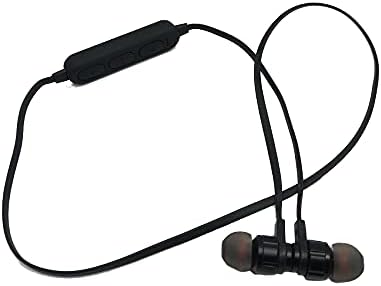
This image displays the complete JBL J777 wireless in-ear headphones. It features two black earbuds connected by a flexible cable, with an inline remote control positioned on the cable. The design is intended for comfortable wear around the neck.
2.2 Vadības ierīces
The inline remote control provides easy access to various functions:
- Ieslēgšanas/daudzfunkciju poga: Used for powering on/off, play/pause music, and answering/ending calls.
- Skaļuma palielināšanas poga: Increases volume, also used for skipping to the next track.
- Skaļuma samazināšanas poga: Decreases volume, also used for skipping to the previous track.

Detalizēts view of the inline remote control for the JBL J777 headphones. It shows three distinct buttons for power/multi-function, volume up, and volume down, along with a small microphone opening for hands-free calls.
3. Iestatīšana
3.1 Austiņu uzlāde
- Connect the micro-USB charging cable to the charging port on the inline remote control.
- Pievienojiet kabeļa otru galu USB barošanas avotam (piemēram, datora USB portam, USB sienas adapterim).
- LED indikators uzlādes laikā parasti deg sarkanā krāsā un nodziest vai kļūst zils, kad ierīce ir pilnībā uzlādēta.
- The integrated 90mAh lithium battery provides wireless operation.
3.2 Bluetooth savienošana pārī
To connect your JBL J777 headphones to a Bluetooth-enabled device:
- Pārliecinieties, vai austiņas ir izslēgtas.
- Nospiediet un turiet Power/Multi-function button for approximately 5-7 seconds until the LED indicator flashes red and blue alternately. This indicates the headphones are in pairing mode.
- On your mobile phone or Bluetooth-enabled device, go to the Bluetooth settings and enable Bluetooth.
- Meklēt available devices and select "JBL J777" from the list.
- Once paired, the LED indicator will typically flash blue slowly or remain solid blue.
- The headphones have an operation distance of up to 10 meters (33 feet) in an open environment.
4. Lietošanas instrukcijas
4.1 Ieslēgšana/izslēgšana
- Lai ieslēgtu: Nospiediet un turiet Power/Multi-function button for 3 seconds. The LED will flash blue.
- Lai izslēgtu: Nospiediet un turiet Power/Multi-function button for 3 seconds. The LED will flash red and then turn off.
4.2 Mūzikas atskaņošana
- Atskaņot/pauzēt: Nospiediet pogu Power/Multi-function pogu vienu reizi.
- Nākamais ieraksts: Nospiediet un turiet Skaļuma palielināšana pogu.
- Iepriekšējais ieraksts: Nospiediet un turiet Skaļuma samazināšana pogu.
- Skaļāk: Nospiediet pogu Skaļuma palielināšana īsi pogu.
- Skaļums uz leju: Nospiediet pogu Skaļuma samazināšana īsi pogu.
4.3 Zvanu pārvaldība
- Atbildēt/beigt zvanu: Nospiediet pogu Power/Multi-function pogu vienu reizi.
- Noraidīt zvanu: Nospiediet un turiet Power/Multi-function pogu 2 sekundes.
- Atkārtoti sastādīt pēdējo numuru: Divreiz nospiediet Power/Multi-function pogu.
4.4 Aktīva trokšņu atcelšana
The JBL J777 headphones feature active noise cancellation to reduce ambient noise for a more immersive listening experience. This feature operates automatically or is controlled via the multi-function button, depending on the specific model variant.
5. Apkope
Proper care ensures the longevity and optimal performance of your headphones.
- Tīrīšana: Viegli noslaukiet austiņas un vadu ar mīkstu, sausu drānu. Nelietojiet spēcīgas ķīmiskas vielas vai abrazīvus materiālus.
- Uzglabāšana: Store the headphones in a cool, dry place away from direct sunlight and extreme temperatures. Avoid tangling the cable.
- Akumulatora kopšana: Lai paildzinātu akumulatora darbības laiku, izvairieties no biežas akumulatora pilnīgas izlādes. Regulāri uzlādējiet austiņas, pat ja tās ilgstoši netiek lietotas.
6. Traucējummeklēšana
If you encounter any issues with your JBL J777 headphones, refer to the following common problems and solutions:
- Austiņas neieslēdzas: Pārliecinieties, vai akumulators ir uzlādēts. Pievienojiet strāvas avotam un mēģiniet vēlreiz.
- Nevar savienot pārī ar ierīci:
- Ensure the headphones are in pairing mode (flashing red and blue).
- Pārliecinieties, vai jūsu ierīcē ir iespējots Bluetooth.
- Pārvietojiet austiņas tuvāk ierīcei.
- Turn off and on both the headphones and your device, then try pairing again.
- Nav skaņas:
- Pārbaudiet skaļuma līmeni gan austiņās, gan pievienotajā ierīcē.
- Pārliecinieties, vai austiņas ir pareizi savienotas pārī un pievienotas.
- Mēģiniet atskaņot audio no citas lietotnes vai avota.
- Slikta skaņas kvalitāte vai saraustīts savienojums:
- Pārliecinieties, vai starp austiņām un ierīci nav šķēršļu.
- Pārvietojieties tālāk no citām bezvadu ierīcēm, kas var radīt traucējumus.
- Atkārtoti savienojiet austiņas pārī ar savu ierīci.
7. Specifikācijas
Detailed technical specifications for the JBL J777 Wireless In-Ear Headphones:
| Zīmols | JBL |
| Modeļa numurs | J777 |
| Tips | Ausīs ievietojamas bezvadu austiņas |
| Savienojamība | Bezvadu (Bluetooth 4.2) |
| Bluetooth Profiles | HFP, A2DP, AVCTP, AVDTP, AVRCP |
| Darbības attālums | Līdz 10 metriem (33 pēdām) |
| Pārraides spēks | klase 2 |
| Frekvenču diapazons | 2.402–2.480 GHz |
| Skaļruņa diametrs | Ø15 mm |
| Impedance | 32Ω |
| Mikrofons | Integrēts |
| Trokšņa kontrole | Aktīvā trokšņu slāpēšana |
| Akumulators | Rechargeable Lithium, 90mAh |
| Savietojams ar | Mobilie telefoni |
| TF karšu atbalsts | 128MB - 32GB |
| Iekļautie komponenti | Ausu spilventiņi |

This image shows the rear side of the JBL J777 product packaging. It clearly lists technical specifications such as Bluetooth version, supported profiles, operation distance, transmitting power, frequency range, speaker size, impedance, and battery capacity. It also indicates TF card support.
8. Garantija un atbalsts
For warranty information regarding your JBL J777 Wireless In-Ear Headphones, please refer to the documentation provided at the time of purchase. This information is typically included in the product packaging or available on the official JBL webvietne.
For further assistance, technical support, or to inquire about service, please visit the official JBL support page or contact their customer service department directly. Keep your proof of purchase handy for any warranty claims.


