Ievads
This manual provides detailed instructions for the safe and efficient operation, maintenance, and troubleshooting of your BE COOL Air Cooler, Model BCP5AC2101F. Please read this manual thoroughly before using the appliance and keep it for future reference.
Svarīgi drošības norādījumi
- Vienmēr pārliecinieties, ka ierīce ir novietota uz stabilas, līdzenas virsmas.
- Neiegremdējiet ierīci, vadu vai kontaktdakšu ūdenī vai citos šķidrumos.
- Unplug the appliance from the power outlet before cleaning, filling, or performing any maintenance.
- Glabājiet ierīci bērniem un mājdzīvniekiem nepieejamā vietā.
- Neaizbloķējiet gaisa ieplūdes vai izplūdes atveres. Nodrošiniet atbilstošu ventilāciju ap ierīci.
- Use only clean tap water in the water tank. Do not add any chemicals or additives.
- Ja strāvas vads ir bojāts, tas jānomaina ražotājam, tā servisa aģentam vai līdzīgi kvalificētām personām, lai izvairītos no briesmām.
- Šī ierīce ir paredzēta lietošanai tikai iekštelpās.
Produkts beidziesview
Familiarize yourself with the components of your BE COOL Air Cooler.

1. attēls. Priekšpuse view of the BE COOL Air Cooler, showing the main fan grille, water level indicator, and "BE COOL" logo.

Figure 2: Top control panel with buttons for Timer, Cool, Speed, and On/Off, along with indicator lights.

Figure 3: Diagram illustrating key features: integrated dust filter, timer function, and remote control operation.
Iestatīšana
1. Izpakošana
Carefully remove the air cooler from its packaging. Retain the packaging for future storage or transport.
2. Riteņu piestiprināšana
The appliance comes with 4 castor wheels for easy mobility. Insert each wheel into the designated slots at the bottom of the unit until they click securely into place.
3. Ūdens tvertnes uzpildīšana
The BE COOL Air Cooler features a 5-liter water tank. For cooling and humidifying functions, the tank must be filled with water.
- Pārliecinieties, vai ierīce ir atvienota no strāvas padeves.
- Locate the water tank opening, typically at the bottom rear or side of the unit.
- Carefully pour clean tap water into the tank. Do not exceed the "MAX" fill line indicated on the water level indicator.
- For enhanced cooling, you may add ice packs (not included) to the water tank if available.
- Close the water tank opening securely.
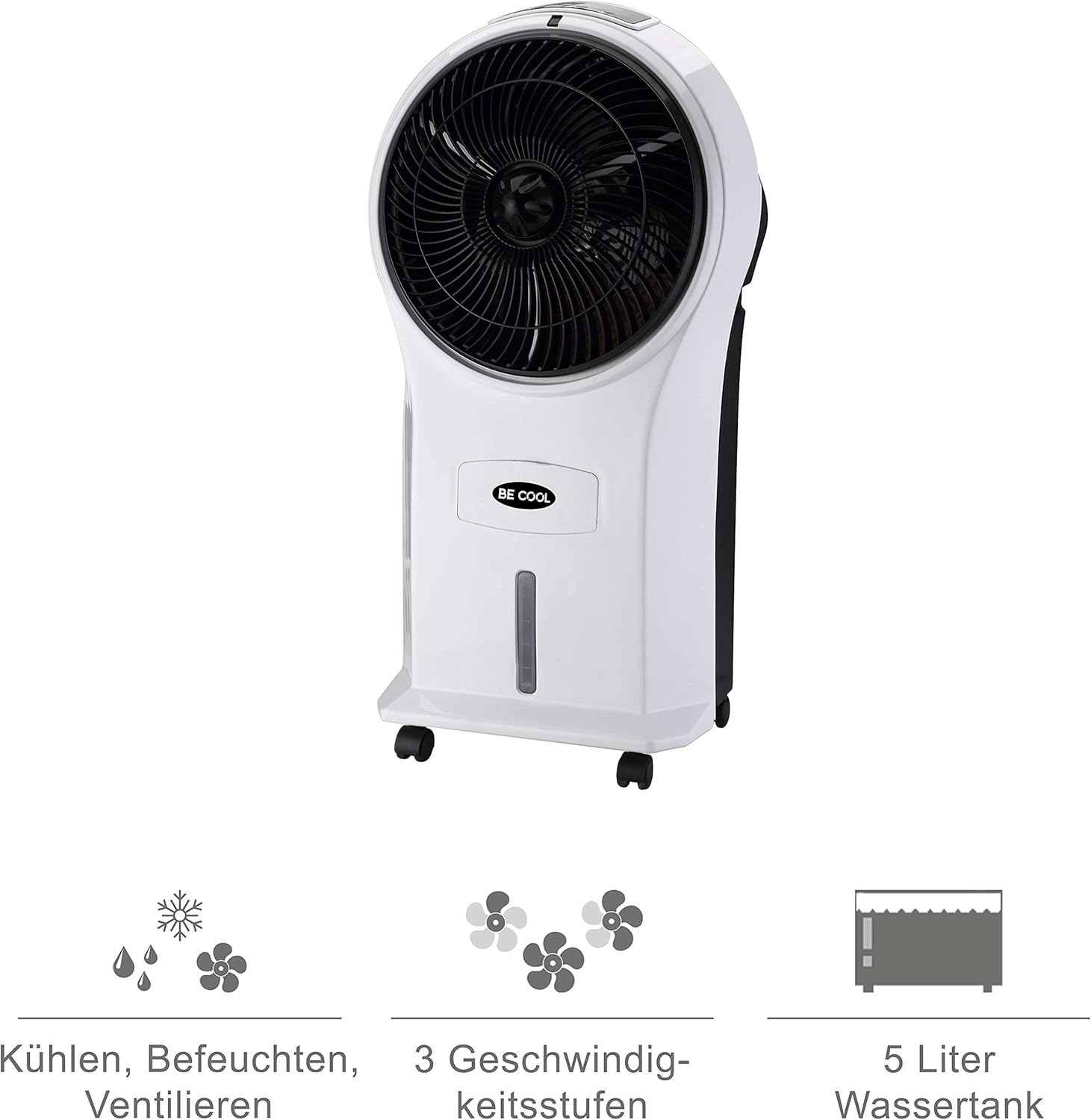
Figure 4: Visual representation of the 3-in-1 functions (cooling, humidifying, ventilating), 3 speed levels, and the 5-liter water tank capacity.
Lietošanas instrukcijas
1. Ieslēgšana/izslēgšana
Plug the power cord into a suitable electrical outlet. Press the Ieslēgts/Izslēgts pogu uz vadības paneļa vai tālvadības pults, lai ieslēgtu vai izslēgtu ierīci.
2. Ventilatora ātruma regulēšana
Nospiediet pogu Ātrums button repeatedly to cycle through the three available fan speeds: Low, Medium, and High. The corresponding indicator light will illuminate.
3. Cooling and Humidifying Function
To activate the cooling and humidifying function, ensure the water tank is filled. Press the Forši button. The unit will begin to draw water from the tank to cool and humidify the air. This function can reduce room temperature by up to 8°C.
4. Taimera funkcija
The air cooler features a 7-hour timer. Press the Taimeris button repeatedly to set the desired operating time in increments (e.g., 1 hour, 2 hours, 4 hours, up to 7 hours). The unit will automatically turn off once the set time has elapsed.
5. Tālvadības pults lietošana
The included remote control allows for convenient operation from a distance. Ensure the remote control has batteries installed (batteries not included). Point the remote control towards the front of the air cooler when operating.
6. Air Purification
The integrated filter helps to purify the air by trapping dust, pollen, mites, bacteria, and unpleasant odors, contributing to a cleaner indoor environment.

Figure 5: The BE COOL Air Cooler positioned in a bedroom, demonstrating its compact size and portability.

Figure 6: The BE COOL Air Cooler in an office environment, highlighting its suitability for various indoor spaces.
Apkope
Regulāra apkope nodrošina jūsu gaisa dzesētāja optimālu darbību un ilgmūžību.
1. Gaisa filtra tīrīšana
The air filter should be cleaned regularly, especially if the unit is used frequently or in dusty environments.
- Atvienojiet ierīci no strāvas kontaktligzdas.
- Locate and remove the air filter, usually found at the back of the unit.
- Gently clean the filter with a soft brush or vacuum cleaner to remove dust. For deeper cleaning, rinse with lukewarm water and mild detergent.
- Pirms filtra ievietošanas atpakaļ ierīcē ļaujiet tam pilnībā nožūt.
2. Ūdens tvertnes tīrīšana
To prevent mold and mildew growth, clean the water tank weekly or as needed.
- Unplug the appliance and empty any remaining water from the tank.
- Noslaukiet tvertnes iekšpusi ar mīkstu drāniņu dampnomazgā ar maigu mazgāšanas līdzekļa šķīdumu.
- Rinse the tank thoroughly with clean water to remove any detergent residue.
- Allow the tank to air dry completely before refilling or storing the unit.
3. Ārējā tīrīšana
Noslaukiet ierīces ārpusi ar mīkstu, damp audums. Neizmantojiet abrazīvus tīrīšanas līdzekļus vai šķīdinātājus.
4. Uzglabāšana
If storing the air cooler for an extended period, ensure the water tank is empty and clean, and the unit is dry. Store it in a cool, dry place, preferably in its original packaging.
Problēmu novēršana
Biežāk sastopamās problēmas un to risinājumus skatiet šajā sadaļā.
| Problēma | Iespējamais cēlonis | Risinājums |
|---|---|---|
| Ierīce neieslēdzas. | Nav barošanas avota; Nav nospiesta ieslēgšanas/izslēgšanas poga. | Check if the power cord is securely plugged in. Press the On/Off button. |
| Nav dzesēšanas efekta. | Water tank empty; Cool function not activated. | Fill the water tank. Press the Cool button. |
| Vāja gaisa plūsma. | Air filter clogged; Fan speed set too low. | Clean the air filter. Increase the fan speed. |
| Nepatīkama smaka. | Stagnant water in tank; Dirty filter. | Empty and clean the water tank. Clean or replace the air filter. |
| Tālvadības pults nedarbojas. | Baterijas ir izlādējušās vai nepareizi ievietotas; šķērslis starp tālvadības pulti un ierīci. | Replace batteries. Ensure no obstructions and point directly at the unit. |
Specifikācijas
- Modelis: BCP5AC2101F
- Veids: 3-in-1 Evaporative Air Cooler (Cooler, Humidifier, Fan)
- Enerģijas patēriņš: 45 vati
- Gaisa plūsmas jauda: 17.5 cubic meters per minute (1050 m³/h)
- Ūdens tvertnes ietilpība: 5 litri
- Ventilatora ātrumi: 3 (zems, vidējs, augsts)
- Taimeris: Līdz 7 stundām
- Vadības veids: Tālvadības pults, manuālās pogas
- Izmēri (G x P x A): 31.5 x 27 x 61 cm (12.4 x 10.6 x 24 collas)
- Svars: 2.9 kg (6.4 mārciņas)
- Krāsa: Balts/Melns
- Iekļautie komponenti: Main unit, Remote control, 4 Castor wheels
Garantija un atbalsts
For warranty information or technical support, please refer to the warranty card included with your purchase or contact Be Cool customer service. Keep your proof of purchase for warranty claims.
For further assistance, you may visit the official Be Cool store on Amazon: Be Cool Store


