1. Ievads
This manual provides comprehensive instructions for the assembly, operation, and maintenance of your FLEXISPOT EN2 Electric Height Adjustable Standing Desk. Please read this manual thoroughly before assembly and use to ensure safe and efficient operation.
The FLEXISPOT EN2 desk features a spacious one-piece desktop, an electric height adjustment system with memory presets, and a removable clamp power strip for convenient device charging and cable management. It is designed to support a dynamic work environment, allowing seamless transitions between sitting and standing positions.
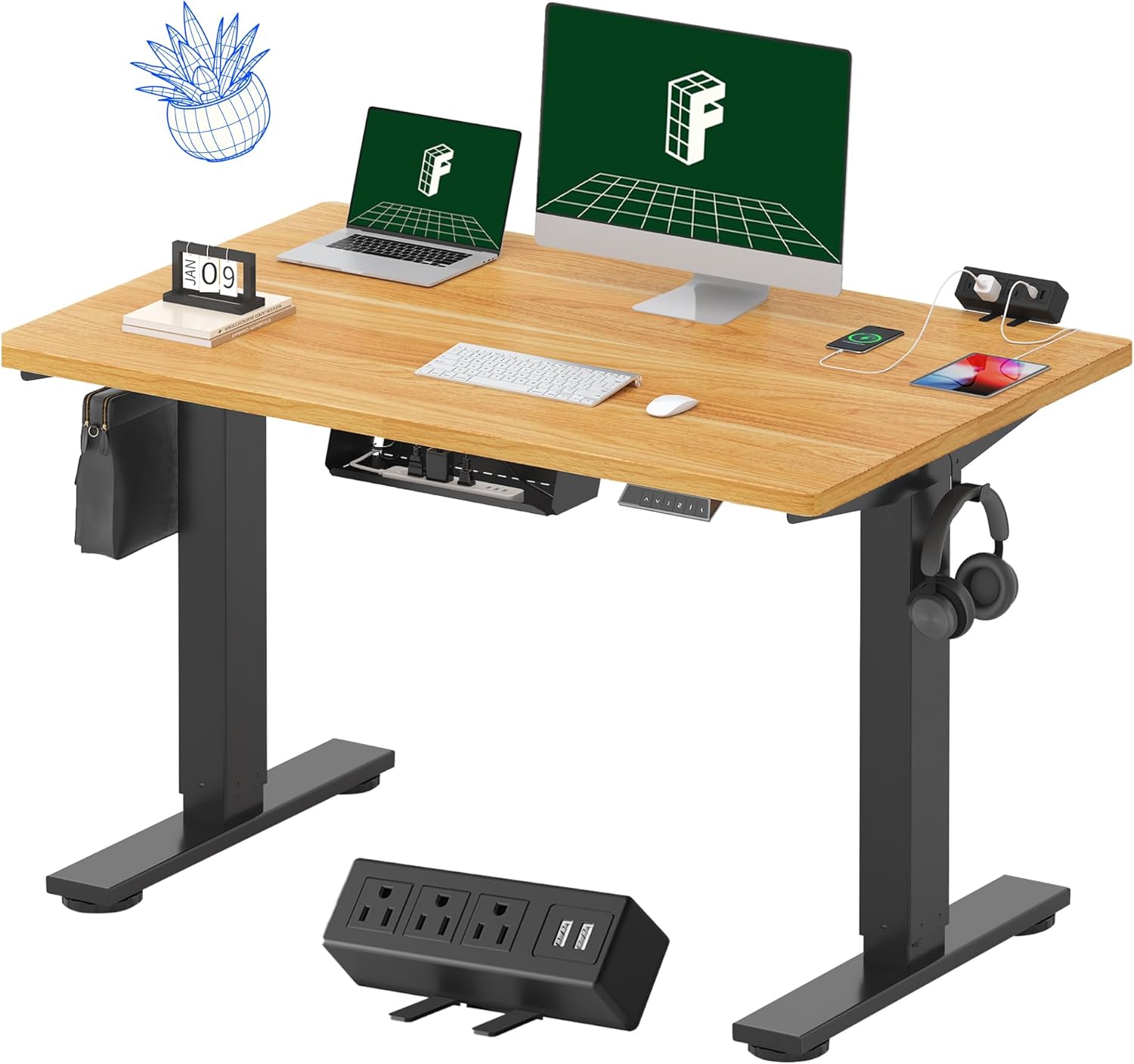
Image 1.1: FLEXISPOT EN2 Standing Desk with Maple Top and Black Frame, showcasing a typical setup with monitors, a laptop, and a clamp strāvas sloksne.
2. Drošības informācija
BRĪDINĀJUMS: Šo drošības norādījumu neievērošana var izraisīt traumas vai produkta bojājumus.
- Vienmēr rūpīgi ievērojiet montāžas instrukcijas.
- An electric drill (not included) may be required for assembly.
- Ensure the desk is properly anchored to prevent tipping.
- Nepārsniedziet ieteicamo maksimālo svaru — 176 mārciņas (80 kg).
- Keep the work surface clear of items that could fall and cause injury during height adjustments.
- Always unplug the desk before performing any maintenance or making adjustments to the frame or electrical components.
- Darbības laikā turiet bērnus un mājdzīvniekus prom no galda.
3. Iepakojuma saturs
Your FLEXISPOT EN2 Standing Desk will arrive in two separate packages, which may be shipped separately. Please ensure you have received both packages and all components before beginning assembly.

Image 3.1: Illustration showing the desk components arriving in two separate packages: one for the desktop and one for the desk frame.
Iekļautie komponenti:
- One-piece desktop (48" x 30" Maple Top)
- Electric height-adjustable frame (Black)
- 6-button digital controller with 4 memory presets
- Removable clamp power strip (3 AC outlets, 2 USB charging ports)
- Cable management device
- Assembly hardware and tools (excluding electric drill)
4. Uzstādīšana un montāža
Assembly typically requires two people and an electric drill (not included). Follow the detailed instructions provided in the separate assembly guide included with your product. The process involves attaching the legs to the desktop and connecting the control panel and motor.
Montāžas padomi:
- Novietojiet visas sastāvdaļas uz mīkstas, tīras virsmas, lai novērstu skrāpējumus.
- Pārliecinieties, ka visas skrūves ir cieši pievilktas, bet nepārvelciet.
- Properly route all cables using the provided cable management solutions to avoid interference with desk movement.
Video 4.1: Official FLEXISPOT Standing Desk Frame Installation Guide. This video demonstrates the step-by-step process of assembling the desk frame and attaching it to the desktop.
5. Lietošanas instrukcijas
5.1 Digitālais vadības panelis
The desk is operated using a 6-button digital controller, typically mounted on the underside of the desktop. It features up/down arrows, an LED display for height, and four programmable memory presets.

Image 5.1: Digital control panel with LED display showing current height, up/down arrows, and four numbered memory preset buttons.
5.2. Augstuma regulēšana
- Nospiediet un turiet Augšupvērsta bultiņa (^) poga, lai paceltu galdu.
- Nospiediet un turiet Lejupvērsta bultiņa (v) poga, lai nolaistu galdu.
- The desk adjusts smoothly from 28.1 inches (71.4 cm) to 45.7 inches (116.1 cm).
- The motor operates quietly at less than 50 dB.
5.3 Atmiņas iestatījumu iestatīšana
The controller allows you to save up to four preferred height settings for quick adjustments.
- Pielāgojiet galda augstumu vēlamajā augstumā, izmantojot augšup/lejupvērstās bultiņas.
- Nospiediet pogu Atmiņa (M) button. The LED display will flash.
- 3 sekunžu laikā nospiediet vienu no numurētajām iepriekš iestatītajām pogām (1, 2, 3 vai 4), lai saglabātu pašreizējo augstumu šajā iestatījumā.
- Lai atsauktu saglabātu augstumu, vienkārši nospiediet atbilstošo numurēto iepriekš iestatīto pogu. Galds automātiski pārvietosies uz saglabāto pozīciju.
Video 5.2: FlexiSpot Brand Store video demonstrating the desk's height adjustment and memory preset functions.
6. Funkcijas
6.1 One-Piece Desktop
The desk features a spacious, single-piece desktop made of FSC-Certified wood. This design provides a smooth, seamless work surface, enhancing stability and aesthetics compared to multi-piece desktops.

Image 6.1: Visual comparison highlighting the smooth surface of a single-piece desktop against the visible seams of a two-piece desktop.
6.2 Removable Clamp Strāvas sloksne
A desktop-mounted power strip is included, featuring 3 AC outlets (125V/12A) and 2 USB charging ports (5V/2A). This allows for convenient charging of electronic devices directly from your desk. The power strip can be clipped to the back or side of your desk.

Image 6.2: Close-up of the removable clamp power strip, detailing its 3 AC outlets and 2 USB-A ports, and how it attaches to the desk edge.
6.3. Kabeļu pārvaldība
The desk includes a cable management device to help organize and tidy up your workspace, preventing cables from dangling and interfering with desk movement.

Image 6.3: Illustration demonstrating effective cable management with an under-desk tray, showing a tidy setup compared to unmanaged cables.
7. Apkope
- Regulāri pārbaudiet visas skrūves un savienojumus, lai pārliecinātos, ka tie ir cieši pievilkti.
- Clean the desktop surface with a soft, damp audums. Izvairieties no abrazīviem tīrīšanas līdzekļiem, kas var sabojāt apdari.
- Turiet motoru un elektriskās sastāvdaļas tīras no putekļiem un mitruma.
- Do not place hot items directly on the desktop without protective coasters.
8. Traucējummeklēšana
8.1 Desk Not Moving or Displaying Error Code (e.g., "r5t")
If your desk is not responding or the LED display shows an error code like "r5t", a system reset may be required.
- Unplug the desk from the power outlet.
- Pagaidiet vismaz 10–15 sekundes.
- Plug the desk back into the power outlet.
- Press and hold the "Down Arrow (v)" button until the desk reaches its lowest position and then slightly rises. This indicates a successful reset.
- Ja problēma joprojām pastāv, sazinieties ar klientu atbalsta dienestu.
8.2 Desk Wobbling at Higher Heights
While the desk is designed for stability, minor wobbling can occur at maximum heights. Ensure the adjustable feet on the leg bases are properly leveled to compensate for uneven flooring.
9. Specifikācijas
| Funkcija | Specifikācija |
|---|---|
| Zīmols | FLEXISPOT |
| Modelis | EN2 |
| Darbvirsmas materiāls | FSC-Certified Maple Wood |
| Darbvirsmas izmēri | 48 collas (platums) x 30 collas (dziļums) |
| Darbvirsmas biezums | 1 collas |
| Rāmja materiāls | Industrial-grade Alloy Steel (Black) |
| Augstuma regulēšanas diapazons | 28.1" līdz 45.7" (71.4 cm līdz 116.1 cm) |
| Motora trokšņa līmenis | < 50 dB |
| Svara ietilpība | 176 mārciņas (80 kg) |
| Vadības panelis | 6-button digital controller with 4 memory presets |
| Strāvas kontaktligzda | 3 AC outlets (125V/12A), 2 USB charging ports (5V/2A) |
| Nepieciešama montāža | Yes (electric drill recommended) |
10. Garantija un atbalsts
10.1 Informācija par garantiju
- 5 gadu garantija: Covers frames, motors, and other mechanical devices.
- 2 gadu garantija: Covers controllers, switches, and electronics.
Please retain your proof of purchase for warranty claims. The warranty covers defects in materials and workmanship under normal use.
10.2 Klientu atbalsts
For any questions, troubleshooting assistance, or warranty claims, please contact FLEXISPOT customer support through their official webvietnē vai mazumtirgotājā, kur iegādājāties produktu.


