Ievads
This instruction manual provides comprehensive guidance for the 8Bitdo Media Remote (White Short Edition), designed for seamless media control on your Xbox One, Xbox Series X, and Xbox Series S consoles. This remote offers dedicated media playback buttons, Xbox system navigation, and motion-activated backlighting for enhanced usability.
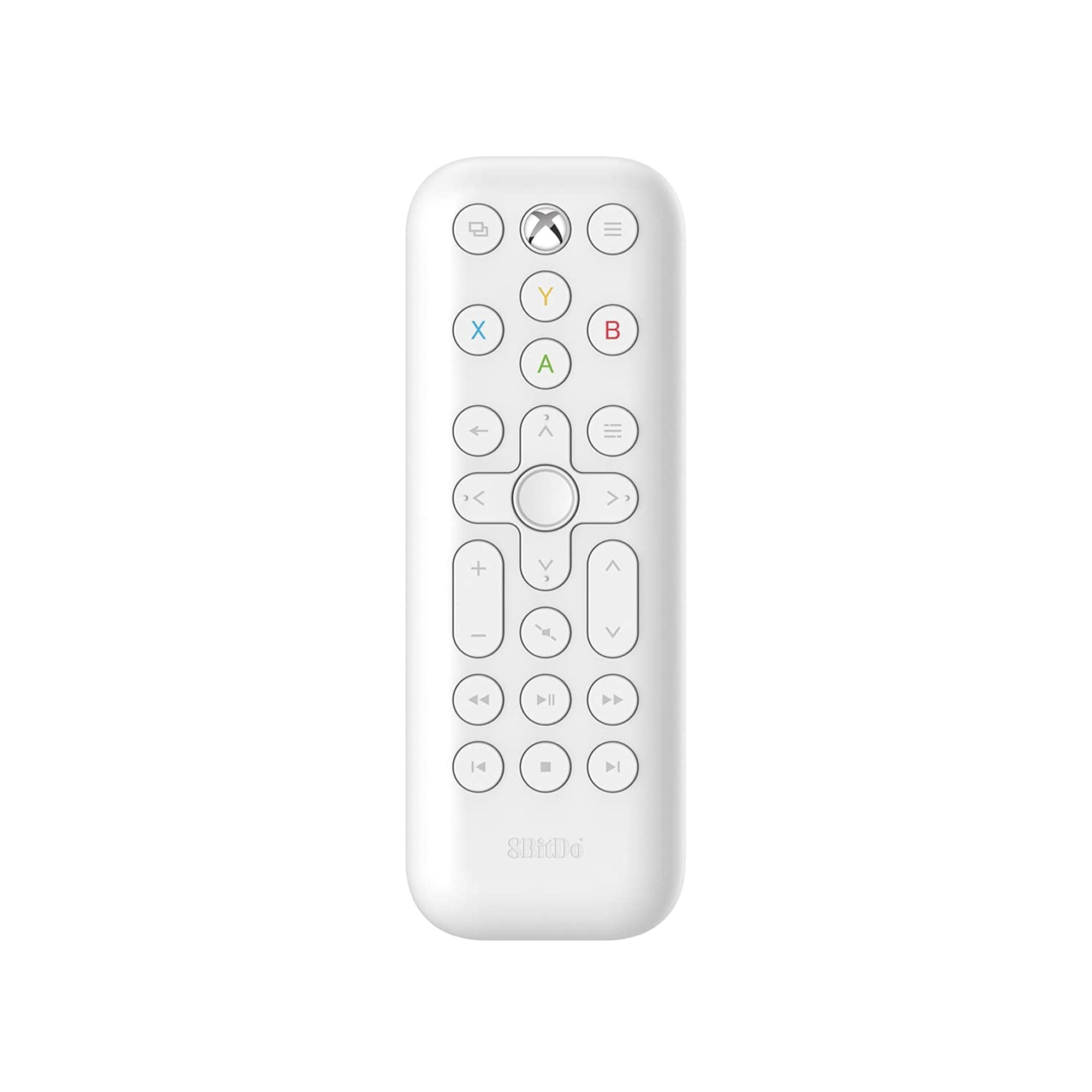
Image: The 8Bitdo Media Remote in White, Short Edition, showcasing tā kompakto dizainu un pogu izkārtojumu.
Iestatīšana
1. Akumulatora uzstādīšana
The 8Bitdo Media Remote requires two AAA batteries for operation. These are typically included with your purchase.
- Atrodiet bateriju nodalījuma vāciņu tālvadības pults aizmugurē.
- Lai atvērtu nodalījumu, pabīdiet vāku uz leju.
- Ievietojiet divas AAA baterijas, nodrošinot pareizu polaritāti (+ un -).
- Pabīdiet bateriju nodalījuma vāciņu atpakaļ vietā, līdz tas droši noklikšķ.

Image: A hand demonstrating how to open the battery compartment and insert AAA batteries into the remote.
2. Sākotnējais savienojums
The 8Bitdo Media Remote uses infrared (IR) technology. No manual pairing is required. Simply ensure a clear line of sight between the remote's IR emitter (located at the top) and your Xbox console's IR receiver.

Image: A user holding the 8Bitdo Media Remote, pointing it towards an Xbox Series S console, illustrating the line-of-sight requirement for infrared communication.
Lietošanas instrukcijas
1. Ieslēgšana/izslēgšana un navigācija
- Dedicated Home Button: Press the Xbox Home button (located at the top center) to instantly wake your Xbox console.
- Virziena paliktnis (D-Pad): Use the circular D-Pad for navigating menus and selecting items.
- A/B/X/Y pogas: These colored buttons correspond to standard Xbox controller functions for menu selection and interaction.

Image: The 8Bitdo Media Remote being used to wake an Xbox console, highlighting the dedicated Home button functionality.
2. Multivides atskaņošanas vadīklas
The remote features a full suite of media playback buttons:
- Atskaņot/pauzēt: Start or pause media playback.
- Ātri uz priekšu/attīt: Skip forward or backward through content.
- Skaļuma palielināšana/ samazināšana: Adjust the volume of your media.
- Izslēgt skaņu: Izslēgt vai ieslēgt audio.
3. Motion-Activated Backlight
The buttons on the remote are motion-activated and will illuminate when the remote is picked up or moved, making it easy to use in low-light conditions.
4. OneGuide Button Customization
The OneGuide button (three horizontal lines icon) can be customized to launch a specific application on your Xbox. To configure this:
- On your Xbox, go to Iestatījumi.
- Dodieties uz Devices & connections, pēc tam atlasiet Multivides tālvadība.
- Choose the desired action or app to launch when the OneGuide button is pressed.
5. TV Volume Control (HDMI-CEC)
Your Xbox can control your TV's volume if your TV supports HDMI-CEC (Consumer Electronics Control). To enable this:
- Press the Xbox button on your controller to open the guide.
- Dodieties uz Iestatījumi > Ģenerālis > TV un displeja opcijas.
- Izvēlieties Ierīces vadība > HDMI-CEC and enable all options.
- Consult your TV manufacturer's manual for specific HDMI-CEC settings.
Apkope
1. Akumulatora nomaiņa
Replace the AAA batteries when the remote's performance diminishes or the backlight becomes dim. Refer to the 'Battery Installation' steps in the Setup section.
2. Tīrīšana
Wipe the remote with a soft, dry cloth. Avoid using harsh chemicals or abrasive materials that could damage the finish or buttons.
Problēmu novēršana
- Tālvadības pults nereaģē:
- Pārliecinieties, vai ir pareizi ievietotas jaunas baterijas.
- Verify a clear line of sight between the remote and your Xbox console. Obstructions can block the infrared signal.
- Confirm your Xbox console is powered on and not in a deep sleep mode that disables IR reception.
- Backlight constantly active:
- The backlight is motion-activated. Any movement will trigger it. This is normal operation.
- If battery life is a concern due to frequent backlighting, consider using rechargeable AAA batteries.
- Televizora skaļuma regulēšana nedarbojas:
- Ensure your TV supports HDMI-CEC and that it is enabled in your TV's settings.
- Verify HDMI-CEC settings are correctly configured on your Xbox console (Settings > General > TV & display options > Device control > HDMI-CEC).
Specifikācijas
| Modelis | 6922621501848 (White Short Edition) |
| Zīmols | 8Bitdo |
| Savienojamība | Infrasarkano (IS) |
| Saderība | Xbox Series X, Xbox Series S, Xbox One |
| Barošanas avots | 2 x AAA baterijas (iekļautas) |
| Dimensions (Short Edition) | 134.25 x 48 x 18.8 mm |
| Preces svars | 2.88 unces |

Image: A visual comparison of the 8Bitdo Media Remote in both short and long editions, detailing their respective dimensions.

Image: An illustration showing the 8Bitdo Media Remote's compatibility with Xbox One, Xbox Series X, and Xbox Series S consoles.
Garantija un atbalsts
8Bitdo is committed to producing high-quality gaming hardware. For specific warranty information, product support, or to access the latest firmware updates, please visit the official 8Bitdo webvietnē vai sazinieties tieši ar klientu apkalpošanas dienestu. Saglabājiet pirkuma apliecinājumu garantijas prasību iesniegšanai.
Lai iegūtu papildu resursus un informāciju par produktu, varat apmeklēt vietni 8Bitdo veikals vietnē Amazon.
Produkts beidziesview Video
Video: Oficiāls paziņojumsview of the 8Bitdo Media Remote for Xbox One and Xbox Series X|S, demonstrating its features and functionality.


