1. Ievads
This manual provides essential information for the proper setup, operation, and maintenance of your Digital Persona U.are.u 4500 USB Fingerprint Reader. This device is designed to provide reliable and secure biometric authentication using advanced optical fingerprint scanning technology.
Svarīga piezīme: This product package includes only the fingerprint reader device. Software, drivers, and detailed manuals are not provided on a physical CD and must be obtained separately or downloaded as part of your specific application's requirements.

1.1. attēls: Produkta iepakojums
2. Funkcijas
The Digital Persona U.are.u 4500 Fingerprint Reader incorporates several key features for enhanced performance and user experience:
- Optical Scanning Technology: Utilizes advanced optical technology for superior image quality and product reliability.
- High Durability (HD): Engineered for robust performance and longevity.
- Advanced Recognition: Capable of recognizing even challenging fingerprints, including dry, moist, or rough ones.
- Augsta izšķirtspēja: Features a pixel resolution of 512 dpi for detailed fingerprint capture.
- Zilais LED indikators: A soft, cool blue LED provides visual feedback and blends into various environments.
- 360-Degree Recognition: Allows for fingerprint capture from any angle, enhancing usability.
- Kompakts dizains: Small and portable for convenient use.
- SDK pieejamība: Compatible with DigitalPersona SDK packages for custom application development.

2.1. attēls: Galvenās iezīmesview
3. Iestatīšana
Follow these steps to set up your Digital Persona U.are.u 4500 Fingerprint Reader:
- Izpakojiet ierīci: Carefully remove the fingerprint reader from its packaging.
- Noņemiet aizsargplēvi: If present, gently peel off any protective film from the sensor surface.
- Savienojuma izveide ar datoru: Plug the USB cable of the fingerprint reader into an available USB port on your computer.
- Draivera instalēšana: Your operating system may automatically detect and install generic drivers. However, for full functionality, you will need to install the specific drivers and software compatible with the Digital Persona U.are.u 4500. These are typically provided with the application you intend to use (e.g., DigitalPersona Pro Workstation, DigitalPersona Pro Kiosk, DigitalPersona Online, DigitalPersona Personal, or any DigitalPersona SDK packages). Refer to your software's documentation for driver installation instructions.
- Pārbaudiet savienojumu: Once drivers are installed, the blue LED on the device should illuminate, indicating it is powered and ready for use.

3.1. attēls. Priekšpuse View of the Fingerprint Reader

Figure 3.2: USB Cable Connection Point
4. Lietošanas instrukcijas
To use the Digital Persona U.are.u 4500 Fingerprint Reader for authentication or enrollment:
- Sagatavojiet pirkstu: Ensure your finger is clean and free from excessive moisture or dryness. The device is designed to work with dry, moist, or rough fingerprints, but extreme conditions may affect performance.
- Place Finger on Sensor: Gently place the pad of your finger flat onto the illuminated sensor area of the reader. Ensure full contact with the sensor surface.
- Saglabāt pozīciju: Hold your finger steady on the sensor until the software indicates a successful scan or enrollment. The device supports 360-degree recognition, meaning the orientation of your finger does not significantly impact the scan.
- Izpildiet programmatūras norādījumus: Your specific application software will guide you through the enrollment or authentication process, indicating when to place or remove your finger.

Figure 4.1: Finger Placement for 360-Degree Recognition
5. Apkope
Proper maintenance ensures the longevity and optimal performance of your fingerprint reader:
- Sensora tīrīšana: Regularly clean the sensor surface with a soft, lint-free cloth. If necessary, slightly dampen the cloth with water or a mild, non-abrasive cleaner. Do not use harsh chemicals, alcohol, or abrasive materials, as these can damage the sensor.
- Izvairieties no skrāpējumiem: Do not use sharp objects or excessive force on the sensor surface, as this can cause scratches and impair performance.
- Uzglabāšana: Kad ierīce netiek lietota, uzglabājiet to tīrā, sausā vietā, prom no tiešiem saules stariem un ekstremālām temperatūrām.
6. Traucējummeklēšana
If you encounter issues with your fingerprint reader, try the following troubleshooting steps:
- Ierīce nav atpazīta:
- Ensure the USB cable is securely plugged into both the device and the computer.
- Try connecting the device to a different USB port.
- Restartējiet datoru.
- Verify that the necessary drivers are correctly installed. You may need to reinstall them.
- Poor Fingerprint Reading:
- Ensure your finger is clean and dry (or slightly moist, as appropriate).
- Notīriet sensora virsmu, kā aprakstīts sadaļā Apkope.
- Try different fingers or adjust the placement of your finger on the sensor to ensure full contact.
- Ensure the software you are using is up-to-date and compatible with the U.are.u 4500.
- Blue LED Not On:
- Check USB connection and try a different port.
- Pārliecinieties, vai datora USB porti darbojas pareizi.
For further assistance, please refer to the support resources provided by Digital Persona or your software vendor.
7. Specifikācijas
| Specifikācija | Vērtība |
|---|---|
| Modeļa nosaukums | U.are.u 4500 |
| Zīmols | BSTUOKEY (Manufacturer: DP) |
| Skenera tips | Pirkstu nospiedums |
| Savienojamības tehnoloģija | USB |
| Izšķirtspēja | 512 dpi |
| Krāsu dziļums | 8 bāzes punkti |
| Gaismas avota veids | LED |
| Optisko sensoru tehnoloģija | Optiskais |
| Preces svars | 4.2 unces (0.12 kilogrami) |
| Iepakojuma izmēri | 7.87 x 4.72 x 2.76 collas |
| Izcelsmes valsts | Ķīna |
| Datums pirmais pieejams | 20. gada 2019. jūnijs |
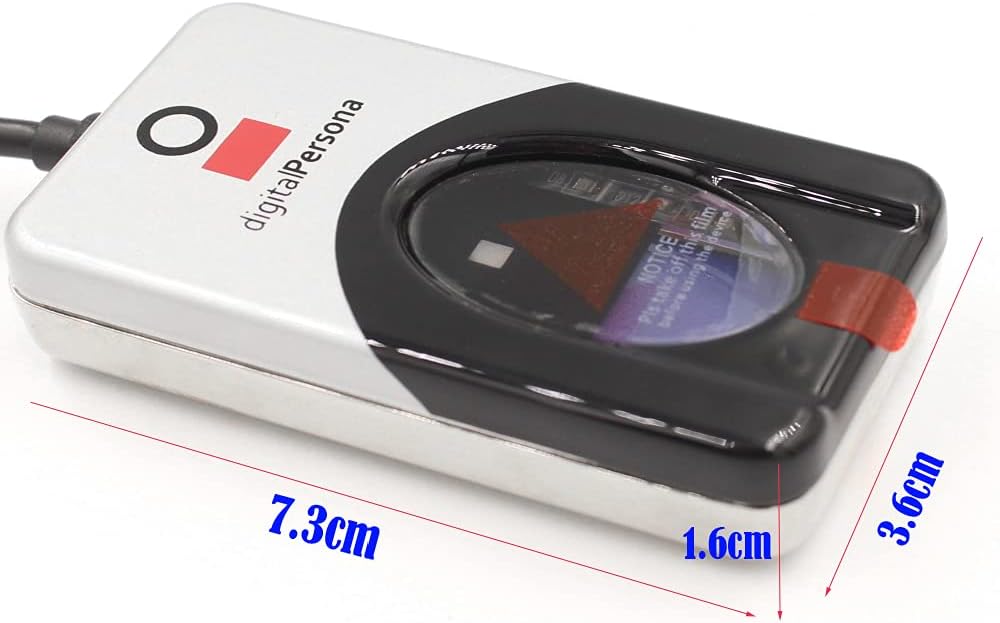
7.1. attēls: Ierīces izmēri
8. Garantija un atbalsts
For information regarding product warranty, technical support, or service, please contact the vendor or refer to the official Digital Persona support channels. The device is designed to integrate with various Digital Persona SDK packages, and support for these integrations is typically provided by Digital Persona directly or through your software solution provider.


