1. Drošības informācija
Pirms šīs ierīces lietošanas rūpīgi izlasiet visus norādījumus un saglabājiet tos turpmākai uzziņai. Šo norādījumu neievērošana var izraisīt elektriskās strāvas triecienu, ugunsgrēku vai nopietnus savainojumus.
- Pirms ventilatora tīrīšanas, apkopes vai pārvietošanas vienmēr atvienojiet to no strāvas kontaktligzdas.
- Do not operate the fan with a damaged cord or plug. If the cord or plug is damaged, contact customer service for repair or replacement.
- Šis ventilators ir paredzēts lietošanai tikai iekštelpās. Nelietojiet to ārpus telpām vai mitrās vietās.
- Sargājiet ventilatoru no ūdens un citiem šķidrumiem. Neiegremdējiet ventilatoru ūdenī.
- Ensure the fan is placed on a stable, flat surface to prevent it from tipping over.
- Ventilatora darbības laikā turiet bērnus un mājdzīvniekus prom no tā.
- Do not insert fingers or any objects into the grille when the fan is operating.
- Do not block air openings or operate near curtains, drapes, or other objects that could block airflow.
- Do not use the fan in areas where flammable liquids or gases are stored.
2. Produkts beidziesview
The Amazon Basics 40" 70-Degree Oscillating Digital Tower Fan is designed to provide efficient and customizable cooling for various indoor spaces. It features a sleek, compact design and user-friendly controls.
Sastāvdaļas
- Torņa ventilatora bloks
- Base (requires assembly)
- Tālvadības pults
Galvenās iezīmes
- Efektīva dzesēšana: Delivers powerful airflow for effective cooling in enclosed spaces.
- Pielāgojami ātrumi: Four intuitive speed settings to adjust airflow.
- Vairāki režīmi: Includes Standard, Breeze, and Nature modes for varied airflow patterns.
- Svārstības: 70-degree oscillation for wide-range air flow coverage.
- Taimera funkcija: Programmable timer up to 15 hours for energy saving and convenience.
- Tālvadības pults: Convenient remote for adjusting settings from a distance.
- Digitālās vadības ierīces: Easy-to-use digital control panel located on the top of the fan.
- Kompakts dizains: Slim tower design (11.4"D x 11.4"W x 39.3"H) fits easily into any room.

2.1. attēls: The Amazon Basics 40-inch Digital Tower Fan shown with its remote control. The fan is black with a sleek, tall design, and the remote is compact with clearly labeled buttons for power, speed, mode, oscillation, and timer.

2.2. attēls: A diagram illustrating the key features of the tower fan, including its 40-inch height, 4 customizable airflow speed settings, timer with auto shutoff (1h, 2h, 4h, 8h options), and convenient remote control for adjusting speed, oscillation, and timer. The diagram highlights the digital display and control panel on top of the fan.
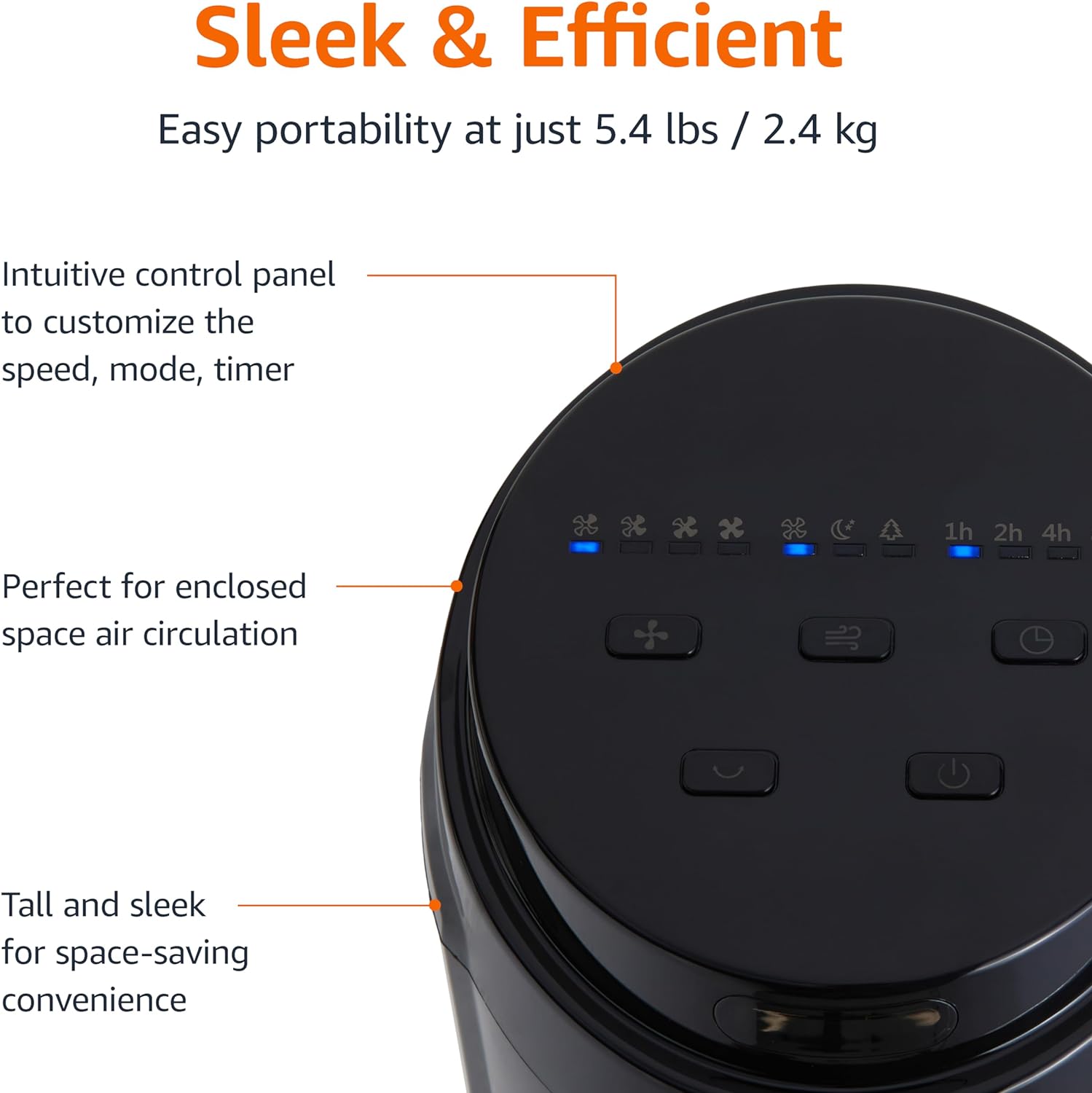
2.3. attēls: Tuvplāns view of the intuitive control panel located on the top of the Amazon Basics Tower Fan. The panel features buttons for speed, mode, power, oscillation, and timer, along with LED indicators for selected settings. This design allows for easy customization of fan operation.
3. Iestatīšana
3.1. Montāža
- Uzmanīgi izņemiet visas sastāvdaļas no iepakojuma.
- Attach the fan base to the main tower unit. Align the slots on the base with the corresponding tabs on the bottom of the fan.
- Secure the base using the provided screws, if any, ensuring it is firmly attached.
3.2. Izvietošana
- Novietojiet ventilatoru uz stabilas, līdzenas virsmas.
- Ensure there is adequate space around the fan for proper air circulation, especially for the oscillation feature.
- Keep the fan at least 1 foot (30 cm) away from walls, furniture, and other objects.
- Plug the power cord into a standard NEMA 5-15 (US Standard Wall Outlet) electrical outlet.
4. Lietošanas instrukcijas
The fan can be operated using either the control panel on top of the unit or the included remote control.
4.1 Control Panel & Remote Control Functions
| Poga/Funkcija | Apraksts |
|---|---|
| Barošana (ieslēgts/izslēgts) | Ieslēdz vai izslēdz ventilatoru. |
| Ātrums | Cycles through 4 fan speed settings (Low, Medium, High, Max). |
| Režīms | Selects between 3 operating modes:
|
| Svārstības | Activates or deactivates the 70-degree oscillation feature, allowing the fan to sweep air across a wider area. |
| Taimeris | Sets the fan to automatically turn off after a specified period (up to 15 hours in 1-hour increments). |
4.2. Tālvadības pults lietošana
The remote control allows for convenient operation of all fan functions from a distance. Ensure the remote is pointed towards the fan's control panel for optimal response.
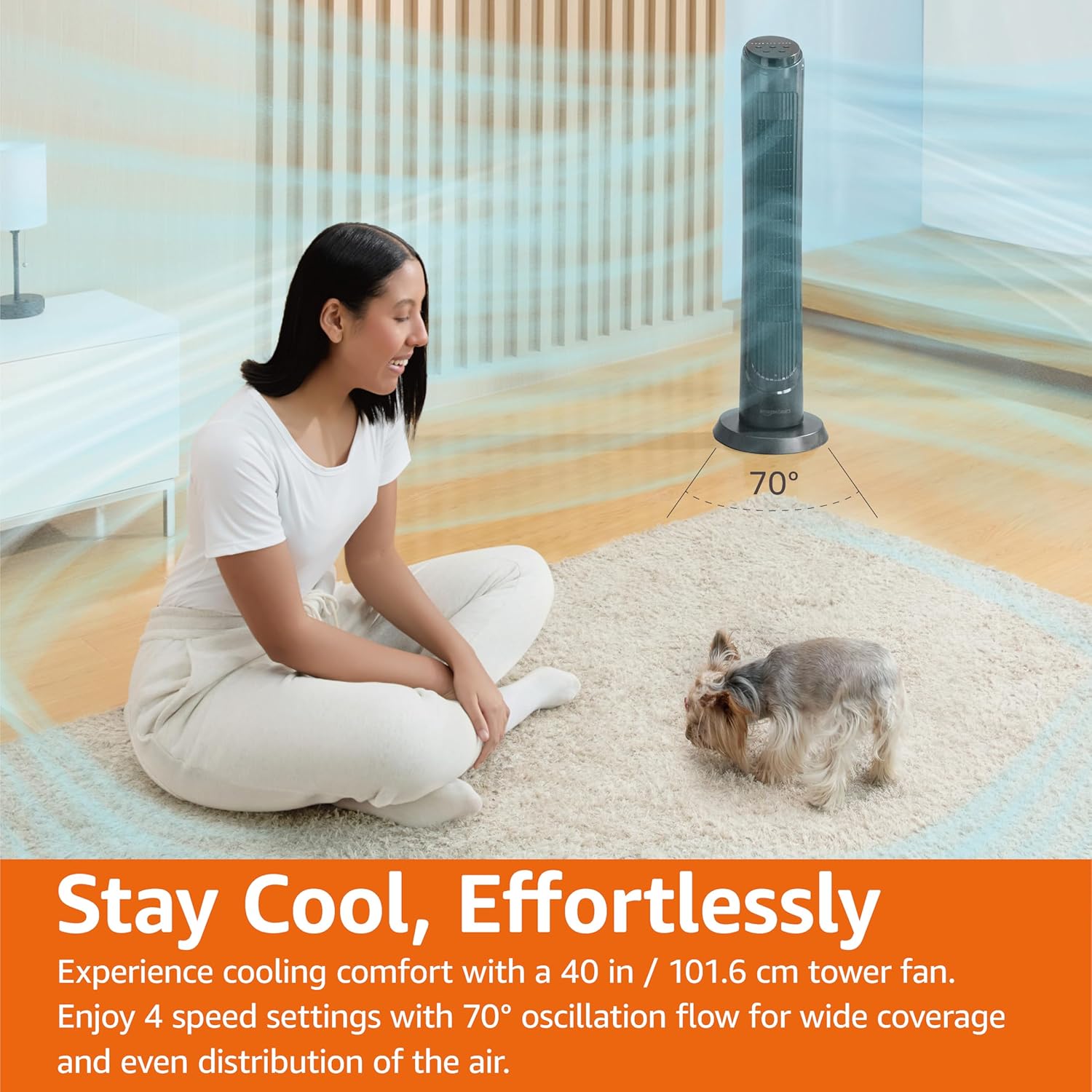
4.1. attēls: The Amazon Basics Tower Fan oscillating 70 degrees, providing wide coverage and even air distribution in a room. A person and a small dog are comfortably seated on a rug, benefiting from the airflow.

4.2. attēls: The Amazon Basics Tower Fan positioned in a modern living space, demonstrating its effective airflow. The image visually represents the air movement from the fan, highlighting its ability to circulate air throughout the room.
5. Apkope
5.1. Tīrīšana
- Pirms tīrīšanas vienmēr atvienojiet ventilatoru no kontaktligzdas.
- Izmantojiet mīkstu, damp drānu, lai noslaucītu ventilatora ārējās virsmas.
- Do not use abrasive cleaners or harsh chemicals, as these may damage the fan's finish.
- For dust accumulation on the air intake or output grilles, use a vacuum cleaner with a brush attachment to gently remove dust.
- Pirms ventilatora atkārtotas pieslēgšanas elektrotīklam pārliecinieties, vai tas ir pilnībā izžuvis.
5.2. Uzglabāšana
- If storing the fan for an extended period, clean it thoroughly as described above.
- Uzglabājiet ventilatoru tā oriģinālajā iepakojumā vai piemērotā kastē, lai pasargātu to no putekļiem un bojājumiem.
- Uzglabāt vēsā, sausā vietā.
6. Traucējummeklēšana
Ja rodas problēmas ar ventilatoru, lūdzu, skatiet tālāk norādītās bieži sastopamās problēmas un risinājumus.
| Problēma | Iespējamais cēlonis | Risinājums |
|---|---|---|
| Ventilators neieslēdzas. | Nav barošanas avota; Nav nospiesta ieslēgšanas/izslēgšanas poga. | Ensure the power cord is securely plugged into a working outlet. Press the Power button on the control panel or remote. |
| Vāja gaisa plūsma vai tās nav. | Air intake/output blocked; Fan speed too low. | Check for any obstructions around the fan grilles. Increase the fan speed setting. |
| Svārstības nedarbojas. | Svārstību funkcija nav aktivizēta. | Press the Oscillation button on the control panel or remote. Ensure the fan is on a flat surface. |
| Tālvadības pults nedarbojas. | Batteries are dead; Remote not pointed correctly. | Replace the remote control batteries. Ensure the remote is pointed directly at the fan's control panel. |
| Neparasts troksnis. | Ventilators neatrodas uz līdzenas virsmas; iekšējs šķērslis. | Place the fan on a stable, level surface. Unplug the fan and check for any foreign objects inside the grilles (do not attempt to disassemble). |
Ja problēma joprojām pastāv pēc šo risinājumu izmēģināšanas, lūdzu, sazinieties ar klientu atbalsta dienestu.
7. Specifikācijas
| Atribūts | Detaļas |
|---|---|
| Zīmols | Amazon pamati |
| Modeļa nosaukums | DC2021 |
| Krāsa | Melns |
| Elektrisko ventilatoru dizains | Stāvu ventilators |
| Barošanas avots | Maiņstrāva |
| Stils | 40" - Digital |
| Produkta izmēri | 11.4"D x 11.4"W x 39.3"H |
| Telpas veids | Guļamistaba, dzīvojamā istaba, birojs |
| Īpaša iezīme | Oscillating, 4 Speeds, 3 Modes, Timer, Remote Control |
| Ieteicamie lietojumi | Cooling and Air Circulation for Indoor Spaces |
| Trokšņa līmenis | 60 dB |
| Wattage | 50 vati |
| Preces svars | 7.5 mārciņas (aptuveni 3.4 kg) |
| Iekļautie komponenti | Tālvadības pults |
| Lietošana iekštelpās/ārā | Iekštelpās |
| Kontroles metode | Tālvadības pults |
| Asmens materiāls | Plastmasa |
| Jaudas līmeņu skaits | 4 |
| Galvenā strāvas savienotāja tips | NEMA 5-15 (US Standard Wall Outlet) |
| Ražotājs | Amazon |
| UPC | 840095880428 |
| Izcelsmes valsts | Ķīna |
8. Garantija un atbalsts
For detailed warranty information, please refer to the official Warranty PDF document provided by Amazon Basics. This document outlines the terms and conditions of your product's warranty.
For further assistance, troubleshooting not covered in this manual, or to inquire about replacement parts, please contact Amazon Basics customer support.
- Oficiālā lietotāja rokasgrāmata (PDF): Lejupielādēt PDF
- Oficiālā garantija (PDF): Lejupielādēt PDF
- Amazon Basics Store: Apmeklēt veikalu


