1. Ievads
This manual provides detailed instructions for the installation, operation, and maintenance of your ESLYYDS Double Din Car Stereo. This advanced multimedia system offers a wide range of features including Apple CarPlay, Android Auto, Bluetooth connectivity, a high-definition touchscreen, and support for a backup camera, enhancing your in-car entertainment and navigation experience.

Figure 1.1: ESLYYDS Double Din Car Stereo Overview
2. Iepakojuma saturs
Lūdzu, pārliecinieties, ka jūsu iepakojumā ir iekļautas visas tālāk norādītās preces:
- ESLYYDS Double Din Car Stereo Unit
- Montāžas kronšteinu komplekts
- Camera Wire A
- Camera Wire B
- Steering Wheel Control Unit
- Vadu instalācija A
- Vadu instalācija B
- Aizmugure-view Kamera
- Tālvadības pults
- Lietotāja rokasgrāmata (šis dokuments)

Figure 2.1: Stereo Dimensions and Included Accessories
3. Produkta īpašības
The ESLYYDS Double Din Car Stereo is equipped with a variety of features designed for convenience and enhanced driving experience:
- Apple CarPlay un Android Auto saderība: Seamlessly integrate your smartphone for navigation, music, calls, and messages using voice control.
- 7-inch HD Capacitive Touch Screen: A responsive and accurate display supporting 1080P video playback.
- Bluetooth 5.2: For stable and clear hands-free calling and audio streaming.
- Tālruņa spoguļa saite: Display your smartphone's screen directly on the stereo.
- Divkārša USB saskarne: One port for media playback and another with 2.1A fast charging capability.
- Aizmugure View Kameras ieeja: Supports the included 12 HD LED light, night vision, 170° viewing angle waterproof backup camera for safer reversing.
- Stūres rata vadība (SWC): Savietojams ar esošajām stūres vadības ierīcēm ērtai lietošanai.
- AM/FM Audio Receiver: Access to radio stations with user-friendly digital control.
- AUX IN Connectivity: Ārējām audioierīcēm.
- 7 Color LED Buttons: Customizable button illumination.
3.1 Apple CarPlay un Android Auto
Connect your smartphone via USB to access navigation, phone contacts, email, notifications, and music directly on the stereo display. This feature utilizes voice control technology for safe operation while driving.
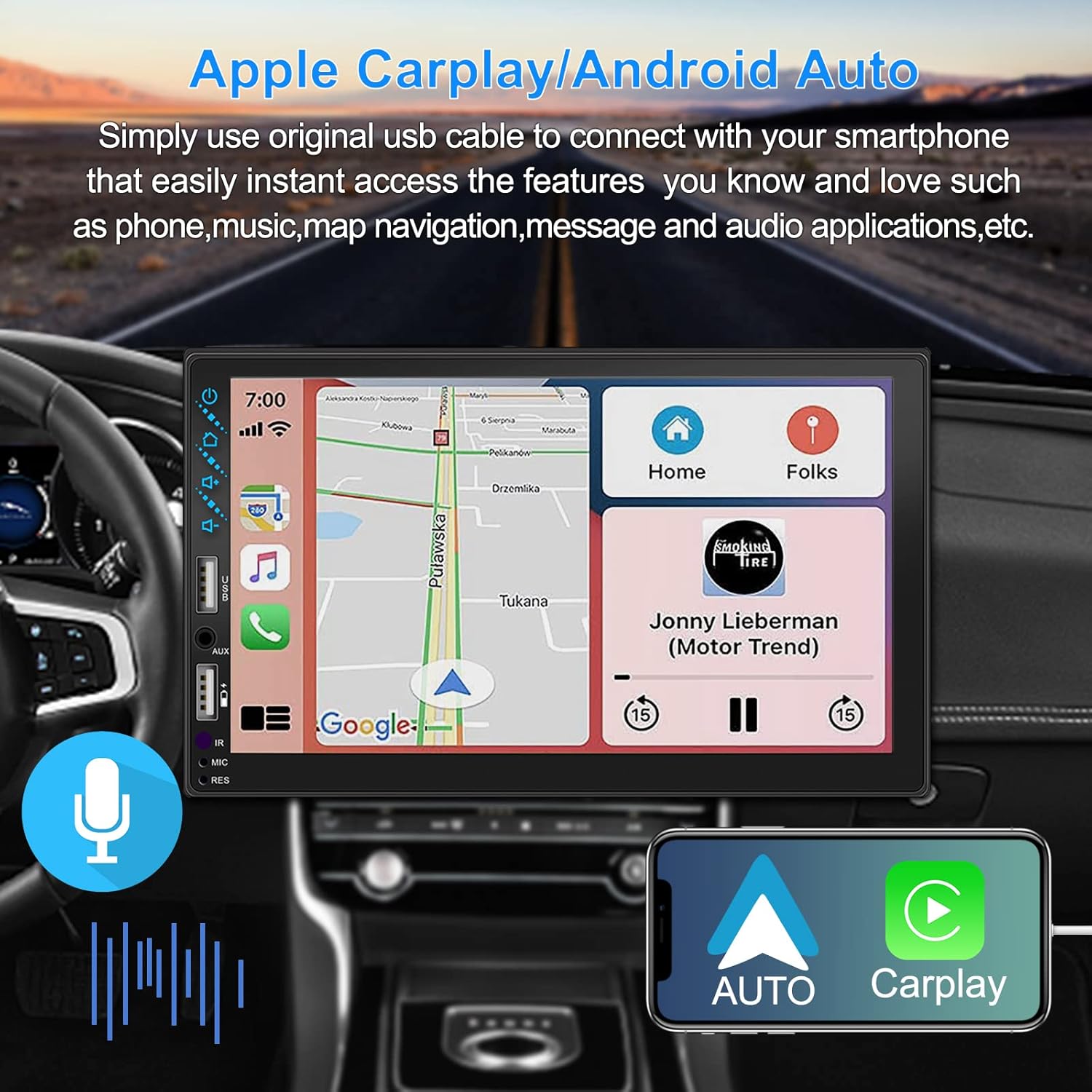
Figure 3.1: Apple CarPlay and Android Auto Interface
3.2. Balss vadība
Utilize voice commands to control various functions such as making calls, playing music, and navigating, allowing you to keep your hands on the wheel and eyes on the road.

3.2. attēls: Balss vadības funkcionalitāte
3.3 Tālruņa spoguļsaite
The Mirror Link function allows you to display your smartphone's screen directly onto the stereo's touchscreen. This supports Android devices (version 10.1 and below) and iPhone devices (version 14.5 and below, including iPhone 12, 11, XR, and 8 series and below) with resolutions up to 1920x1080 pixels.
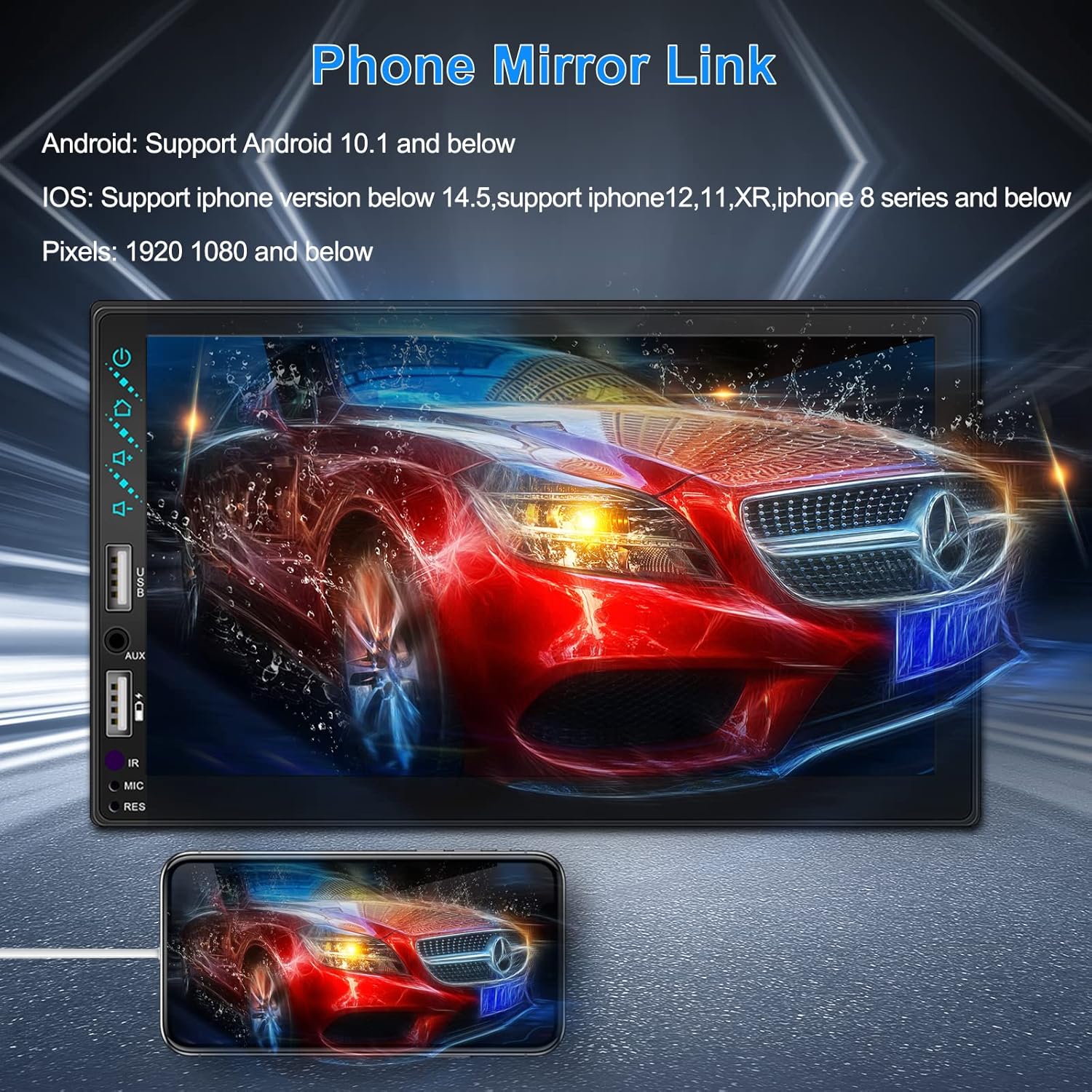
Figure 3.3: Phone Mirror Link
3.4 Aizmugure View Kamera
The included waterproof backup camera features 12 HD LED lights for night vision and a 170° viewing angle. When you shift into reverse, the system automatically displays the camera feed on the screen, providing optimal visibility in various weather conditions.
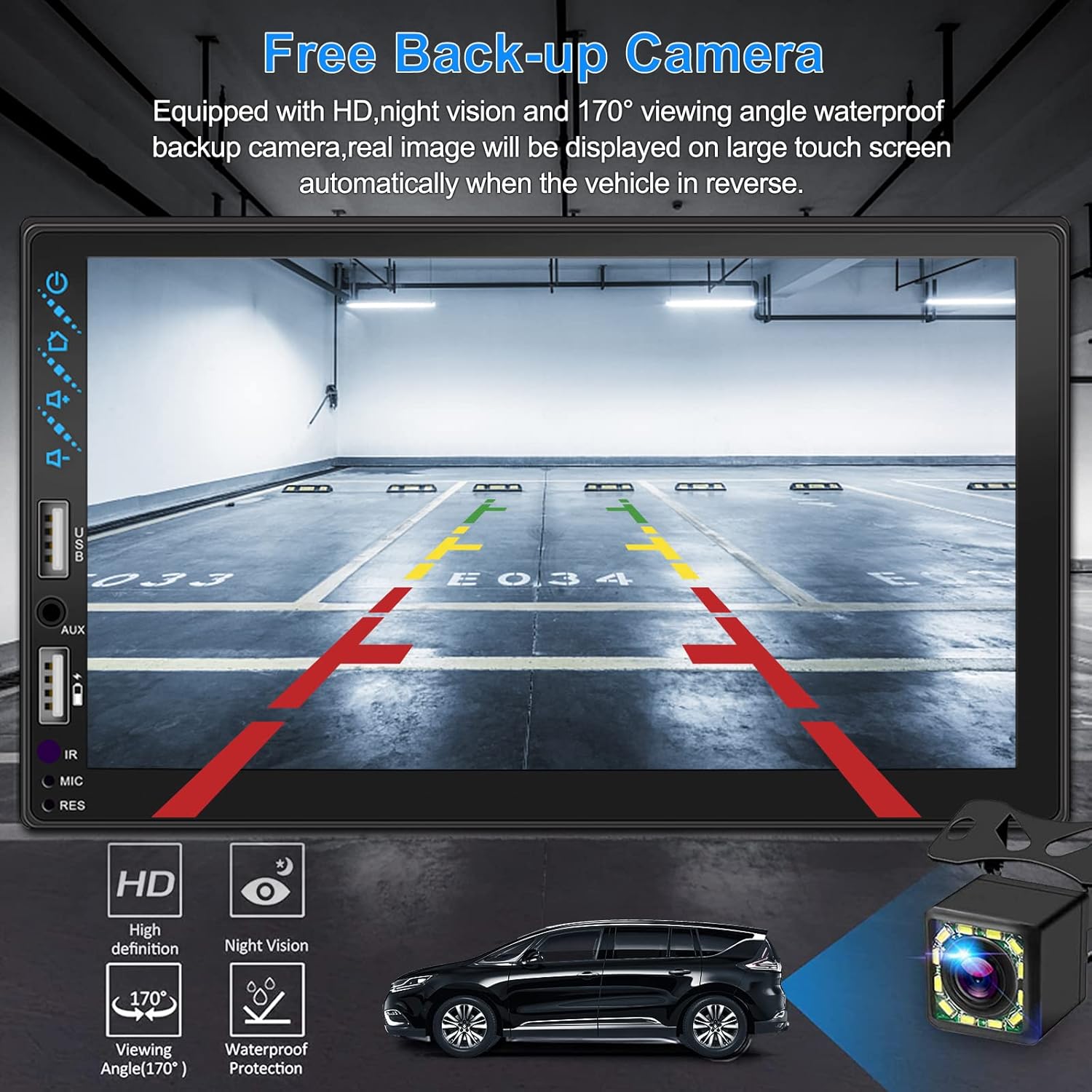
3.4. attēls. Aizmugure View Kameras displejs
4. Instalācijas rokasgrāmata
Pareiza uzstādīšana ir ļoti svarīga optimālai veiktspējai. Ja neesat pazīstams ar automašīnas audiosistēmas elektroinstalāciju, ieteicams ierīci uzstādīt speciālistam.
4.1 Izmēri
The stereo unit has a standard double din size. Refer to Figure 2.1 for detailed dimensions.
- Platums: 178 mm (7 collas)
- Augstums: 102 mm (4 collas)
- Dziļums: 60 mm (2.6 collas)
4.2 Elektroinstalācijas shēma
Carefully follow the wiring diagram below to connect the stereo to your vehicle's electrical system. Ensure all connections are secure to prevent malfunctions.
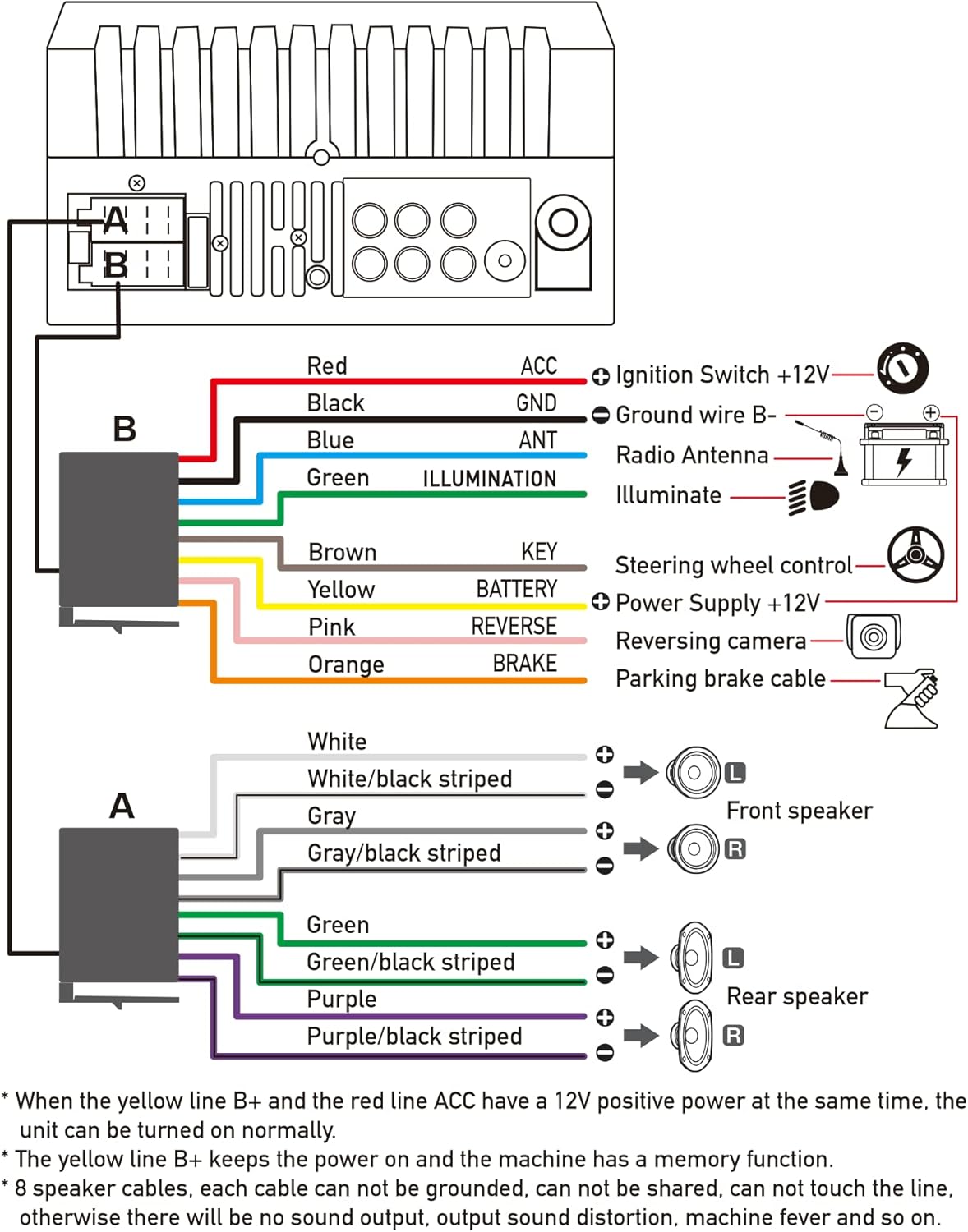
4.1. attēls: Galvenā elektroinstalācijas shēma
- Red (ACC): Connect to Ignition Switch +12V.
- Melns (GND): Connect to Ground wire B-.
- Blue (ANT): Connect to Radio Antenna (if applicable).
- Green (ILLUMINATION): Connect to Illuminate wire.
- Brown (KEY): Connect to Steering wheel control.
- Yellow (BATTERY): Connect to Power Supply +12V.
- Pink (REVERSE): Connect to Reversing camera input.
- Orange (BRAKE): Connect to Parking brake cable.
Speaker Connections (8 speakers supported):
- White / White/black striped: Priekšējais kreisais skaļrunis
- Gray / Gray/black striped: Priekšējais labais skaļrunis
- Green / Green/black striped: Aizmugurējais kreisais skaļrunis
- Purple / Purple/black striped: Aizmugurējais labais skaļrunis
Svarīgas piezīmes:
- The unit requires both the Yellow (BATTERY) and Red (ACC) wires to have a 12V positive power supply simultaneously for normal operation.
- The Yellow (BATTERY) wire keeps the power on and maintains memory functions.
- For speaker connections, each cable must not be grounded or shared with other cables. Incorrect wiring can lead to no sound output, sound distortion, or damage to the machine.
5. Lietošanas instrukcijas
5.1 Pamatdarbības
- Ieslēgšana/izslēgšana: Nospiediet barošanas pogu uz priekšējā paneļa vai tālvadības pults.
- Skaļuma kontrole: Use the volume buttons on the front panel, steering wheel controls, or remote control.
- Avota izvēle: Tap the 'Source' or 'Mode' icon on the touchscreen to switch between Radio, Bluetooth, USB, AUX, CarPlay, and Android Auto.
5.2 Apple CarPlay / Android Auto Usage
- Connect your compatible iPhone or Android smartphone to the stereo's USB port using a certified USB cable.
- The stereo will automatically detect the connection and prompt you to launch CarPlay or Android Auto.
- Izpildiet ekrānā redzamos norādījumus, lai pabeigtu iestatīšanu.
- Once connected, you can access supported apps like Maps, Phone, Messages, and Music directly from the stereo's touchscreen or via voice commands.
5.3 Bluetooth savienošana pārī
- Ieslēdziet Bluetooth savā viedtālrunī.
- Stereoiekārtā dodieties uz Bluetooth izvēlni.
- Meklēt available devices on your smartphone. The stereo's Bluetooth name will typically be 'ESLYYDS' or similar.
- Select the stereo from your smartphone's list and confirm the pairing code if prompted.
- Kad savienojums ir izveidots pārī, varat bezvadu režīmā veikt/saņemt zvanus un straumēt audio.
5.4 Phone Mirror Link Usage
- Pievienojiet viedtālruni stereosistēmas USB portam.
- Select the 'Mirror Link' option on the stereo's screen.
- Follow the specific instructions displayed on the stereo for your phone's operating system (Android or iOS) to enable screen mirroring. This may involve enabling USB debugging for Android or trusting the device for iOS.
5.5. Radio darbība
- Select the 'Radio' source.
- Use the 'Scan' function to automatically search and save stations, or manually tune using the frequency controls.
- Saglabājiet iecienītākās stacijas iepriekš iestatītajās pogās, lai tām ātri piekļūtu.
5.6 USB atskaņošana
- Insert a USB drive containing audio or video files into the designated USB playback port.
- The stereo will automatically switch to USB mode or prompt you to select it.
- Pārlūkojiet un atskaņojiet savu multividi files using the touchscreen controls.
6. Apkope
Lai nodrošinātu automašīnas stereosistēmas ilgmūžību un optimālu veiktspēju, ievērojiet šīs apkopes vadlīnijas:
- Tīrīšana: Use a soft, dry cloth to clean the screen and exterior. For stubborn smudges on the screen, use a screen cleaner specifically designed for electronic displays. Avoid abrasive cleaners or solvents.
- Temperatūra: Izvairieties no ierīces ilgstošas pakļaušanas ekstremālām temperatūrām, gan karstumam, gan aukstumam.
- Mitrums: Turiet ierīci sausu. Nepakļaujiet to ūdens vai pārmērīga mitruma iedarbībai.
- Programmaparatūras atjauninājumi: Pārbaudiet ražotāju webvietni, lai regulāri pārbaudītu visus pieejamos programmaparatūras atjauninājumus, kas uzlabo veiktspēju un pievieno jaunas funkcijas.
7. Traucējummeklēšana
If you encounter issues with your ESLYYDS car stereo, please refer to the following common problems and solutions. If the problem persists, contact customer support.
| Problēma | Iespējamais cēlonis | Risinājums |
|---|---|---|
| Nav jaudas | Nepareiza elektroinstalācija; Izdedzis drošinātājs; Problēma ar transportlīdzekļa akumulatoru. | Check power (Yellow and Red) and ground (Black) wire connections. Inspect vehicle fuses. Ensure vehicle battery is charged. |
| Nav skaņas | Skaļruņu vadi nepareizi pievienoti; pārāk zems skaļums; aktīva skaņas izslēgšanas funkcija. | Verify all speaker wire connections (ensure no shorts or grounds). Increase volume. Check if mute is enabled. |
| Bluetooth netiek savienots | Bluetooth not enabled on phone/stereo; Incorrect pairing process. | Ensure Bluetooth is active on both devices. Delete previous pairings and re-attempt pairing process. |
| CarPlay/Android Auto netiek palaists | Faulty USB cable; Phone not compatible; Software issue. | Use a high-quality, certified USB cable. Ensure your phone's OS version is compatible. Restart both phone and stereo. |
| Aizmugurējā kamera nerāda | Camera wire disconnected; Reverse trigger wire not connected. | Check the camera's video input and power connections. Ensure the Pink (REVERSE) wire is correctly connected to the vehicle's reverse light trigger. |
| USB not reading media | Neatbalstīts file format; Corrupted USB drive; USB port issue. | Nodrošiniet plašsaziņas līdzekļus files are in supported formats (e.g., MP3, MP4, MKV). Try a different USB drive. |
8. Specifikācijas
| Funkcija | Specifikācija |
|---|---|
| Produkta izmēri | 7 x 2.6 x 3.94 collas |
| Preces svars | 2.33 mārciņas |
| Modeļa numurs | L3 |
| Displeja izmērs | 7 collas (18 cm) |
| Displeja veids | HD kapacitatīvs skārienekrāns |
| Savienojamības tehnoloģija | Carplay, Android Auto, Mirror-Link, Bluetooth 5.2, USB, AUX |
| Kontrollera tips | Google Assistant, iOS, Android |
| Īpašas funkcijas | Touchscreen, RDS, Steering Wheel Control (SWC), Fast Charging USB (2.1A) |
| Saderīgas ierīces | Viedtālrunis |
| Savienotāja veids | USB |
| Audio izvades režīms | Ieskauj |
| Telpiskās skaņas kanālu konfigurācija | 5.1 |
| Video kodēšanas atbalsts | MKV |
| Krāsa | Melns |
| Datums pirmais pieejams | 25. gada 2021. septembris |
9. Garantija un atbalsts
ESLYYDS is committed to providing excellent customer service and technical support. For any inquiries or assistance, please contact our professional technical team.
- Naudas atdošanas garantija: 30-day period from purchase.
- Nomaiņas garantija: 12-month period for product replacement.
- Tehniskais atbalsts: Tiek nodrošināts mūža tehniskais atbalsts.
Please refer to your purchase documentation for specific contact details or visit the official ESLYYDS webvietne, lai iegūtu atbalsta informāciju.


