1. Drošības instrukcijas
Pirms produkta lietošanas uzmanīgi izlasiet šos drošības norādījumus. Saglabājiet šo rokasgrāmatu turpmākai uzziņai.
- Šis produkts ir paredzēts lietošanai tikai iekštelpās. Nepakļaujiet to mitrumam vai ekstremālām temperatūrām.
- Nemēģiniet atvērt vai modificēt ierīci. Tas var anulēt garantiju un radīt drošības risku.
- Glabājiet ierīci bērniem nepieejamā vietā.
- Use only the provided micro-USB cable for charging.
- Neskatieties tieši LED gaismas avotā.
2. Iepakojuma saturs
Pārliecinieties, vai iepakojumā ir visas preces:
- ANSMANN Under-Cabinet Light M
- Mikro-USB uzlādes kabelis
- Lietošanas pamācība
3. Produkts beidziesview
The ANSMANN Under-Cabinet Light M is a versatile, rechargeable LED lamp designed for various indoor applications. It features a motion sensor, adjustable color temperatures, and a slim design for discreet placement.

Image 1: The ANSMANN Under-Cabinet Light M, showcasing its sleek, white design and integrated motion sensor.
Galvenās funkcijas:
- PIR kustības sensors: Automatically activates the light when motion is detected in low-light conditions.
- Krēslas sensors: Ensures the light only activates in dark environments, conserving battery life.
- Regulējama krāsu temperatūra: Choose between 3 color temperatures (cool white, neutral white, warm white) or activate all LEDs for maximum brightness.
- Bezpakāpju aptumšošana: Adjust brightness by holding down the control button.
- Uzlādējams akumulators: Integrated battery for cordless operation, charged via micro-USB.
- Magnētiskais stiprinājums: Easy installation and removal with a magnetic strip.

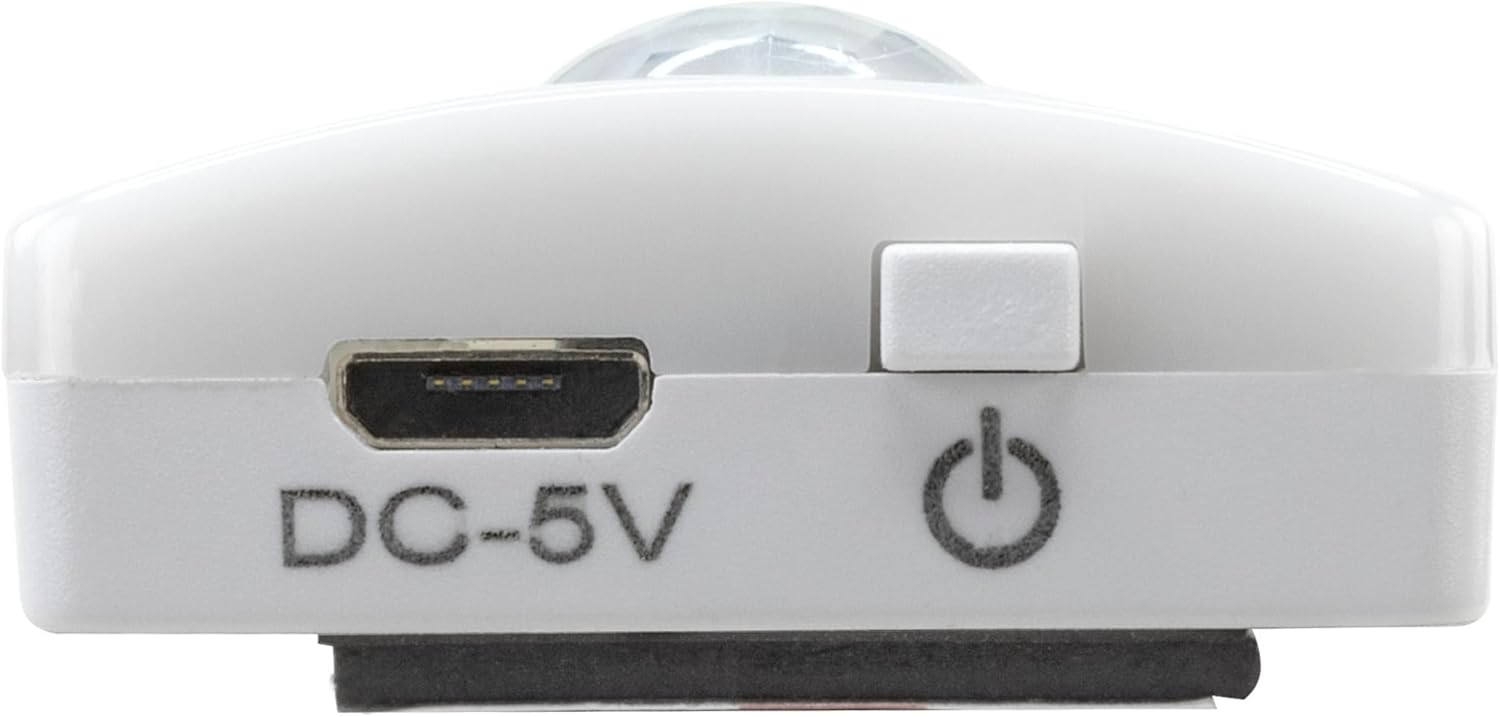
Image 2: Diagram illustrating the Micro-USB Port, On/Off button, and PIR motion sensor on the device.
4. Iestatīšana un instalēšana
The Under-Cabinet Light M offers flexible installation options using its integrated magnetic strip.
Magnētiskais stiprinājums:
- Identify a suitable, clean, and dry surface for installation (e.g., inside a cabinet, under a shelf).
- The light comes with a fixed magnetic strip on its back. For non-metallic surfaces, use the included adhesive strip.
- Peel off the protective film from the adhesive strip and firmly press it onto the desired surface.
- Attach the Under-Cabinet Light M to the adhesive strip. The magnetic connection will hold it in place.
3. attēls: Tuvplāns view of the magnetic strip and the removable adhesive strip, demonstrating the mounting mechanism.

4. attēls: Piemērsample of the under-cabinet light installed in a modern kitchen setting, providing illumination over a countertop.
5. Darbība
The Under-Cabinet Light M offers intuitive control for its lighting functions.
Ieslēgšana/izslēgšana:
- Locate the On/Off button (refer to Image 2).
- Press the button once to turn the light on or off.
Krāsu temperatūras regulēšana:
- With the light on, short press the control button repeatedly to cycle through the 3 available color temperatures: cool white, neutral white, and warm white.
- A fourth press will activate all LEDs for maximum brightness.
Aptumšošanas funkcija:
- To adjust the brightness, press and hold the control button. The light will gradually dim or brighten. Release the button when the desired brightness level is reached.
Motion and Twilight Sensor:
- When the light is in motion sensor mode, it will automatically turn on when movement is detected within its range.
- The integrated twilight sensor ensures that the motion sensor only activates the light in dark environments, preventing unnecessary illumination during daylight hours.
6. Uzlāde
The Under-Cabinet Light M is equipped with a rechargeable battery for convenient cordless use.
- When the battery is low, the light output may decrease or the light may not turn on.
- Gently detach the light from its magnetic mounting surface.
- Connect the provided micro-USB cable to the micro-USB port on the light (refer to Image 2).
- Connect the other end of the micro-USB cable to a suitable USB power source (e.g., USB wall adapter, computer USB port).
- An indicator light will show the charging status (e.g., red for charging, green for fully charged).
- Once fully charged, disconnect the cable and reattach the light to its mounting surface.

5. attēls: Detalizēts view of the Micro-USB charging port and the On/Off button, essential for charging and operation.
7. Apkope
To ensure the longevity and optimal performance of your Under-Cabinet Light M, follow these simple maintenance guidelines:
- Clean the light regularly with a soft, dry cloth. Do not use abrasive cleaners or solvents.
- Ensure the motion sensor lens is kept clean and free from obstructions for proper function.
- Store the light in a cool, dry place if not in use for extended periods.
8. Traucējummeklēšana
If you encounter issues with your Under-Cabinet Light M, refer to the following common problems and solutions:
| Problēma | Iespējamais cēlonis | Risinājums |
|---|---|---|
| Gaisma neieslēdzas. | Akumulators ir izlādējies. | Charge the light using the micro-USB cable. |
| Motion sensor is not detecting movement. | Ensure the sensor is clean and unobstructed. Check if the environment is dark enough for the twilight sensor to activate. | |
| Gaisma neuzlādējas. | Bojāts kabelis vai barošanas avots. | Try a different micro-USB cable or USB power adapter. |
| Uzlādes ports ir netīrs. | Gently clean the micro-USB port with a dry, soft brush. | |
| Gaisma mirgo vai ir blāva. | Zems akumulators. | Uzlādējiet ierīci. |
Ja problēma joprojām pastāv pēc šo risinājumu izmēģināšanas, lūdzu, sazinieties ar klientu atbalsta dienestu.
9. Specifikācijas
| Funkcija | Detaļas |
|---|---|
| Modeļa numurs | 1600-0438 |
| Produkta izmēri | 25 cm garums x platums x augstums (9.84 cm platums x 1.38 cm platums x 0.51 cm augstums) |
| Preces svars | 112 grami (0.25 mārciņas) |
| Barošanas avots | Darbojas ar baterijām |
| Uzlādes ports | Micro-USB (DC-5V) |
| Materiāls | Plastmasa |
| Krāsa | Balts |
| Instalācijas veids | Sienas stiprinājums (magnētisks) |
| Telpas veids | Dining Room, Kitchen, Wardrobe, Hallway, etc. |
10. Garantija un atbalsts
ANSMANN products are manufactured with high-quality standards. For information regarding warranty terms and conditions, please refer to the documentation provided with your purchase or visit the official ANSMANN webvietne.
For technical support or inquiries, please contact ANSMANN customer service through their official channels.


