1. Produkts beidziesview
The DOGNESS Smart Camera Pet Feeder is designed to provide automated feeding for your pets, offering convenience and peace of mind. It features a built-in camera for monitoring, portion control, voice recording, and timer-programmable feeding schedules.

1.1. attēls: Priekšpuse view of the DOGNESS Smart Camera Pet Feeder. The feeder is dark blue and silver, with a camera lens and speaker grille visible on the front panel, and a stainless steel food bowl at the base.

1.2. attēls: The DOGNESS Smart Camera Pet Feeder shown alongside a smartphone displaying the live camera feed from the feeder. This illustrates the remote monitoring capability.
2. Iestatīšana
2.1 Izpakošana un sastāvdaļu pārbaude
Uzmanīgi izņemiet visas sastāvdaļas no iepakojuma. Pārliecinieties, vai ir šādas lietas:
- DOGNESS Smart Camera Pet Feeder unit
- Strāvas adapteris
- Nerūsējošā tērauda pārtikas bļoda
- Lietošanas instrukcija (šis dokuments)
2.2 Strāvas pieslēgums
The feeder can be powered by the included AC adapter or by D-cell batteries (not included) for backup power.
- Connect the AC adapter to the power port on the feeder and plug it into a standard wall outlet.
- For battery backup, open the battery compartment (usually located at the bottom or back of the unit) and insert three (3) D-cell batteries, ensuring correct polarity.
Note: The feeder will automatically switch to battery power in case of a power outage. Wi-Fi functionality may be limited when operating solely on battery power.
2.3 Lietotņu lejupielāde un instalēšana
The DOGNESS Smart Camera Pet Feeder requires the official DOGNESS app for full functionality.
- Meklēt "DOGNESS" in your device's app store (Apple App Store for iOS or Google Play Store for Android).
- Download and install the official DOGNESS app.
- Follow the in-app instructions to create an account and log in.
2.4 Wi-Fi savienojums
Connect your feeder to your home Wi-Fi network using the DOGNESS app.
- Pārliecinieties, vai viedtālrunis ir savienots ar 2.4 GHz Wi-Fi tīklu. The feeder does not support 5GHz Wi-Fi networks.
- Open the DOGNESS app and select "Add Device" or the '+' icon.
- Follow the on-screen prompts to pair your feeder with the app. This typically involves selecting your Wi-Fi network and entering the password.
- The feeder's indicator light will confirm a successful connection.
2.5 Pārtikas piltuves piepildīšana
The feeder has a large capacity for dry pet food.
- Open the lid of the food hopper located at the top of the feeder.
- Pour dry pet food into the hopper. Ensure the food kibble size is appropriate for automatic feeders to prevent jamming.
- Cieši aizveriet vāku, lai saglabātu pārtikas svaigumu.
- Place the stainless steel food bowl into its designated slot at the base of the feeder.
3. Lietošanas instrukcijas
3.1 Ēdienreižu plānošana
Program automatic feeding times and portion sizes through the DOGNESS app.
- Open the DOGNESS app and select your feeder.
- Dodieties uz sadaļu “Grafiks” vai “Barošanas plāns”.
- Add new feeding times, specifying the time of day and the number of portions for each meal.
- Save your settings. The feeder will dispense food automatically at the scheduled times.
3.2. Manuālā barošana
Dispense food instantly using the app or the manual feed button on the unit.
- Izmantojot lietotni: On the feeder's main screen in the DOGNESS app, locate the "Feed Now" or "Manual Feed" option. Select the desired number of portions and confirm.
- Via Unit: Press and hold the manual feed button (if available) on the feeder for a few seconds to dispense a single portion.
3.3 Voice Recording and Playback
Record a custom message to play at meal times to call your pet.
- In the DOGNESS app, go to the feeder settings.
- Find the "Voice Recording" or "Meal Call" option.
- Follow the prompts to record your voice message.
- The recorded message will play automatically before each scheduled meal.
3.4 Kameras funkcijas
Monitor your pet and the feeder's status using the built-in HD camera with night vision.
- Tiešraidē View: Open the DOGNESS app and select your feeder to access the live camera feed.
- Nakts redzamība: The camera automatically switches to night vision in low-light conditions, providing clear visibility.
- Divvirzienu audio: Use the app's microphone and speaker functions to communicate with your pet remotely.
4. Apkope
4.1. Tīrīšanas instrukcijas
Regulāra tīrīšana nodrošina barotavas higiēnu un pareizu darbību.
- Food Hopper and Bowl: These components are removable and should be hand washed with mild soap and water. Rinse thoroughly and dry completely before reassembling.
- Galvenā vienība: Wipe the exterior of the feeder with a soft, damp cloth. Do not immerse the main unit in water or use abrasive cleaners.
- Ensure all parts are completely dry before adding food or reconnecting power.
Care Instructions: Hand Wash Only for removable food contact parts.
4.2 Pārtikas uzpildīšana
Monitor the food level in the hopper and refill as needed to prevent interruptions in feeding.
- The app may provide notifications for low food levels.
- Visually inspect the food level through the transparent section of the hopper.
- Open the lid and add dry kibble, ensuring it does not exceed the maximum fill line.
4.3. Akumulatora nomaiņa
If using battery backup, replace batteries periodically or when the low battery indicator appears.
- Atveriet akumulatora nodalījumu.
- Remove old D-cell batteries and dispose of them responsibly.
- Insert new D-cell batteries, observing correct polarity.
- Droši aizveriet akumulatora nodalījumu.
5. Traucējummeklēšana
This section addresses common issues you might encounter with your DOGNESS Smart Camera Pet Feeder.
| Problēma | Iespējamais cēlonis | Risinājums |
|---|---|---|
| Barotājs neizdod barību. |
|
|
| Nevar izveidot savienojumu ar Wi-Fi. |
|
|
| App is unresponsive or crashes. |
|
|
| Camera feed is unclear or unavailable. |
|
|
6. Specifikācijas
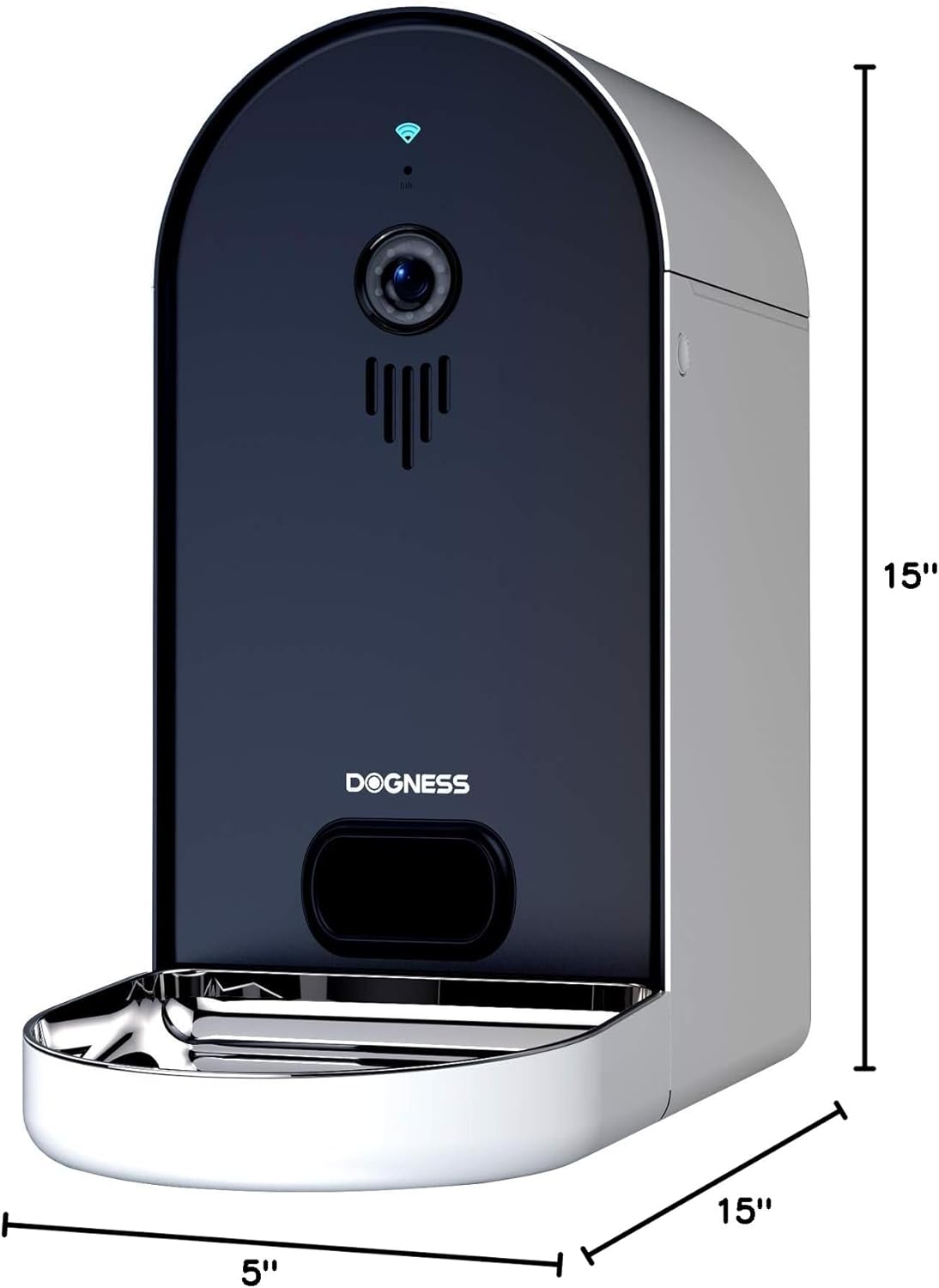
6.1. attēls: Diagram illustrating the dimensions of the DOGNESS Smart Camera Pet Feeder, showing a height of 15 inches, width of 5 inches, and depth of 15 inches.
| Funkcija | Detaļas |
|---|---|
| Zīmols | SUŅI |
| Modeļa numurs | B09KBPR7TS |
| Preces svars | 6.5 mārciņas |
| Produkta izmēri (LxWxH) | 15 x 5 x 15 collas |
| Mērķa sugas | Dog, Cat |
| Šķirnes ieteikums | Visi šķirņu izmēri |
| Ieteicamie lietojumi | Vairāki mājdzīvnieki |
| Īpašas funkcijas | Portion Control, Timer, Voice Recording, Night Vision Camera |
| Kopšanas instrukcijas | Mazgāt tikai ar rokām (noņemamas detaļas) |
| Wi-Fi saderība | Tikai 2.4 GHz tīkli |
| Barošanas avots | AC Adapter, D-cell Battery Backup |
7. Garantija un atbalsts
For warranty information and customer support, please refer to the documentation included with your product or visit the official DOGNESS webvietne. Ražotāja website typically provides detailed warranty terms, registration options, and contact information for technical assistance.
Saglabājiet pirkuma čeku kā pirkuma apliecinājumu jebkādu garantijas prasību gadījumā.