Ievads
Thank you for choosing the Mistral MSF1650R 16-inch Stand Fan. This manual provides important information regarding the assembly, operation, maintenance, and troubleshooting of your new fan. Please read it thoroughly before use and retain it for future reference.
Svarīgi drošības norādījumi
- Always ensure the fan is placed on a stable, level surface to prevent it from tipping over.
- Nelietojiet ventilatoru ar bojātu vadu vai kontaktdakšu. Ja vads ir bojāts, tas jānomaina ražotājam, tā servisa pārstāvim vai līdzīgi kvalificētām personām, lai izvairītos no briesmām.
- Unplug the fan from the power outlet before cleaning, assembling, or disassembling parts.
- Keep fingers, pencils, or any other objects out of the fan guard when it is operating.
- Nelietojiet ventilatoru ūdens tuvumā vai pārāk mitrā vidē.
- Šo ierīci nav paredzēts lietot personām (tostarp bērniem) ar ierobežotām fiziskām, maņu vai garīgām spējām vai pieredzes un zināšanu trūkumu, ja vien par viņu drošību atbildīgā persona nav sniegusi viņu uzraudzību vai norādījumus par ierīces lietošanu.
- Bērni ir jāuzrauga, lai nodrošinātu, ka viņi nespēlējas ar ierīci.
Produkta sastāvdaļas
Familiarize yourself with the main parts of your Mistral MSF1650R stand fan.
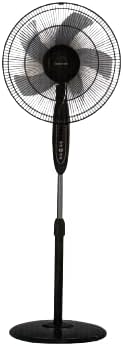
1. attēls. Priekšpuse view of the Mistral MSF1650R 16-inch Stand Fan, showing the fan head, control panel, adjustable stand, and round base.

Figure 2: The Mistral MSF1650R stand fan accompanied by its remote control, illustrating the convenience of remote operation.
- Priekšējā apsardze
- Fan Blade (5 ABS blades)
- Aizmugures aizsargs
- Motora korpuss
- Vadības panelis
- Regulējams statīva kāts
- Bāze
- Tālvadības pults
Montāžas instrukcijas
Lai saliktu statīva ventilatoru, veiciet tālāk norādītās darbības.
- Pievienojiet pamatni: Place the stand pole onto the base and secure it using the provided screw and washer from underneath the base.
- Install the Rear Guard: Position the rear guard onto the motor housing, ensuring it aligns with the locating pins. Secure it with the guard nut.
- Ventilatora lāpstiņas uzstādīšana: Slide the fan blade onto the motor shaft, aligning the notch on the blade with the pin on the shaft. Secure it with the blade cap, turning it counter-clockwise.
- Piestipriniet priekšējo aizsargu: Place the front guard onto the rear guard, aligning the clips. Secure the guards together using the guard ring and clip, ensuring it is tightly fastened around the perimeter.
- Pielāgot augstumu: Loosen the height adjustment knob on the stand pole, extend or retract the pole to the desired height, and then tighten the knob securely.
Lietošanas instrukcijas
Your Mistral MSF1650R fan can be operated via the control panel on the fan body or the remote control.
Vadības paneļa funkcijas:
- IESLĒGŠANAS/IZSLĒGŠANAS poga: Nospiediet, lai ieslēgtu vai izslēgtu ventilatoru.
- SPEED poga: Press repeatedly to cycle through fan speeds: Low, Medium, High.
- MODE poga: Nospiediet, lai izvēlētos starp parasto, dabisko un miega režīmu.
- TIMER poga: Press to set the operating timer (up to 7.5 hours). Each press adds 0.5 hours.
- OSC (svārstību) poga: Press to start or stop the fan head oscillating horizontally.
Tālvadības pults funkcijas:
The remote control duplicates all functions available on the fan's control panel for convenient operation from a distance.
- Ensure batteries are correctly inserted into the remote control.
- Point the remote control towards the fan's receiver when operating.
- Buttons on the remote correspond to the functions described above (ON/OFF, SPEED, MODE, TIMER, OSC).
Apkope un tīrīšana
Regulāra tīrīšana palīdzēs uzturēt ventilatora darbību un pagarinās tā kalpošanas laiku.
- Pirms tīrīšanas atvienojiet kontaktdakšu: Always disconnect the fan from the power supply before attempting any cleaning or maintenance.
- Tīras ārējās virsmas: Noslaukiet ventilatora ārējās virsmas ar mīkstu, damp audums. Neizmantojiet abrazīvus tīrīšanas līdzekļus vai šķīdinātājus.
- Clean Fan Blades and Guards: To clean the fan blades and inside the guards, you may need to carefully remove the front guard. Use a soft cloth or a vacuum cleaner with a brush attachment to remove dust. Ensure all parts are dry before reassembling.
- Uzglabāšana: If storing the fan for an extended period, cover it to protect it from dust and store it in a dry, cool place.
Problēmu novēršana
Biežāk sastopamās problēmas un to risinājumus skatiet tālāk esošajā tabulā.
| Problēma | Iespējamais cēlonis | Risinājums |
|---|---|---|
| Ventilators neieslēdzas. | Nav barošanas avota. Ventilators nav pievienots. Nav nospiesta ieslēgšanas/izslēgšanas poga. | Pārbaudiet strāvas kontaktligzdu. Pārliecinieties, vai kontaktdakša ir pilnībā ievietota. Nospiediet ON/OFF pogu. |
| Vāja gaisa plūsma. | Ventilatora ātrums iestatīts pārāk zems. Dust accumulation on blades/guards. | Palieliniet ventilatora ātrumu. Clean fan blades and guards as per maintenance instructions. |
| Ventilators rada neparastu troksni. | Vaļīgas detaļas. Ventilatora lāpstiņu aizsprostojums. | Ensure all assembly screws and nuts are tight. Atvienojiet strāvas padevi un pārbaudiet, vai nav svešķermeņu. |
| Tālvadības pults nedarbojas. | Beigušās baterijas. Šķērslis starp tālvadības pulti un ventilatoru. | Nomainiet baterijas. Nodrošiniet brīvu redzamību līdz ventilatora uztvērējam. |
Specifikācijas
Technical details for the Mistral MSF1650R 16-inch Stand Fan.

Figure 3: Detailed specifications of the Mistral MSF1650R stand fan, including dimensions, power, and features.
| Modelis | MSF1650R |
| Ventilatora lāpsta | 5 ABS Fan Blade |
| Voltage | 220–240 V ~ 50 Hz |
| Jauda | 55W |
| Gaisa tilpums | 66.49 m³/min |
| Maksimālā gaisa plūsma | 3.45 m/s |
| Produkta izmēri | 45 x 15 x 57 cm (dziļums x platums x augstums) |
| Maksimālais augstums | 1.3m (Adjustable) |
| Neto svars | 5.85 kg |
| Īpašas funkcijas | Adjustable Height, Remote Controlled, 7.5 Hours Timer, 3 Speed Selection, Normal/Natural/Sleep Modes |
Garantija un atbalsts
For warranty information or technical support, please refer to the warranty card included with your purchase or contact Mistral customer service. Keep your proof of purchase for warranty claims.
For further assistance, please visit the official Mistral webvietnē vai sazinieties ar to pilnvarotajiem servisa centriem.


