Ievads
Thank you for choosing the Inateck KB02017 AZERTY Keyboard. This manual provides detailed instructions for setting up, operating, and maintaining your keyboard to ensure optimal performance and longevity. Please read this manual thoroughly before use.
Saderība
The Inateck KB02017 keyboard is compatible with the following iPad models:
- iPad 10.2-inch (9th Generation, 2021)
- iPad 10.2-inch (8th Generation, 2020)
- iPad 10.2-inch (7th Generation, 2019)
- iPad Air 3 (10.5-inch, 2019)
- iPad Pro 10.5 collu

This image illustrates the compatible iPad models and how to locate your iPad's model number for verification.
Iepakojuma saturs
Lūdzu, pārbaudiet, vai iepakojumā nav šādu priekšmetu:
- Inateck KB02017 Magnetic Detachable Keyboard
- Aizsargmaciņa
- USB uzlādes kabelis
- Lietotāja rokasgrāmata
Produkta īpašības
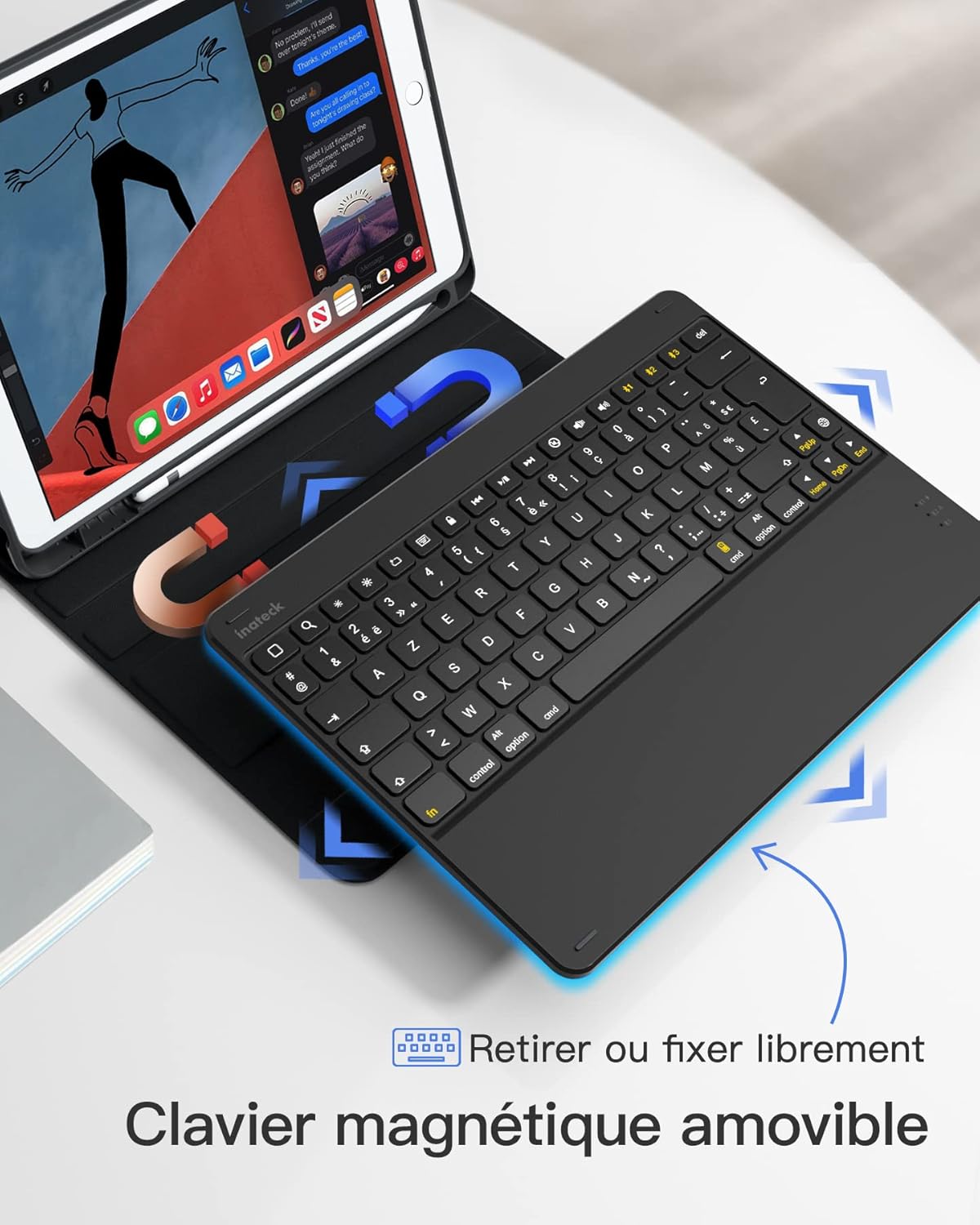
- Magnetic Detachable Design: The keyboard can be easily detached from the protective case, offering flexibility and portability. This allows you to use the iPad with or without the keyboard.
- True French AZERTY Layout: Designed with a genuine French AZERTY keyboard layout for comfortable and familiar typing.
- Vairāki Viewleņķi: The case supports three adjustable viewing angles, allowing you to find the most comfortable position for typing, viewzīmēšana.
- Independent iOS Shortcut Keys: A dedicated row of shortcut keys provides quick access to various iOS functions, enhancing productivity.
- Full Protection: The flexible and shock-resistant protective case safeguards your iPad from daily bumps and scratches.
- Ilgs akumulatora darbības laiks: Enjoy up to 100 hours of continuous operation or 50 days of standby time on a single charge.

The keyboard features a magnetic detachable design for versatile use.

The keyboard features a true French AZERTY layout.

Regulējams viewing angles provide ergonomic comfort.
Iestatīšana
1. Tastatūras uzlādēšana
Before first use, fully charge the keyboard. Connect the provided USB charging cable to the keyboard's charging port and a USB power source. The charging indicator light will show the charging status.
2. Bluetooth savienošana pārī
- Pārliecinieties, vai tastatūra ir uzlādēta un ieslēgta.
- Savā iPad ierīcē dodieties uz Iestatījumi > Bluetooth un ieslēdziet Bluetooth.
- Nospiediet un turiet Fn + C keys simultaneously on the keyboard for 3 seconds. The Bluetooth indicator light will start flashing, indicating the keyboard is in pairing mode.
- On your iPad, look for "Inateck KB02017" (or similar name) in the list of available devices and tap to connect.
- Once connected, the Bluetooth indicator light on the keyboard will stop flashing and remain solid for a few seconds, then turn off.
The keyboard connects to your iPad via Bluetooth.
Lietošanas instrukcijas
Using Shortcut Keys
The top row of the keyboard features dedicated iOS shortcut keys for quick access to various functions. These keys allow you to control your iPad efficiently without touching the screen.
| Taustiņa ikona | Funkcija |
|---|---|
| Sākums | Atgriezieties sākuma ekrānā |
| Meklēt | Activate Spotlight Search |
| Spilgtuma samazināšana | Samaziniet ekrāna spilgtumu |
| Spilgtums | Palieliniet ekrāna spilgtumu |
| Keyboard Hide/Show | Hide or show the on-screen keyboard |
| Iepriekšējais celiņš | Pāriet uz iepriekšējo multivides ierakstu |
| Atskaņot/Pauzēt | Play or pause media playback |
| Nākamais celiņš | Pārejiet uz nākamo multivides ierakstu |
| Izslēgt skaņu | Izslēgt vai ieslēgt audio |
| Skaļuma samazināšana | Samaziniet skaļumu |
| Skaļuma palielināšana | Palieliniet skaļumu |
| Bloķēšanas ekrāns | Lock the iPad screen |

Dedicated shortcut keys for iOS functions.
Apkope
Tīrīšana
Lai notīrītu tastatūru, viegli noslaukiet virsmu ar mīkstu,amp audumu. Izvairieties no spēcīgu ķīmisku vielu vai abrazīvu materiālu lietošanas. Pārliecinieties, ka šķidrums nenokļūst tastatūras iekšējās sastāvdaļās.
Akumulatora kopšana
The keyboard is powered by a rechargeable battery. To prolong battery life:
- Charge the keyboard regularly, even if not in frequent use.
- Nepakļaujiet tastatūru ārkārtējai temperatūrai.
- Ja akumulators tiek uzglabāts ilgstoši, pirms uzglabāšanas uzlādējiet akumulatoru līdz aptuveni 50%.

The keyboard offers long battery life for extended use.
Problēmu novēršana
Keyboard Fails to Connect via Bluetooth
- Clear the paired device history for "Inateck KB02017" on your iPad.
- Deactivate and then reactivate the keyboard's Bluetooth.
- Nospiediet un turiet Fn + C keys for 3 seconds to enter Bluetooth pairing mode.
- Tap on "Inateck KB02017" in your iPad's Bluetooth device list to pair.
Some Keys Transmit Incorrect Values
If keys are not producing the expected characters (e.g., 'A' instead of 'Q' for AZERTY layout), ensure the correct keyboard layout is selected on your iPad:
- Dodieties uz Iestatījumi > Ģenerālis > Tastatūra.
- Pieskarieties Klaviatūras, tad Add New Keyboard... if 'French (AZERTY)' is not listed.
- Zem Aparatūras tastatūra, ensure the correct 'French (AZERTY)' layout is selected for your Inateck KB02017.

Common troubleshooting steps for connectivity and key input issues.
Specifikācijas
| Funkcija | Detaļas |
|---|---|
| Zīmols | Inateck |
| Modeļa numurs | KB02017 |
| Krāsa | Tumši pelēks |
| Savienojamības tehnoloģija | Bluetooth |
| Jaudas veids | Darbojas ar baterijām |
| Tastatūras apraksts | Savrups |
| Saderīgas ierīces | iPad 2021/2020/2019 (9th/8th/7th Generation), iPad Air 3, iPad Pro 10.5 |
| Vienuma izmēri (G x P x A) | 25.5 x 19.8 x 1.8 cm |
| Produkta svars | 0.65 kg (1.43 mārciņas) |
| Īpaša iezīme | Viegls |
| Materiāls | Aluminum, Polycarbonate, PBT |
Garantija un atbalsts
For warranty information or technical support, please refer to the documentation included with your purchase or visit the official Inateck website. Contact details for customer service can typically be found on the product packaging or the brand's support page.


