1. Ievads
The Amazon Echo Show 5 (3rd Gen) is a smart display designed to integrate seamlessly into your daily life. It features a 5.5-inch screen and enhanced audio capabilities, providing visual and auditory interactions with Alexa. This device is refurbished, tested, and certified to function like a new unit, and comes with the same limited warranty.
The device is constructed with sustainability in mind, utilizing 100% post-consumer recycled polyester yarn for its fabric and 100% recycled aluminum. Its packaging is also 100% recyclable.
2. Kas ir kastē
Upon unboxing your Amazon Echo Show 5 (3rd Gen), you should find the following items:
- Echo Show 5 (3rd Gen) device
- Power adapter (22W) and cable (4.9ft)
- Īsā lietošanas pamācība
3. Iestatīšanas rokasgrāmata
Lai iestatītu Echo Show 5, veiciet šīs darbības:
- Ieslēgšana: Connect the included power adapter to your Echo Show 5 and plug it into a wall outlet. The device will automatically power on.
- Izpildiet ekrānā redzamos norādījumus: The device will guide you through the initial setup process on its 5.5-inch touch screen.
- Izveidojiet savienojumu ar Wi-Fi: Select your Wi-Fi network from the list and enter the password. The Echo Show 5 supports dual-band Wi-Fi (802.11a/b/g/n/ac). It does not support ad-hoc (peer-to-peer) networks.
- Log in to Amazon Account: Enter your Amazon account credentials when prompted.
- Personalizēt iestatījumus: Configure your time zone, location, and other preferences.
- Izpētiet funkcijas: Once setup is complete, you can begin interacting with Alexa and exploring the device's capabilities.
The device utilizes Amazon Wi-Fi Simple Setup technology for an easier connection process to your Wi-Fi network.
4. Echo Show 5 lietošana
The Echo Show 5 allows for various interactions through voice commands and its touch screen.
4.1. Displeja funkcijas
The 5.5-inch touch screen provides visual information and controls:
- Informācija īsumā: View news headlines, weather forecasts, and calendar events.
- Fotoattēlu displejs: Set the background to a rotating slideshow of your favorite photos. You can invite family and friends to share photos.
- Saturs Viewing: Stream shows, view song titles, and follow along with recipes.

4.2. Audio funkcijas
The device features a full-range 1.75-inch built-in speaker, offering enhanced bass and clearer vocals for audio playback.
- Mūzika un podraides: Stream audio content from services like Amazon Music and Spotify.
- Bluetooth savienojums: Atbalsta Advanced Audio Distribution Profile (A2DP) for streaming audio from your mobile device to the Echo Show 5, or from the Echo Show 5 to a Bluetooth speaker. Audio/Video Remote Control Profile (AVRCP) allows voice control of connected mobile devices. Bluetooth speakers requiring PIN codes are not supported.


4.3. Kameras funkcijas
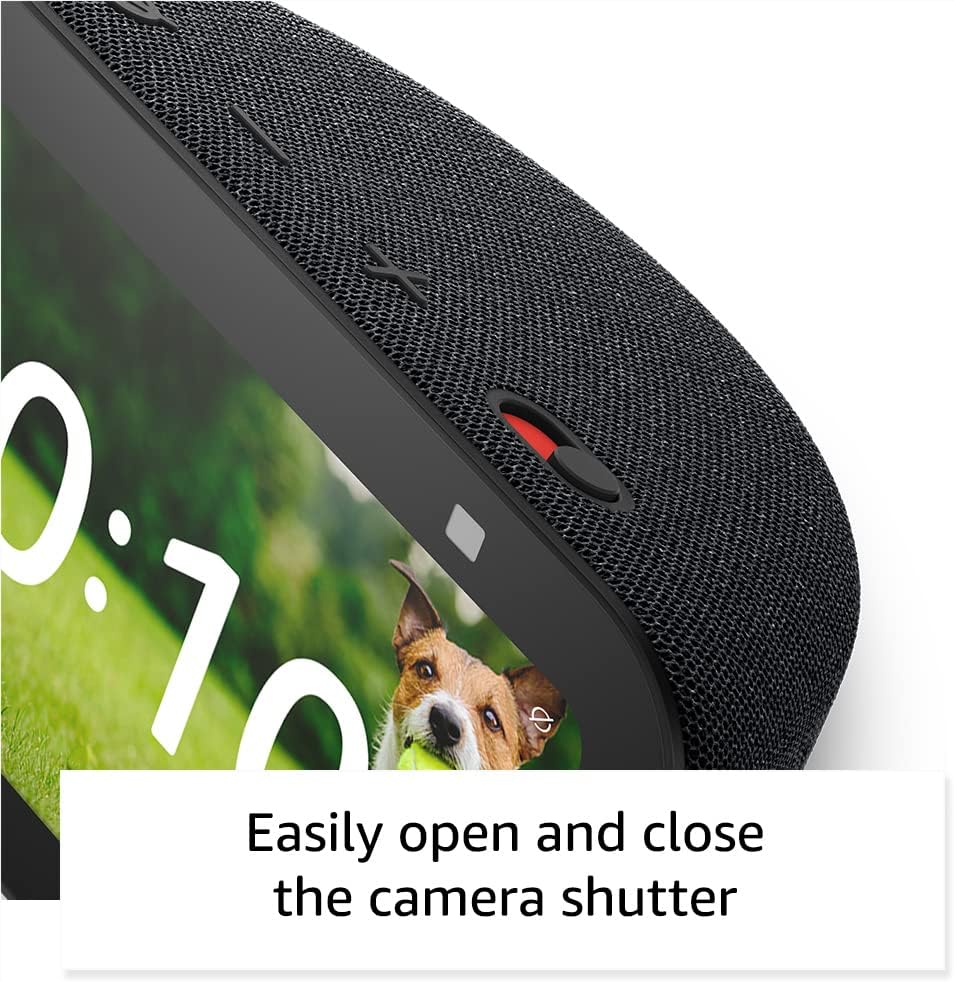
The Echo Show 5 includes a 2 MP camera with a built-in shutter.
- Videozvani: Use the camera to make video calls to friends and family who have the Alexa app or another Echo device with a screen.
- Mājas uzraudzība: Check in on your home, family, or pets using the built-in camera. You can also view compatible video doorbells.


4.4. Viedās mājas vadība
Control compatible smart devices such as lights and thermostats using voice commands or the touch screen, even when you are away from home. The device supports Wi-Fi, Bluetooth Low Energy Mesh, and Matter for smart home compatibility.
4.5. Privātuma funkcijas
The Echo Show 5 incorporates multiple layers of privacy controls:
- Mic/Camera Off Button: A physical button to electronically disconnect the microphone and camera.
- Built-in Camera Shutter: A physical slider to cover the camera lens.
- Wake Word tehnoloģija: Ierīce sāk ierakstīt un sūtīt audio uz mākoni tikai pēc modināšanas vārda (piemēram, "Alexa") noteikšanas.
- Straumēšanas indikatori: Visual indicators show when the device is actively streaming to the cloud.
- Balss ierakstu pārvaldība: Spēja view un izdzēsiet savus balss ierakstus.
- Ring Video Encryption: Atbalsta viewing end-to-end encrypted Ring video.
4.6. Pieejamības līdzekļi
The Echo Show 5 includes various accessibility features to personalize Alexa to your abilities. These can be accessed via Iestatījumi → Pieejamība.
- Pieskarieties, lai aktivizētu Alexa: Piekļūstiet Alexa, izmantojot skārienekrāna flīzes vai tastatūru.
- Adaptīvā klausīšanās: Nodrošina vairāk laika, lai pabeigtu runāšanu, pirms Alexa atbild.
- Vēlamais runas ātrums: Kontrolējiet, cik ātri vai lēni Alexa runā.
- Paraksti: Alexa Captioning, Call Captioning, and Closed Captioning provide text captions for supported content.
- Parādi un pastāsti: Palīdz neredzīgiem vai vājredzīgiem lietotājiem atpazīt produktus, sakot: "Alexa, ko es turu?".
- BalssView Ekrāna lasītājs: Nodrošina piekļuvi lietotājiem ar redzes traucējumiem vai ar redzes traucējumiem.
- Ekrāna lupa: Ļauj pietuvināt/attālināt un pārvietoties pa ekrānu.
- Paziņot, kad tuvumā: Atskaņo paziņojumu skaņas, kad tiek konstatēta ierīces tuvumā.
- Kindle skaļā lasīšana: Alexa var skaļi lasīt Kindle grāmatas.
- Reāllaika teksts: Enables typing live text in a video call.
- Papildu funkcijas ietver krāsu inversiju, krāsu korekciju un skaņas pieprasījumu.
5. Apkope
Lai nodrošinātu Echo Show 5 ilgmūžību un optimālu veiktspēju, ievērojiet šīs apkopes vadlīnijas:
- Tīrīšana: Use a soft, lint-free cloth to gently wipe the screen and exterior. Avoid abrasive cleaners, solvents, or aerosol sprays.
- Izvietojums: Novietojiet ierīci uz stabilas, līdzenas virsmas, prom no tiešiem saules stariem, siltuma avotiem un pārmērīga mitruma. Nodrošiniet atbilstošu ventilāciju ap ierīci.
- Programmatūras atjauninājumi: The device receives guaranteed software security updates for at least four years after its last availability for purchase as a new unit. Ensure your device is connected to Wi-Fi to receive these updates automatically.
- Jaudas cikls: If the device becomes unresponsive, unplug it from the power outlet, wait for 10 seconds, and then plug it back in.
6. Traucējummeklēšana
If you encounter issues with your Echo Show 5, try the following solutions:
- Nav jaudas: Ensure the power adapter is securely connected to both the device and a working wall outlet. Try a different outlet.
- Wi-Fi savienojamības problēmas:
- Pārbaudiet, vai jūsu Wi-Fi maršrutētājs darbojas pareizi.
- Restartējiet maršrutētāju un modemu.
- On the Echo Show 5, go to Settings → Network and try reconnecting to your Wi-Fi network.
- Pārliecinieties, vai ierīce atrodas jūsu Wi-Fi maršrutētāja darbības rādiusā.
- Alexa neatbild:
- Ensure the microphone is not muted (the light ring will be red). Press the mic/camera off button if it is.
- Speak clearly and directly to the device.
- Try restarting the device by unplugging and replugging it.
- Displeja problēmas: If the screen is unresponsive or frozen, try restarting the device.
- Skaņas problēmas:
- Check the volume level on the device.
- Ensure no external Bluetooth speakers are connected if you intend to use the internal speaker.
- Kamera nedarbojas: Ensure the camera shutter is open and the camera is not disabled via the mic/camera off button.
Lai saņemtu papildu palīdzību, skatiet Amazon atbalsta dienestu webvietni vai sazinieties ar klientu apkalpošanas dienestu.
7. Specifikācijas
| Funkcija | Detaļas |
|---|---|
| Modelis | Echo Show 5 (3. paaudze) — izlaidums 2023. gadā |
| Izmēri (G x D x A) | 5.8 x 3.6 x 3.2 collas (147 mm x 91 mm x 82 mm) |
| Svars | 16.1 unces (456 grami) |
| Displejs | 5.5” skārienekrāns |
| Kamera | 2 MP with built-in shutter |
| Procesors | MediaTek MT 8169 B |
| Wi-Fi savienojamība | Dual-band 802.11a/b/g/n/ac (does not support ad-hoc networks) |
| Bluetooth savienojums | A2DP support for audio streaming, AVRCP for voice control (Bluetooth speakers requiring PIN codes not supported) |
| Audio | Full range 1.75” built-in speaker |
| Viedās mājas saderība | Wi-Fi, Bluetooth zema enerģijas patēriņa tīkls, Matter |
| Valodas atbalsts | angļu un spāņu |
8. Garantija un atbalsts
Your Amazon Echo Show 5 (3rd Gen) comes with a 1-year limited warranty and service. As a refurbished device, it receives the same limited warranty as a new device.
For detailed warranty information and terms of service, please refer to the documentation provided with your device or visit the official Amazon support website. Information regarding software security updates is also available through Amazon's official channels.


