1. Produkts beidziesview
The OREI BK-21 is an advanced 8K 2x1 HDMI Switch designed to streamline your audio-visual setup. This device allows you to connect two HDMI source devices to a single HDMI display, providing seamless switching between inputs. It supports high-resolution video and audio formats, making it ideal for gaming, home theater, and professional applications.

Figure 1: OREI 8K 2x1 HDMI Switch (Model BK-21)
Galvenās iespējas ietver:
- Supports resolutions up to 8K@60Hz, 4K@120Hz, and 1080p@240Hz.
- HDMI 2.1 and HDCP 2.3/2.2/1.4 compliant.
- High Speed 48Gbps Video Bandwidth.
- Supports HDR10+, HDR10, Dolby Vision, 3D, and CEC.
- Features VRR (Variable Refresh Rate), ALLM (Auto Low-Latency Mode), and QFT (Quick Frame Transport).
- Dual switching options: Automatic and Manual.
2. Iepakojuma saturs
Lūdzu, pārliecinieties, vai iepakojumā ir visas preces:
- 1x OREI BK-21S HDMI Switcher
- 1x USB barošanas kabelis
- 1x lietotāja rokasgrāmata

2. attēls. Iepakojuma saturs
3. Produkta īpašības
The OREI BK-21 HDMI Switch offers a robust set of features for high-performance audio and video distribution:
- Augstas izšķirtspējas atbalsts: Experience stunning visuals with support for 8K@60Hz, 4K@120Hz, and 1080p@240Hz.
- Advanced HDMI Standards: Fully compliant with HDMI 2.1 and HDCP 2.3/2.2/1.4 for broad compatibility and secure content transmission.
- Liels joslas platums: Supports 48Gbps video bandwidth for uncompressed high-resolution video.
- Dinamiskā HDR atbalsts: Compatible with HDR10+, HDR10, and Dolby Vision for enhanced contrast and color.
- Gaming Optimized Features: Includes VRR (Variable Refresh Rate), ALLM (Auto Low-Latency Mode), and QFT (Quick Frame Transport) for a smoother gaming experience.
- Visaptverošs audio atbalsts: Delivers exceptional sound quality with LPCM, Dolby True HD, DTS HD Master Audio, Dolby-AC3, and DTS7.1.
- Plaša saderība: Works with a variety of HDMI devices such as PlayStation 5, Xbox, Roku 4, 4K TV, Amazon Fire TV, Ultra Projector, PS4, Apple TV, Cable box, Blu-ray player, DVD player, PC, and STB.

Figure 3: Supported Video Standards

Figure 4: Audio Support

5. attēls: Plaša ierīču saderība
4. Connections and Setup
Follow these steps to connect your OREI BK-21 HDMI Switch:
- Pievienojiet HDMI avotus: Plug your two HDMI source devices (e.g., gaming console, Blu-ray player) into the HDMI IN1 and HDMI IN2 ports on the switch.
- Savienojuma izveide ar displeju: Connect an HDMI cable from the HDMI OUT port on the switch to the HDMI input on your display (TV, monitor, projector).
- Strāvas pieslēgums: Connect the provided USB cable to the POWER port on the switch and to a USB power source (e.g., a USB wall adapter, a USB port on your TV or media device). The switch requires 5V DC power.

6. attēls: Aizmugurējā paneļa savienojumi
For optimal performance, use high-quality HDMI 2.1 cables under 10 feet. For longer lengths, OREI Fiber Optic HDMI cables are recommended.
Video 1: OREI Direct's overview of the 8K 2x1 HDMI Switch, demonstrating its features and connections.
5. Lietošanas instrukcijas
The OREI BK-21 HDMI Switch offers both manual and automatic switching modes:
- Manuāla pārslēgšana: Press the button on the top of the switch to cycle between HDMI IN1 and HDMI IN2. The corresponding LED indicator (1 or 2) will illuminate to show the currently active input.
- Automātiska pārslēgšana: The switch supports automatic detection of active HDMI sources. When a new source is activated, the switch can automatically switch to that input. This feature can be enabled or disabled as per user preference to prevent unintended switching.

Figure 7: Top Panel with Selection Button and Indicators
6. Tehniskās specifikācijas
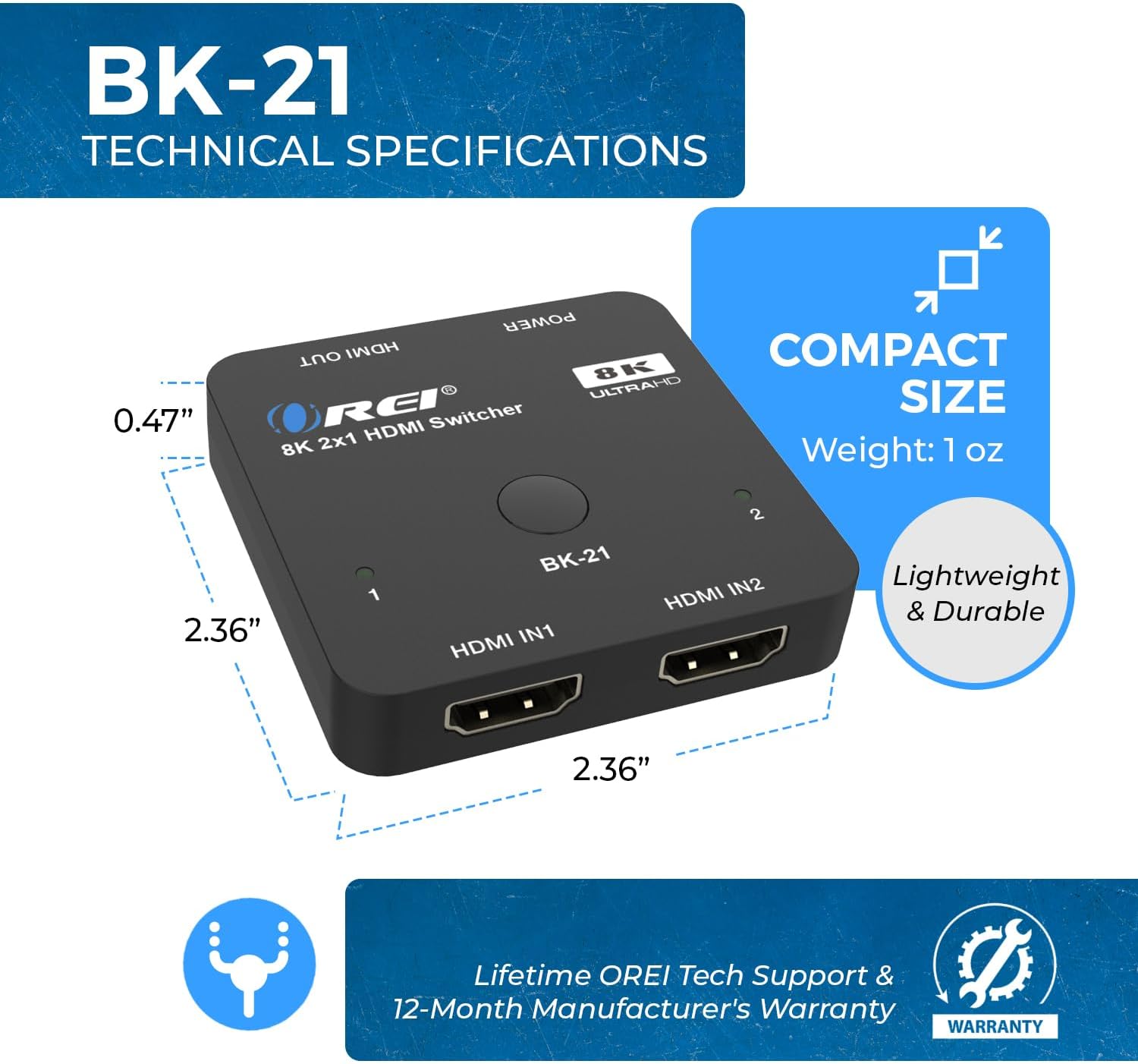
8. attēls: Kompakts izmērs un izmēri
| Funkcija | Apraksts |
|---|---|
| Modeļa numurs | BK-21 |
| Produkta izmēri | 2 x 4 x 0.5 collas |
| Preces svars | 2.8 unces |
| Krāsa | Melns |
| Savienotāja veids | HDMI |
| Kabeļa veids | HDMI |
| HDMI versija | HDMI 2.1 |
| HDCP versija | HDCP 2.3/2.2/1.4 |
| Maksimālā izšķirtspēja | 8K@60Hz, 4K@120Hz, 1080p@240Hz |
| Video joslas platums | 48 Gbps |
| HDR atbalsts | HDR10+, HDR10, Dolby Vision |
| Spēļu funkcijas | VRR, ALLM, QFT |
| Audio formāti | LPCM, Dolby True HD, DTS HD Master Audio, Dolby-AC3, DTS7.1 |
| Saderīgas ierīces | Blu-Ray Player, DVD Player, Gaming Console (PS5, Xbox), PC, Television, Roku, Amazon Fire TV, Ultra Projector, Apple TV, Cable box, STB |
7. Traucējummeklēšana
If you encounter issues with your OREI BK-21 HDMI Switch, please refer to the following common troubleshooting steps:
- Nav signāla:
- Pārliecinieties, vai visi HDMI kabeļi ir droši pievienoti gan avota ierīcēm, gan slēdzim, gan displejam.
- Verify the USB power cable is connected and the power LED on the switch is illuminated.
- Try connecting the HDMI source directly to the display to confirm the source and display are working correctly.
- Test with different HDMI cables, especially high-quality HDMI 2.1 certified cables.
- Ensure the correct input is selected on your display.
- Mirgojošs vai saraustīts signāls:
- Check cable lengths; for 8K/4K@120Hz, shorter, high-quality HDMI 2.1 cables are crucial.
- Pārliecinieties, vai barošanas avots ir stabils un pietiekams.
- Samaziniet avota ierīces izšķirtspēju vai atsvaidzes intensitāti, lai pārbaudītu, vai problēma joprojām pastāv.
- Audio problēmas:
- Confirm that your display's audio settings are correctly configured.
- Check the audio output settings on your source device.
- Ensure the HDMI cables support audio transmission.
- Automatic Switching Not Working:
- Some devices may not trigger auto-switching effectively. Try manual switching using the button on the switch.
- Ensure the auto-switching feature is enabled if applicable (refer to specific product manual for details on enabling/disabling).
8. Kopšana un uzturēšana
To ensure the longevity and optimal performance of your OREI BK-21 HDMI Switch, please follow these guidelines:
- Tīrīšana: Use a soft, dry cloth to clean the device. Avoid using liquid or aerosol cleaners.
- Uzglabāšana: Uzglabājiet ierīci vēsā, sausā vietā, pasargājot no tiešiem saules stariem un ekstremālām temperatūrām.
- Apstrāde: Rīkojieties ar ierīci uzmanīgi. Izvairieties no tās nomešanas vai spēcīgu triecienu iedarbības.
- Ventilācija: Ensure the device has adequate ventilation to prevent overheating. Do not block any ventilation openings.
- Jauda: Always use the provided USB power cable. Disconnect power during electrical storms or when unused for long periods.
9. Garantija un klientu atbalsts
The OREI BK-21 HDMI Switch comes with a 1 gadu pilna garantija. For any technical assistance, troubleshooting, or warranty claims, please contact OREI Support.
Lai saņemtu papildu palīdzību, lūdzu, apmeklējiet Official OREI Store on Amazon vai skatiet kontaktinformāciju, kas norādīta jūsu produkta iepakojumā.


