1. Ievads
Welcome to the user manual for your new Avtex W195TS Smart TV. This television is specifically designed for mobile living, offering versatile power options (12V, 24V, and 240V) and a range of smart features, including Wi-Fi, Bluetooth, and an integrated Freesat satellite decoder. This manual provides essential information for setting up, operating, maintaining, and troubleshooting your device to ensure optimal performance and enjoyment.
2. Drošības informācija
Pirms televizora lietošanas uzmanīgi izlasiet visus drošības norādījumus. Saglabājiet šo rokasgrāmatu turpmākai uzziņai.
- Barošanas avots: Nodrošiniet pareizo tilpumutage is used (12V, 24V DC or 240V AC). Do not overload power outlets.
- Ventilācija: Neaizbloķējiet ventilācijas atveres. Nodrošiniet pietiekamu vietu ap televizoru, lai nodrošinātu atbilstošu gaisa cirkulāciju.
- Ūdens un mitrums: Nepakļaujiet televizoru lietum vai mitrumam. Nenovietojiet uz televizora priekšmetus, kas pildīti ar šķidrumu.
- Tīrīšana: Pirms tīrīšanas atvienojiet televizoru no strāvas. Izmantojiet mīkstu, sausu drānu. Nelietojiet šķidrus tīrīšanas līdzekļus vai aerosolu tīrīšanas līdzekļus.
- Izvietojums: Place the TV on a stable, flat surface or mount securely to a wall/bracket. Avoid direct sunlight or heat sources.
- Apkope: Nemēģiniet apkalpot šo produktu pats. Visu apkopi uzticiet kvalificētam servisa personālam.
3. Iepakojuma saturs
Before setup, please check that all items are present in the box:
- Viedtelevizors Avtex W195TS
- Tālvadības pults ar baterijām
- 12V/24V līdzstrāvas barošanas kabelis
- 240 V maiņstrāvas adapteris
- Galda statīvs (ja piemērojams)
- Lietotāja rokasgrāmata (šis dokuments)
4. Produkts beidziesview
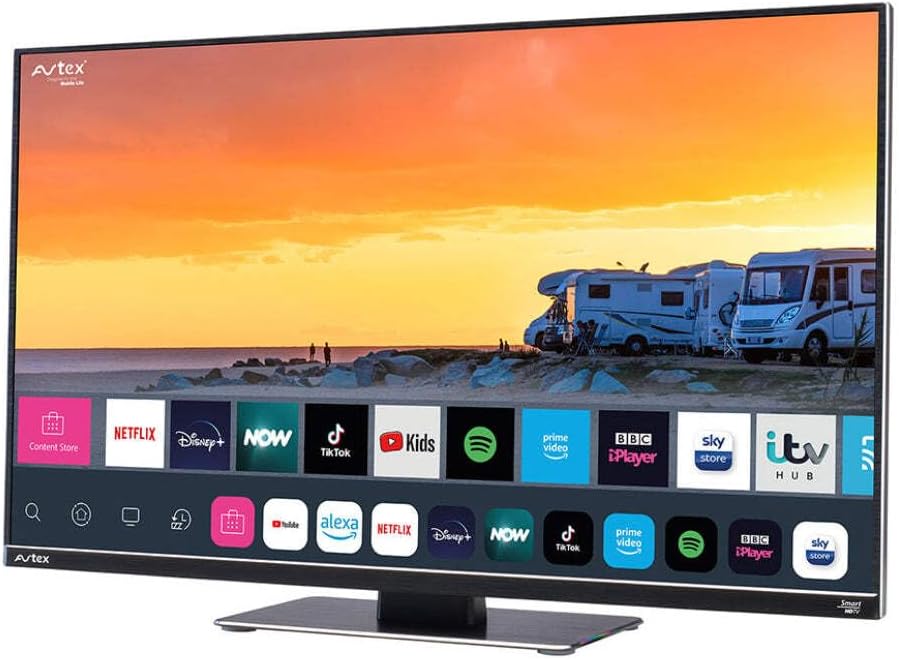
Figure 4.1: Avtex W195TS Smart TV Front View
This image shows the Avtex W195TS Smart TV from a slight angle, highlighting its slim design and the vibrant display. The screen shows a user interface with icons for popular streaming services like Netflix, Disney+, Now, TikTok, Kids, Spotify, Prime Video, BBC iPlayer, Sky Store, and ITV Hub. The background on the screen depicts a scenic view of motorhomes parked near a beach at sunset. The Avtex logo is visible on the top left and bottom left of the TV frame.
4.1. Porti un savienojumi
- HDMI porti: For connecting external devices like Blu-ray players, game consoles, or set-top boxes.
- USB porti (2): Multivides atskaņošanai no USB diskdziņiem vai USB piederumu pievienošanai.
- Antenas ieeja: For connecting a terrestrial TV antenna.
- Satelīta ieeja: For connecting a satellite dish for Freesat or other satellite services.
- Līdzstrāvas barošanas ieeja: For 12V/24V DC power connection.
- Maiņstrāvas ieeja: For 240V AC power connection via adapter.
- Ethernet ports: Vadu tīkla savienojumam.
- Audio izvade: Ārējo audiosistēmu vai austiņu pievienošanai.
5. Iestatīšana
5.1. Installing the Stand (Optional)
- Uzmanīgi novietojiet televizoru ar ekrānu uz leju uz mīkstas, tīras virsmas, lai novērstu ekrāna bojājumus.
- Novietojiet statīvu ar stiprinājuma caurumiem televizora apakšā.
- Nostipriniet statīvu, izmantojot komplektācijā iekļautās skrūves.
5.2. Strāvas pieslēgums
The Avtex W195TS supports multiple power inputs:
- 12 V/24 V līdzstrāva: Connect the supplied 12V/24V DC power cable to the DC input on the TV and to your vehicle's 12V or 24V power outlet.
- 240 V maiņstrāva: Connect the supplied 240V AC power adapter to the AC input on the TV, then plug the adapter into a standard 240V AC wall socket.
Piezīme: Do not connect both DC and AC power simultaneously.
5.3. Antenas/satelīta savienojums
- Terrestrial TV: Connect your aerial cable to the 'ANTENNA IN' port.
- Satellite TV (Freesat): Connect your satellite dish cable to the 'SATELLITE IN' port.
5.4. Sākotnējā ieslēgšana un pirmā iestatīšanas reize
- Connect the TV to power and press the power button on the remote control or TV.
- The First-Time Setup Wizard will appear. Follow the on-screen prompts to select your language, country, and time zone.
- Perform an automatic channel scan for both terrestrial and satellite channels.
- Izveidojiet savienojumu ar savu Wi-Fi tīklu, atlasot tīkla nosaukumu un ievadot paroli.
6. Darbība
6.1. Tālvadības funkcijas
Iepazīstieties ar tālvadības pults pogām, lai ērti pārvietotos pa televizoru un vadītu tā funkcijas.
- Barošanas poga: Ieslēdz/izslēdz televizoru.
- Avota poga: Selects input sources (HDMI, USB, TV, Satellite).
- Skaļums +/-: Regulē skaļuma līmeni.
- Kanāls +/-: Pārslēdz TV kanālus.
- Navigācijas pogas (augšup/lejup/pa kreisi/pa labi/labi): Izvēlnes navigācijai un atlasei.
- Viedā centra/sākuma poga: Piekļūst viedtelevizora saskarnei.
- Lietotnes pogas: Dedicated buttons for popular streaming apps (if available).
6.2. Viedtelevizora funkcijas
Your Avtex W195TS is equipped with smart TV capabilities:
- App Store: Download and install various applications for streaming, news, and entertainment.
- Straumēšanas pakalpojumi: Access pre-installed or downloaded apps like Netflix, Disney+, Prime Video, BBC iPlayer, etc. (subscription may be required).
- Web Pārlūkprogramma: Pārlūkojiet internetu tieši savā televizorā.
- Ekrāna spoguļošana: Connect your smartphone or tablet to display content on the TV screen (compatibility may vary).
6.3. Bluetooth savienojums
Pair Bluetooth devices such as headphones or external speakers for enhanced audio experience.
- Go to the TV's settings menu.
- Select 'Bluetooth' or 'Connected Devices'.
- Enable Bluetooth and put your device into pairing mode.
- Sarakstā atlasiet savu ierīci, lai savienotu pārī.
6.4. Multivides atskaņošana, izmantojot USB
Insert a USB drive into one of the USB ports to view fotoattēlus, atskaņojiet video vai klausieties mūziku.
- The TV will usually prompt you to open the media player.
- Pārvietojieties pa savu fileizmantojot tālvadības pulti.
7. Apkope
7.1. Televizora tīrīšana
- Ekrāns: Viegli noslaukiet ekrānu ar mīkstu, nepūkošu drānu. Noturīgu traipu gadījumā nedaudz noslaukietampNoslaukiet drānu ar ūdeni vai ekrānam paredzētu tīrīšanas līdzekli (nesmidziniet tieši uz ekrāna).
- Casing: Televizora tīrīšanai izmantojiet mīkstu, sausu drānu.asing. Izvairieties no abrazīviem tīrīšanas līdzekļiem vai šķīdinātājiem.
7.2. Programmatūras atjauninājumi
Periodically check for software updates to ensure your TV has the latest features and bug fixes. Updates can usually be found in the TV's settings menu under 'System' or 'Software Update'.
8. Traucējummeklēšana
If you encounter issues with your Avtex W195TS, refer to the following common problems and solutions:
| Problēma | Iespējamais cēlonis | Risinājums |
|---|---|---|
| Nav spēka | Strāvas kabelis nav pievienots; no kontaktligzdas nav strāvas. | Check power cable connection; test outlet with another device; ensure correct voltage (12 V/24 V/240 V). |
| Nav attēla, bet ir skaņa | Izvēlēts nepareizs ievades avots; bojāts kabelis. | Press the 'Source' button on the remote to select the correct input; check HDMI/antenna cables. |
| Nav skaņas, bet attēls ir | Skaļums ir izslēgts vai pārāk zems; ārējās audiosistēmas problēma. | Ieslēdziet skaņu vai palieliniet skaļumu; pārbaudiet savienojumus ar ārējām audioierīcēm. |
| Nevar izveidot savienojumu ar Wi-Fi | Nepareiza parole; problēma ar maršrutētāju; televizors atrodas pārāk tālu no maršrutētāja. | Re-enter Wi-Fi password; restart router; move TV closer to router or use an extender. |
| Tālvadības pults nedarbojas | Izlādējušās baterijas; šķērslis; problēma ar savienošanu pārī. | Nomainiet baterijas; noņemiet šķēršļus; atkārtoti savienojiet tālvadības pulti pārī, ja tā ir Bluetooth tālvadības pults. |
9. Specifikācijas
| Funkcija | Specifikācija |
|---|---|
| Zīmols | Avtex |
| Modeļa numurs | AVTEX W195TS |
| Ekrāna izmērs | 19.5 collas |
| Izšķirtspēja | 1080p (pilna HD) |
| Malu attiecība | 16:9 |
| Savienojamības tehnoloģija | Bluetooth, HDMI, Wi-Fi |
| Kopējais USB portu skaits | 2 |
| Voltage | 12 Volts, 24 Volts, 240 Volts |
| Preces svars | 2.5 kilogrami |
| Modeļa gads | 2018 |
10. Garantija un atbalsts
Your Avtex W195TS Smart TV comes with a manufacturer's warranty. Please refer to the warranty card included in your product packaging for specific terms and conditions, including warranty period and coverage details. Keep your proof of purchase for warranty claims.
For technical support, troubleshooting assistance beyond this manual, or warranty inquiries, please contact Avtex customer service through their official website or the contact information provided with your product. When contacting support, please have your model number (AVTEX W195TS) and serial number ready.


