Ievads
This manual provides instructions for the proper use and maintenance of your Alecto AK-20 Alarm Clock with Thermometer. Please read these instructions carefully before operating the device and retain them for future reference. The AK-20 is designed to display time, date, day, and indoor temperature, featuring multiple alarms, a snooze function, and radio-controlled time synchronization.
Drošības informācija
- Nepakļaujiet ierīci ekstremālām temperatūrām, tiešiem saules stariem vai augstam mitrumam.
- Izvairieties no ierīces nomešanas vai nepakļaušanas spēcīgam triecienam.
- Nemēģiniet ierīci izjaukt vai remontēt paši. Visu apkopi uzticiet kvalificētam personālam.
- Atbrīvojieties no izlietotajām baterijām atbildīgi saskaņā ar vietējiem noteikumiem.
Iepakojuma saturs
Izpakojot, pārliecinieties, vai visas preces ir klāt un labā stāvoklī:
- Alecto AK-20 Alarm Clock
- User Manual (NL/EN/DE/FR)
Produkts beidziesview
The Alecto AK-20 features a clear digital display and intuitive controls for easy operation.

1. attēls. Priekšpuse view of the Alecto AK-20 Alarm Clock, showing the large digital display with time, date, day, and temperature, along with control buttons at the bottom.

2. attēls: Leņķis view of the Alecto AK-20, highlighting the main display and the alarm ON/OFF switches on the right side.
Vadības un displeja elementi:
- Liels digitālais displejs: Shows time (AM/PM indicator), date, day of the week, and indoor temperature.
- LAIKA IESTATĪŠANAS poga: Izmanto, lai atvērtu laika iestatīšanas režīmu.
- - / + Pogas: Used to adjust values (decrease/increase).
- Modinātāja iestatīšanas poga: Izmanto, lai atvērtu modinātāja iestatīšanas režīmu.
- ALARM 1-4 ON/OFF Switches: Located on the side for individual alarm activation.
- Atlikt/gaismas poga: Located on top, activates backlight and snooze function.
- AUTO LIGHT Switch: Located on the back, controls automatic backlight.
- Poga RESET: Located on the back, for factory reset.

3. attēls. Labā puse view of the alarm clock, showing the physical ON/OFF switches for Alarm 3 and Alarm 4.

4. attēls. Aizmugure view of the alarm clock, showing the battery compartment, RESET button, and AUTO LIGHT switch.
Iestatīšana
1. Akumulatora uzstādīšana
- Atrodiet bateriju nodalījumu modinātāja aizmugurē (skatiet 4. attēlu).
- Atveriet akumulatora nodalījuma vāku.
- Ievietojiet divas AA baterijas, nodrošinot pareizu polaritāti (+ un -).
- Droši aizveriet akumulatora nodalījuma vāku.
The display will light up, and the clock will begin searching for the DCF radio signal for automatic time synchronization.
2. Initial Time and Date Synchronization (DCF)
The AK-20 is a radio-controlled clock. Upon battery installation, it will automatically attempt to synchronize with the DCF signal. This process may take several minutes. A signal icon on the display indicates successful reception.
- Place the clock near a window for better signal reception.
- Nenovietojiet to elektronisko ierīču tuvumā, kas var radīt traucējumus.
3. Manual Time and Date Setting (Optional)
If DCF synchronization is not desired or unsuccessful, you can set the time and date manually:
- Nospiediet un turiet LAIKA IESTATĪŠANA pogu, līdz sāk mirgot stundu cipari.
- Izmantojiet - or + pogas, lai pielāgotu stundu.
- Nospiediet LAIKA IESTATĪŠANA vēlreiz, lai apstiprinātu stundu un pārietu uz minūtēm.
- Atkārtojiet šo procesu minūtēm, gadam, mēnesim un dienai.
- Nospiediet LAIKA IESTATĪŠANA pēdējo reizi, lai izietu no iestatīšanas režīma.
4. Valodas izvēle
The device supports multiple languages for day display. To change the language:
- Normālā laika displeja režīmā nospiediet - pogu atkārtoti.
- The day of the week will cycle through available languages (Dutch, French, German, English, Spanish, Italian, Danish, Russian).
- Stop when your desired language is displayed.
Lietošanas instrukcijas
1. Modinātāju iestatīšana
The AK-20 allows setting up to four independent alarms.
- Nospiediet un turiet SIGNALIZĀCIJAS IESTATĪJUMI button until the alarm time (e.g., ALARM-1) starts flashing.
- Izmantojiet - or + pogas, lai pielāgotu vēlamo modinātāja stundu.
- Nospiediet SIGNALIZĀCIJAS IESTATĪJUMI vēlreiz, lai apstiprinātu stundu un pārietu uz minūtēm.
- Izmantojiet - or + pogas, lai pielāgotu vēlamās modinātāja minūtes.
- Nospiediet SIGNALIZĀCIJAS IESTATĪJUMI to confirm and move to the next alarm (ALARM-2, ALARM-3, ALARM-4).
- Repeat steps 2-4 for each alarm you wish to set.
- After setting all desired alarms, press SIGNALIZĀCIJAS IESTATĪJUMI , lai izietu no modinātāja iestatīšanas režīma.
2. Trauksmes aktivizēšana/deaktivizēšana
Each alarm has a dedicated ON/OFF switch on the side of the unit (refer to Figure 3).
- Slide the corresponding switch to ON to activate an alarm. An alarm icon will appear on the display.
- Bīdiet slēdzi uz IZSLĒGTS to deactivate an alarm. The alarm icon will disappear.
3. Atlikšanas funkcija
Kad atskan modinātājs, nospiediet SNOZE / GAISMA button on top of the clock. The alarm will temporarily stop and sound again after a few minutes (typically 5-10 minutes, depending on the model's default setting).
4. Fona apgaismojuma funkcija
The display features a backlight for visibility in low-light conditions.
- Manuāls fona apgaismojums: Īsi nospiediet pogu SNOZE / GAISMA button to activate the backlight for a few seconds.
- Automātiskais fona apgaismojums: On the back of the unit, slide the AUTOMĀTISKĀ GAISMA pārslēgties uz ON. The backlight will automatically illuminate in dark environments. Slide to IZSLĒGTS to disable this feature.
5. Temperatūras displejs
The integrated thermometer displays the indoor temperature.
- Lai pārslēgtos starp Celsija grādiem (°C) un Fārenheita grādiem (°F), nospiediet + pogu normālā laika displeja režīmā.
Apkope
- Tīriet ierīci ar mīkstu, sausu drānu. Nelietojiet abrazīvus tīrīšanas līdzekļus vai šķīdinātājus.
- Ja ierīce ilgstoši netiks izmantota, izņemiet baterijas, lai novērstu elektrolīta noplūdi.
Problēmu novēršana
| Problēma | Iespējamais cēlonis | Risinājums |
|---|---|---|
| Displejs ir tukšs vai blāvs. | Bateriju līmenis ir zems vai tās ir nepareizi ievietotas. | Nomainiet baterijas ar jaunām AA baterijām, nodrošinot pareizu polaritāti. |
| Laiks nav pareizs. | DCF signal not received or manual time not set. | Ensure the clock is in an area with good signal reception. Manually set the time if necessary. |
| Trauksmes signāls neskan. | Modinātājs nav aktivizēts vai nepareizi iestatīts. | Check the alarm ON/OFF switch on the side. Verify alarm time settings. |
| Fona apgaismojums nedarbojas. | AUTO LIGHT switch is OFF or batteries are low. | Check the AUTO LIGHT switch on the back. Replace batteries if needed. |
Ja problēma joprojām pastāv pēc šo risinājumu izmēģināšanas, lūdzu, sazinieties ar klientu atbalsta dienestu.
Specifikācijas
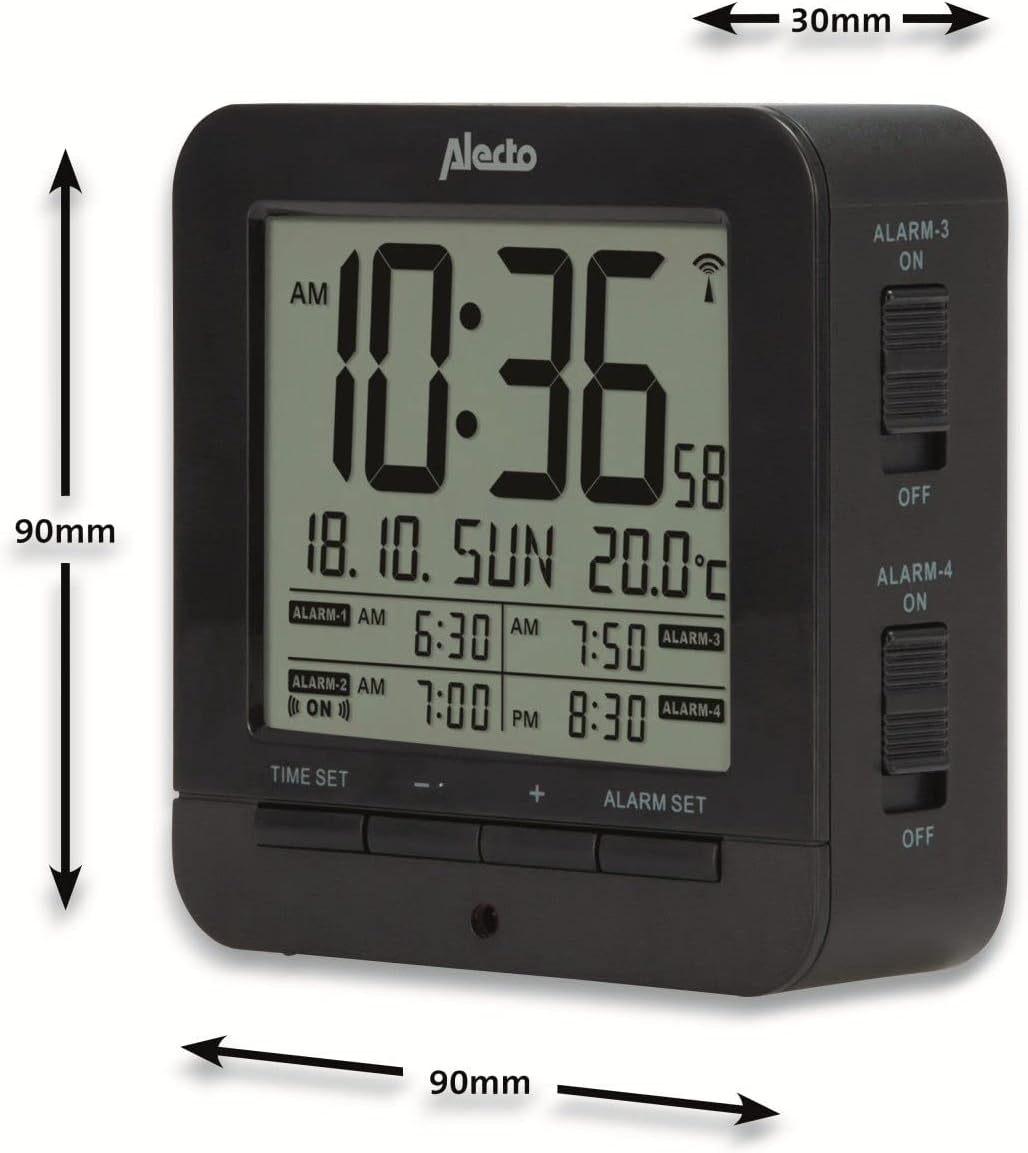
Figure 5: Alecto AK-20 Alarm Clock showing its approximate dimensions: 90mm height, 90mm width, and 30mm depth.
| Funkcija | Detaļas |
|---|---|
| Modeļa numurs | AK-20 (A003319) |
| Zīmols | Alecto |
| Krāsa | Melns |
| Materiāls | Akrilnitrila butadiēna stirols (ABS) |
| Izmēri (A x P x D) | 9 x 9 x 3 cm (aptuveni 3.54 x 3.54 x 1.18 collas) |
| Ekrāna izmēri | 6.4 x 5.4 cm (aptuveni 2.52 x 2.13 collas) |
| Svars | 231 g (aptuveni 0.51 mārciņas) |
| Barošanas avots | 2 x AA baterijas (nav iekļautas) |
| Displeja veids | Digitālais |
| Īpašas funkcijas | Temperature Display, 4 Alarms, Snooze Function, Backlight, DCF Radio Control |
| Temperatūras mērvienības | °C / °F selectable |
| Atbalstītās valodas | Dutch, French, German, English, Spanish, Italian, Danish, Russian |
Garantija un atbalsts
Alecto products are manufactured to high quality standards. For information regarding warranty terms and conditions, please refer to the documentation provided with your purchase or visit the official Alecto website. For technical support or service inquiries, please contact your retailer or the Alecto customer service department.


