1. Ievads
This manual provides essential information for the safe and efficient operation of your Powertech MB3904 8 Step Intelligent Lead Acid and Lithium Battery Charger. Please read this manual thoroughly before use and retain it for future reference.
2. Drošības informācija
Vienmēr ievērojiet šādus drošības pasākumus:
- Ensure the charger is disconnected from the power supply before making or breaking connections to the battery.
- Lietojiet lādētāju tikai labi vēdināmās telpās.
- Izvairieties no sasalušu akumulatoru uzlādes.
- Nepakļaujiet lādētāju lietus vai pārmērīga mitruma iedarbībai.
- Uzglabāt bērniem nepieejamā vietā.
- This charger is designed for 6V or 12V Lead Acid or LiFePO4 batteries only. Do not use with other battery types.
3. Iepakojuma saturs
Pārliecinieties, vai iepakojumā ir visi priekšmeti:
- Powertech MB3904 8 Step Intelligent Battery Charger Unit
- Akumulators Clamp Connectors (Red and Black)
- Ring Terminal Connectors
- Maiņstrāvas vads
- Lietotāja rokasgrāmata (šis dokuments)
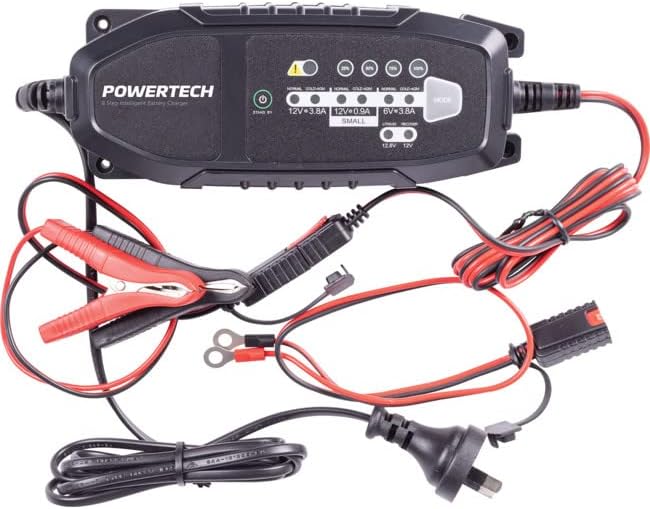
Image: The Powertech MB3904 battery charger unit shown with its various included accessories, including battery clamps, ring terminals, and the AC power cord.
4. Produkta īpašības
The Powertech MB3904 charger offers advanced features for optimal battery maintenance:
- 8-Step Charging Process: Ensures thorough and efficient charging for various battery types.
- Multi-Voltage Saderība: Suitable for both 6V and 12V lead acid and LiFePO4 batteries.
- Visaptveroša aizsardzība: Includes overload, short circuit, reverse polarity, safety timer, and wrong battery protection.
- Intuitīvi LED indikatori: Clearly display charge status and selected mode.
- Režīma izvēles poga: Allows easy switching between charging modes.
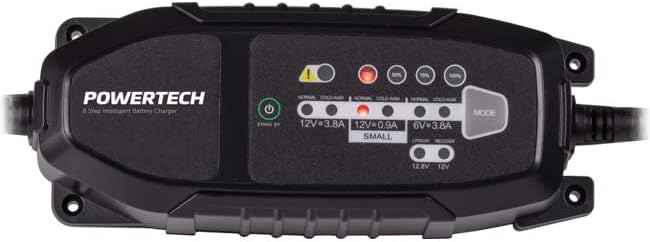
Attēls: No augšas uz leju view of the Powertech MB3904 charger, highlighting the LED indicators for charge status and the 'MODE' button for selecting charging programs.
5. Iestatīšana
- Izvietojums: Novietojiet lādētāju uz stabilas, līdzenas virsmas labi vēdināmā vietā, prom no tiešiem saules stariem vai siltuma avotiem.
- Akumulatora savienojums: Ensure the battery terminals are clean. Connect the red (+) clamp/ring terminal to the positive (+) battery terminal and the black (-) clamp/ring terminal to the negative (-) battery terminal. Ensure a secure connection.
- Strāvas pieslēgums: Plug the AC power cord into a suitable wall outlet. The charger will enter standby mode.
6. Lietošanas instrukcijas
6.1. Selecting Charging Mode
After connecting the battery and power, press the REŽĪMS button to cycle through the available charging programs. The corresponding LED will illuminate to indicate the selected mode:
- 12V 3.8A (Normal): Standard charging for 12V lead acid batteries.
- 12V 3.8A (Cold/AGM): For charging 12V lead acid batteries in cold conditions or AGM batteries.
- 12V 0.9A (Small): For charging smaller 12V lead acid batteries.
- 6 V 3.8 A: For charging 6V lead acid batteries.
- Lithium (12.8V/12V): For charging 12V LiFePO4 batteries.
- Remonts: A special mode for desulfation of deeply discharged lead acid batteries.
6.2. Uzlādes process
Once a mode is selected, the charger will automatically begin the 8-step charging process. The progress LEDs (25%, 50%, 75%, 100%) will illuminate sequentially to indicate the battery's charge level. When the 100% LED is solid, the battery is fully charged.
6.3. Lādētāja atvienošana
- Atvienojiet maiņstrāvas vadu no sienas kontaktligzdas.
- Atvienojiet melno (-) klamp/ring terminal from the negative (-) battery terminal.
- Atvienojiet sarkano (+) klamp/ring terminal from the positive (+) battery terminal.
7. Apkope
- Tīrīšana: Notīriet lādētāju casinnoslaukiet ar mīkstu, sausu drānu. Nelietojiet abrazīvus tīrīšanas līdzekļus vai šķīdinātājus.
- Uzglabāšana: Uzglabājiet lādētāju vēsā, sausā vietā, kad to neizmantojat.
- Kabeļa pārbaude: Periodically inspect the power cord and battery cables for any signs of damage. Do not use the charger if cables are damaged.
8. Traucējummeklēšana
| Problēma | Iespējamais cēlonis | Risinājums |
|---|---|---|
| Lādētājs neieslēdzas. | Nav strāvas no kontaktligzdas; vaļīgs savienojums. | Pārbaudiet strāvas kontaktligzdu; pārliecinieties, vai strāvas vads ir droši pievienots. |
| Error LED illuminated. | Reverse polarity; short circuit; wrong battery type. | Check battery connections for correct polarity; inspect cables for shorts; ensure battery type matches selected mode. |
| Akumulators netiek uzlādēts. | Battery deeply discharged/damaged; incorrect mode selected. | Try "Repair" mode for lead acid batteries; test battery with a multimeter; ensure correct charging mode is selected. |
9. Specifikācijas
- Modelis: MB3904
- Ievades apjomstage: 220-240V maiņstrāva, 50/60Hz
- Izejas apjomstage: 6 V / 12 V līdzstrāva
- Uzlādes strāva: 0.9A / 3.8A
- Akumulatoru veidi: Lead Acid (WET, MF, CA, EFB, GEL, AGM), LiFePO4
- Aizsardzība: Overload, Short Circuit, Reverse Polarity, Safety Timer, Wrong Battery
- Izmēri: Apmēram 20.4 x 7.4 x 4.8 cm
- Svars: Apmēram 534 g
- Atbilstība: CE
10. Garantija un atbalsts
This Powertech product is covered by a standard manufacturer's warranty. For specific warranty terms and conditions, please refer to the warranty card included with your purchase or contact your retailer.
For technical support or service inquiries, please contact Jaycar Electronics customer service or visit their official webvietne. Saglabājiet pirkuma apliecinājumu garantijas prasību iesniegšanai.
Jaycar elektronika Webvietne: www.jaycar.com.au


