1. Ievads
This manual provides comprehensive instructions for the OMAIC BN59-01312A Replacement Voice Remote Control. It covers setup, operation, compatibility, and troubleshooting to ensure optimal performance with your compatible Samsung television.
2. Produkts beidziesview
The OMAIC BN59-01312A remote control is designed as a direct replacement for various Samsung Smart TV remotes, offering voice control functionality and quick access buttons for popular streaming services. It features a durable design tested for extensive use.

Figure 1: OMAIC Replacement Voice Remote Control with highlighted shortcut buttons.

2. attēls: Saderībaview of the remote with different Samsung Smart TV types.
3. Iestatīšana un savienošana pārī
To use your OMAIC Replacement Voice Remote Control, it must first be paired with your Samsung TV. Follow these steps:
- Pārliecinieties, vai televizors ir ieslēgts.
- Point the new remote control towards your Samsung TV.
- Nospiediet un turiet Atpakaļ/Iziet pogu un Atskaņot/Pauzēt button simultaneously for 5-8 seconds.
- A "Pairing complete" message should appear on your TV screen, indicating successful pairing.
- If pairing fails, repeat the steps. It may be helpful to turn the TV off and then on again before re-attempting the pairing process.

Figure 3: Visual guide for pairing the remote control with a Samsung Smart TV.
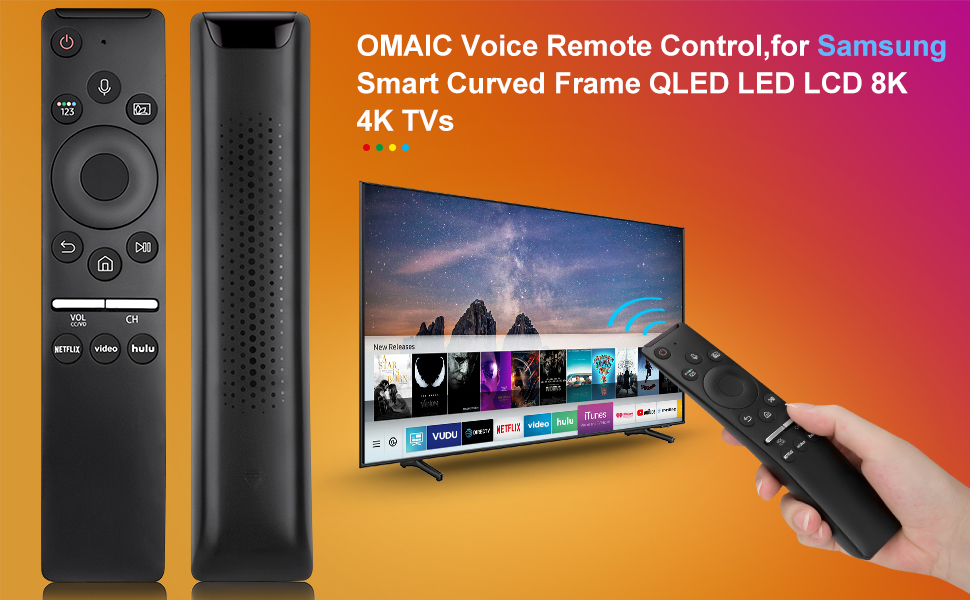
Figure 4: Detailed steps for connecting your Smart TV remote.
4. Lietošanas instrukcijas
The remote control offers intuitive navigation and quick access to various functions:
- Balss vadība: Press the microphone button and speak your commands to interact with your Smart TV.
- Īsinājumtaustiņi: Dedicated buttons for Netflix, Prime Video, and Hulu provide instant access to these streaming applications.
- Volume and Channel: Use the dedicated volume (VOL) and channel (CH) buttons to adjust audio levels and navigate channels.
- Navigācijas bloks: The circular navigation pad allows for easy menu navigation and selection.
- Full-Angle Control: The remote is tested to control your TV from any angle within 40 feet.

Figure 5: Key features including voice search and streaming service shortcuts.

Figure 6: Demonstrating voice control functionality to open applications.
5. Akumulatora uzstādīšana
The remote control requires 2 AA batteries for operation. These batteries are typically included with your purchase.
- Slide open the battery cover located on the back of the remote control.
- Ievietojiet divas AA baterijas, nodrošinot pareizu polaritāti (+ un -).
- Bīdiet atpakaļ akumulatora vāciņu vietā, līdz tas droši noklikšķ.
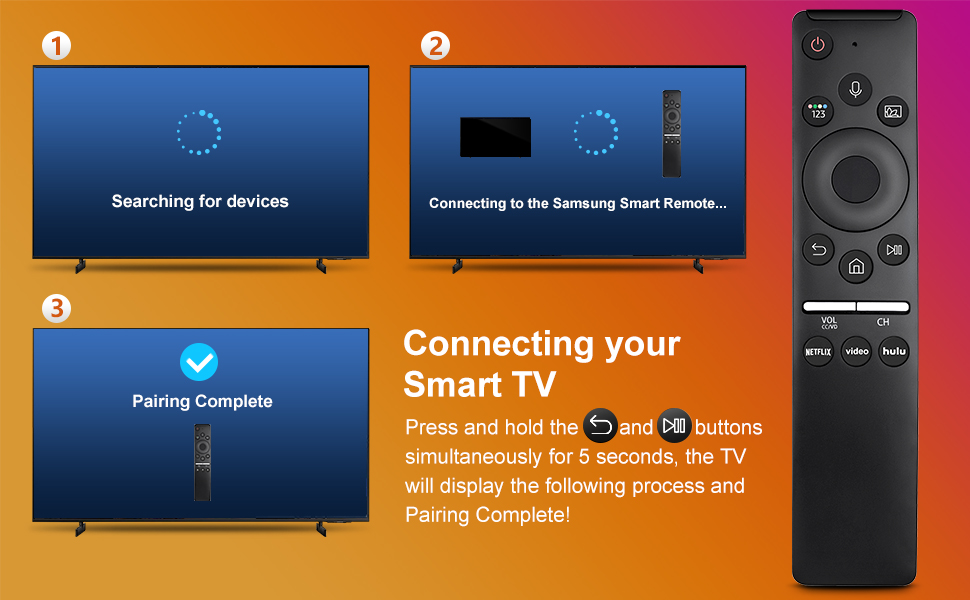
Figure 7: Battery installation and other key features.
6. Saderība
This remote control is compatible with a wide range of Samsung TV models and original remote control models. Refer to the lists below for specific compatibility:
Compatible Samsung TV Remote Control Models:
- BN59-01312A, BN59-01312F, BN59-01312D, BN59-01312E, BN59-01312G, BN59-01312K, BN59-01312L, BN59-01312M, BN59-01312X, BN59-01312U, BN59-01312T
- BN59-01329A, BN59-01329C, BN59-01329F
- BN59-01330A, BN59-01330C, BN59-01330H, BN59-01330N, BN59-01330Q, BN59-01330M, BN59-01330H, BN59-01312Q
Saderīgie Samsung televizoru modeļi:
- QN75Q60RAFX, QN43Q60RAFX, QN49Q60RAFX, QN49Q70RAFX, QN55Q60RAFX, QN55Q70RAFX, QN55Q80RAFX, QN65Q60RAFX, QN65Q70RAFX, QN65Q80RAFX, QN65Q90RAFX, QN75Q70RAFX, QN75Q80RAFX, QN75Q90RAFX, QN82Q60RAFX, QN82Q70RAFX, QN82Q80RAFX, QN82Q90RAFX
- QN55Q900RBFX, QN65Q900RBFX, QN75Q900RBFX, QN82Q900RBFX, QN85Q900RBFX, QN98Q900RBFX
7. Traucējummeklēšana
- Tālvadības pults nereaģē: Pārbaudiet, vai baterijas ir pareizi ievietotas un vai tām ir pietiekams uzlādes līmenis. Nomainiet baterijas, ja nepieciešams.
- Pārī savienošanas problēmas: If the remote does not pair, ensure no other remotes are actively paired with the TV. Turn the TV off and on, then re-attempt the pairing process as described in Section 3.
- Balss vadība nedarbojas: Ensure the remote is properly paired. Some TV models may require specific settings to enable voice control. Consult your TV's user manual for details.
- Ierobežots diapazons: Ensure there are no obstructions between the remote and the TV. The remote is designed for optimal performance within 40 feet.
8. Specifikācijas
| Funkcija | Detaļas |
|---|---|
| Produkta izmēri | 6.35 x 1.42 x 0.66 collas |
| Preces svars | 1.76 unces |
| Preces modeļa numurs | BN59-01312A |
| Baterijas | Nepieciešamas 2 AA baterijas (iekļautas komplektā) |
| Īpaša iezīme | Balss meklēšana |
| Maksimālais atbalstīto ierīču skaits | 18 |
| Saderīgas ierīces | Televīzija |

Figure 8: Physical dimensions of the OMAIC Replacement Voice Remote Control.
9. Garantija un atbalsts
OMAIC provides 100 days of after-sales support for this product. If you have any questions or encounter issues, please contact us. We aim to reply within 12 hours and are committed to assisting you.


