1. Produkts beidziesview
The Point Wired Mini Keyboard Pt-350 is a compact and versatile keyboard designed for both gaming and general typing. It features a high-quality build and a modern design, adhering to industry standards for reliable performance. This keyboard is an ideal choice for users seeking a durable and efficient input device.
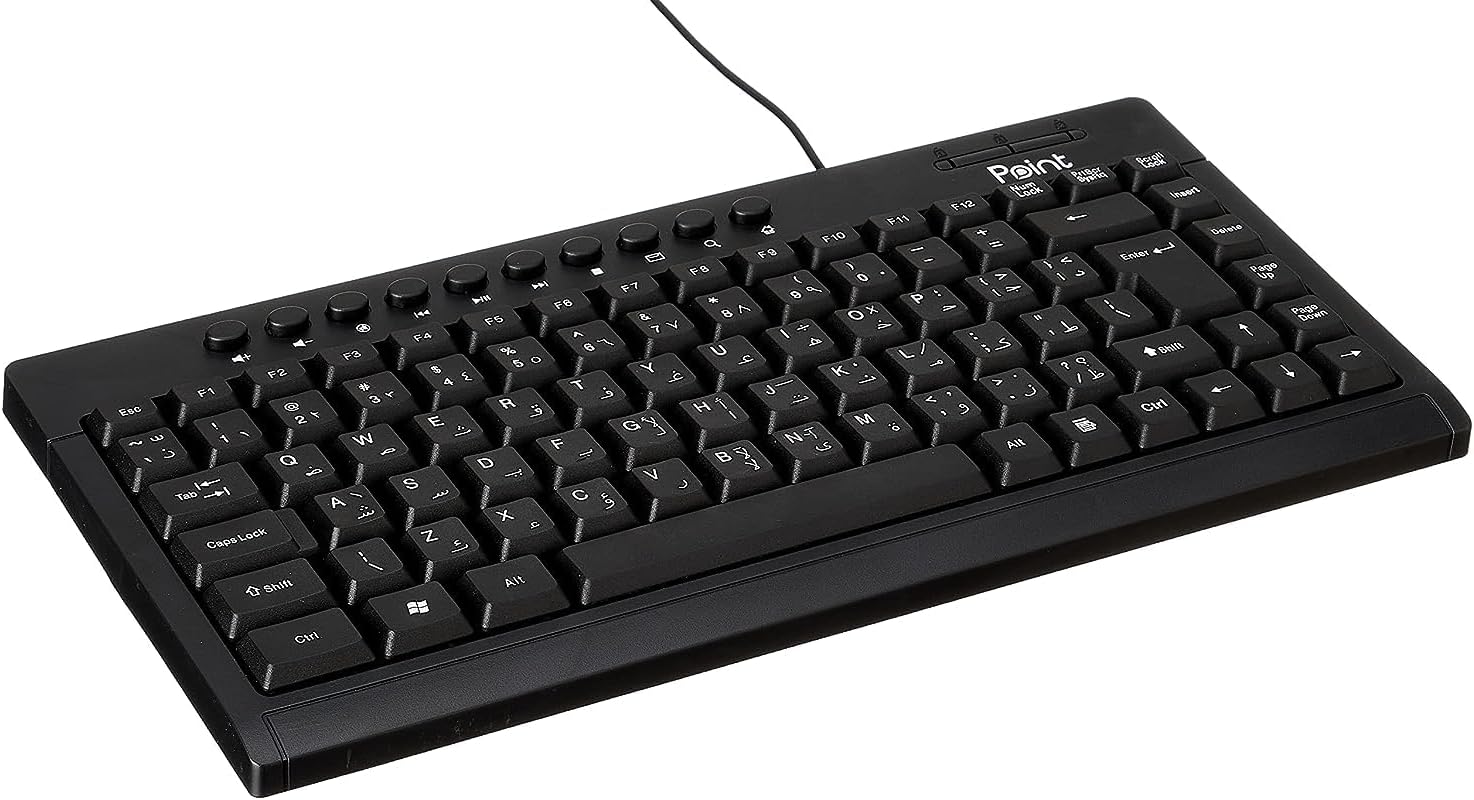
1.1. attēls: Leņķis view of the Point Wired Mini Keyboard Pt-350, showcasing tā kompakto dizainu un taustiņu izkārtojumu.
Galvenās funkcijas:
- Wired connectivity for stable performance.
- Compact design suitable for various setups.
- Durable construction from high-quality plastic materials.
- Designed for both gaming and typing applications.
2. Iepakojuma saturs
Lūdzu, rūpīgi pārbaudiet iepakojumu, lai pārliecinātos, ka visas sastāvdaļas ir klāt:
- Point Wired Mini Keyboard Pt-350
- Lietotāja rokasgrāmata (šis dokuments)
3. Iestatīšana
Follow these steps to set up your Point Wired Mini Keyboard Pt-350:
- Izpakojiet tastatūru: Uzmanīgi izņemiet tastatūru no iepakojuma.
- Identificējiet USB savienotāju: The keyboard comes with an integrated USB cable.
- Izveidojiet savienojumu ar datoru: Locate an available USB port on your computer (desktop PC, laptop, etc.). Insert the keyboard's USB connector firmly into the USB port.
- Draivera instalēšana (Plug & Play): The keyboard is plug-and-play compatible. Your operating system (Windows, macOS, Linux) should automatically detect and install the necessary drivers. This process usually takes a few seconds.
- Pārbaudiet funkcionalitāti: Once connected, open a text editor or any application that accepts text input and test the keys to ensure proper operation.

3.1. attēls: No augšas uz leju view of the keyboard, illustrating the key layout and integrated cable for connection.
4. Lietošanas instrukcijas
The Point Wired Mini Keyboard Pt-350 operates like a standard computer keyboard. Below are general instructions and tips for use:
Pamata rakstīšana:
- Simply press the desired keys to input characters, numbers, and symbols into your active application.
- Izmantojiet Shift key for uppercase letters and alternative symbols on keys.
- The Caps Lock key toggles permanent uppercase typing.
- The Backspace key deletes characters to the left of the cursor.
- The Ievadiet key confirms input or moves to the next line.
Funkciju taustiņi (F1–F12):
The function keys (F1 through F12) perform various tasks depending on the active program or operating system. Some common uses include:
- F1: Often opens help for the active program.
- F2: Renames a selected item.
- F5: Atsvaidzina a web page or document.
- F11: Toggles full-screen mode in many browsers.
Multivides atslēgas:
The keyboard may include dedicated multimedia keys or secondary functions on the F-keys (accessed via the Fn key, if present). These typically control:
- Volume control (Mute, Volume Up, Volume Down)
- Media playback (Play/Pause, Stop, Previous Track, Next Track)
5. Apkope
Pareiza apkope nodrošina tastatūras ilgmūžību un optimālu veiktspēju:
- Tīrīšana: Regularly clean the keyboard to prevent dust and debris buildup. Use a soft, lint-free cloth slightly dampnoskalot ar ūdeni vai maigu tīrīšanas šķīdumu. Izvairieties no spēcīgām ķīmiskām vielām vai abrazīviem materiāliem.
- Putekļu noņemšana: Use compressed air to blow out dust and crumbs from between the keys.
- Izvairieties no noplūdēm: Keep liquids away from the keyboard to prevent damage to internal components. In case of a spill, immediately disconnect the keyboard and allow it to dry completely before reconnecting.
- Uzglabāšana: Kad tastatūra netiek lietota, uzglabājiet to tīrā, sausā vietā, prom no ekstremālām temperatūrām.
6. Traucējummeklēšana
If you encounter issues with your Point Wired Mini Keyboard Pt-350, refer to the following common problems and solutions:
Tastatūra nereaģē:
- Pārbaudiet USB savienojumu: Pārliecinieties, vai USB kabelis ir droši pievienots darbojošam datora USB portam. Izmēģiniet citu USB portu.
- Restartējiet datoru: Vienkārša restartēšana bieži vien var atrisināt savienojamības problēmas.
- Pārbaude citā datorā: Connect the keyboard to another computer to determine if the issue is with the keyboard or your computer's setup.
- Pārbaudiet ierīču pārvaldnieku (Windows): In Windows, go to Device Manager and check if the keyboard is listed under 'Keyboards' and if there are any error symbols. You might need to update or reinstall the driver.
Taustiņi nedarbojas vai ir lipīgi:
- Tīras atslēgas: Dust, crumbs, or liquid residue can cause keys to stick or malfunction. Refer to the Maintenance section for cleaning instructions.
- Fiziski bojājumi: Inspect the keys for any visible physical damage.
Nepareiza rakstzīmju izvade:
- Check Language Settings: Ensure your operating system's keyboard language settings match the physical layout of your keyboard.
- Draivera problēma: Reinstalling the keyboard driver might resolve this.
Ja pēc šo darbību veikšanas problēma joprojām pastāv, lūdzu, sazinieties ar klientu atbalsta dienestu.
7. Specifikācijas
Technical specifications for the Point Wired Mini Keyboard Pt-350:

7.1. attēls: sāni view of the keyboard, highlighting its profile and compact form factor.
| Funkcija | Detaļas |
|---|---|
| Zīmola nosaukums | Punkts |
| Modelis | Pt-350 |
| Savienojamības tehnoloģija | Vadu |
| Saderīgas ierīces | Dators |
| Tastatūras apraksts | Daudzfunkcionāls |
| Ieteicamie lietojumi | PC spēles |
| Īpašas funkcijas | Spēles |
| Krāsa | Melns |
| Stils | Mūsdienīgs |
| Materiāls | Plastmasa |
| Piegādes izmēri | 34.5 x 26.4 x 3 cm |
| Svars | 800 grami |
| Pirmais pieejamais datums | 4. gada 2022. septembris |
| ASIN | B0BD2DM9ZJ |
8. Garantija un atbalsts
This product is covered by a standard manufacturer's warranty. Please refer to the warranty card included with your purchase for specific terms and conditions, including the warranty period and coverage details.
For technical support, troubleshooting assistance, or warranty claims, please contact Point customer service through the contact information provided on the product packaging or the official Point website. When contacting support, please have your product model (Pt-350) and purchase details ready.


