1. Ievads
Thank you for choosing the Gembird USB-C Gigabit Network Adapter with 3-Port USB 3.1 Hub. This device is designed to expand the connectivity of your USB-C enabled laptop, tablet, or computer, providing both high-speed Gigabit Ethernet and additional USB 3.1 ports. This manual provides essential information for setting up, operating, and maintaining your device.
2. Produkta īpašības
- USB-C savienojums: Connects to your host device via a reversible USB-C port.
- Gigabitu Ethernet ports: Provides a stable and fast wired network connection up to 1000 Mbps.
- 3-Port USB 3.1 Hub: Adds three USB 3.1 ports for connecting peripherals such as external hard drives, flash drives, keyboards, and mice.
- Ātrgaitas datu pārsūtīšana: USB 3.1 ports support data transfer rates up to 5 Gbps.
- Plug and Play: No driver installation required for most modern operating systems.
3. Iepakojuma saturs
Please ensure the following items are included in your package:
- Gembird USB-C Gigabit Network Adapter with 3-Port USB 3.1 Hub (Model A-CMU3-LAN-01)
4. Produkts beidziesview
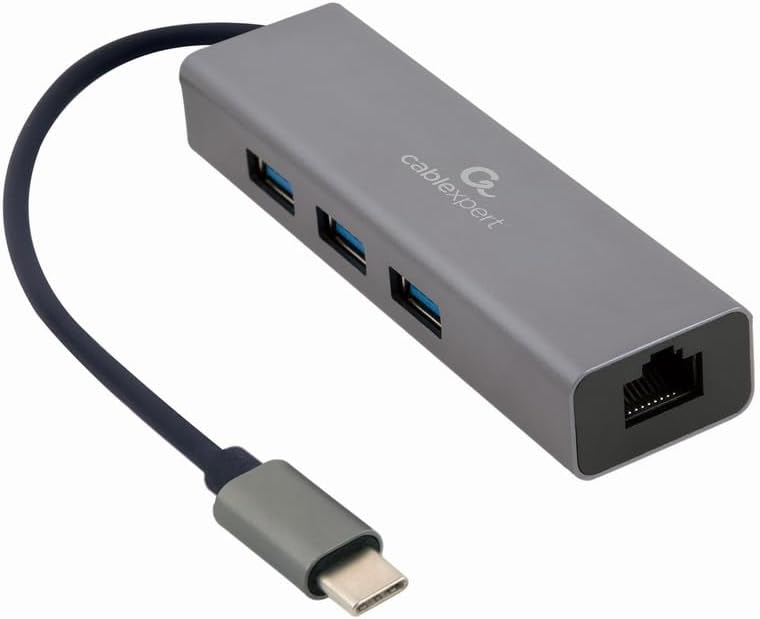
1. attēls: Priekšpuse view of the Gembird USB-C Gigabit Network Adapter, showing the USB-C cable, three USB 3.1 ports, and the RJ45 Gigabit Ethernet port.

2. attēls: Retail packaging for the Gembird USB-C Gigabit Network Adapter, highlighting key features like USB Type-C, USB 3.1 x 3, RJ45, Gigabit, 1000 Mbps, and Plug & Play.
5. Iestatīšana
Follow these steps to set up your Gembird USB-C Gigabit Network Adapter:
- Savienojuma izveide ar resursdatora ierīci: Plug the USB-C connector of the adapter into an available USB-C port on your laptop, tablet, or computer.
- Savienojuma izveide ar tīklu: Insert an Ethernet cable (RJ45) from your router or modem into the Gigabit Ethernet port on the adapter.
- Pievienojiet USB perifērijas ierīces: Plug your USB devices (e.g., flash drives, external hard drives, mouse, keyboard) into the three available USB 3.1 ports on the adapter.
- Draivera instalēšana: The adapter is typically plug-and-play. Your operating system (Windows, macOS, Linux, Chrome OS) should automatically detect and install the necessary drivers. If prompted, allow the system to install drivers.
6. Lietošanas instrukcijas
Kad adapteris ir pievienots, tas darbojas automātiski:
- Piekļuve tīklam: Your host device should now have a wired network connection. You can verify this in your operating system's network settings.
- USB Device Access: Connected USB peripherals will be recognized by your host device and function as if directly connected.
7. Traucējummeklēšana
Ja rodas problēmas, skatiet tālāk norādītās bieži sastopamās problēmas un risinājumus.
- Nav tīkla savienojuma:
- Pārliecinieties, vai Ethernet kabelis ir droši pievienots gan adapterim, gan maršrutētājam/modemam.
- Check your router/modem for proper operation.
- Pārbaudiet tīkla iestatījumus savā resursdatora ierīcē.
- Try connecting the adapter to a different USB-C port on your host device.
- Neatpazītas USB ierīces:
- Ensure USB devices are properly plugged into the adapter's USB 3.1 ports.
- Try connecting the USB device directly to your host computer to confirm it is functional.
- Some high-power USB devices may require an external power source if your host device's USB-C port does not provide sufficient power (this adapter does not have a dedicated power input).
- Lēns tīkla ātrums:
- Ensure your Ethernet cable is rated for Gigabit speeds (Cat5e or higher).
- Verify your internet service provider's speed and your router's capabilities.
- Ensure your host device's USB-C port supports USB 3.0/3.1 speeds.
8. Specifikācijas
| Modeļa numurs | A-CMU3-LAN-01 |
| Aparatūras saskarne | USB-C (Host), USB 3.1 (Hub), RJ45 (Ethernet) |
| Kopējais USB portu skaits | 3 (USB 3.1) |
| Ethernet porti | 1 (Gigabit RJ45) |
| Data Transfer Rate (USB) | Līdz 5 Gb/s (USB 3.1) |
| Datu pārsūtīšanas ātrums (Ethernet) | 10/100/1000 Mb/s |
| Produkta izmēri | 10 x 2 x 2.7 collas |
| Preces svars | 2.46 unces |
9. Apkope
Lai nodrošinātu adaptera ilgmūžību un optimālu veiktspēju:
- Tīrīšana: Ierīces ārpuses tīrīšanai izmantojiet mīkstu, sausu drānu. Izvairieties no šķidriem tīrīšanas līdzekļiem vai šķīdinātājiem.
- Uzglabāšana: Nelietošanas laikā glabājiet adapteri vēsā, sausā vietā, pasargājot to no tiešiem saules stariem un ekstremālām temperatūrām.
- Apstrāde: Avoid dropping or subjecting the device to strong impacts. Do not attempt to disassemble the adapter.
10. Garantija un atbalsts
This Gembird product comes with a divu gadu garantija pret rūpnīcas defektiemLūdzu, saglabājiet pirkuma apliecinājumu garantijas prasību iesniegšanai.
For technical support or warranty inquiries, please contact your retailer or visit the official Gembird webvietne kontaktinformācijai.