1. Ievads
Thank you for choosing the Nexxt Indoor Smart Camera. This manual provides essential information for the safe and efficient use of your new device. Please read it thoroughly before installation and operation, and retain it for future reference.
This 1080p HD fixed room camera is designed to provide reliable indoor surveillance with features such as night vision, two-way audio communication, motion detection, and seamless integration with smart home ecosystems like Amazon Alexa and Google Assistant.
2. Drošības informācija
- Ensure the camera is powered by the provided power adapter. Using unauthorized adapters may damage the device and void the warranty.
- Do not expose the camera to water, moisture, or extreme temperatures. It is designed for indoor use only.
- Nenovietojiet kameru tiešos saules staros vai siltuma avotu tuvumā.
- Nemēģiniet pats izjaukt vai remontēt kameru. Visus apkopes darbus uzticiet kvalificētam personālam.
- Sargājiet kameru un tās piederumus bērniem un mājdzīvniekiem nepieejamā vietā.
- Ensure stable Wi-Fi connectivity for optimal performance.
3. Iepakojuma saturs
Pārliecinieties, vai iepakojumā ir visi priekšmeti:
- NEXXT Indoor Smart Camera (NHC-I710)
- Strāvas adapteris
- Stāvēt
- Lietotāja rokasgrāmata (šis dokuments)

Image: The retail packaging of the NEXXT Indoor Smart Camera, showing the camera and key features.
4. Produkts beidziesview
The Nexxt Indoor Smart Camera offers a range of features for comprehensive home monitoring:
- Full HD 1080p izšķirtspēja: Nodrošina skaidru un detalizētu video footage.
- Automātiska nakts redzamība: Integrated infrared LEDs enable clear monitoring in low-light conditions up to 30 feet.
- Divvirzienu komunikācija: Built-in microphone and speaker allow for real-time audio interaction.
- Kustības noteikšana: Brīdina par kameras darbības laukā konstatētu kustību view.
- Vietējā un mākoņkrātuve: Supports microSD cards (sold separately) and Microsoft Azure cloud storage (subscription sold separately) for recording.
- Viedās mājas integrācija: Compatible with Amazon Alexa and Google Assistant for voice control and integration into smart routines.
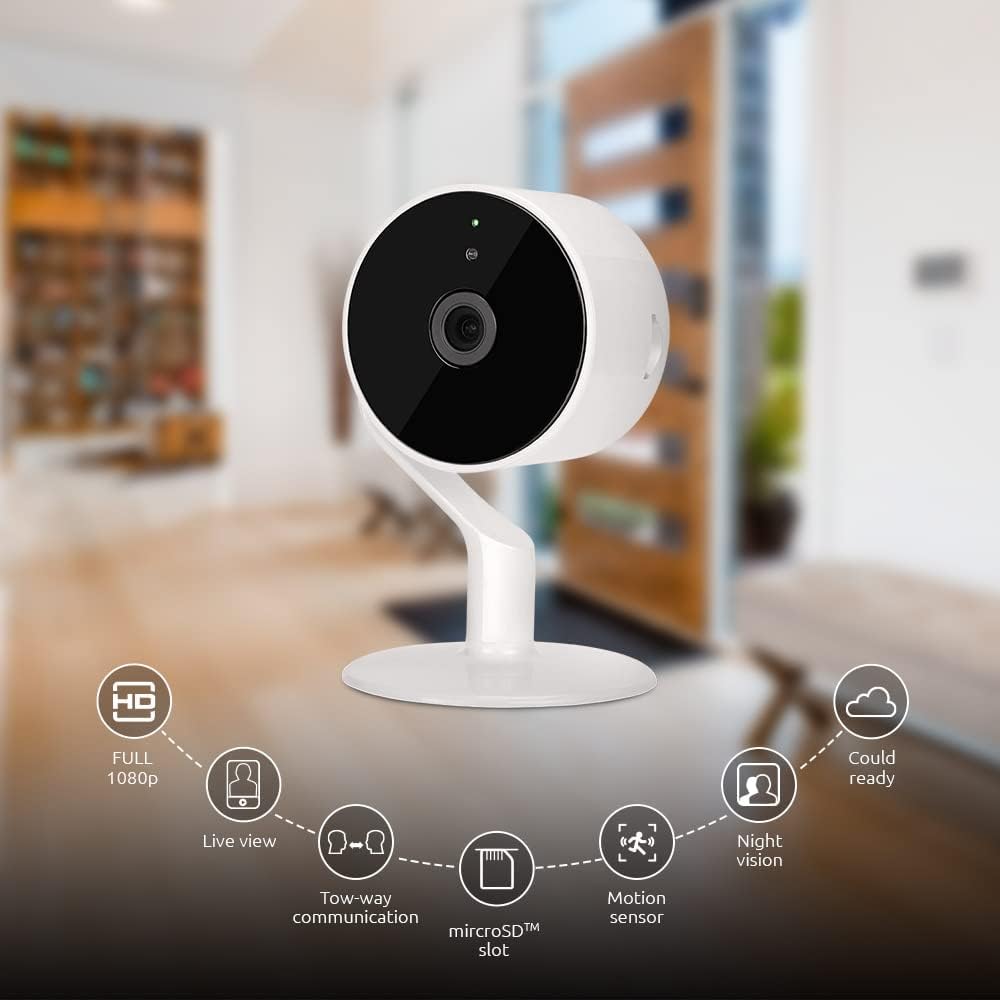
Image: The NEXXT Indoor Smart Camera highlighting its key features: Full HD 1080p, Live View, Two-way communication, microSD slot, Motion sensor, Night vision, and Cloud ready.
5. Iestatīšana
5.1. Ieslēgšanās
- Place the camera on a stable, flat surface or mount it using appropriate hardware (not included).
- Pievienojiet strāvas adapteri kameras barošanas ieejas portam.
- Plug the power adapter into a standard electrical outlet. The camera will power on and its indicator light will begin to flash, indicating it's ready for pairing.
5.2 Lietotnes instalēšana un savienošana pārī
To control and monitor your camera, you need to download the Nexxt Home App:
- Lejupielādēt Nākamā mājas lietotne no Google Play veikals (for Android devices) or the Apple App Store (for iOS devices).
- Open the Nexxt Home App and create a new account or log in if you already have one.
- Pieskarieties ikonai “+” vai “Pievienot ierīci”, lai sāktu savienošanas pārī procesu.
- Select "Camera" or the specific camera model from the list of devices.
- Follow the on-screen instructions in the app to connect the camera to your home Wi-Fi network. This typically involves scanning a QR code displayed on your phone with the camera.
- Once connected, the camera's indicator light will turn solid, and you will see the camera added to your app.

Image: Illustration showing the NEXXT Indoor Smart Camera being set up to function as a webcam, connecting to a laptop.
6. Lietošanas instrukcijas
6.1. Tiešraide View
From the Nexxt Home App, tap on your camera's name to access the live video feed. You can view reāllaika footagjūsu uzraugāmās teritorijas e.

Image: The NEXXT Indoor Smart Camera on a desk, with text indicating "Full HD resolution" and its ability to provide 1080p high-quality video day or night.
6.2 Divvirzienu saruna
Tiešraides laikā view, tap the microphone icon in the app to enable two-way audio. You can speak through your phone, and your voice will be projected through the camera's speaker. Tap the icon again to end communication.

Image: An illustration depicting communication between a person using a phone and another person near the camera, symbolizing the two-way talk feature.
6.3 Nakts redzamība
The camera automatically switches to night vision mode in low-light conditions. You can also manually toggle night vision on/off within the app settings for the camera.

Image: A split image showing a room in daylight on one side and the same room in night vision on the other, demonstrating the camera's night vision capability.

Image: A smartphone screen displaying the Nexxt Home app interface with a night vision toggle switch, overlaid on a room scene, indicating active night vision monitoring.
6.4 Kustību noteikšana un brīdinājumi
Configure motion detection sensitivity and alert preferences in the app. When motion is detected, you will receive notifications on your smartphone.

Image: A person sleeping in bed with a motion detection icon overlaid, indicating advanced motion detection with an effective range of up to 30 feet.

Image: A woman holding a smartphone displaying the Nexxt Home app, with text indicating that advanced human identification technology helps reduce false alarms and unwanted notifications.
6.5 Recording & Storage
The camera supports local storage via a microSD card (up to 128GB, not included) and cloud storage via Microsoft Azure (subscription required, sold separately). Insert the microSD card into the designated slot on the camera. Manage recording settings and view ierakstīts footage through the Nexxt Home App.
6.6 Piekļuves koplietošana
You can securely share your camera's security feed with multiple approved devices, allowing family members or trusted individuals to also monitor your home.

Image: Two smartphones displaying the Nexxt Home app, with text stating "Everyone Can Keep Watch" and explaining that the security feed can be securely shared with multiple approved devices.
6.7 Viedās mājas integrācija
The Nexxt Indoor Smart Camera is compatible with Amazon Alexa and Google Assistant. Follow the instructions in your Alexa or Google Home app to link your Nexxt Home account and enable voice commands for your camera.
7. Apkope
- Tīrīšana: Kameras objektīva un korpusa tīrīšanai izmantojiet mīkstu, sausu drānu. Nelietojiet šķidrus tīrīšanas līdzekļus vai aerosolus.
- Uzglabāšana: Ja kamera tiek ilgstoši uzglabāta, atvienojiet to no strāvas un uzglabājiet vēsā, sausā vietā.
- Programmaparatūras atjauninājumi: Regularly check the Nexxt Home App for available firmware updates to ensure optimal performance and security.
8. Traucējummeklēšana
- Kamera neizveido savienojumu ar Wi-Fi:
- Pārliecinieties, vai jūsu Wi-Fi tīkls ir 2.4 GHz. Kamera neatbalsta 5 GHz Wi-Fi.
- Pārbaudiet savas Wi-Fi paroles pareizību.
- Pārvietojiet kameru tuvāk Wi-Fi maršrutētājam.
- Restartējiet maršrutētāju un kameru.
- Nav tiešraides view or choppy video:
- Pārbaudiet sava interneta savienojuma ātrumu.
- Ensure the camera has a strong Wi-Fi signal.
- Close and reopen the Nexxt Home App.
- Kustību brīdinājumi nav saņemti:
- Verify that motion detection is enabled in the app settings.
- Check your phone's notification settings for the Nexxt Home App.
- Pielāgojiet kustības noteikšanas jutību.
- Divvirzienu audio nedarbojas:
- Ensure your phone's microphone is enabled for the Nexxt Home App.
- Pārbaudiet skaļuma iestatījumus savā tālrunī un lietotnē.
9. Specifikācijas
| Funkcija | Specifikācija |
|---|---|
| Modeļa nosaukums | NHC-I710 |
| Video uzņemšanas izšķirtspēja | 1080p HD |
| Lietošana iekštelpās/ārā | Iekštelpās |
| Savienojamības tehnoloģija | Bezvadu (Wi-Fi) |
| Savienojamības protokols | Wi-Fi (2.4 GHz) |
| Barošanas avots | Elektrība ar vadu |
| Nakts redzamības diapazons | 30 pēdas |
| Kontrollera tips | Amazon Alexa, Google palīgs |
| Montāžas veids | Galda virsmas stiprinājums |
| Vienuma izmēri (G x P x A) | 3 x 7 x 3 collas |
| Preces svars | 6.7 unces (0.19 kilogrami) |
| UPC | 798302056152 |
| Starptautiskās aizsardzības novērtējums | IP65 |
10. Garantija un atbalsts
The Nexxt Indoor Smart Camera comes with a 2 gada garantija no iegādes datuma. Lūdzu, saglabājiet pirkuma apliecinājumu garantijas prasību iesniegšanai.
For technical support, troubleshooting assistance, or warranty inquiries, please visit the official Nexxt Solutions website or contact their customer support through the Nexxt Home App.
Nākamie risinājumi Webvietne: www.nexxtsolutions.com


