1. Ievads
This manual provides detailed instructions for the amazon basics Wired Gaming Mouse, Model ABIM03. This mouse is designed to enhance your gaming and computing experience with its adjustable DPI, customizable RGB lighting, and programmable buttons. Please read this manual thoroughly before use to ensure proper operation and longevity of your device.
2. Produkta īpašības
- Regulējams DPI: Up to 6400 DPI for precise cursor control and quick movements.
- Pielāgojams RGB apgaismojums: Personalize your mouse with various RGB lighting modes and driver customization options for PC.
- Programmējamās pogas: Equipped with multiple programmable buttons for assigning custom functions or macros.
- Gaming-Grade Sensor: Ensures accurate tracking and rapid response for gaming.
- Izturīgs dizains: Features extra durable switches and enhanced build quality for extended use.
- Honeycomb Grip: Ergonomic honeycomb design provides a comfortable and secure grip.

Image: The amazon basics Wired Gaming Mouse highlighting its adjustable DPI settings, ranging from 1200 to 7200 (though product states up to 6400).
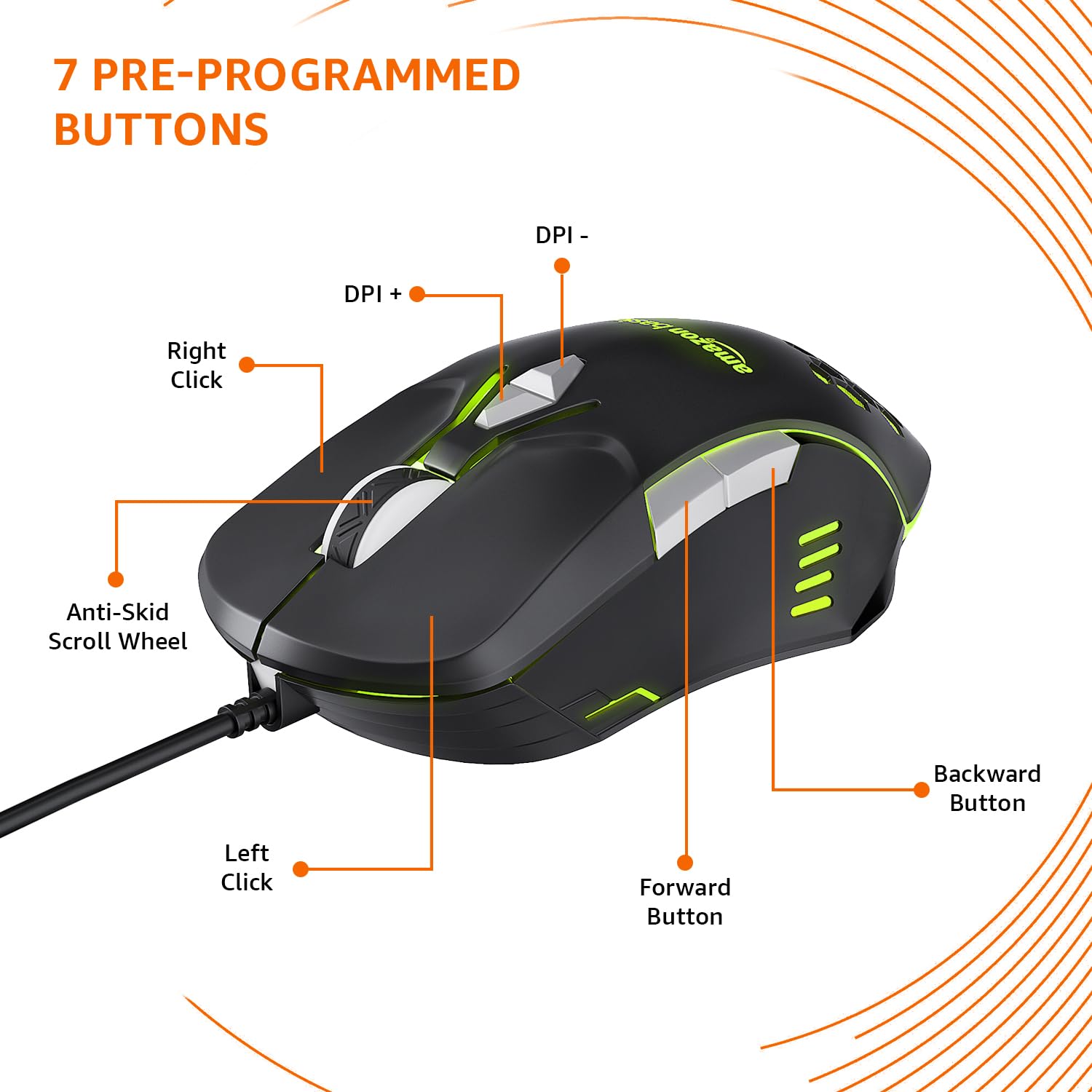
Image: The amazon basics Wired Gaming Mouse showing its 7 pre-programmed buttons, including Left Click, Right Click, Anti-Skid Scroll Wheel, DPI+, DPI-, Forward Button, and Backward Button.

Attēls: No augšas uz leju view of the amazon basics Wired Gaming Mouse, emphasizing its honeycomb-designed surface for improved grip and airflow.

Image: The amazon basics Wired Gaming Mouse illuminated with red RGB lighting, showcasing its light and comfortable design.
3. Iestatīšanas instrukcijas
- Izpakojiet peli: Uzmanīgi izņemiet spēļu peli no iepakojuma.
- Savienojuma izveide ar datoru: Pievienojiet peles USB savienotāju datora pieejamajam USB portam.
- Draivera instalēšana: Your operating system (Windows, Linux) should automatically detect and install the necessary drivers. If prompted, follow the on-screen instructions. For advanced customization of RGB and programmable keys, refer to the manufacturer's website for specific driver software.
- Izvietojums: Place the mouse on a flat, clean surface or a mouse pad for optimal performance.
4. Lietošanas instrukcijas
4.1. Pamata funkcionalitāte
- Kreisais klikšķis: Primārā darbība, atlase.
- Ar peles labo pogu noklikšķiniet: Sekundārā darbība, konteksta izvēlnes.
- Ritināšanas ritenis: Scroll up/down pages. Pressing the scroll wheel often acts as a middle click.
- Pogas uz priekšu/atpakaļ: Parasti izmanto navigācijai web pārlūkprogrammas vai file pētnieki.
4.2 DPI (punkti collā) regulēšana
The mouse features dedicated DPI adjustment buttons (DPI+ and DPI-) to change cursor sensitivity on the fly. Press these buttons to cycle through different DPI levels up to 6400. A higher DPI setting results in faster cursor movement across the screen with less physical mouse movement.
4.3 Customizing RGB Lighting
The mouse includes customizable RGB lighting. Specific lighting modes can often be cycled through using a dedicated button (if present) or through the optional driver software. Refer to the driver software for advanced customization options, including color selection, effects, and brightness.
4.4 Programmēšanas pogas
The mouse is equipped with programmable buttons. To assign custom functions, macros, or key combinations to these buttons, you will need to install and use the specific driver software provided by the manufacturer. This software typically allows you to create profiles dažādām lietojumprogrammām vai spēlēm.
Video: A short product highlight video demonstrating the key features of the amazon basics Wired Gaming Mouse, including adjustable DPI, RGB lighting, programmable buttons, and durable design.
5. Apkope
- Tīrīšana: Use a soft, dry cloth to clean the exterior of the mouse. For stubborn dirt, a slightly damp Var izmantot drānu, nodrošinot, ka pelē nenokļūst šķidrums.
- Sensoru tīrīšana: Occasionally, use a cotton swab lightly dampened with isopropyl alcohol to gently clean the optical sensor on the underside of the mouse. Ensure the mouse is disconnected before cleaning.
- Izvairieties no šķidrumiem: Do not immerse the mouse in water or any cleaning solutions.
- Uzglabāšana: Uzglabājiet peli vēsā, sausā vietā, prom no tiešiem saules stariem un ekstremālām temperatūrām.
6. Traucējummeklēšana
| Problēma | Risinājums |
|---|---|
| Pele nereaģē. |
|
| Kursora kustība ir nevienmērīga vai saraustīta. |
|
| Programmable buttons are not working. |
|
| RGB apgaismojums nedarbojas vai ir iestrēdzis. |
|
7. Specifikācijas
| Funkcija | Detaļas |
|---|---|
| Zīmols | amazon pamati |
| Modeļa numurs | ABIM03 |
| Savienojamības tehnoloģija | Vadu (USB) |
| Kustību noteikšanas tehnoloģija | Optiskais |
| DPI diapazons | Līdz 6400 DPI |
| Programmējamās atslēgas | 4 (in addition to standard left/right click and scroll) |
| Apgaismojums | RGB |
| Krāsa | Melns |
| Preces svars | 145 g |
| Produkta izmēri (LxWxH) | 15.8 x 10.4 x 5.4 cm |
| Aparatūras platforma | PC |
| Operētājsistēmas saderība | Linux, Windows 7 and above |
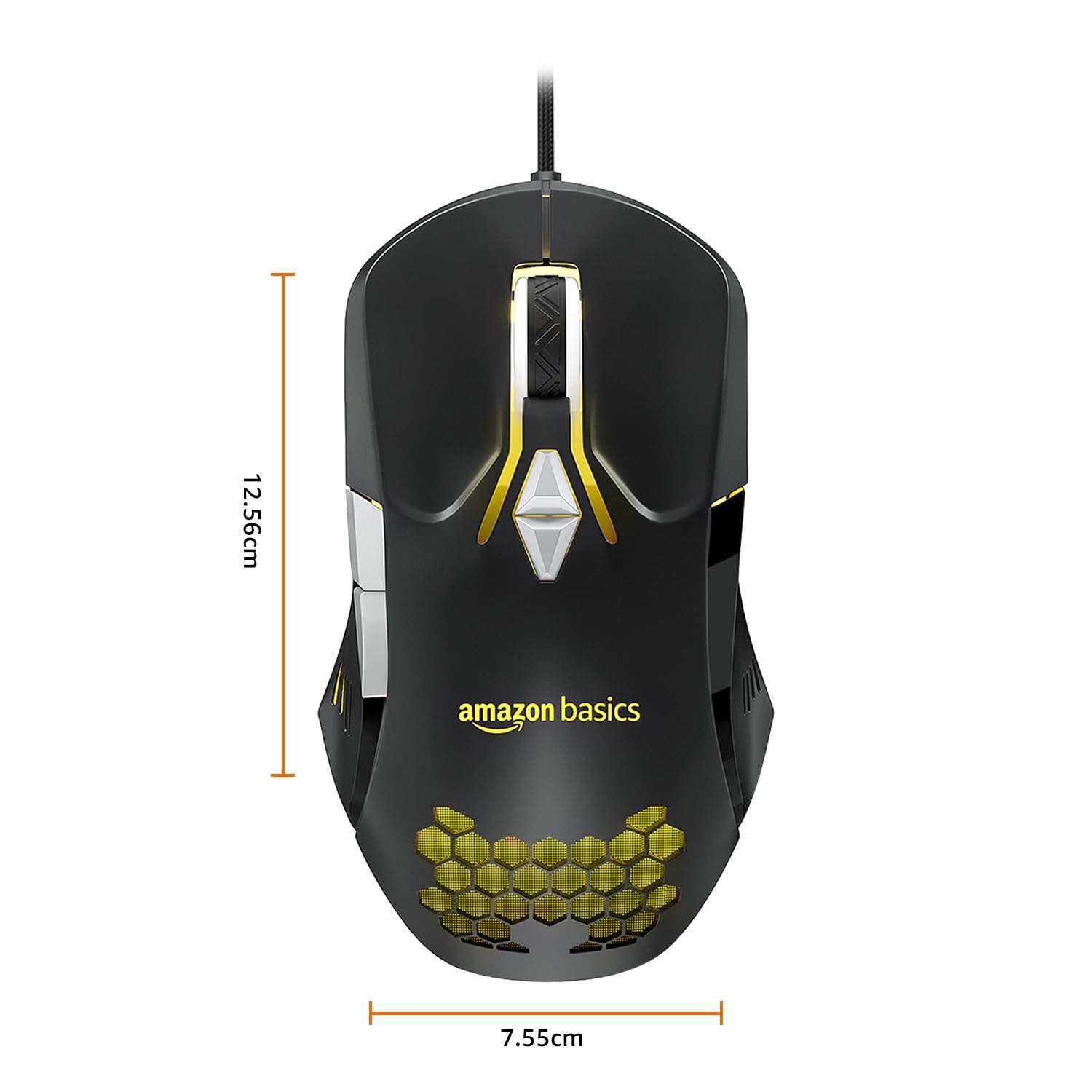
Image: The amazon basics Wired Gaming Mouse with its length (12.56cm) and width (7.55cm) dimensions indicated.
8. Informācija par garantiju
This amazon basics Wired Gaming Mouse comes with a 1 gadu garantija from the date of purchase. This warranty covers manufacturing defects and issues arising from normal use. It does not cover damage caused by misuse, accidents, unauthorized modifications, or normal wear and tear. Please retain your proof of purchase for warranty claims.
9. Atbalsts
For further assistance, technical support, or warranty claims, please visit the official amazon basics support page or contact customer service through your purchase platform. Ensure you have your product model number (ABIM03) and proof of purchase ready when contacting support.
Tiešsaistes resursi:
- Produkta lapa: amazon.in/dp/B0BTD2YN6Y
- amazon basics Store: amazon basics Store


