1. Ievads
This manual provides detailed instructions for the setup, operation, and maintenance of your Adler AD 1196B Digital Alarm Clock. Please read this manual thoroughly before using the device to ensure proper function and longevity.
2. Produkts beidziesview
2.1 Galvenās funkcijas
- Digital time display with 12/24 hour format.
- Izgaismots displejs ērtai viewing, automatically turns off after 4 seconds.
- Three independent alarm time settings.
- Three alarm activation settings: 5 days (weekday), 6 days (weekday + Saturday), 7 days (every day).
- Displays current time, date, indoor temperature, and humidity.
- Battery-powered for portability and backup during power outages.
2.2. Iepakojuma saturs
- Adler AD 1196B Digital Alarm Clock Unit
- Lietotāja rokasgrāmata
Piezīme: Nepieciešamas 2x AA baterijas, kas nav iekļautas komplektā.

1. attēls. Priekšpuse view of the Adler AD 1196B Digital Alarm Clock, displaying 12:00, 26°C, 56% humidity, and the current date.
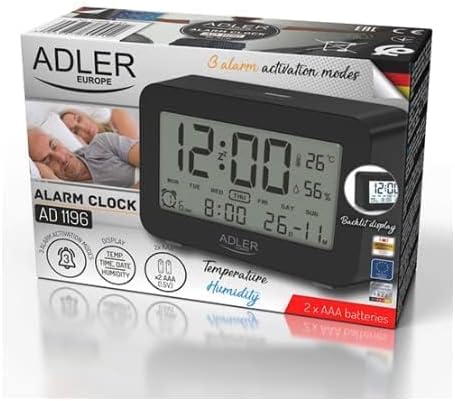
Figure 2: The Adler AD 1196B Digital Alarm Clock shown in its retail packaging, highlighting key features.
3. Iestatīšana
3.1 Akumulatora uzstādīšana
- Atrodiet bateriju nodalījuma vāciņu modinātāja aizmugurē.
- Pabīdiet vai paceliet vāku, lai atvērtu nodalījumu.
- Ievietojiet divas (2) AA baterijas, nodrošinot pareizo polaritāti (+ un -), kā norādīts nodalījuma iekšpusē.
- Droši uzlieciet akumulatora nodalījuma vāku.
The clock will power on automatically once batteries are inserted. The display will show default settings or begin flashing.
3.2. Sākotnējā ieslēgšana
Upon successful battery installation, the display will illuminate. You may need to press a button (e.g., "MODE" or "SET") to activate the display if it remains blank after battery insertion. The backlight will activate briefly and then turn off.
4. Lietošanas instrukcijas
Familiarize yourself with the control buttons, typically located on the back or top of the device. Common buttons include: MODE, SET, UP/+, DOWN/-, ALARM.
4.1 Laika iestatīšana
- Nospiediet un turiet IESTATĪT poga (vai REŽĪMS button, depending on model) until the hour digits begin to flash.
- Izmantojiet UP/+ or UZ LEJU/- pogas, lai pielāgotu stundu.
- Nospiediet IESTATĪT (vai REŽĪMS) again to move to the minute setting.
- Izmantojiet UP/+ or UZ LEJU/- pogas, lai pielāgotu minūtes.
- Turpiniet nospiest IESTATĪT (vai REŽĪMS) to cycle through 12/24 hour format, and then to exit time setting mode.
4.2 Datuma iestatīšana
- Normālā laika displejā nospiediet REŽĪMS button repeatedly until the date display starts flashing or you enter date setting mode.
- The year digits may flash first. Use UP/+ or UZ LEJU/- lai pielāgotu gadu.
- Nospiediet REŽĪMS to move to the month setting, then adjust with UP/+ or UZ LEJU/-.
- Nospiediet REŽĪMS to move to the day setting, then adjust with UP/+ or UZ LEJU/-.
- Nospiediet REŽĪMS again to confirm and exit date setting.
4.3 Setting Alarms (Alarm 1, Alarm 2, Alarm 3)
The AD 1196B features three independent alarms. The process is similar for each.
- Nospiediet pogu TRANSPORTLĪDZEKLIS pogu vienreiz view Alarm 1. Press again for Alarm 2, and a third time for Alarm 3.
- Kamēr viewing the desired alarm (e.g., AL1), press and hold the IESTATĪT pogu, līdz mirgo modinātāja stundu cipari.
- Izmantot UP/+ or UZ LEJU/- lai iestatītu modinātāja stundu.
- Nospiediet IESTATĪT , lai pārietu uz modinātāja minūšu iestatījumu.
- Izmantot UP/+ or UZ LEJU/- lai iestatītu modinātāja minūtes.
- Nospiediet IESTATĪT again to confirm the alarm time.
- Lai aktivizētu/deaktivizētu modinātāju, nospiediet TRANSPORTLĪDZEKLIS button repeatedly until the alarm icon (e.g., bell symbol) appears or disappears next to the corresponding alarm number (AL1, AL2, AL3).
4.4 Alarm Activation Modes (5, 6, 7 Days)
After setting an alarm time, you can choose its activation frequency:
- While in alarm setting mode (after setting minutes for an alarm), press IESTATĪT one more time. The display will show a day indicator (e.g., "5 DAY", "6 DAY", "7 DAY").
- Izmantot UP/+ or UZ LEJU/- to cycle through the options:
- 5 DIENA: Alarm sounds Monday to Friday.
- 6 DIENA: Alarm sounds Monday to Saturday.
- 7 DIENA: Alarm sounds every day of the week.
- Nospiediet IESTATĪT to confirm your selection and exit alarm setting for that specific alarm.
4.5 Fona apgaismojuma funkcija
The display features a backlight for improved visibility in low light conditions. The backlight automatically activates when a button is pressed and turns off after approximately 4 seconds to conserve battery power.
4.6 Temperatūras un mitruma displejs
The alarm clock continuously displays the current indoor temperature (in Celsius) and relative humidity percentage. No specific action is required to view these readings; they are shown on the main display.
5. Apkope
5.1. Tīrīšana
To clean the alarm clock, gently wipe the surface with a soft, dry cloth. Do not use abrasive cleaners, solvents, or chemical sprays, as these may damage the display or casing.
5.2. Akumulatora nomaiņa
When the display becomes dim or the clock functions erratically, it is time to replace the batteries. Follow the battery installation steps in Section 3.1. Always replace both batteries with new AA batteries of the same type. Dispose of old batteries responsibly according to local regulations.
6. Traucējummeklēšana
| Problēma | Iespējamais cēlonis | Risinājums |
|---|---|---|
| Displejs ir tukšs vai blāvs. | Bateriju līmenis ir zems vai tās ir nepareizi ievietotas. | Nomainiet baterijas ar jaunām AA baterijām, nodrošinot pareizu polaritāti. |
| Trauksmes signāls neskan. | Modinātājs nav aktivizēts vai nepareizi iestatīts. | Ensure the alarm icon is visible on the display. Verify the alarm time and activation mode (5, 6, or 7 days) are set correctly. |
| Laiks/datums nav pareizs. | Time/Date was not set or reset after battery change. | Follow instructions in Section 4.1 and 4.2 to set the correct time and date. |
| Temperatūras/mitruma rādījumi šķiet neprecīzi. | Pulkstenis ir novietots siltuma avota, ventilācijas atveres tuvumā vai tiešos saules staros. | Relocate the clock to a stable environment away from extreme temperature or humidity fluctuations. Allow time for readings to stabilize. |
7. Specifikācijas
- Modelis: AD 1196B
- Barošanas avots: 2 x AA baterijas (nav iekļautas)
- Displeja veids: Digitāls LCD ar fona apgaismojumu
- Funkcijas: Time, Date, Day of Week, Temperature (°C), Humidity (%), 3 Alarms with 3 Activation Modes
- Fona apgaismojuma ilgums: Apmēram 4 sekundes
- Materiāls: Plastmasa
- Izmēri (G x D x A): 11 cm x 3.81 cm x 5 cm
- Svars: 1.6 kg
8. Garantija un atbalsts
For warranty information or technical support, please refer to the warranty card included with your product or contact the manufacturer directly. Keep your purchase receipt as proof of purchase.
Manufacturer: Adler


