1. Ievads
The ATOMSTACK F30 Air Assist Pump is an accessory designed to significantly improve the performance of compatible laser engraving and cutting machines. By providing a focused stream of air, it helps to clear smoke and debris from the laser's path, preventing energy attenuation and ensuring a cleaner, more precise cut or engraving. This system also aids in rapidly cooling the material's surface, minimizing burning and achieving smoother edges on your projects.

Figure 1: The ATOMSTACK F30 Air Assist Pump with its included accessories, showcasing its compact design and components.
2. Drošības informācija
Please read and understand all safety instructions before operating the ATOMSTACK F30 Air Assist Pump. Failure to follow these instructions may result in injury or damage to the equipment.
- Always ensure proper ventilation in your workspace when using the air assist pump with a laser engraver.
- Keep the air assist pump and its components away from water or other liquids.
- Do not attempt to disassemble or modify the pump. Refer all servicing to qualified personnel.
- Glabāt bērniem un mājdzīvniekiem nepieejamā vietā.
- Pirms lietošanas pārliecinieties, vai visi savienojumi ir droši.
3. Iepakojuma saturs
Pārliecinieties, vai jūsu iepakojumā ir iekļauti visi tālāk norādītie priekšmeti:
- 1x Air pump (ATOMSTACK F30 Air Assist Pump)
- 1x 2 meters of air pipe
- 4x stiprinājuma skrūve
- 4x Fixed cable tie
- 1x sešstūra uzgriežņu atslēga
- 4x Special dedicated filter glass
- 3x Retrofit air hood
4. Iestatīšana
Follow these steps to install and set up your ATOMSTACK F30 Air Assist Pump with your compatible laser engraver. The process is designed for ease of use, requiring minimal additional accessories.
- Prepare the Laser Module: Loosen the screws on your laser module and carefully remove the original protective cover.
- Remove Original Wind Hood: If present, loosen screws and remove the original wind hood from the laser module.
- Install New Wind Hood: Install one of the provided suitable modified wind hoods onto the laser module. Secure it with the fixing screws.
- Insert Filter Glass: Install a dedicated replacement filter glass into the designated slot on the new wind hood.
- Connect Air Pipe to Laser Module: Connect one end of the 2-meter air pipe to the air inlet on the modified wind hood.
- Connect Air Pipe to Pump: Connect the other end of the air pipe to the air outlet on the ATOMSTACK F30 Air Assist Pump.
- Strāvas pieslēgums: Plug the power adapter into the air pump's power input, then connect it to a suitable power outlet.

Figure 2: Visual guide illustrating the quick installation process for the air assist pump, using an A10 Pro as an example.
Video 1: A detailed demonstration of the ATOMSTACK F30 Air Assist system, including its components and installation process. This video also highlights the benefits of using air assist for laser cutting and engraving.
5. Lietošanas instrukcijas
The ATOMSTACK F30 Air Assist Pump is designed for simple operation, providing adjustable airflow to optimize your laser engraving and cutting tasks.
5.1. Power On and Airflow Adjustment
Once connected, turn on the air assist pump using the integrated knob. This knob serves as both the power switch and the airflow adjustment control. Rotate the knob to adjust the airflow from 10 L/min to 30 L/min, depending on your material and desired cutting/engraving effect.

3. attēls: Tuvplāns view of the ATOMSTACK F30 Air Assist Pump's control panel, showing the 2-in-1 knob for power and airflow adjustment, and the power input port.
5.2. Benefits During Operation
The adjustable airflow helps to:
- Remove Smoke and Dust: Effectively clears smoke and dust generated during cutting/engraving, preventing energy attenuation and ensuring consistent laser performance.
- Reduce Surface Temperature: Powerful airflow quickly reduces the surface temperature of the material, preventing excessive burning and scorch marks.
- Achieve Cleaner Edges: Contributes to cleaner and smoother cutting edges, enhancing the overall quality of your finished work.
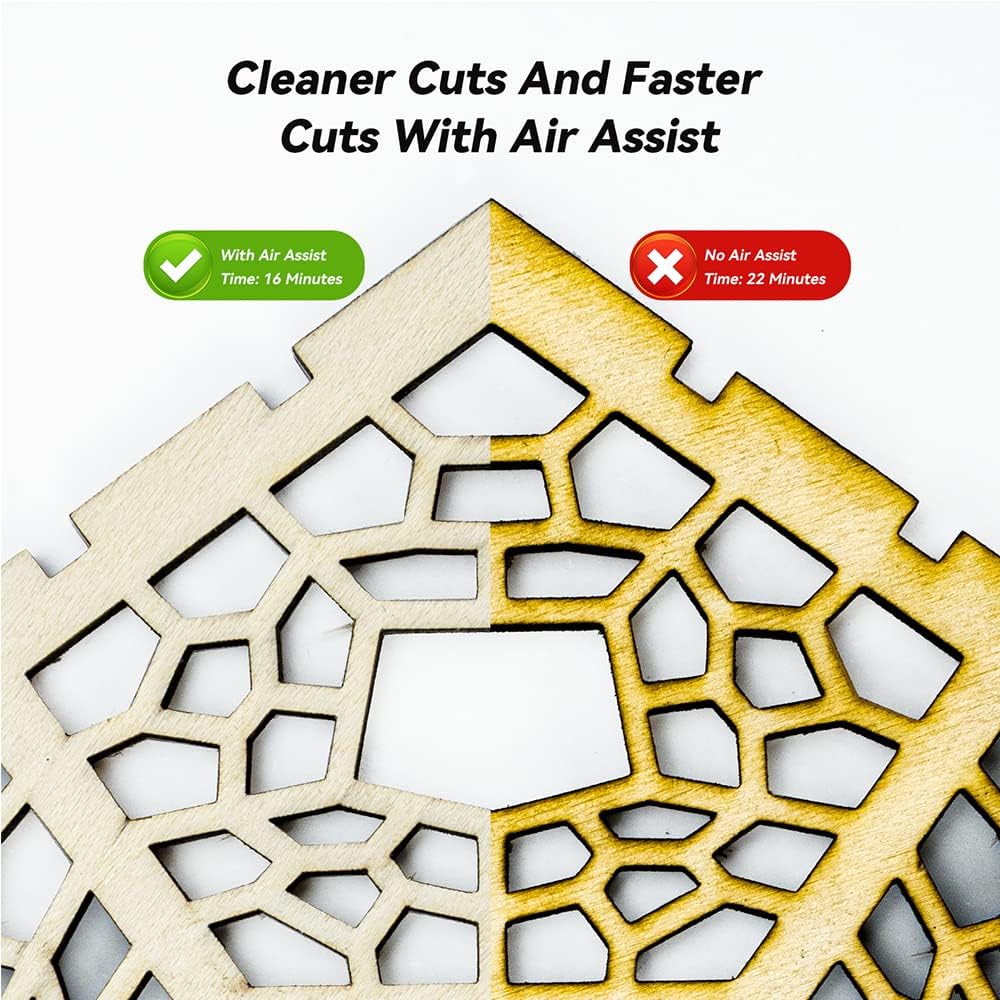
Figure 4: A visual comparison demonstrating the improved cutting effect when using the air assist, resulting in cleaner edges and reduced burning compared to cutting without air assist.
5.3. Zema trokšņa darbība
Even when the airflow is adjusted to its maximum setting, the ATOMSTACK F30 Air Assist Pump operates at a noise level of less than 60dB. This is comparable to the volume of a household electric fan, ensuring a quiet working environment.

Figure 5: The ATOMSTACK F30 Air Assist Pump operating with a sound level meter displaying a low decibel reading, indicating its quiet performance.
6. Apkope
Regular maintenance ensures the longevity and optimal performance of your ATOMSTACK F30 Air Assist Pump.
- Tīrīšana: Periodically wipe down the exterior of the pump with a soft, dry cloth. Ensure no dust or debris accumulates around the air intake/outlet.
- Filtra nomaiņa: The package includes dedicated replacement filter glass. Replace the filter glass when it appears dirty or if you notice a decrease in airflow efficiency.
- Air Pipe Inspection: Regularly check the air pipe for any kinks, blockages, or damage. Ensure it is securely connected to both the pump and the laser module.
7. Traucējummeklēšana
If you encounter issues with your ATOMSTACK F30 Air Assist Pump, refer to the following common problems and solutions:
| Problēma | Iespējamais cēlonis | Risinājums |
|---|---|---|
| Nav gaisa plūsmas vai vāja gaisa plūsma | Power not connected; Air pipe kinked/blocked; Filter clogged; Airflow knob set too low. | Check power connection; Straighten air pipe or clear blockage; Replace filter glass; Adjust airflow knob to a higher setting. |
| Sūknis ir trokšņains | Normal operation noise; Pump not on a stable surface. | Ensure pump is on a flat, stable surface to minimize vibration; Noise level is typically below 60dB. |
| Laser cutting/engraving quality is poor despite air assist | Incorrect airflow setting; Laser module issues; Material not suitable. | Adjust airflow to optimal level for material; Consult laser engraver manual for laser-specific troubleshooting; Ensure material is compatible with laser processing. |
Ja problēma joprojām pastāv pēc šo risinājumu izmēģināšanas, lūdzu, sazinieties ar klientu atbalsta dienestu, lai saņemtu papildu palīdzību.
8. Specifikācijas
| Funkcija | Detaļas |
|---|---|
| Modeļa numurs | F30 |
| Gaisa plūsma | 10-30 L/min (Adjustable) |
| Trokšņa līmenis | Mazāk par 60 dB |
| Saderība | ATOMSTACK X7 PRO/S10 PRO/A10 PRO/A5 PRO/A5 M50 Pro/A5 M50/A5 30W/20W and other ATOMSTACK laser engraver models. |
| Preces svars | 2.42 mārciņas |
| Iepakojuma izmēri | 8.8 x 6.3 x 4.3 collas |
| Ražotājs | ATMEKSTS |
| Datums pirmais pieejams | 3. gada 2023. februāris |
9. Garantija un atbalsts
The ATOMSTACK F30 Air Assist Pump comes with a standard manufacturer's warranty. For specific warranty terms and conditions, please refer to the documentation provided with your purchase or visit the official ATOMSTACK webvietne.
For technical support, troubleshooting assistance beyond this manual, or warranty claims, please contact the seller or ATOMSTACK customer service through their official channels. Ensure you have your product model number and purchase details ready when contacting support.


