1. Produkts beidziesview
The ProtoArc K100-A is an ultra-slim wireless Bluetooth keyboard specifically designed for Mac devices. It features a full-size layout with a numeric keypad, responsive scissor-switch keys for quiet typing, and adjustable white LED backlighting. This keyboard supports connection to up to three devices simultaneously, allowing for seamless switching between your MacBook, iMac, iPad, or iPhone. Its built-in rechargeable battery ensures long-lasting use.

Image: The ProtoArc K100-A keyboard connected to a MacBook, iPad, and iPhone, showcasing tā vairāku ierīču iespējas.
2. Iepakojuma saturs
- ProtoArc K100-A Bluetooth tastatūra ar aizmugurgaismojumu
- USB-C uzlādes kabelis
- Lietotāja rokasgrāmata (šis dokuments)
3. Darba sākšana
3.1 Tastatūras uzlāde
Before first use, fully charge the keyboard. Connect the provided USB-C charging cable to the keyboard's Type-C port and the other end to a USB power source (e.g., computer USB port, USB wall adapter). A full charge takes approximately 4-5 hours. The built-in 1200mAh lithium-ion battery provides a standby time of 3-4 months.

Image: The keyboard's Type-C charging port with the charging cable inserted.
3.2 Ieslēgšana/izslēgšana
Locate the power switch on the side or back of the keyboard. Slide it to the "ON" position to power on the keyboard. Slide it to "OFF" when not in use to conserve battery.
4. Bluetooth savienojums
The ProtoArc K100-A keyboard supports connection to three different devices via Bluetooth. Follow these steps to pair your devices:
- Pārliecinieties, vai tastatūra ir ieslēgta.
- Nospiediet un turiet vienu no Bluetooth kanālu taustiņiem (BT1, BT2, vai BT3) 3–5 sekundes, līdz atbilstošais indikators sāk ātri mirgot. Tas norāda, ka tastatūra ir savienošanas pārī režīmā.
- On your Mac device (MacBook, iMac, iPad, iPhone), go to Sistēmas iestatījumi (vai Sistēmas preferences) > Bluetooth.
- Ieslēdziet Bluetooth un meklējiet pieejamās ierīces.
- Atlasiet "ProtoArc K100-A"no ierīču saraksta.
- Follow any on-screen prompts to complete the pairing process. The indicator light will stop flashing and remain solid for a few seconds, then turn off, indicating successful pairing.
- Atkārtojiet šīs darbības ne vairāk kā divām papildu ierīcēm, izmantojot citus Bluetooth kanālu taustiņus.

Image: The dedicated Bluetooth channel keys (BT1, BT2, BT3) on the keyboard.
4.1 Pārslēgšanās starp ierīcēm
Lai pārslēgtos starp pārī savienotajām ierīcēm, vienkārši nospiediet atbilstošo Bluetooth kanāla taustiņu (BT1, BT2, vai BT3) once. The keyboard will connect to the selected device within a few seconds.
5. Lietošanas instrukcijas
5.1 Fona apgaismojuma vadība
The keyboard features soft white LED backlighting with three adjustable brightness levels (low, medium, high). To adjust the backlight brightness, press the backlight key (often indicated by a sun icon or similar) located on the top right of the keyboard. Pressing it repeatedly cycles through the brightness levels and turns the backlight off.

Image: The keyboard with its white adjustable backlight at different brightness levels.
5.2 īsinājumtaustiņi
The keyboard includes 12 shortcut keys for enhanced productivity on Mac devices. These keys provide quick access to functions such as brightness adjustment, mission control, media playback, volume control, and more. Refer to the key labels for specific functions.

Image: Detail of the keyboard's silent scissor-switch keys, designed for quiet and responsive typing.
6. Apkope un kopšana
- Uzturiet tastatūru tīru, noslaukot to ar mīkstu, sausu drānu. Izvairieties no asu ķīmisku vielu vai abrazīvu materiālu lietošanas.
- Do not expose the keyboard to extreme temperatures, humidity, or direct sunlight.
- Avoid spilling liquids on the keyboard. If a spill occurs, immediately power off the keyboard and allow it to dry completely before use.
- When not in use for extended periods, power off the keyboard to preserve battery life.
- The keyboard automatically enters sleep mode after 30 minutes of inactivity to save power. Press any key to wake it up.
7. Traucējummeklēšana
- Keyboard not connecting/disconnecting frequently:
- Pārliecinieties, vai tastatūra ir pilnībā uzlādēta.
- Verify Bluetooth is enabled on your device and the keyboard is within range (up to 10 meters).
- Mēģiniet atkārtoti savienot pārī tastatūru ar savu ierīci.
- Pārliecinieties, vai netraucē citi spēcīgi bezvadu signāli.
- Taustiņi nereaģē vai reaģē ar aizkavēšanos:
- Pārbaudiet akumulatora līmeni un, ja nepieciešams, uzlādējiet.
- Pārliecinieties, vai tastatūra ir pareizi pievienota, izmantojot Bluetooth.
- If the keyboard has entered sleep mode, press any key and wait a few seconds for it to reconnect.
- Fona apgaismojums nedarbojas:
- Pārliecinieties, vai tastatūra ir ieslēgta.
- Press the backlight key to cycle through brightness levels and turn it on.
- If the battery is very low, the backlight may not function to conserve power. Charge the keyboard.
8. Specifikācijas
| Modeļa numurs | K100-A |
| Zīmols | ProtoArc |
| Savienojamības tehnoloģija | Bluetooth |
| Saderīgas ierīces | Mac OS 12.2 or higher (MacBook, MacBook Pro, MacBook Air, iMac, iMac Pro, Mac Pro/Mini, iPad, iPhone) |
| Īpašas funkcijas | Backlit, Rechargeable, Multi-Device Connection (3 devices) |
| Akumulatora ietilpība | 1200mAh Litija jons |
| Uzlādes laiks | 4-5 stundas |
| Gaidīšanas laiks | 90-120 dienas |
| Produkta izmēri | 16.79 collas garums x 4.78 collas platums x 0.57 collas augstums |
| Preces svars | 1.59 mārciņas |
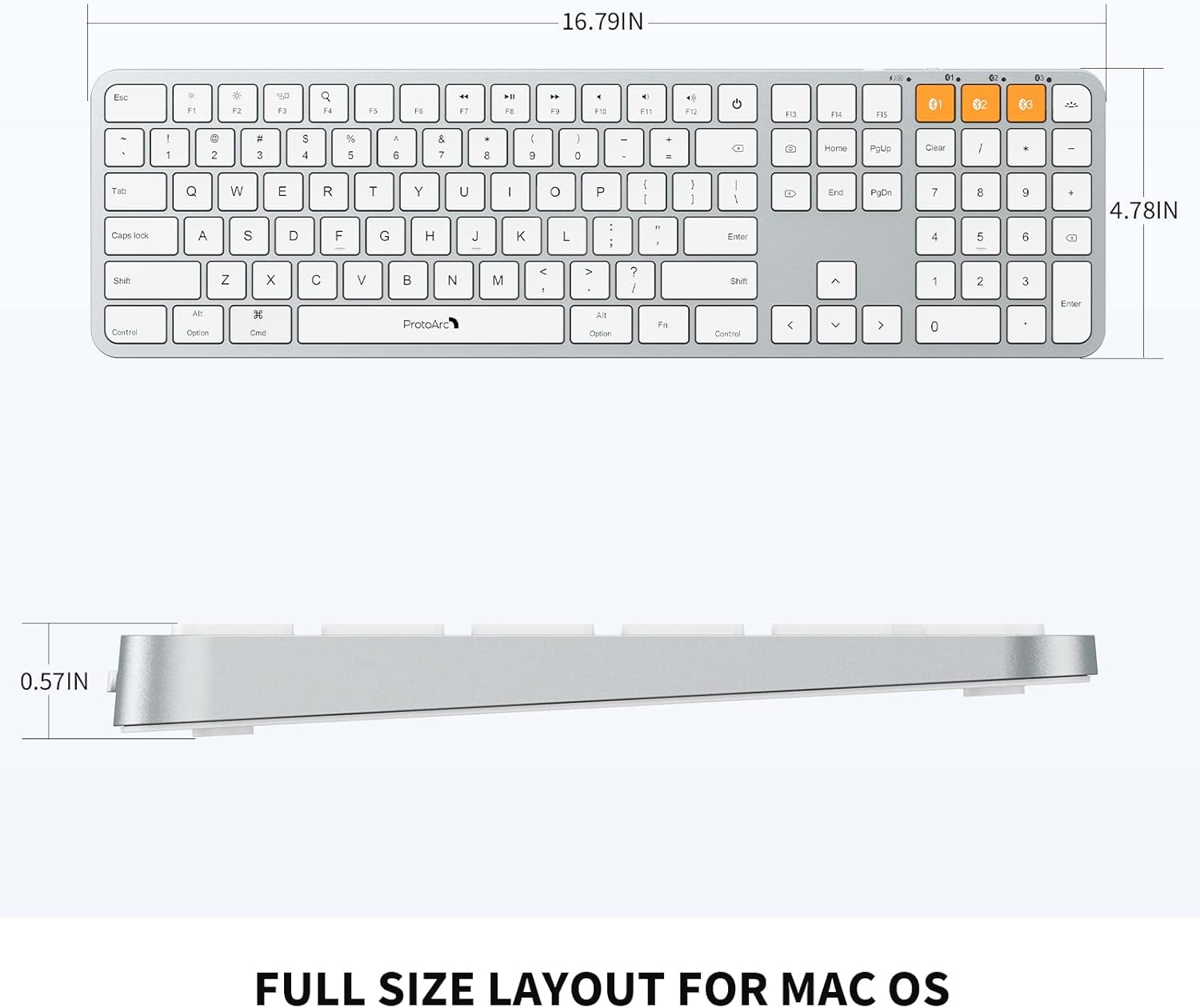
Image: Dimensional diagram of the ProtoArc K100-A keyboard.
9. Garantija un atbalsts
Lai saņemtu informāciju par garantiju un tehnisko atbalstu, lūdzu, skatiet oficiālo ProtoArc vietni. webvietnē vai sazinieties tieši ar klientu apkalpošanas dienestu. Saglabājiet pirkuma čeku garantijas prasību gadījumā.


