Ievads
Thank you for choosing the Genai True Wireless Earphones. This manual provides detailed instructions on how to set up, operate, maintain, and troubleshoot your new earphones. Please read this manual carefully before use to ensure optimal performance and longevity of your device.
Produkts beidziesview
The Genai True Wireless Earphones feature a digital intelligence LED display on the charging case, tap control for easy operation, and Bluetooth 5.0 for stable connectivity. They are designed for comfortable in-ear wear and deliver clear stereo sound.
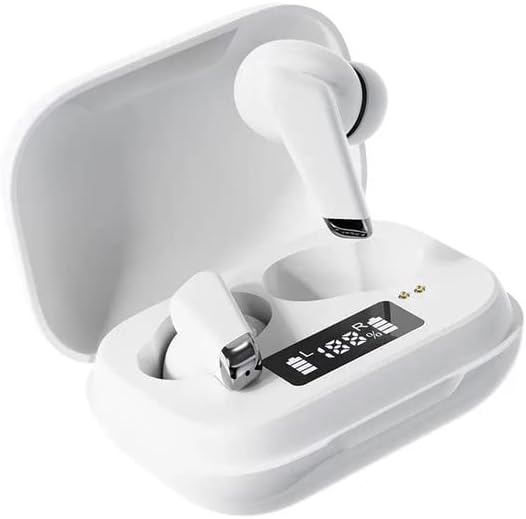
Image: Genai True Wireless Earphones in their charging case, showcasing the digital LED display indicating battery levels.
Galvenās funkcijas:
- Patiess bezvadu stereo (TWS): Seamless audio experience without cables.
- Pieskarieties kontrolei: Intuitive touch-sensitive controls for music and calls.
- Digital Intelligence LED Display: Shows real-time battery status of earbuds and charging case.
- Bluetooth 5.0: Nodrošina stabilu un efektīvu bezvadu savienojumu.
- Ergonomisks ausīs ievietojams dizains: Comfortable and secure fit.
Iestatīšanas rokasgrāmata
1. Austiņu un korpusa uzlādēšana
- Sākotnējā maksa: Pirms pirmās lietošanas reizes pilnībā uzlādējiet uzlādes futrāli un austiņas. Ievietojiet austiņas uzlādes futrālī.
- Pievienojiet lādētāju: Pievienojiet uzlādes futrāli strāvas avotam, izmantojot saderīgu USB kabeli.
- Monitora LED displejs: The digital LED display on the case will show the charging status and battery percentage. Ensure both earbuds and the case are fully charged before proceeding.

Image: The charging case with its digital LED display, indicating the charge level of both the case and the individual earbuds.
2. Savienošana pārī ar jūsu ierīci
- Ieslēgšana: Atveriet uzlādes futrāli. Austiņas automātiski ieslēgsies un pāries savienošanas pārī režīmā. Jūs varat dzirdēt skaņas signālu.
- Aktivizējiet Bluetooth: Viedtālrunī vai citā Bluetooth ierīcē atveriet Bluetooth iestatījumus un iespējojiet Bluetooth.
- Izvēlieties ierīci: Look for "Genai Earphones" (or similar name) in the list of available devices and select it to connect.
- Apstiprinājums: Once successfully paired, you will hear a confirmation sound, and the earbuds will be ready for use.

Image: A visual representation of the Bluetooth 5.0 chipset, highlighting the stable wireless connection technology.
Lietošanas instrukcijas
The Genai True Wireless Earphones feature intuitive tap controls. The specific functions may vary slightly, but common controls are listed below:
Ieslēgšana/izslēgšana
- Ieslēgšana: Atveriet uzlādes futrāli vai dažas sekundes turiet nospiestu abu austiņu skārienvirsmu.
- Izslēgt: Ievietojiet austiņas atpakaļ uzlādes futrālī un aizveriet vāku vai vairākas sekundes turiet nospiestu abu austiņu skārienvirsmu, līdz tās izslēdzas.
Mūzikas atskaņošana
- Atskaņot/pauzēt: Viens pieskāriens austiņām.
- Nākamais ieraksts: Veiciet dubultskārienu labajai austiņai.
- Iepriekšējais ieraksts: Veiciet dubultskārienu kreisajā austiņā.
Zvanu pārvaldība
- Atbildēt/beigt zvanu: Vienreiz pieskarieties jebkurai austiņai ienākošā vai aktīva zvana laikā.
- Noraidīt zvanu: Ienākošā zvana laikā turiet nospiestu jebkuru austiņu.
Balss palīgs
- Balss palīga aktivizēšana: Trīsreiz pieskarieties jebkurai austiņai (funkcionalitāte var atšķirties atkarībā no ierīces).

Image: An illustration showing an earbud comfortably and ergonomically fitted within the ear canal.
Apkope
Tīrīšana
- Austiņu un uzlādes futrāļa tīrīšanai izmantojiet mīkstu, sausu, neplūksnojošu drānu.
- Nelietojiet abrazīvus tīrīšanas līdzekļus, šķīdinātājus vai aerosola aerosolus.
- Viegli notīriet ausu uzgaļus un skaļruņa sietiņu, lai noņemtu ausu sēru vai gružus.
Uzglabāšana
- Kad austiņas netiek lietotas, uzglabājiet tās uzlādes futrālī, lai tās aizsargātu un uzlādētu.
- Izvairieties no uzglabāšanas ekstremālās temperatūrās, tiešos saules staros vai augstā mitrumā.
Problēmu novēršana
- Earbuds not pairing with each other or with device:
- Pārliecinieties, vai abas austiņas ir uzlādētas.
- Ievietojiet abas austiņas atpakaļ uzlādes futrālī, aizveriet vāku, uzgaidiet dažas sekundes un pēc tam vēlreiz atveriet vāku.
- On your device, forget/delete the "Genai Earphones" from the Bluetooth list and try pairing again.
- Nav skaņas vai kluss skaļums:
- Pārbaudiet skaļuma līmeni gan ierīcē, gan austiņās.
- Pārliecinieties, vai austiņas ir pareizi pievienotas ierīcei.
- Notīriet austiņu skaļruņa sietiņu no visiem gružiem.
- Uzlādes problēmas:
- Pārliecinieties, vai uzlādes kabelis ir droši pievienots gan korpusam, gan strāvas avotam.
- Pārliecinieties, vai barošanas avots ir aktīvs.
- Notīriet uzlādes kontaktus gan uz austiņām, gan uz korpusa.
Specifikācijas
| Funkcija | Detaļas |
|---|---|
| Modelis | B0BX5G53VT |
| Savienojamības tehnoloģija | Bezvadu (Bluetooth 5.0) |
| Ausu kausu tips | Daļēji atvērts |
| Vadītāju skaits | 2 |
| Uzlādes metode | Uzlādes futrālis |
| Austiņu spilventiņu materiāls | Silikona |
| Vadītāja diametrs | 10 mm |
| Kopējie harmoniskie kropļojumi | 0.02% |
| Impedances diapazons | Līdz 32 Ω |
| Materiāls | Silikona |
| Ausu novietojums | Ausī |
| Formas faktors | Īsts bezvadu savienojums |
Garantija un atbalsts
The Genai True Wireless Earphones come with a 12 mēnešu garantija from the date of purchase, covering manufacturing defects. For any quality problems or support inquiries, please contact the seller directly through your purchase platform.
We are committed to ensuring 100% customer satisfaction. If you encounter any issues, please do not hesitate to reach out for assistance, including full refunds or replacements as applicable.


