1. Ievads
Welcome to the DOOGEE V MAX Plus 5G Rugged Smartphone user manual. This guide will assist you in understanding the features and functions of your new device, ensuring optimal performance and longevity. Please read this manual thoroughly before using your smartphone.

Figure 1: DOOGEE V MAX Plus 5G Rugged Smartphone
2. Ierīce beigusiesview
The DOOGEE V MAX Plus is designed for durability and high performance. Key features include a large battery, advanced camera system, and robust construction.
2.1. Iepakojuma saturs
- DOOGEE V MAX Plus Rugged Phone
- USB-C kabelis
- Strāvas adapteris
- SIM izstumšanas rīks
- Lietotāja rokasgrāmata (šis dokuments)
Video 1: Unboxing the DOOGEE S100 PRO (similar model, demonstrates package contents and initial handling).
3. Iestatīšana
3.1 SIM/SD kartes ievietošana
- Atrodiet SIM kartes paliktni ierīces sānos.
- Ievietojiet SIM kartes izņemšanas rīku mazajā caurumā blakus paplātei, lai to atvērtu.
- Place your Nano-SIM card(s) and/or microSD card into the tray with the gold contacts facing down, ensuring correct orientation.
- Carefully push the tray back into the slot until it is flush with the device. Ensure the rubber seal is properly seated to maintain water and dust resistance.

Figure 2: SIM/SD card tray location (image shows Android 14, but the phone's side profile is visible).
3.2 Sākotnējā ieslēgšana un pamata konfigurācija
- Press and hold the Power button (located on the side) until the DOOGEE logo appears.
- Izpildiet ekrānā redzamos norādījumus, lai izvēlētos valodu, izveidotu savienojumu ar Wi-Fi un iestatītu savu Google kontu.
- Konfigurējiet drošības iestatījumus, piemēram, atbloķēšanu ar pirkstu nospiedumu vai PIN kodu/rakstu.
4. Viedtālruņa lietošana
4.1 Akumulators un uzlāde
The DOOGEE V MAX Plus features a 22000mAh battery. Use the provided 33W fast charger for optimal charging. The device also supports OTG for reverse charging other devices.
- Uzlāde: Pievienojiet USB-C kabeli tālruņa uzlādes portam un strāvas adapterim. Pievienojiet adapteri sienas kontaktligzdai.
- Akumulatora darbības laiks: Expect extended usage times, including up to 2350 hours of standby and 130 hours of calls.
- OTG funkcija: Connect an OTG cable (not included) to the USB-C port to charge other devices.

Figure 3: Battery and 33W fast charging capabilities.
Video 2: Demonstrates the 22000mAh battery and camping light feature (from a similar model).
4.2 Kameras funkcijas
The smartphone is equipped with a versatile camera system:
- 200MP galvenā kamera: Augstas izšķirtspējas fotoattēliem.
- 32MP priekšējā kamera: Pašbildēm un videozvaniem.
- 20MP nakts redzamības kamera: For clear images in low-light conditions.
- 50MP Wide-Angle Camera: Plašiem ainavu uzņēmumiem.
- 8MP telefoto kamera: For detailed zoomed-in photos.
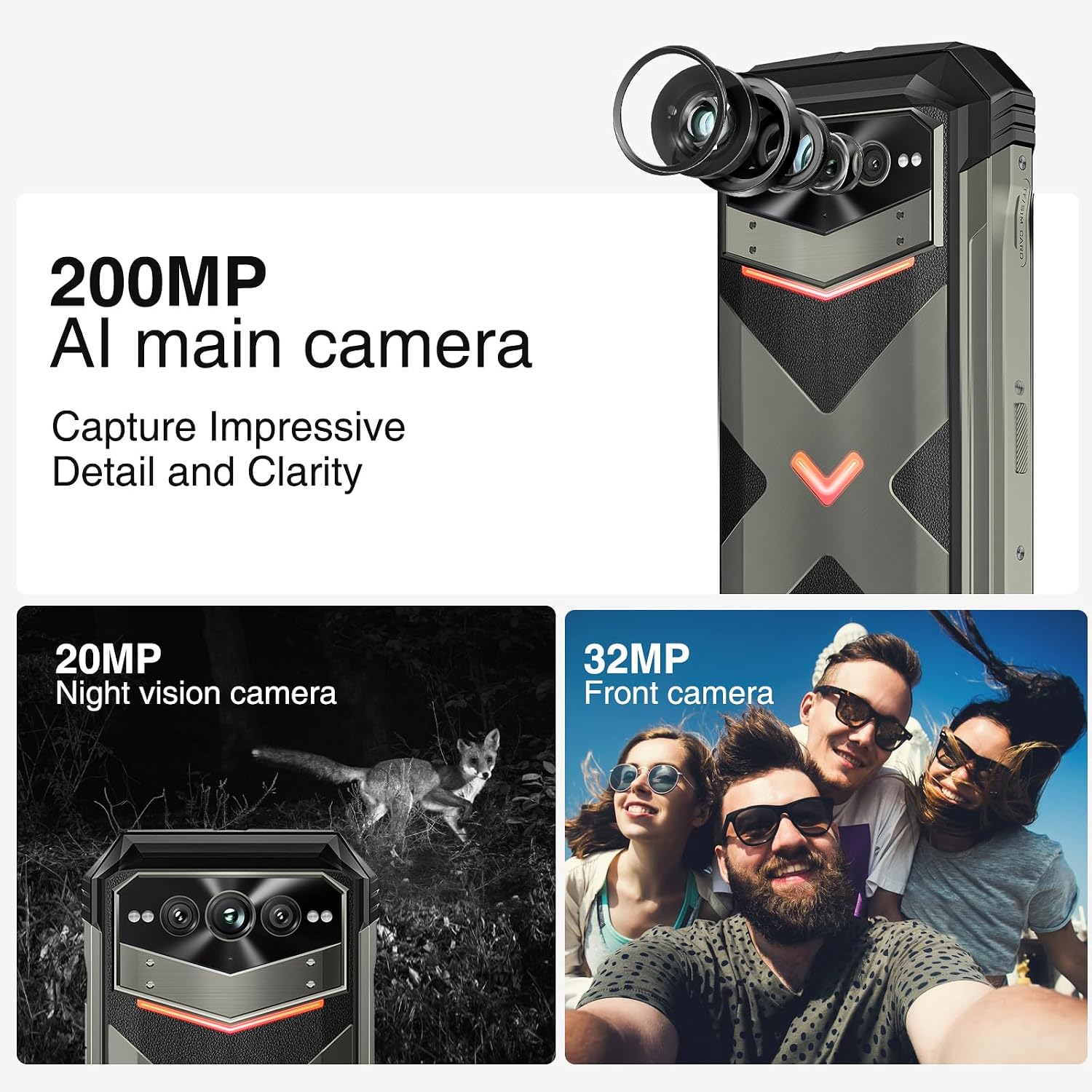
4. Attēls: beidziesview of the 200MP AI main camera, 20MP night vision camera, and 32MP front camera.
4.3 Attēlojums un mijiedarbība
The device features a 6.58-inch FHD+ display with a 120Hz refresh rate for smooth visuals.
- Ekrāns: 6.58-inch FHD+ (2408x1080) display with Corning Gorilla Glass.
- Intelligent Interaction Lights: Customizable LED lights on the back for notifications, calls, and charging status.
- Sānu pirkstu nospiedumu atbloķēšana: Lai nodrošinātu ātru un drošu piekļuvi.

Figure 5: Display specifications including size, resolution, aspect ratio, and refresh rate.

Figure 6: Key interaction and connectivity features.
4.4 Savienojamība un veiktspēja
The DOOGEE V MAX Plus supports 5G connectivity and runs on Android 14, powered by a MediaTek Dimensity 7050 processor.
- Operētājsistēma: Android 14 for enhanced privacy and personalized settings.
- Procesors: MediaTek Dimensity 7050 6nm 2.2GHz for efficient performance.
- Atmiņa un atmiņa: Up to 36GB RAM (12GB physical + 24GB virtual) and 512GB internal storage, expandable up to 2TB via microSD.
- Bezvadu: Wi-Fi 6, Cellular (5G), NFC, GPS.

Figure 7: Processor, RAM, and ROM details.
5. Apkope
To ensure the longevity and optimal performance of your rugged smartphone, follow these maintenance guidelines:
- Tīrīšana: Izmantojiet mīkstu, damp cloth to clean the device. Avoid harsh chemicals or abrasive materials. Ensure all port covers are securely closed before cleaning with water.
- Ūdens un putekļu izturība: The device is IP68/IP69K rated. Ensure all port covers (USB-C, SIM tray) are fully sealed to maintain water and dust resistance. Do not intentionally submerge the device beyond its rated depth or duration.
- Akumulatora kopšana: Avoid extreme temperatures. Do not fully discharge the battery regularly. For long-term storage, charge the battery to about 50% and power off the device.
- Programmatūras atjauninājumi: Regulāri pārbaudiet un instalējiet sistēmas atjauninājumus, lai nodrošinātu, ka jūsu ierīcē ir jaunākie drošības ielāpi un veiktspējas uzlabojumi.
6. Traucējummeklēšana
This section addresses common issues you might encounter with your DOOGEE V MAX Plus.
| Problēma | Iespējamais cēlonis | Risinājums |
|---|---|---|
| Ierīce neieslēdzas | Zems akumulatora līmenis, programmatūras kļūme | Uzlādējiet ierīci vismaz 30 minūtes. Nospiediet un 10–15 sekundes turiet ieslēgšanas/izslēgšanas pogu, lai piespiedu kārtā restartētu ierīci. |
| Slikts tīkla signāls | SIM card not properly inserted, network coverage issue | Reinsert the SIM card. Move to an area with better network coverage. Contact your carrier if the issue persists. |
| Camera glitches (e.g., video not saving) | Software bug, insufficient storage | Clear camera app cache/data. Ensure sufficient storage space. Check for system updates. If persistent, consider a factory reset (backup data first). |
| Screen scrolling is jerky | High background app usage, software issue | Close unnecessary background apps. Restart the device. Ensure software is up to date. |
| Device is heavy/bulky | Inherent design due to large battery and rugged build | This is a characteristic of rugged phones with large batteries. No specific solution, but users may adapt over time. |
7. Specifikācijas
| Funkcija | Detaļas |
|---|---|
| Modeļa nosaukums | VMAXPLUS |
| Operētājsistēma | Android 14 |
| Procesors | MediaTek Dimensity 7050 (procesora ātrums 2.2 GHz) |
| RAM | 12 GB (paplašināma līdz 36 GB) |
| Iekšējā krātuve | 512 GB (paplašināma līdz 2 TB, izmantojot microSD) |
| Ekrāna izmērs | 6.58 collas |
| Izšķirtspēja | 2408*1080 (FHD+) |
| Atsvaidzināšanas biežums | 120 Hz |
| Galvenā kamera | 200 MP |
| Priekšējā kamera | 32 MP |
| Nakts redzamības kamera | 20 MP |
| Akumulatora ietilpība | 22000 mAh |
| Uzlāde | 33 W ātra uzlāde |
| Savienojamība | 5G, Wi-Fi 6, NFC, GPS |
| Ūdens/putekļu izturība | IP68/IP69K, MIL-STD-810H |
| Izmēri | 6.85 x 31.97 x 8.15 collas |
| Svars | 15.2 unces (430 grami) |
8. Garantija un atbalsts
8.1 Informācija par garantiju
Your DOOGEE V MAX Plus 5G Rugged Smartphone comes with a standard manufacturer's warranty. Please refer to the warranty card included in your product packaging for specific terms, conditions, and duration of coverage. Keep your proof of purchase for warranty claims.
8.2 Klientu atbalsts
For further assistance, technical support, or service inquiries, please contact DOOGEE customer support through their official website or the contact information provided in your product documentation. You may also visit the DOOGEE Store on Amazon lai iegūtu papildu informāciju par produktu un resursiem.