1. Ievads
Thank you for choosing the Jesebang BD86 Bluetooth 5.4 Wireless Earbuds. This manual provides detailed instructions on how to set up, operate, and maintain your new earbuds. Please read this manual carefully before use to ensure optimal performance and longevity of your device.

Image 1.1: Jesebang BD86 Wireless Earbuds and Charging Case.
2. Iepakojuma saturs
Lūdzu, pārbaudiet, vai iepakojumā nav šādu priekšmetu:
- Jesebang BD86 Wireless Earbuds (Left and Right)
- Bezvadu uzlādes futrālis
- USB-C uzlādes kabelis
- Lietotāja rokasgrāmata
3. Produkts beidziesview
Familiarize yourself with the components of your Jesebang BD86 earbuds and charging case.
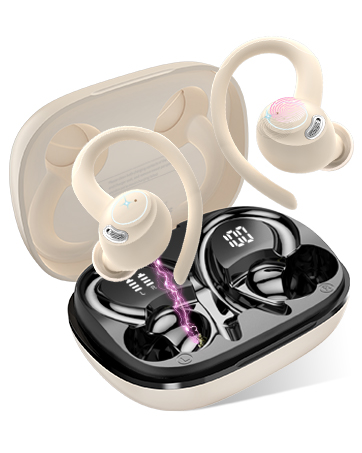
Image 3.1: Component Diagram. This image illustrates the key parts of the earbuds and charging case, including Mic 1, LED Indicator, Mic 2, Charging Pin on the earbuds, and the Dual LED Display and Type-C Input on the charging case.
- Earbuds: Equipped with Mic 1, LED Indicator, Mic 2, and Charging Pins.
- Uzlādes futrālis: Features a Dual LED Display for battery status and a Type-C Input for charging.
4. Iestatīšana
4.1. Austiņu un maciņa uzlādēšana
Pirms pirmās lietošanas reizes pilnībā uzlādējiet austiņas un uzlādes futrāli.
- Connect the USB-C charging cable to the Type-C input port on the charging case.
- Pievienojiet otru kabeļa galu USB barošanas avotam (piem., datoram, sienas adapterim).
- Ievietojiet austiņas uzlādes futrālī. Lai sāktu uzlādi, pārliecinieties, vai tās ir pareizi ievietotas.
Uzlādes korpusa LED displejā būs redzams akumulatora uzlādes procents.tage of the case and individual charge levels for each earbud. A full charge takes approximately 1.5 hours. The earbuds provide up to 6 hours of playback on a single charge, with the charging case extending total playback to 30 hours.

Image 4.1: Charging Case LED Display. This image shows the charging case with its LED display indicating the battery levels for both the case and the individual left and right earbuds.
4.2. Savienošana pārī ar jūsu ierīci
The Jesebang BD86 earbuds feature one-touch automatic pairing.
- Pārliecinieties, vai jūsu ierīcē ir ieslēgts Bluetooth.
- Atveriet uzlādes futrāli un izņemiet abas austiņas. Tās automātiski ieslēgsies un pāries savienošanas pārī režīmā.
- On your device, search for Bluetooth devices and select "BD86" from the list.
- Once connected, you will hear a confirmation prompt, and the earbuds' LED indicators will stop flashing.
After the initial pairing, the earbuds will automatically connect to the last paired device when removed from the case.

Image 4.2: Bluetooth Pairing. This image displays a smartphone screen with the Bluetooth settings open, showing the "BD86" earbuds available for connection.
5. Lietošanas instrukcijas
5.1. Pieskarieties Vadības elementiem
The Jesebang BD86 earbuds feature intuitive touch controls for managing audio playback and calls.

Image 5.1: Smart Touch Controls. This diagram illustrates the various touch gestures and their corresponding functions on the earbuds, including changing tracks, play/pause, rejecting calls, activating voice assistants, power on/off, and answering calls.
| Žests | Funkcija |
|---|---|
| Touch and hold (L/R) for 2 seconds | Mainīt celiņu |
| Veiciet dubultskārienu (L/R) | Play/Pause, Reject Call |
| Trīskāršs pieskāriens (L/R) | Balss palīga aktivizēšana (Siri, Google palīgs) |
| Touch and hold (L/R) for 5 seconds | Ieslēgšana/izslēgšana |
| Viens pieskāriens (L/R) | Atbildēt uz zvanu |
5.2. Audio funkcijas
The BD86 earbuds are designed for an immersive audio experience:
- HiFi stereo skaņa: Equipped with 14.2mm composite titanized diaphragm dynamic drivers, these earbuds restore high-frequency elements for rich, detailed audio.
- Notīrīt zvanus: Integrated with 4 HD microphones and ENC (Environmental Noise Cancellation) technology to ensure clear call quality by reducing background noise.
- Vēja trokšņa samazināšana: Advanced wind flow technology minimizes wind noise, ensuring clear communication even in windy conditions.

Image 5.2: Acoustic Design. This image illustrates the internal acoustic components of the earbud, highlighting the 13mm drivers, ENC Noise Cancelling, and HD Call capabilities.
5.3. Ūdensizturība
The earbuds are rated IP7 waterproof, providing protection against sweat and rain. This allows for use during sports and in various weather conditions.

Image 5.3: IP7 Water Resistance. The image shows the earbuds with water droplets, symbolizing their IP7 dust and water resistance, suitable for daily use.
6. Apkope
Lai nodrošinātu austiņu ilgmūžību un optimālu veiktspēju, ievērojiet šīs apkopes vadlīnijas:
- Tīrīšana: Regulāri tīriet austiņas un uzlādes futrāli ar mīkstu, sausu, neplūksnojošu drānu. Izvairieties no abrazīvu materiālu vai spēcīgu ķīmisku vielu lietošanas.
- Uzlādes kontakti: Periodically clean the charging contacts on both the earbuds and inside the case with a dry cotton swab to ensure a good connection.
- Uzglabāšana: Kad austiņas netiek lietotas, uzglabājiet tās to uzlādes futrālī, lai pasargātu tās no putekļiem un bojājumiem.
- Izvairieties no ekstremāliem apstākļiem: Nepakļaujiet austiņas ilgstoši ekstremālām temperatūrām, augstam mitrumam vai tiešiem saules stariem.
7. Traucējummeklēšana
If you encounter any issues with your Jesebang BD86 earbuds, refer to the following common solutions:
| Problēma | Iespējamais risinājums |
|---|---|
| Austiņas netiek savienotas pārī | Ensure earbuds are charged. Turn off and on your device's Bluetooth. Place earbuds back in case, close, then reopen and try pairing again. |
| Nav skaņas no vienas austiņas | Check individual earbud charge. Try re-pairing both earbuds. Ensure both earbuds are removed from the case simultaneously. |
| Zems skaļums vai slikta skaņas kvalitāte | Adjust volume on both your device and the earbuds. Clean any debris from the earbud speakers. Ensure earbuds are properly seated in your ears. |
| Uzlādes problēmas | Ensure the charging cable is securely connected. Clean the charging contacts on both earbuds and the case. Try a different USB power source or cable. |
| Austiņas bieži atvienojas | Ensure you are within the Bluetooth range (up to 15 meters). Avoid obstacles between your device and the earbuds. Try re-pairing. |
8. Specifikācijas
| Funkcija | Detaļas |
|---|---|
| Modelis | BD86 |
| Zīmols | Džesebanga |
| Bluetooth versija | 5.4 |
| Wireless Range | Līdz 15 metriem |
| Austiņu akumulatora darbības laiks | Līdz 6 stundām (ar vienu uzlādi) |
| Kopējais spēles laiks (ar futrāli) | Līdz 30 stundām |
| Uzlādes laiks | Apm. 1.5 stundas |
| Ūdensizturība | IP7 (Impermeabile) |
| Mikrofons | 4 HD Mics with ENC Noise Cancellation |
| Vadītāja izmērs | 14.2mm Composite Titanized Diaphragm Dynamic Driver |
| Kontroles metode | Pieskarieties vadībai |
| Balss asistenta atbalsts | Siri, Google palīgs |
| Uzlādes ports | USB-C |
| Svars (vienai austiņai) | 3.3 grami |
| Izmēri (produkts) | 5.5 x 4.5 x 1.8 cm |
| Saderīgas ierīces | IOS, Android, PC, Tablets, Laptops, Car Audio Systems |
9. Garantija un atbalsts
9.1. Preču garantija
Jesebang offers a 2 gada garantija for the BD86 Wireless Earbuds. This warranty covers manufacturing defects and ensures that any issues arising within this period will be addressed. Please retain your proof of purchase for warranty claims.

Image 9.1: 2 Years Warranty. This image displays a badge indicating a 2-year warranty, highlighting Jesebang's commitment to quality.
9.2. Klientu atbalsts
Our professional customer support team is available 24/7 to assist you with any questions or concerns you may have regarding your product. Our goal is to provide high-level customer support to ensure a satisfying purchase experience.
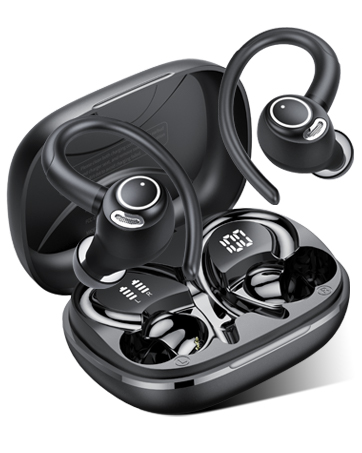
Image 9.2: 24/7 Customer Support. This image shows hands holding a glowing clock icon with '24/7', representing continuous customer support.
For support, please refer to the contact information provided with your product packaging or visit the official Jesebang webvietne.
