Ievads
Thank you for choosing the Epson EB-L210SF projector. This manual provides essential information for the safe and efficient use of your projector. Please read it thoroughly before operating the device and keep it for future reference.
The Epson EB-L210SF is a 3LCD Full-HD projector designed for clear and vibrant image projection. It features a laser light source for long-lasting performance.
Svarīga drošības informācija
- Lāzera drošība: Do not look directly into the projector lens when the laser light source is active. Avoid direct eye exposure to the laser beam.
- Ventilācija: Ensure adequate ventilation around the projector. Do not block ventilation openings. Overheating can cause damage.
- Barošanas avots: Izmantojiet tikai šim projektoram norādīto barošanas bloku.
- Apstrāde: Rīkojieties ar projektoru uzmanīgi. Izvairieties no tā nomešanas vai spēcīgu triecienu iedarbības.
- Tīrīšana: Pirms tīrīšanas atvienojiet strāvas vadu. Izmantojiet mīkstu, sausu drānu. Nelietojiet šķidrus vai aerosola tīrīšanas līdzekļus.
Iestatīšana
1. Izpakošana un novietošana
Carefully remove the projector and all accessories from the packaging. Place the projector on a stable, level surface. Ensure there is sufficient space around the projector for proper ventilation.

1. attēls. Priekšpuse un sāni view of the Epson EB-L210SF projector, showing the lens and ventilation grilles.
2. Strāvas pieslēgšana
- Pievienojiet komplektā iekļauto strāvas vadu projektora maiņstrāvas ieejai.
- Pievienojiet otru strāvas vada galu iezemētai elektrības kontaktligzdai.
3. Ievades avotu pievienošana
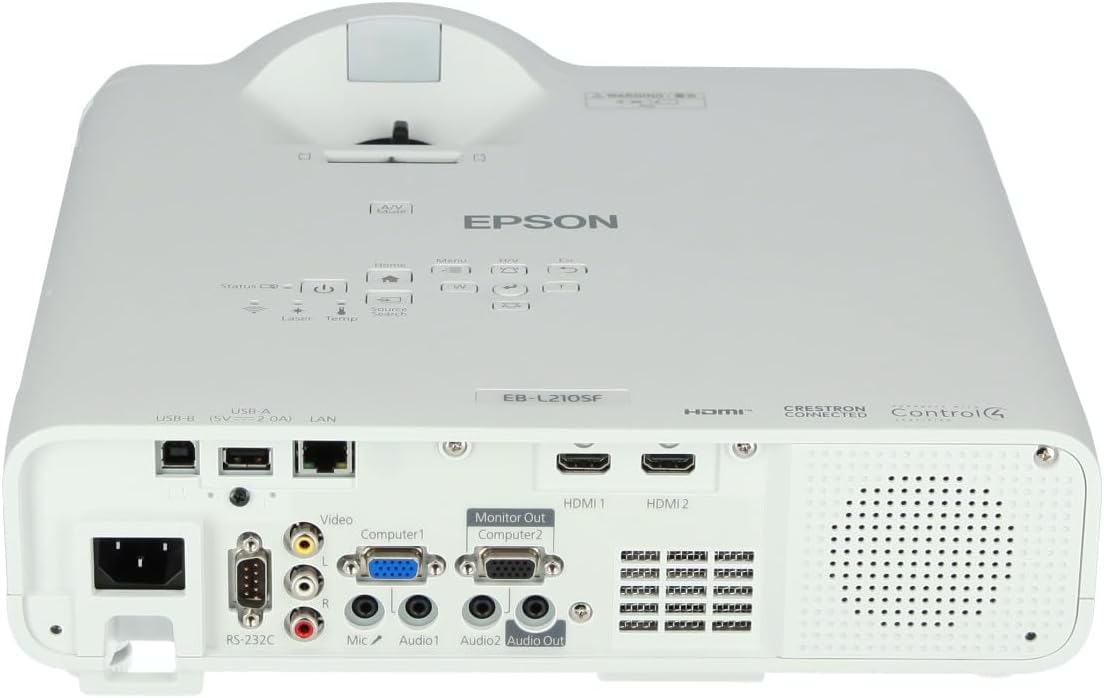
The projector supports various input sources. Connect your device (computer, Blu-ray player, etc.) to the appropriate port on the projector's rear panel.

Figure 2: Rear panel of the projector, displaying various input and output ports including HDMI, Computer (VGA), Video, USB, and Audio connections.
- HDMI: Connect an HDMI cable from your device to one of the HDMI ports (HDMI 1 or HDMI 2).
- Dators (VGA): Connect a VGA cable from your computer to the Computer 1 or Computer 2 port. For audio, connect a separate audio cable to Audio 1 or Audio 2.
- Video: Connect composite video and audio cables to the Video and Audio (R/L) ports.
- USB: Use the USB-A port for connecting USB storage devices or the USB-B port for display over USB.
- LAN: Connect an Ethernet cable for network control and monitoring.
4. Initial Power On and Image Adjustment
- Press the power button on the projector or remote control to turn on the device. The power indicator will illuminate.
- Pielāgojiet fokusa gredzens ap objektīvu, līdz attēls ir ass un skaidrs.
- Izmantojiet zoom lever (if available) to adjust the image size.
- Ja attēls izskatās trapecveida, izmantojiet stūrakmens korekcija feature (manual or automatic) to square the image. Refer to the Operating section for details on menu navigation.
Projektora darbība
1. Control Panel Overview
The control panel on top of the projector allows access to various functions and settings.
3. attēls: augšdaļa view of the projector, highlighting the control panel with buttons for power, menu, source selection, and navigation.
- Barošanas poga: Ieslēdz vai izslēdz projektoru.
- Avota meklēšana: Pārslēdzas starp pieejamajiem ievades avotiem.
- Izvēlnes poga: Atver ekrāna displeja (OSD) izvēlni.
- Navigation Buttons (Arrow keys): Izmanto, lai pārvietotos pa izvēlnes opcijām.
- Ievadīšanas poga: Apstiprina izvēlnē veiktās izvēles.
- Esc Button: Iziet no pašreizējās izvēlnes vai atgriežas iepriekšējā ekrānā.
- Mājas poga: Accesses the home screen or quick settings.
- A/V izslēgšana: Temporarily mutes audio and blanks the screen.
2. Ievades avota izvēle
Nospiediet pogu Avota meklēšana button on the control panel or remote control to cycle through the connected input sources (e.g., HDMI 1, HDMI 2, Computer 1, Video). The projector will automatically detect and display the active source.
3. Adjusting Image and Audio Settings
Nospiediet pogu Izvēlne button to access the projector's on-screen display (OSD) menu. Use the navigation buttons to browse categories such as:
- Attēls: Adjust brightness, contrast, color, tint, sharpness, and color temperature.
- Signāls: Configure input signal settings, aspect ratio, and overscan.
- Iestatījumi: General projector settings like language, display options, and power management.
- Audio: Adjust volume, mute, and audio input selection.
Izvēlieties opciju un nospiediet Ievadiet to modify its value. Press Esc lai izietu no izvēlnes.
Apkope
1. Projektora tīrīšana
- Ārpuse: Wipe the projector's exterior with a soft, dry, lint-free cloth. For stubborn dirt, dampviegli samitriniet drānu ar ūdeni un pēc tam nosusiniet.
- Objektīvs: Gently wipe the lens with a lens cleaning cloth or lens paper. Avoid using abrasive materials or excessive force.
- Gaisa filtrs: Regularly check and clean the air filter to prevent dust buildup, which can affect performance and cause overheating. Refer to the projector's on-screen menu for filter maintenance reminders.
2. Lāzera gaismas avots
The Epson EB-L210SF uses a laser light source, which offers a long operational life and does not require lamp replacement. No user maintenance is typically required for the laser light source itself.
Problēmu novēršana
Ja rodas problēmas ar projektoru, skatiet tālāk norādītās bieži sastopamās problēmas un risinājumus.
| Problēma | Iespējamais cēlonis/risinājums |
|---|---|
| Nav projicēts attēls |
|
| Attēls ir izplūdis vai neass |
|
| Attēls ir deformēts (trapecveida) |
|
| Nav skaņas |
|
| Projector is not wireless | The Epson EB-L210SF is not inherently a wireless projector. Wireless functionality typically requires an optional external wireless adapter, which is sold separately. Please consult Epson's official website or your retailer for compatible wireless adapters. |
| Overheating warning (Temp indicator) |
|
Specifikācijas
| Funkcija | Detaļas |
|---|---|
| Modeļa numurs | V11HA75080 |
| Displeja izšķirtspēja | 1920 x 1080 (Full HD) |
| Savienojamības tehnoloģija | HDMI, VGA, USB, LAN |
| Produkta izmēri | 11.81 x 11.81 x 11.81 collas |
| Preces svars | 10.14 mārciņas |
| Gaismas avots | Lāzers |
| Ražotājs | Epson |
| Ieteicamie lietojumi | Uzraudzība |
| Īpaša iezīme | Viegls |
| Nepieciešamas baterijas | 1 AAAA (for remote control, not included with projector unit) |
| Datums pirmais pieejams | 14. gada 2023. novembris |
Garantija un atbalsts
Detalizētu informāciju par garantiju skatiet produktam pievienotajā garantijas kartē vai apmeklējiet oficiālo Epson tīmekļa vietni. webvietne. Garantijas noteikumi un nosacījumi var atšķirties atkarībā no reģiona.
For technical support, product registration, or to download the latest drivers and software, please visit the official Epson support website or contact Epson customer service in your region. Contact information can typically be found on the Epson webvietne.


