1. Ievads
This manual provides essential information for the safe and effective operation of your VOLTCRAFT DSO-2202H + AFG Handheld Oscilloscope. This versatile device combines the functions of an oscilloscope, a multimeter, and an arbitrary function generator (AFG) into a single portable unit. Please read this manual thoroughly before using the device to ensure proper handling and to prevent damage or injury.
2. Drošības informācija
Always observe the following safety precautions to avoid personal injury and prevent damage to the instrument or other equipment.
- Izlasiet visus norādījumus: Before operating the device, read and understand all safety and operating instructions.
- Use proper probes: Use only probes and accessories rated for the voltage and current of the measurement.
- Izvairieties no mitriem apstākļiem: Nedarbiniet ierīci mitrā vai damp vides.
- Zemējums: Ensure proper grounding when connecting to mains power or high-voltage ķēdes.
- Neatveriet casing: Refer all servicing to qualified service personnel. Opening the casing var pakļaut jūs bīstamam tilpumamtages.
- Observe all ratings: Nepārsniedziet ierīces maksimālo ieejas jaudu.
3. Produkts beidziesview
The VOLTCRAFT DSO-2202H + AFG is a compact, multi-functional test instrument designed for various electrical measurement tasks. It features a clear color LCD display and intuitive controls.
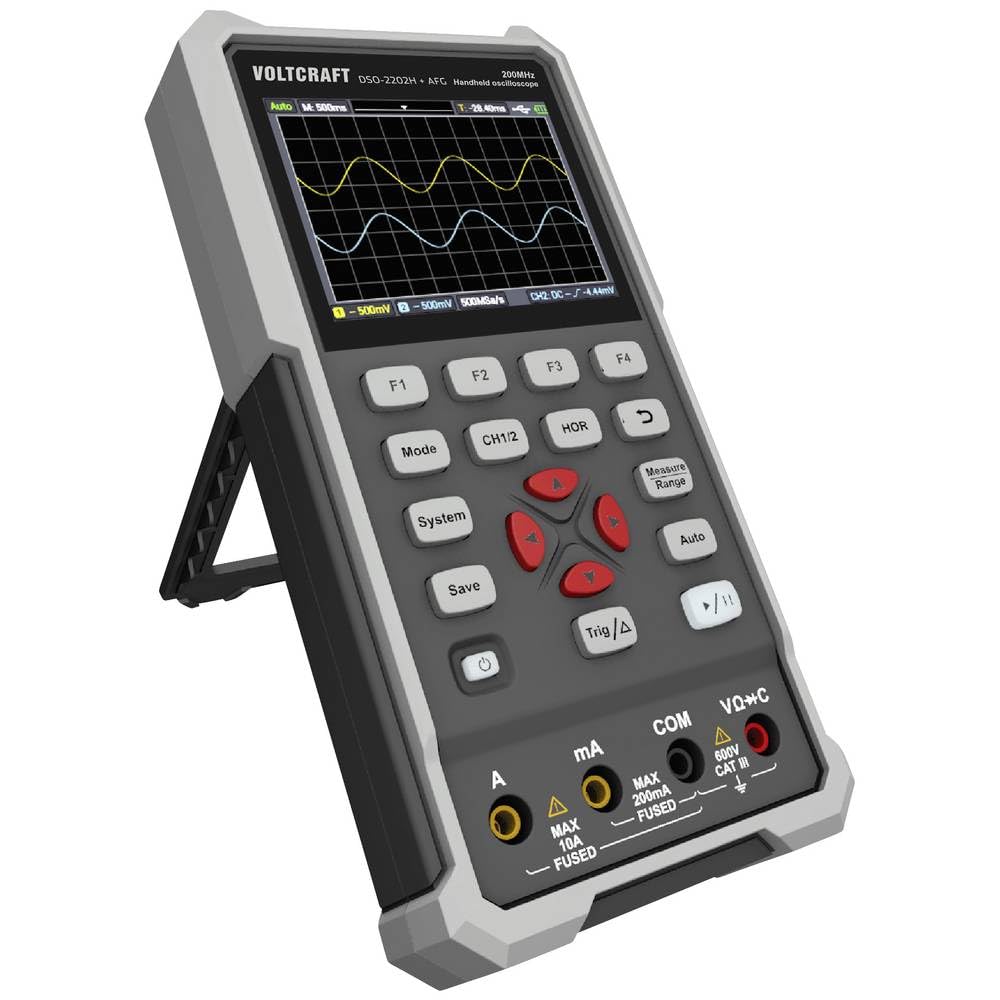
1. attēls. Priekšpuse view of the VOLTCRAFT DSO-2202H + AFG Handheld Oscilloscope with connected test probes. The display shows a voltage reading, and the control panel with function buttons and navigation keys is visible below.
Galvenās funkcijas:
- 3-in-1 Oscilloscope, Multimeter, and Waveform Generator
- 3.5-inch (8.89 cm) Color LCD Screen (320 x 240 pixels)
- USB Type-C Interface for connectivity and data storage
- Izturīgs un izturīgs dizains
4. Iestatīšana
Follow these steps for initial setup of your device.
4.1 Ieslēgšana/izslēgšana
- Lai ieslēgtu ierīci, nospiediet un turiet Jauda button located on the side/top panel.
- The color LCD screen will illuminate, displaying the startup sequence.
- Lai izslēgtu, nospiediet un turiet Jauda pogu vēlreiz, līdz ierīce izslēdzas.
4.2 Zondu pievienošana
For oscilloscope functions, connect the oscilloscope probes to the BNC connectors. For multimeter functions, connect the test leads to the appropriate input jacks (VΩ+C, mA, A, COM) at the bottom of the device.
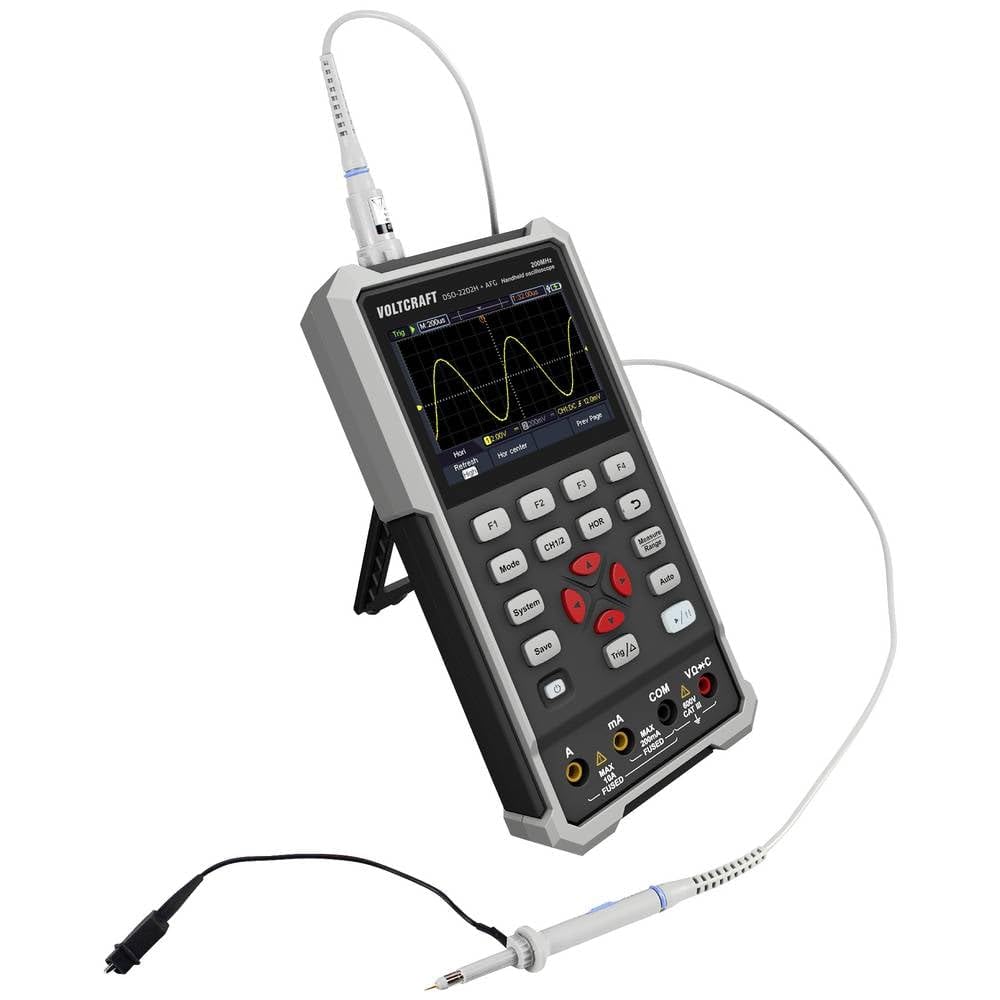
2. attēls: sāni view of the device showing the kickstand extended for desktop use and an oscilloscope probe connected to the BNC input. The multimeter input jacks are visible at the bottom.
5. Lietošanas instrukcijas
The DSO-2202H + AFG offers three primary modes of operation: Oscilloscope, Multimeter, and Arbitrary Function Generator.
5.1 Osciloskopa režīms
This mode allows you to visualize and analyze electrical signals. The device features 2 channels and a 200MHz bandwidth.
- Nospiediet pogu Režīms button to select Oscilloscope mode.
- Connect the oscilloscope probe(s) to the circuit under test.
- Izmantojiet CH1/2 button to switch between channels or view gan.
- Adjust the vertical sensitivity (V/div) and horizontal time base (s/div) using the navigation buttons.
- Izmantojiet Trig/Δ button to set trigger conditions for stable waveform display.
- The Auto button can automatically adjust settings for a stable waveform.

Figure 3: The device displaying a waveform in oscilloscope mode. The screen shows voltage and time divisions, indicating a signal measurement.
5.2 Multimetra režīms
The multimeter function allows for precise measurements of voltage, current, resistance, capacitance, and continuity.
- Nospiediet pogu Režīms button to select Multimeter mode.
- Connect the test leads to the appropriate input jacks (e.g., VΩ+C for voltage/resistance/capacitance, A or mA for current, COM for common).
- Select the desired measurement function (e.g., DC Voltage, AC sējtage, Resistance) using the function buttons (F1-F4) or navigation keys.
- Displejā nolasiet mērījuma vērtību.
5.3 Arbitrary Function Generator (AFG) Mode
The AFG allows you to generate various waveforms for testing circuits.
- Nospiediet pogu Režīms button to select AFG mode.
- Connect the output of the AFG to the circuit requiring a signal input.
- Use the function buttons (F1-F4) and navigation keys to select waveform type (sine, square, triangle, etc.), frequency, ampgaismas platums un nobīde.
- Adjust parameters as needed for your application.
5.4. Datu glabāšana
The USB Type-C port can be used for data storage. Connect the device to a computer using a USB Type-C cable to transfer saved waveforms or measurement data.
6. Apkope
Pareiza apkope nodrošina ierīces ilgmūžību un precizitāti.
- Tīrīšana: Regulāri tīriet ierīci ar mīkstu, sausu drānu. Nelietojiet abrazīvus tīrīšanas līdzekļus vai šķīdinātājus.
- Uzglabāšana: Uzglabājiet ierīci vēsā, sausā vietā, pasargājot no tiešiem saules stariem un ekstremālām temperatūrām.
- Akumulatora kopšana: If the device has an internal rechargeable battery, ensure it is charged periodically if stored for long periods to maintain battery health.
- Zondes aprūpe: Inspect probes and test leads for damage before each use. Replace any damaged accessories immediately.
7. Traucējummeklēšana
Ja rodas problēmas ar ierīci, skatiet tālāk norādītās bieži sastopamās problēmu novēršanas darbības.
- Ierīce neieslēdzas: Ensure the device is charged or connected to a power source. Check the power button for proper engagement.
- Nav displeja: If the device powers on but the screen is blank, try adjusting the display brightness (if available) or restarting the device.
- Nepareizi rādījumi: Verify that probes and test leads are correctly connected and not damaged. Ensure the correct measurement mode and range are selected. Calibrate the device if necessary (refer to advanced settings or contact support).
- Nestabila viļņu forma: In oscilloscope mode, adjust the trigger level, trigger source, and time base settings. Use the Auto button for initial setup.
For persistent issues, contact VOLTCRAFT customer support or your retailer.
8. Specifikācijas
| Specifikācija | Vērtība |
|---|---|
| Ražotājs | VOLTCRAFT |
| Modeļa numurs | VC-13438620 (DSO-2202H + AFG) |
| Produkta izmēri (G x P x A) | 17 x 12 x 40 cm |
| Svars | 600 grami |
| Materiāls | Plastmasa |
| Osciloskopa joslas platums | 200 MHz |
| Kanāli | 2 kanāls |
| Sample Likme | 1 GSa/s |
| Atmiņas dziļums | 8 kpts |
| Izšķirtspēja | 8 bits |
| Displejs | 3.5-inch (8.89 cm) Color LCD (320 x 240 pixels) |
| Interfeiss | C tipa USB |
| Mērīšanas sistēma | Metrika |
| Baterijas ir iekļautas | Nē |
| Nepieciešamas baterijas | Nē |
9. Garantija un atbalsts
For warranty information, please refer to the documentation provided with your purchase or contact your retailer. For technical support, visit the official VOLTCRAFT webvietnē vai sazinieties ar klientu apkalpošanas nodaļu.