ANCEL AD530, BM200 Pro

ANCEL AD530 OBD2 Scanner and BM200 Pro Battery Monitor Instruction Manual

Comprehensive guide for the setup, operation, and maintenance of your ANCEL AD530 OBD2 Scanner and ANCEL BM200 Pro Battery Monitor.

Ievads

This manual provides detailed instructions for using your ANCEL AD530 OBD2 Scanner and ANCEL BM200 Pro Battery Monitor. This package includes one (1) ANCEL AD530 Code Reader and one (1) ANCEL BM200 Pro Battery Monitor. Please read this manual thoroughly before operation to ensure proper use and to maximize the benefits of these diagnostic tools.

ANCEL AD530 OBD2 Scanner

1. Produkts beidziesview

The ANCEL AD530 is a full-function OBD2 diagnostic tool designed for all vehicles. It provides comprehensive diagnostic capabilities to help identify and resolve vehicle issues efficiently.

ANCEL AD530 OBD2 Scanner displaying various diagnostic functions

1. attēls: ANCEL AD530 displaying its full range of OBD2 functions, including reading and erasing DTCs, I/M readiness, live data stream, O2 sensor test, on-board monitor, EVAP system test, freeze frame, DTC lookup, vehicle information, battery test, and VIN information.

Galvenās funkcijas ietver:

  • Lasīt un dzēst DTC: Retrieve and clear Diagnostic Trouble Codes.
  • I/M Readiness Test: Check emission-related systems' readiness status.
  • Tiešraides datu plūsma: View real-time sensor data.
  • O2 sensora tests: Monitor and test oxygen sensors.
  • Borta monitora pārbaude: Piekļūstiet borta diagnostikas uzraudzības testu rezultātiem.
  • EVAP sistēmas pārbaude: Initiate a test of the evaporative emission system.
  • Fiksēt kadra dati: View vehicle parameters recorded when an emission-related fault occurs.
  • DTC meklēšana: Built-in library for code definitions.
  • Transportlīdzekļa informācija: Iegūt VIN, CIN un CVN.
  • Akumulatora pārbaude: Basic battery voltage pārbaude.

2. Iestatīšana un savienojums

To begin using the ANCEL AD530, connect it to your vehicle's OBD2 port. The port is typically located under the dashboard on the driver's side.

  1. Locate the 16-pin OBD2 Data Link Connector (DLC) in your vehicle.
  2. Plug the AD530's OBD2 cable into the vehicle's DLC.
  3. Ierīce ieslēgsies automātiski.

3. Operating the ANCEL AD530

Navigate the AD530 using the directional buttons and the "OK" button. The "ESC" button returns to the previous menu, and the "I/M" button provides quick access to I/M Readiness status.

3.1. Emission Test Readiness (I/M Readiness)

ANCEL AD530 displaying I/M Readiness status for emission test

2. attēls: The ANCEL AD530 showing the I/M Readiness screen, indicating the status of various emission monitors (e.g., IGN, MIS, FUEL, CCM, CAT, EVAP, O2S, AIR, HTR, EGR) with checkmarks for 'Ready' and crosses for 'Not Ready'.

This function checks if your vehicle's emission systems are ready for an inspection. A green checkmark indicates the monitor has completed its diagnostic cycle, while a red 'X' means it has not. This helps ensure your vehicle passes exhaust emission tests.

3.2. Reading and Clearing Trouble Codes

  1. From the main menu, select "OBDII" and press "OK".
  2. Choose "Read Codes" to view current, pending, and permanent Diagnostic Trouble Codes (DTCs).
  3. To clear codes, select "Erase Codes". Piezīme: Clearing codes will also clear freeze frame data and reset I/M readiness monitors. Ensure you have addressed the underlying issue before clearing codes.

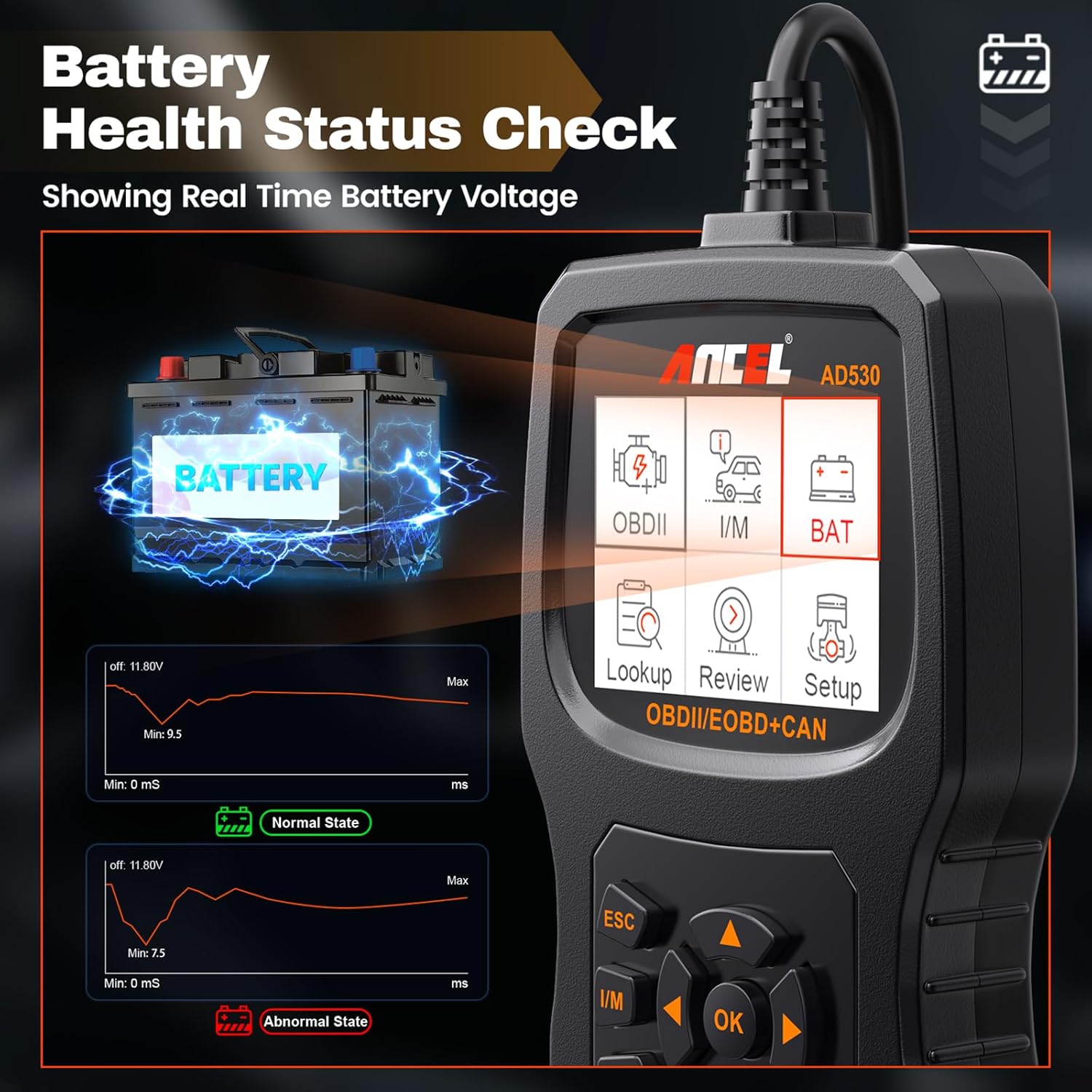
3.3. Battery Health Status Check

ANCEL AD530 displaying real-time battery voltage grafiks

3. attēls: The ANCEL AD530 showing a real-time graph of battery voltage, indicating normal and abnormal states with corresponding voltage ranges. This helps in monitoring the vehicle's battery health.

The AD530 can display real-time battery voltage, providing a quick assessment of your vehicle's battery health. This feature helps in identifying potential battery issues early.

ANCEL BM200 Pro akumulatora monitors

1. Produkts beidziesview

The ANCEL BM200 Pro is a wireless battery monitor designed to provide continuous, real-time monitoring of your vehicle's 12-volt lead-acid battery. It offers multiple test functions and features for comprehensive battery health management.

ANCEL BM200 Pro display unit showing various battery test functions

4. attēls: The ANCEL BM200 Pro display unit illustrating its multi-test functions, including Battery Test, Cranking Test, Charging Test, Voltage Test, State of Health (SoH), State of Charging (SoC), and Temperature Display.

Key features and functions include:

  • Akumulatora pārbaude: Assesses overall battery health.
  • Palaišanas tests: Evaluates the starting system performance.
  • Uzlādes pārbaude: Monitors the alternator's charging output.
  • Voltage pārbaude: Reālā laika sējtage uzraudzība.
  • State of Health (SoH) & State of Charging (SoC): Provides detailed battery status.
  • Temperatūras displejs: Monitors battery temperature.
  • 433MHz Wireless Transmission: Stable and convenient data transmission up to 70 feet.
  • Built-in Alarm Function: Alerts for abnormal battery conditions.
  • Two Charging Modes: Solar and Type-C for the display unit.
  • IP67 ūdensizturīgs dizains: Ensures durability in various conditions.
  • Ugunsdrošs materiāls: Enhanced safety.
  • Zems enerģijas patēriņš: Efficient operation with automatic connection.
  • Drošības aizsardzība: Reverse connection, overheat, short circuit protection, and built-in fuse.
  • Built-in Shock Sensor: Automatic sleep mode to save power.

2. Uzstādīšana

Proper installation of the BM200 Pro monitor unit is crucial for accurate data collection and reliable wireless transmission.

Four steps for installing the ANCEL BM200 Pro battery monitor

5. attēls: Visual guide for the four installation steps of the ANCEL BM200 Pro: 1. Connect black clip to negative terminal. 2. Connect red clip to positive terminal. 3. Stick the monitor unit onto the battery surface. 4. Place the display unit in front of the windshield.

  1. Savienot negatīvo: Firmly connect the black clip of the monitor unit to the negative (-) pole of the vehicle battery.
  2. Pozitīvs savienojums: Firmly connect the red clip of the monitor unit to the positive (+) pole of the vehicle battery.
  3. Mount Monitor Unit: Stick the monitor unit onto the battery surface using the provided double-sided tape.
  4. Position Display Unit: Place the display unit in a suitable location on your dashboard, typically in front of the windshield, ensuring clear visibility and optimal wireless reception.

Svarīgi padomi:

  • Ensure the device is securely installed for the first time. Loose installation may cause abnormal data capture and display.
  • Verify the RF signal icon in the upper right corner of the display. A visible RF symbol indicates the display is successfully connected to the monitor unit and is receiving real-time data. If the RF symbol does not appear, try restarting the display unit.

3. Operating the ANCEL BM200 Pro

The BM200 Pro continuously monitors your battery and transmits data wirelessly to the display unit. The display provides real-time information and alerts.

3.1. Battery Test Functions

The display unit shows various battery parameters:

  • Akumulatora pārbaude: Provides an overall assessment of battery health, often displayed as a percentage (SoH).
  • Palaišanas tests: When the engine starts, the device automatically tests the cranking system, displays the cranking voltage, and determines if the starting process is abnormal.
  • Uzlādes pārbaude: After the car starts, it monitors the charging system, displays the charging percentage in real-time, and assesses the alternator's working condition.
  • Voltage pārbaude: Continuously monitors battery voltage, helping to predict potential battery maintenance issues.

3.2. Bezvadu pārraide

ANCEL BM200 Pro showing 433MHz wireless transmission range

6. attēls: The ANCEL BM200 Pro demonstrating its 433MHz wireless transmission capability, allowing stable data transfer between the battery monitor and the display unit over a distance of 30-70 feet.

The BM200 Pro utilizes 433MHz wireless transmission technology, offering a stable connection and convenient monitoring from a distance of 30 to 70 feet. This allows for effective battery monitoring even when outside the vehicle.

3.3. Built-in Alarm Function

ANCEL BM200 Pro alarm function indicating various abnormal conditions

7. attēls: The ANCEL BM200 Pro's built-in alarm function, highlighting alerts for low voltage, low battery, high temperature, abnormal cranking, and abnormal charging, providing timely warnings for proactive maintenance.

The device provides timely automatic alerts for abnormal data, including:

  • Zems tilpumstage
  • Zems akumulators
  • Augsta temperatūra
  • Abnormal cranking
  • Nenormāla uzlāde

These alerts help ensure proactive maintenance and prevent unexpected battery failures.

3.4. Charging the Display Unit

ANCEL BM200 Pro display unit showing solar and Type-C charging options

8. attēls: The ANCEL BM200 Pro display unit illustrating its two charging modes: solar charging via the integrated panel and Type-C charging (5V charger) for simultaneous power replenishment.

The BM200 Pro display unit supports two charging methods:

  • Saules uzlāde: The integrated solar panel allows for continuous charging when exposed to sunlight.
  • C tipa uzlāde: Connect a 5V Type-C charger for faster or indoor charging.

Apkope

Lai nodrošinātu ANCEL AD530 un BM200 Pro ilgmūžību un optimālu veiktspēju, ievērojiet šīs apkopes vadlīnijas:

  • Tīrīšana: Izmantojiet mīkstu, damp cloth to clean the devices. Do not use abrasive cleaners or solvents.
  • Uzglabāšana: Store the devices in a dry, cool environment away from direct sunlight and extreme temperatures.
  • Kabeļa kopšana: Avoid bending or crimping the OBD2 cable excessively.
  • BM200 Pro Monitor Unit: Ensure the battery clips are clean and free of corrosion for a good connection. The unit is IP67 waterproof, but avoid prolonged submersion.
  • BM200 Pro Display Unit: Uzturiet saules paneli tīru, lai nodrošinātu efektīvu uzlādi.

Problēmu novēršana

If you encounter issues with your ANCEL AD530 or BM200 Pro, refer to the following common troubleshooting steps:

  • Device Not Powering On (AD530):
    • Pārliecinieties, vai OBD2 kabelis ir droši pievienots transportlīdzekļa DLC.
    • Pārbaudiet transportlīdzekļa akumulatora spriegumutage; the AD530 draws power from the vehicle.
  • No RF Signal on BM200 Pro Display:
    • Verify that the BM200 Pro monitor unit is correctly connected to the battery terminals.
    • Ensure the monitor unit is securely mounted and not obstructed.
    • Try restarting the display unit.
    • Confirm the display unit is within the 30-70 feet wireless transmission range of the monitor unit.
  • Inaccurate Readings (BM200 Pro):
    • Pārbaudiet, vai akumulatora spailēs nav vaļīgu savienojumu.
    • Ensure the battery clips are clean and free of corrosion.
    • Verify the monitor unit is firmly attached to the battery.
  • Alarms Triggering Frequently (BM200 Pro):
    • If alarms for low voltage, low battery, high temperature, abnormal cranking, or charging are frequent, it indicates a potential issue with your vehicle's battery or charging system. It is recommended to have your vehicle's battery and charging system professionally inspected.

Specifikācijas

ANCEL AD530 OBD2 Scanner

  • Displejs: Krāsu LCD
  • Darbības sējtage: 9–18 V līdzstrāva (no transportlīdzekļa OBD2 porta)
  • Atbalstītie protokoli: OBDII/EOBD/CAN
  • Funkcijas: Read/Clear DTCs, I/M Readiness, Live Data, O2 Sensor Test, On-Board Monitor Test, EVAP Test, Freeze Frame, DTC Lookup, Vehicle Info, Battery Test.

ANCEL BM200 Pro akumulatora monitors

  • Akumulatora saderība: 12-Volt Lead-Acid Batteries
  • Bezvadu pārraide: 433 MHz
  • Pārraides diapazons: 30–70 pēdas (aptuveni 9–21 metri)
  • Display Charging: Saules, C tipa (5 V)
  • Enerģijas patēriņš: Approx. 2.3 mAh per hour
  • Aizsardzība: IP67 Waterproof, Flame Retardant Material, Reverse Connection Protection, Overheat Protection, Short Circuit Protection, Built-in Fuse.
  • Funkcijas: Built-in Alarm, Built-in Shock Sensor (Auto Sleep).
Vehicles compatible with ANCEL BM200 Pro 12-volt lead-acid batteries

9. attēls: The ANCEL BM200 Pro is compatible with a wide range of vehicles equipped with 12-volt lead-acid batteries, including cars, SUVs, light trucks, RVs, travel trailers, pickups, motorcycles, forklifts, boats, and mowers.

Garantija un atbalsts

ANCEL is committed to providing high-quality products and customer service. For any inquiries or support needs, please contact our professional online team.

  • Klientu apkalpošana: 24-hour reply within.
  • Atgriešana un apmaiņa: 30-day return and exchange policy.
  • Tehniskās vadlīnijas: Access to updated technical guidance.
  • Programmatūras atjauninājumi: Free software upgrades.

Lai saņemtu papildu palīdzību, lūdzu, apmeklējiet oficiālo ANCEL vietni. webvietnē vai sazinieties tieši ar viņu klientu atbalsta dienestu.

Saistītie dokumenti — AD530, BM200 Pro

Iepriekšview ANCEL AD530 Pro lietotāja rokasgrāmata: OBDII skenera un akumulatora testera rokasgrāmata
Detalizēta lietotāja rokasgrāmata ANCEL AD530 Pro, 2-in-1 automašīnas diagnostikas rīkam. Aptver OBDII funkcijas, piemēram, nolasīšanu/izslēgšanu.asinG kodi un visaptveroša automašīnu akumulatoru pārbaude, tostarp iedarbināšana, uzlāde un pulsācijas testi.
Iepriekšview ANCEL AD530 User Manual
User manual for the ANCEL AD530 vehicle diagnostic tool, covering safety precautions, general information about OBD II, using the tool's features like I/M readiness, BAT check, DTC lookup, diagnostics, updates, and feedback.
Iepriekšview ANCEL FX2000 lietotāja rokasgrāmata — profesionāls automobiļu OBD II diagnostikas rīks
Visaptveroša lietotāja rokasgrāmata ANCEL FX2000, profesionālam automobiļu OBD II diagnostikas rīkam. Šajā rokasgrāmatā ir aprakstītas produkta funkcijas, savienojums, iestatījumi, diagnostikas funkcijas, sistēmas diagnostika, palīdzības resursi, reģistrācija, programmatūras atjauninājumi, bieži uzdotie jautājumi, garantija un klientu apkalpošana.
Iepriekšview ANCEL AS500 OBD-II diagnostikas rīka lietotāja rokasgrāmata
Comprehensive user manual for the ANCEL AS500 OBD-II diagnostic scanner, covering safety precautions, general information about OBD-II, detailed instructions on using the tool's functions like DTC lookup, data stream, I/M readiness, freeze frame, O2 sensor tests, EVAP tests, vehicle information retrieval, software updates, and feedback.
Iepriekšview ANCEL AD530 Pro lietotāja rokasgrāmata
User's manual for the ANCEL AD530 Pro, a 2-in-1 OBDII and battery diagnostic tool. Learn about safety precautions, product specifications, tool description, and how to use its various functions like reading codes, erasing codes, I/M readiness, data stream, freeze frame, O2 sensor test, on-board monitor test, evap system test, and vehicle information.
Iepriekšview ANCEL BM200 akumulatora monitora lietotāja rokasgrāmata
Visaptveroša ANCEL BM200 akumulatora monitora lietotāja rokasgrāmata, kurā sīki aprakstītas tā specifikācijas, funkcijas, uzstādīšana, lietotnes lietošana un problēmu novēršana 12 V transportlīdzekļu akumulatoriem.