1. Ievads
This manual provides detailed instructions for the installation, operation, and maintenance of the Turing TP-MFD4A28 Smart Series 4MP IR Dome IP Camera. This camera features 4-megapixel resolution, TwilightVision technology for optimal low-light performance, Smart IR up to 30 meters (98 feet), and robust IP67 and IK10 ratings for outdoor and vandal-resistant use. It supports Power over Ethernet (PoE) and a 256GB MicroSD card for local storage.
Galvenās funkcijas ietver:
- Max. 4MP (2688x1520) resolution at 30/25fps
- Fiksēts objektīvs 2.8mm
- TwilightVision for optimal image clarity in low light
- Smart IR up to 30m (98ft) night vision
- IP67 weather resistance and IK10 vandal resistance
- Plašais dinamiskais diapazons (WDR)
- Power over Ethernet (PoE) atbalsts
- Support for 256GB MicroSD card
- People and Vehicle Search capabilities when used with Turing Smart Series NVR and Turing Vision Cloud
2. Drošības informācija
Please read these safety instructions carefully before using the product to prevent damage or injury.
- Barošanas avots: Use only the specified power adapter (12V DC) or a compliant Power over Ethernet (PoE) switch/injector. Incorrect voltage may damage the camera.
- Uzstādīšana: Ensure the camera is securely mounted to prevent it from falling. Professional installation is recommended for outdoor or high-altitude mounting.
- Vide: Do not expose the camera to extreme temperatures, humidity, or corrosive environments beyond its IP67 rating. Avoid direct sunlight for prolonged periods.
- Tīrīšana: Disconnect power before cleaning. Use a soft, dry cloth. Do not use strong detergents or solvents.
- Izjaukšana: Nemēģiniet izjaukt vai pārveidot kameru. Tas anulēs garantiju un var radīt bojājumus.
- Kabeļi: Protect network and power cables from being walked on or pinched, especially at plugs and the point where they exit the camera.
3. Iepakojuma saturs
Pēc izpakošanas pārliecinieties, vai visas preces ir klāt un labā stāvoklī:
- Turing TP-MFD4A28 IP Dome Camera
- Montāžas skrūves un sienas dībeļi
- Ūdensnecaurlaidīgs savienotājs Ethernet kabelim
- Quick Start Guide / Instruction Manual (this document)
- Drill Template (may be included)
Note: A power adapter (12V DC) is not always included as the camera supports PoE. A PoE switch or injector is required for PoE power.
4. Produkts beidziesview
The Turing TP-MFD4A28 is a compact dome-style IP camera designed for discreet surveillance. Its robust housing provides protection against weather and vandalism.
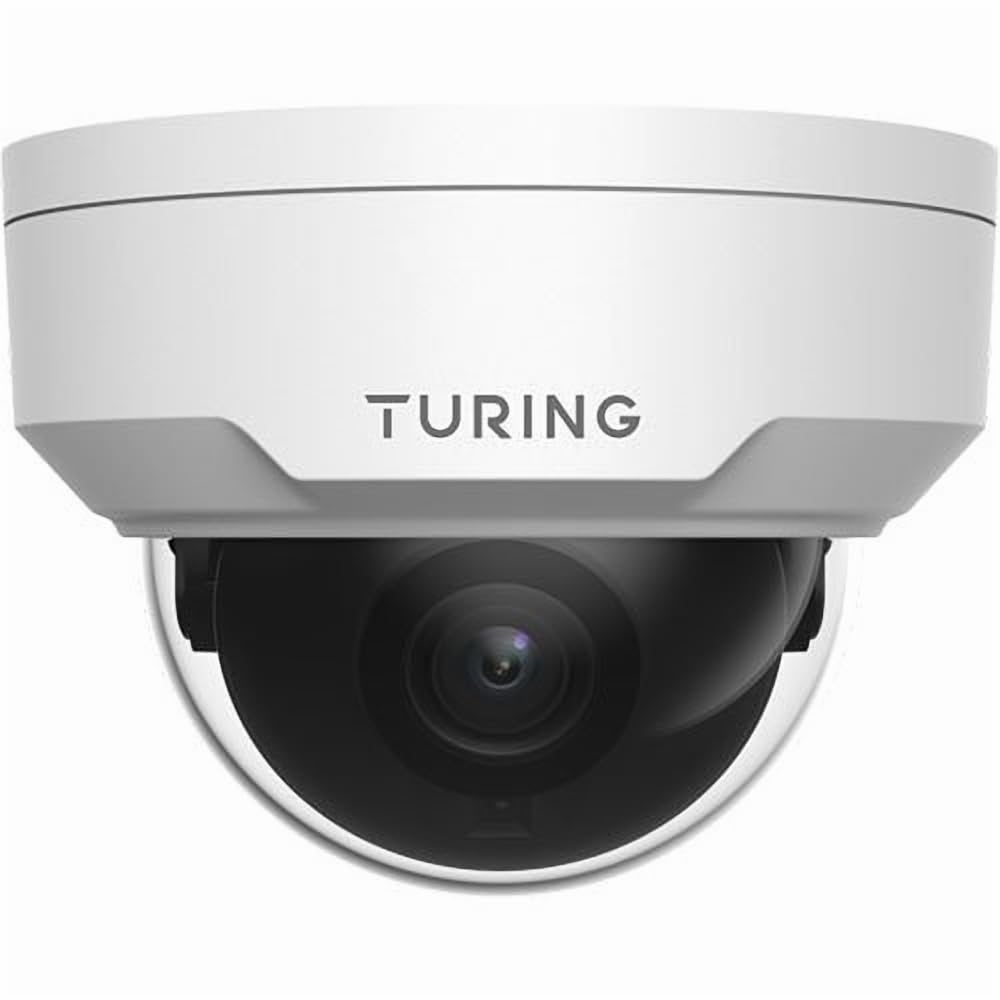
4.1. attēls: Priekšpuse view of the Turing TP-MFD4A28 4MP IR Dome IP Camera, showing its white dome design and lens.
Galvenās sastāvdaļas:
- Dome Cover: Protective cover for the lens and IR LEDs.
- Objektīvs: 2.8mm fixed lens for a wide field of view.
- IR gaismas diodes: Infrared illuminators for night vision.
- MicroSD kartes slots: Located internally, accessible by removing the dome cover.
- Atiestatīšanas poga: Located internally, used for factory reset.
- Ethernet ports (RJ45): Tīkla savienojumam un barošanas avotam, izmantojot Ethernet (PoE).
- Jaudas ieeja (12 V līdzstrāva): Optional power input if PoE is not used.
5. Iestatīšana
5.1 Physical Installation (Wall Mount)
- Izvēlieties atrašanās vietu: Select a suitable wall-mount location that provides the desired viewing angle and is within range of your network cable.
- Sagatavojiet virsmu: Use the provided drill template (if available) to mark the screw holes on the wall. Drill pilot holes.
- Mount the Camera Base: Secure the camera's mounting base to the wall using the provided screws and wall plugs.
- Maršruta kabeļi: Pass the Ethernet cable through the cable entry point on the mounting base.
5.2 Barošana un tīkla savienojums
- Ethernet savienojums: Connect an Ethernet cable from your PoE switch/injector or network router to the camera's RJ45 port. Use the waterproof connector for outdoor installations.
- Jauda (pēc izvēles): Ja neizmantojat PoE, pievienojiet kameras barošanas ieejai 12 V līdzstrāvas adapteri (nav iekļauts komplektā).
- Pārbaudīt jaudu: The camera's indicator light (if present) should illuminate, indicating power.
5.3 MicroSD kartes instalēšana
The camera supports up to a 256GB MicroSD card for local storage.
- Atvienot barošanu: Ensure the camera is powered off before installing or removing the MicroSD card.
- Remove Dome Cover: Carefully twist or unclip the outer dome cover to access the internal components.
- Ievietojiet MicroSD karti: Locate the MicroSD card slot and insert the card with the contacts facing down until it clicks into place.
- Replace Dome Cover: Securely reattach the dome cover, ensuring a watertight seal for IP67 protection.
- Formatēt karti: After powering on, format the MicroSD card via the camera's web interface or connected NVR for proper operation.
5.4. Sākotnējā konfigurācija
For initial setup and advanced configuration, access the camera via its web interface or connect it to a Turing Smart Series NVR or Turing Vision Cloud.
- Atrast IP adresi: Use a network scanner tool or your NVR to discover the camera's IP address on your local network.
- Piekļuve Web Interfeiss: Atveriet a web browser and enter the camera's IP address. Log in using the default credentials (refer to the Quick Start Guide for default username/password).
- Mainīt noklusējuma paroli: Drošības apsvērumu dēļ nekavējoties nomainiet noklusējuma paroli pēc pirmās pieteikšanās.
- Tīkla iestatījumi: Configure network settings (e.g., static IP, DNS) if required by your network environment.
- Laika iestatījumi: Iestatiet pareizo datumu un laiku precīzai ierakstīšanas laikamamps.
6. Darbība
6.1. Tiešraide View un Ierakstīšana
Access the live video feed through your NVR, Turing Vision Cloud, or the camera's web interface. You can initiate manual recordings or configure scheduled/motion-triggered recordings.
- Izšķirtspēja: The camera supports up to 4MP (2688x1520) resolution. Adjust settings as needed for bandwidth and storage.
- Kadru nomaiņas ātrums: Records at 30/25 frames per second for smooth video.
6.2 Night Vision (Smart IR)
The camera automatically switches to night vision mode in low-light conditions, utilizing its Smart IR LEDs to provide clear black-and-white video up to 30 meters (98 feet). TwilightVision technology enhances low-light performance before IR activation.
6.3 collu platleņķa dinamiskais diapazons (WDR)
WDR technology helps balance areas of high contrast in the image, ensuring details are visible in both bright and dark regions simultaneously. This is particularly useful in scenes with strong backlighting.
6.4 Motion Detection and Analytics
Configure motion detection zones and sensitivity via the camera's web interface or NVR. When integrated with a Turing Smart Series NVR or Turing Vision Cloud, the camera supports advanced analytics like People and Vehicle Search.
- Brīdinājuma veids: Motion Only alerts are supported.
- Konfigurācija: Set up email notifications or NVR alarms for detected events.
7. Apkope
7.1 Kameras tīrīšana
Regulāra tīrīšana palīdz uzturēt optimālu attēla kvalitāti.
- Gently wipe the dome cover and lens with a soft, lint-free cloth.
- Noturīgu netīrumu gadījumā izmantojiet viegli samitrinātu drānu.ampnoskalot ar ūdeni. Izvairieties no abrazīviem tīrīšanas līdzekļiem.
- Ensure no moisture enters the camera housing.
7.2. Programmaparatūras atjauninājumi
Periodically check the Turing website or your NVR system for available firmware updates. Firmware updates can improve performance, add new features, and enhance security. Follow the provided instructions carefully when performing updates.
7.3 MicroSD karšu pārvaldība
If using a MicroSD card for recording, it is recommended to format it periodically (e.g., monthly) to maintain performance and prevent data corruption. Back up any important recordings before formatting.
8. Traucējummeklēšana
| Problēma | Iespējamais cēlonis | Risinājums |
|---|---|---|
| Nav strāvas / Kamera neieslēdzas |
|
|
| Nav video plūsmas |
|
|
| Slikta attēla kvalitāte |
|
|
| MicroSD Card Not Recording |
|
|
9. Specifikācijas
| Modeļa numurs | TP-MFD4A28 |
| Efektīva nekustīga izšķirtspēja | 4 megapikseļi (2688x1520) |
| Objektīvs | Fiksēts objektīvs |
| Kadru ātrums | 30 kadri sekundē |
| Nakts redzamības diapazons | Up to 30m (98.43 Feet) with Smart IR |
| Vāja apgaismojuma tehnoloģija | TwilightVision |
| Starptautiskās aizsardzības novērtējums | IP67 (izturīgs pret laikapstākļiem) |
| Izturība pret vandāliem | IK10 |
| Plašais dinamiskais diapazons (WDR) | Jā |
| Barošanas avots | PoE (Power over Ethernet) vai 12V DC |
| Savienojamības tehnoloģija | Vadu (Ethernet) |
| MicroSD karšu atbalsts | Līdz 256 GB |
| Montāžas veids | Sienas stiprinājums |
| Formas faktors | Kupols |
| Izmēri (G x P x A) | 4.3 x 4.3 x 3.2 collas |
| Preces svars | 14.9 unces (0.93 mārciņa) |
| Krāsa | Balts |
| Brīdinājuma veids | Tikai kustība |
| Fotoattēlu sensoru tehnoloģija | CMOS |
10. Garantija un atbalsts
Turing products are covered by a manufacturer's warranty. Please refer to the official Turing webKonkrētus garantijas noteikumus un nosacījumus skatiet tīmekļa vietnē vai pirkuma dokumentācijā.
For technical support, troubleshooting assistance, or warranty claims, please contact Turing customer service through their official webvietni vai pirkuma laikā sniegto kontaktinformāciju.
Tiešsaistes resursi:
- Official Turing Webvietne: www.turing.com
- Support Portal: (Check Turing webvietne, lai iegūtu konkrētas atbalsta saites)


