1. Ievads
1.1 Produkts beidziesview
The SPL BIG 500 Series Stereo Image Processor is a module designed for the 500 series rack format, engineered to enhance the stereo width and depth of audio signals. It features intuitive controls for Range, Stage, Bass, and Bigness, allowing for precise manipulation of the stereo field to achieve a more expansive and engaging sound.
1.2 Galvenās funkcijas
- 500 Series Stereo Image Processor with Range control
- Dedicated Bass Controls for low-end enhancement
- Bigness control for overall stereo width adjustment
- Stage control for perceived depth manipulation
2. Drošības instrukcijas
2.1 Svarīga drošības informācija
- Izlasiet un saglabājiet šīs instrukcijas turpmākai uzziņai.
- Nepakļaujiet šo aprīkojumu lietum vai mitrumam.
- Nodrošiniet atbilstošu ventilāciju; neaizbloķējiet ventilācijas atveres.
- Izmantojiet tikai ražotāja norādītos piederumus/piederumus.
- Visu apkopi uzticiet kvalificētam servisa personālam. Apkope ir nepieciešama, ja iekārta ir jebkādā veidā bojāta.
- Disconnect the 500 series rack from power before installing or removing the module.
3. Iestatīšana
3.1 Installation into a 500 Series Rack
The SPL BIG module is designed for installation into a compatible 500 series rack chassis. Follow these steps for proper installation:
- Ensure the 500 series rack is powered off and disconnected from the mains power supply before beginning installation.
- Carefully slide the BIG module into an available slot in your 500 series rack, ensuring the edge connector aligns correctly with the rack's backplane.
- Secure the module using the mounting screws provided with your 500 series rack. Do not overtighten.
- Once the module is physically installed, connect your audio input and output cables to the appropriate connectors on your 500 series rack.
- Reconnect the 500 series rack to the mains power supply and power it on.
3.2 Priekšējais panelis beidziesview
The front panel of the SPL BIG module provides all controls and indicators for operation. Refer to the image below for a visual guide to the controls.
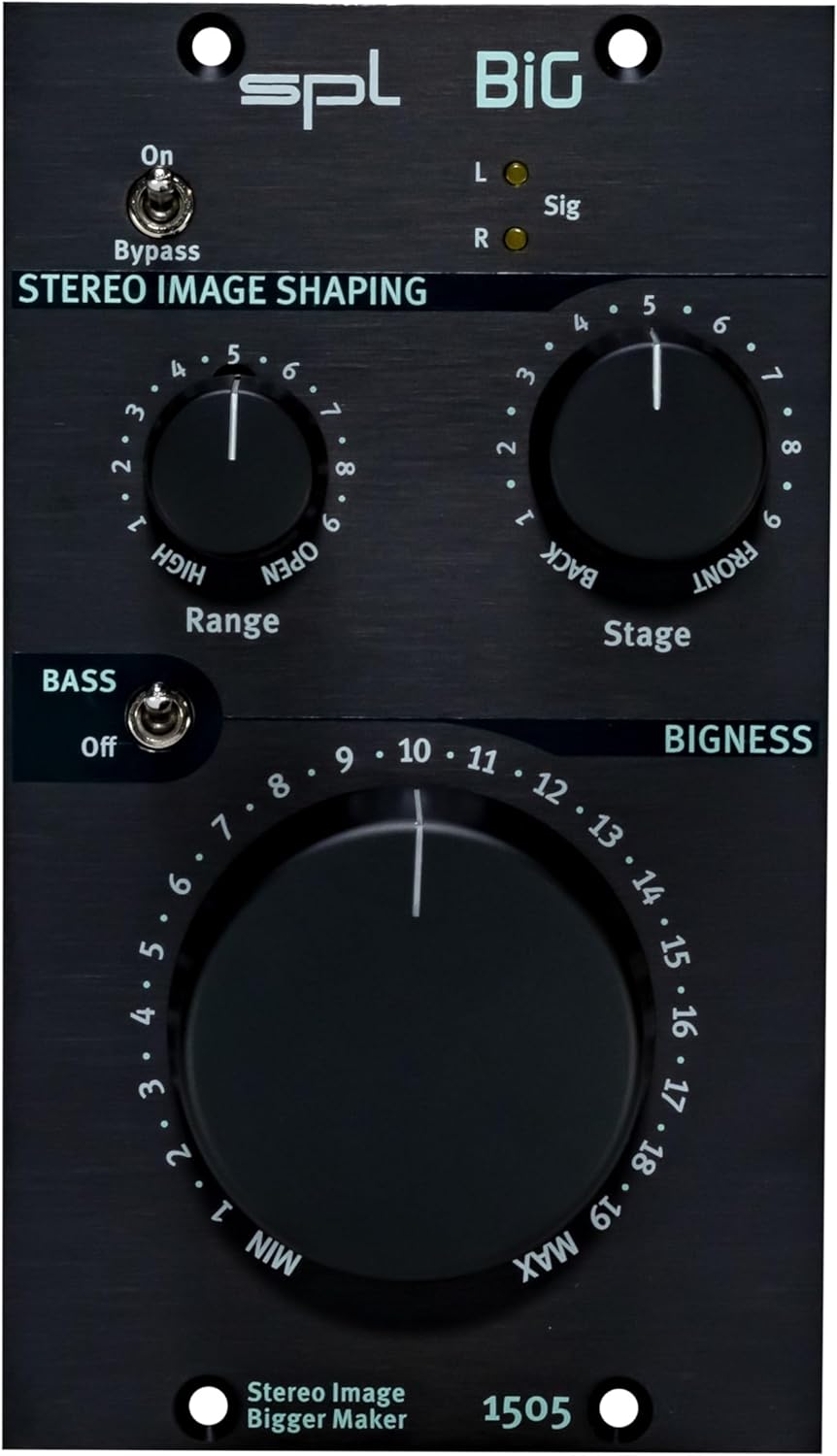
Description: Close-up front view of the SPL BIG 500 Series Stereo Image Processor, highlighting the Range, Stage, and Bigness control knobs, along with the Bass switch and Bypass toggle. The model number 1505 is visible at the bottom.
4. Lietošanas instrukcijas
4.1 Pamatdarbība
The SPL BIG module allows for intuitive control over stereo imaging. Experiment with the controls to achieve the desired sonic effect for your audio material.
4.2 Vadības ierīces un indikatori
- Apvedceļa slēdzis: This toggle switch engages or disengages the stereo image processing. When engaged (ON), the audio signal passes through the unit without any processing. When disengaged (OFF), the BIG module's effects are active.
- Diapazona kontrole: This rotary knob adjusts the frequency range that is primarily affected by the stereo image processing. Turning the knob clockwise increases the frequency range, allowing for broader or more focused stereo enhancement.
- Stage Kontrole: This rotary knob modifies the perceived depth of the stereo image. Settings towards 'BACK' tend to narrow the soundstage, while settings towards 'FRONT' expand the perceived depth and width.
- Basa slēdzis: This toggle switch activates or deactivates the dedicated bass processing. Engaging this switch can enhance the low-end presence and impact without necessarily affecting the stereo width of the higher frequencies.
- Bigness Control: This large rotary knob is the primary control for adjusting the overall stereo width and spaciousness. Turning it clockwise increases the intensity of the stereo widening effect, making the sound appear larger and more expansive.
- L/R Sig LEDs: These indicator lights illuminate to show the presence of audio signals in the left (L) and right (R) channels, confirming that audio is passing through the module.
5. Apkope
5.1. Tīrīšana
To clean the unit, use a soft, dry, and lint-free cloth. Avoid using abrasive cleaners, solvents, or chemical sprays, as these can damage the finish or internal components.
5.2. Uzglabāšana
When not in use for extended periods, store the SPL BIG module in a dry, dust-free environment, ideally within its original packaging or a protective case, to prevent damage from dust, moisture, or physical impact.
6. Traucējummeklēšana
6.1. Bieži sastopamās problēmas un risinājumi
- Nav audio izvades:
- Check all cable connections between the 500 series rack and your audio interface/mixer.
- Ensure the 500 series rack is powered on and receiving power.
- Verify that the Bypass switch on the SPL BIG module is not engaged if you expect processed audio.
- Confirm that an input signal is present and routed correctly to the 500 series rack slot.
- No Stereo Imaging Effect:
- Ensure the Bypass switch on the module is disengaged (OFF).
- Adjust the Range, Stage, and Bigness controls to higher settings to hear the effect more prominently.
- Verify that the input signal being fed to the module is indeed a stereo signal. Mono signals will not exhibit stereo imaging effects.
- Unwanted Noise or Distortion:
- Pārbaudiet visus kabeļu savienojumus, vai tie ir pareizi nostiprināti un integritāti.
- Ensure input levels are not too high, causing clipping in the 500 series rack or the BIG module.
- Test the module in a different slot of the 500 series rack or a different rack if available, to rule out rack-related issues.
7. Specifikācijas
7.1 Tehniskie dati
| Preces svars | 2.29 mārciņas |
| Produkta izmēri | 8.9 x 6.75 x 4.3 collas |
| Materiāla veids | Nerūsējošais tērauds |
| ASIN | B0CBLBSP2H |
| Datums pirmais pieejams | 7. gada 2022. maijs |
8. Garantija un atbalsts
8.1. Produktu atbalsts
For technical assistance, warranty information, or service inquiries regarding your SPL BIG 500 Series Stereo Image Processor, please visit the official SPL website or contact your authorized dealer. Detailed warranty terms and conditions are typically available on the manufacturer's webvietne.
Varat arī apmeklēt SPL Store on Amazon lai iegūtu papildu informāciju par produktu un resursiem.
9. Papildu resursi
9.1 Produkta attēli

Description: Angled view of the SPL BIG 500 Series Stereo Image Processor, showing the front panel and the side of the module, illustrating its compact 500 series form factor.

Description: Side view of the SPL BIG 500 Series Stereo Image Processor, showing the depth of the module and the typical rear connections for a 500 series unit.
9.2 Produktu video
Description: An official product video demonstrating the features and capabilities of the SPL BIG 500 Series Stereo Image Processor.
Description: An official product video providing further insights into the operation and sound shaping possibilities of the SPL BIG 500 Series module.
Description: An official product video showcasing advanced applications and sonic examples of the SPL BIG 500 Series Stereo Image Processor.


