1. Svarīgi drošības norādījumi
Pirms šīs ierīces lietošanas uzmanīgi izlasiet visus norādījumus. Saglabājiet šo rokasgrāmatu turpmākai uzziņai.
- Šī ierīce ir paredzēta tikai lietošanai mājsaimniecībā.
- Neiegremdējiet ierīci ūdenī vai citos šķidrumos.
- Keep the appliance away from water sources, especially when charging.
- Do not use the appliance if the cord or plug is damaged. Contact customer support for repair.
- Always ensure the appliance is switched off before cleaning or performing maintenance.
- Sargāt no bērniem. Šī ierīce nav rotaļlieta.
- Izvairieties no saskares ar kustīgām daļām.
- Do not use the trimmer on irritated skin or open wounds.
- Only use the charging adapter supplied with the appliance.
2. Produkts beidziesview
The HTC AT-206A is a rechargeable hair trimmer designed for precise grooming tasks such as edging, outlining, dry shaving, and light shaping around areas like the neck, ears, and sideburns.

Image 2.1: HTC AT-206A Trimmer and its retail packaging, showing the device and included accessories.
Sastāvdaļas:
- Trimmer Unit (HTC AT-206A)
- Uzlādes kabelis
- Tīrīšanas birste
- Lubricating Oil Bottle
- Ķemmes stiprinājums
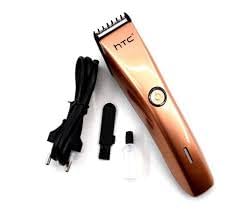
Image 2.2: The HTC AT-206A trimmer displayed with its charging cable, cleaning brush, oil bottle, and comb attachment.
3. Iestatīšana un uzlāde
3.1. Sākotnējā uzlāde
- Before first use, fully charge the trimmer for approximately 8-10 hours.
- Pārliecinieties, vai trimmeris ir izslēgts.
- Pievienojiet uzlādes kabeli trimmera uzlādes portam.
- Pievienojiet adapteri piemērotā elektrotīkla kontaktligzdā.
- Iedegsies uzlādes indikatora lampiņa (ja tāda ir), lai norādītu, ka notiek uzlāde.
- Once fully charged, disconnect the charger from the outlet and the trimmer.
3.2 Ķemmes uzgaļa piestiprināšana
- Pārliecinieties, vai trimmeris ir izslēgts.
- Align the comb attachment with the trimmer blade.
- Gently push the comb attachment onto the blade until it clicks into place.
- To remove, gently pull the comb attachment away from the blade.
4. Lietošanas instrukcijas
4.1 Pamatdarbība
- Pārliecinieties, vai trimmeris ir uzlādēts.
- Nospiediet ieslēgšanas/izslēgšanas pogu, lai ieslēgtu trimmeri.
- Lai izslēgtu trimmeri, vēlreiz nospiediet ieslēgšanas/izslēgšanas pogu.
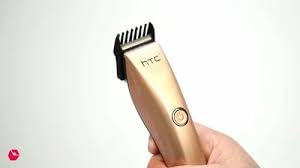
Image 4.1: The HTC AT-206A trimmer held in hand, demonstrating its ergonomic design for ease of use.
4.2 Apgriešanas metodes
- Lai iegūtu labākos rezultātus, izmantojiet trimmeri uz tīriem, sausiem matiem.
- Turiet trimmeri nelielā leņķī pret ādu.
- Lēnām un vienmērīgi pārvietojiet trimmeri pretēji matu augšanas virzienam.
- Use the comb attachment for longer hair lengths (0.5mm-13mm).
- For edging and outlining, use the trimmer without the comb attachment for a closer trim.
- Stretch the skin taut with your free hand to ensure a smooth surface for trimming.
5. Apkope un tīrīšana
Regulāra tīrīšana un apkope nodrošinās optimālu veiktspēju un pagarinās trimmera kalpošanas laiku.
5.1 Asmeņu tīrīšana
- Ensure the trimmer is switched off and disconnected from the charger.
- Use the provided cleaning brush to remove any loose hairs from the blades.
- For a more thorough clean, you may carefully detach the blade head (refer to specific instructions if provided with your model for blade removal).
- Do not rinse the entire trimmer under water unless explicitly stated as waterproof.
5.2 Asmeņu eļļošana
- After cleaning, apply 1-2 drops of the provided lubricating oil onto the blades.
- Ieslēdziet trimmeri uz dažām sekundēm, lai eļļa vienmērīgi sadalītos.
- Noslaukiet lieko eļļu ar mīkstu drānu.
- Oiling the blades regularly (e.g., after every few uses) helps maintain cutting efficiency and prevents rust.
5.3. Uzglabāšana
Store the trimmer in a cool, dry place, away from direct sunlight and moisture. Ensure it is fully charged before storing for extended periods.
6. Traucējummeklēšana
If you encounter any issues with your trimmer, refer to the following common problems and solutions:
- Trimmeris neieslēdzas:
Ensure the trimmer is fully charged. Check if the charging cable is properly connected and the power outlet is functional. - Slikta griešanas veiktspēja / matiņu raušana:
The blades may be dull or clogged with hair. Clean and oil the blades as described in the Maintenance section. Ensure the trimmer is adequately charged. - Akumulators neuztur lādiņu:
Ensure the trimmer is charged for the recommended duration. If the issue persists, the battery may need replacement. Contact customer support. - Pārmērīgs troksnis vai vibrācija:
The blades might be misaligned or require oiling. Clean and oil the blades. If the problem continues, discontinue use and contact customer support.
7. Specifikācijas
| Funkcija | Specifikācija |
|---|---|
| Modeļa numurs | AT-206A (SA-144) |
| Barošanas avots | Uzlādējams akumulators |
| Asmens materiāls | Stainless Steel (Metal) |
| Cutting Length Range | 0.5mm - 13mm (with comb attachment) |
| Izmēri (G x P x A) | 18.7 x 4.9 x 11.2 cm |
| Ieteicamie lietojumi | Dry Shaving, Edging, Light Shaping, Outlining (Neck, Ears, Sideburns, Face) |
| Krāsa | Melns |
| Ražotājs | ĶĪNA |
8. Garantija un atbalsts
This product is covered by a standard manufacturer's warranty. Please refer to the product packaging or contact your retailer for specific warranty terms and conditions.
Lai saņemtu tehnisko atbalstu, palīdzību problēmu novēršanā vai garantijas pieprasījumus, lūdzu, sazinieties tieši ar mazumtirgotāju vai ražotāju. Saglabājiet pirkuma apliecinājumu jebkādiem ar garantiju saistītiem jautājumiem.


