1. Ievads
This manual provides detailed instructions for the setup, operation, and maintenance of your Logitech POP Mouse. The POP Mouse is a compact, wireless mouse designed for multi-device use with customizable features.

Image: The Logitech POP Mouse in Graphite, showcasing tā kompakto un ergonomisko dizainu.
2. Iepakojuma saturs
- Logitech POP Wireless Mouse
- 1x AA Battery (pre-installed)
- Lietotāja dokumentācija

Image: The Logitech POP Mouse and a single AA battery, representing the items included in the product package.
3. Iestatīšanas instrukcijas
3.1. Akumulatora uzstādīšana
- Gently remove the top cover of the mouse. The cover is magnetically attached.
- Ievietojiet komplektā iekļauto AA bateriju, nodrošinot pareizu polaritāti (+/-).
- Replace the top cover, ensuring it snaps securely into place.
3.2. Savienojuma izveide, izmantojot Bluetooth
- Ieslēdziet peli, izmantojot strāvas slēdzi, kas atrodas apakšā.
- Press and hold one of the Easy-Switch buttons (1, 2, or 3) on the bottom of the mouse until the LED indicator starts blinking rapidly. This indicates pairing mode.
- On your device (computer, tablet, or phone), open Bluetooth settings.
- Lai pabeigtu savienošanas pārī procesu, pieejamo ierīču sarakstā atlasiet “Logitech POP Mouse”.
- The LED indicator will glow solid for a few seconds, then turn off, confirming a successful connection.

Image: The underside of the POP Mouse, highlighting the Easy-Switch buttons for multi-device pairing.
4. Lietošanas instrukcijas
4.1. Pamatfunkcijas
- Kreisais klikšķis: Primārā atlase un mijiedarbība.
- Ar peles labo pogu noklikšķiniet: Piekļūst kontekstuālajām izvēlnēm.
- Ritināšanas ritenis: Vertikāli pārvietojas pa dokumentiem un web lapas.
4.2. SilentTouch tehnoloģija
The POP Mouse features SilentTouch Technology, which significantly reduces click noise, providing a quieter user experience without compromising tactile feedback.

Image: A hand operating the POP Mouse, illustrating the quiet operation provided by SilentTouch Technology.
4.3. Viedriteņa ritināšana
The SmartWheel automatically switches between two modes:
- Precizitātes režīms: For detailed, line-by-line navigation.
- Speed Scroll Mode: For rapid scrolling through long documents or web lapas.

Image: A user's hand demonstrating the use of the SmartWheel for efficient navigation.
5. Pielāgošana
5.1. Customizable Top Button (Emoji Button)
The top button, located below the scroll wheel, is customizable. By default, it can be configured to open an emoji menu or assign other shortcuts.
- Download and install the Logitech Options+ Software from the official Logitech webvietne (logitech.com/optionsplus).
- Open the Logitech Options+ Software.
- Select your POP Mouse from the detected devices.
- Dodieties uz pogas pielāgošanas iestatījumiem.
- Assign your desired function to the top button, such as an emoji shortcut, Snip Screen, Mic Mute, or Voice-to-Text.
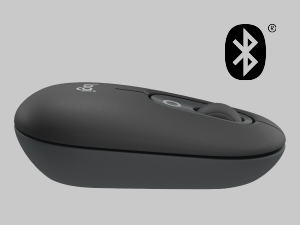
Image: A visual representation of the customizable top button on the POP Mouse, showing its function to access an emoji menu on a connected computer.
6. Vairāku ierīču savienojamība
The Logitech POP Mouse can connect to up to three different devices simultaneously using Bluetooth. You can easily switch between these devices.
6.1. Pārslēgšanas ierīces
To switch between paired devices, press the Easy-Switch button (1, 2, or 3) on the bottom of the mouse corresponding to the desired device. The LED indicator will briefly light up to confirm the selected channel.
6.2. Logitech FLOW (Advanced Feature)
For seamless control across multiple computers, install Logitech Options+ Software on all devices. With Logitech FLOW enabled, you can move your mouse cursor across screens as if they were a single desktop, even copying and pasting text, images, and files starp viņiem.
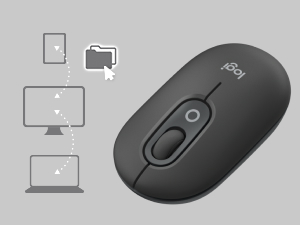
Image: A diagram showing how the POP Mouse can control multiple devices, illustrating the FLOW feature for cross-device interaction.
7. Apkope
7.1. Akumulatora nomaiņa
The POP Mouse operates on a single AA battery with an estimated life of up to 24 months. When the battery is low, the LED indicator on the bottom of the mouse may flash. Replace the battery by following the steps in Section 3.1.
7.2. Tīrīšana
Lai tīrītu peli, izmantojiet mīkstu, nepūkošu drānu. Spēcīgu netīrumu gadījumā nedaudz noslaukietampNoslaukiet drānu ar ūdeni. Izvairieties no spēcīgu ķīmisku vielu vai abrazīvu materiālu lietošanas.
8. Traucējummeklēšana
| Problēma | Risinājums |
|---|---|
| Pele neieslēdzas. | Ensure the power switch on the bottom of the mouse is in the 'ON' position. Check and replace the AA battery if necessary. |
| Pele neizveido savienojumu, izmantojot Bluetooth. |
|
| Kursora kustība ir nevienmērīga vai nereaģē. |
|
| Custom button not working. | Ensure Logitech Options+ Software is installed and running on your computer, and the button is correctly configured. |
9. Specifikācijas
| Funkcija | Detaļas |
|---|---|
| Modeļa numurs | 910-007165 |
| Savienojamība | Bluetooth 5.1 |
| Wireless Range | Līdz 10 metriem (32.81 pēdām) |
| Sensora tehnoloģija | Logitech High Precision Optical Tracking |
| Pogu skaits | 4 (Left/Right click, Scroll wheel click, Top customizable button) |
| Akumulatora tips | 1 x AA akumulators |
| Akumulatora darbības laiks | Līdz 24 mēnešiem (var atšķirties atkarībā no lietošanas) |
| Izmēri (LxWxH) | 14.12 x 2.34 x 1.38 collas (35.86 x 5.94 x 3.51 cm) |
| Svars | 2.89 ounces (82g with battery) |
| Operētājsistēmas saderība | Windows 10 or later, macOS 10.15 or later, iPadOS, Chrome OS, Android |

Image: Technical drawing displaying the length, width, and height measurements of the Logitech POP Mouse.
10. Garantija un atbalsts
Lai saņemtu informāciju par garantiju un tehnisko atbalstu, lūdzu, apmeklējiet oficiālo Logitech atbalsta vietni website or refer to the user documentation included in your product package.
- Tiešsaistes atbalsts: support.logi.com
- Produkta reģistrācija: Registering your product can help you receive faster support and updates.