1. Ievads
This manual provides comprehensive instructions for the Imagebon Backup Camera and its 33ft Extension Cable. It covers product features, installation procedures, operational guidelines, and troubleshooting tips to ensure optimal performance and a clear understanding of the device's functionality. Please read this manual thoroughly before installation and use.
2. Produkts beidziesview
The Imagebon Backup Camera system includes a high-definition rear view camera and a 33-foot extension cable designed for seamless integration with compatible dash cams, carplay systems, and monitors. This system is engineered to provide a clear view of the area behind your vehicle, enhancing safety during reversing maneuvers.
2.1 Sastāvdaļas
- Imagebon Backup Camera (1080P)
- 33-foot Extension Cable (4-Pin Male to 2.5mm Male)
- Mounting Accessories (screws, adhesive pad)

Figure 2.1: Imagebon Backup Camera and 33ft Extension Cable.
This image displays the primary components of the Imagebon Backup Camera system, including the camera unit and the coiled 33-foot extension cable.
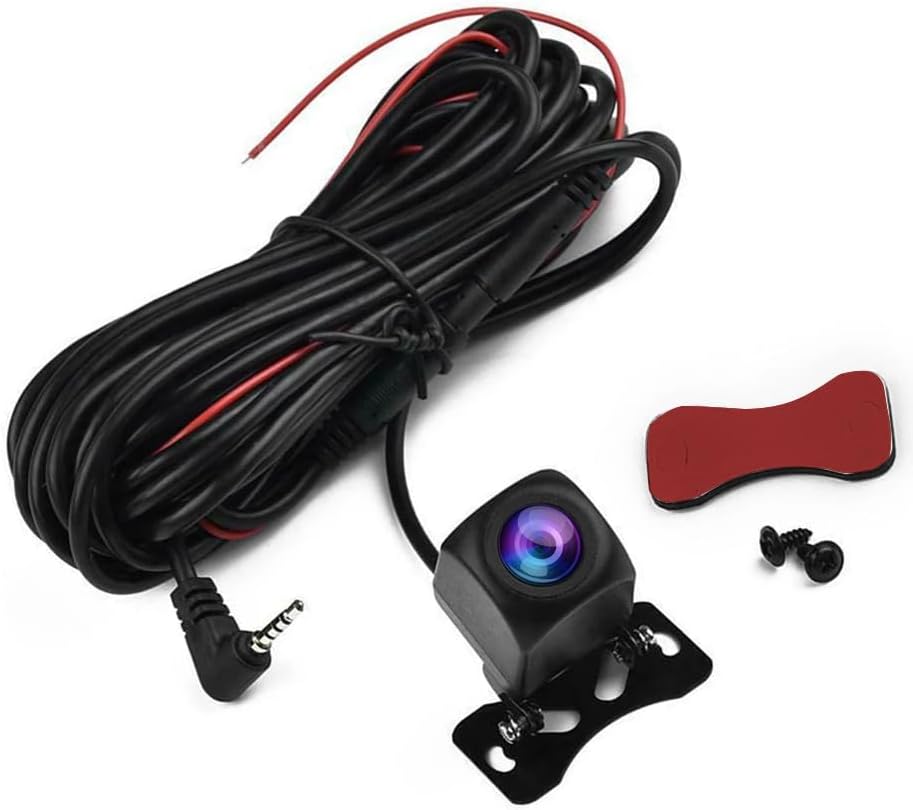
Figure 2.2: Camera and Cable Components with Accessories.
A closer look at the camera, the extension cable, and the small bag containing mounting screws and an adhesive pad for installation.
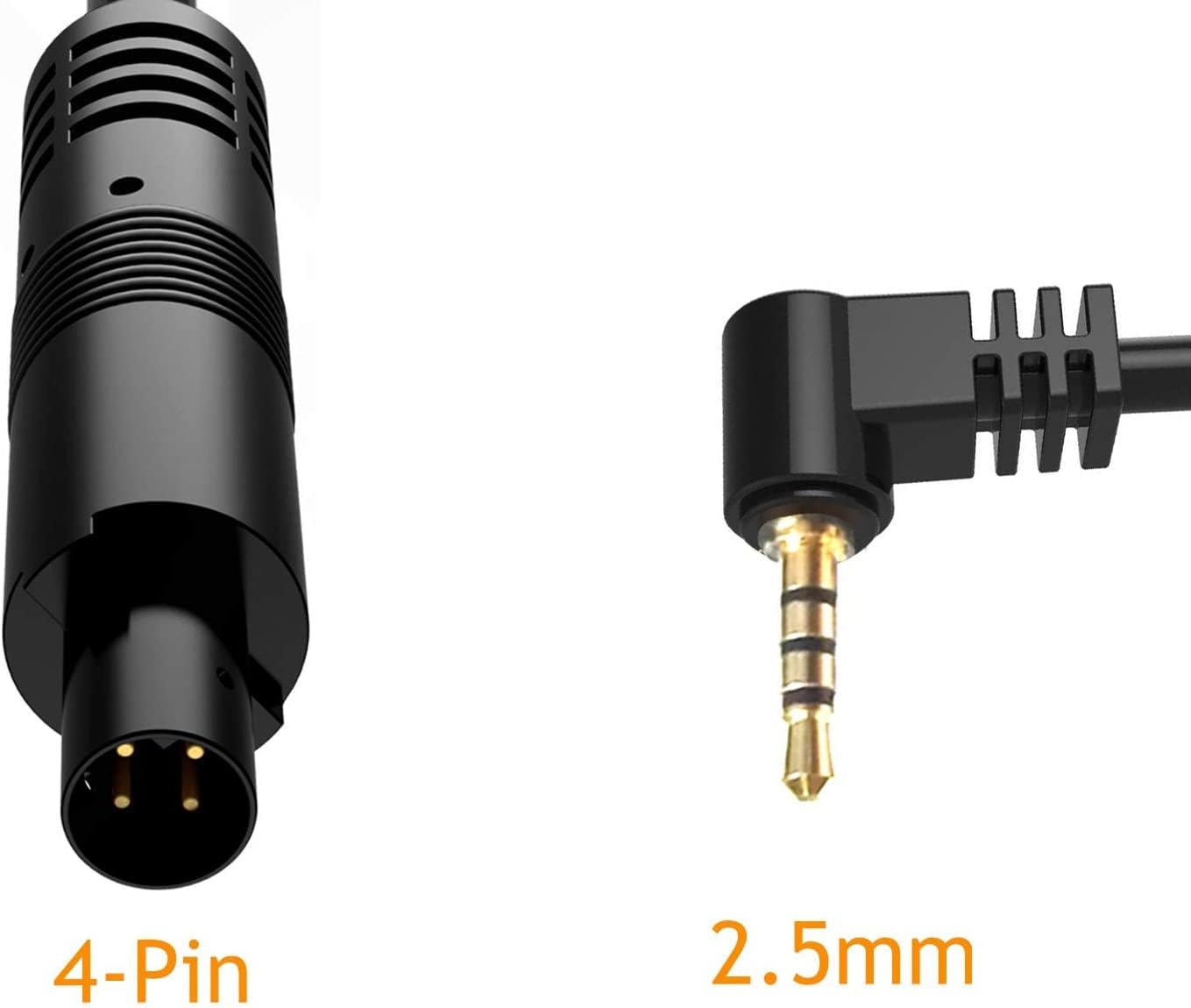
Figure 2.3: 33-foot Extension Cable Length.
This image visually represents the substantial 33-foot length of the extension cable, highlighting its suitability for various vehicle sizes.

Figure 2.4: 4-Pin and 2.5mm Connectors.
Šis attēls sniedz detalizētu view of the 4-pin male and 2.5mm male connectors, crucial for ensuring compatibility with your existing display unit.
2.2 Galvenās funkcijas
- Kabeļa veids: 4-Pin Male to Female with 2.5mm Male connector.
- Kabeļa garums: Approximately 33 feet (10 meters), suitable for most vehicle installations.
- Saderība: Designed for use with dash cams, mirror cams, carplay systems, and other compatible monitors.
- Attēla kvalitāte: 1080P resolution for clear rear view.
- Izturība: Good waterproof effect, adaptable to various harsh weather conditions (e.g., extreme temperatures, rain).
- Plats leņķis: 120 grādu lauks view.
3. Iestatīšana un instalēšana
Proper installation is crucial for the optimal performance of your Imagebon Backup Camera. It is recommended to seek professional assistance for installation if you are unfamiliar with vehicle electrical systems.
3.1 Pirmsinstalācijas pārbaude
- Verify that your existing dash cam, carplay unit, or monitor supports a 4-pin male to female cable with a 2.5mm male connector.
- Ensure the camera's format (AHD 1080P/720P) is compatible with your display unit. Refer to the troubleshooting section if you encounter a black and white image.
3.2 Kameras montāža
The camera is typically mounted near the license plate at the rear of the vehicle. Use the provided screws or adhesive pad to secure the camera in a position that offers a clear, unobstructed view.

Figure 3.1: General Wiring Diagram for Backup Camera.
This diagram illustrates the typical placement of the backup camera and the routing of its cable, including the connection to the vehicle's reverse light for automatic activation.
3.3 Elektroinstalācijas savienojumi
- Connect the Extension Cable: Connect the 4-pin male end of the extension cable to the camera's connector.
- Kabeļa izvietošana: Carefully route the 33-foot extension cable from the rear of the vehicle to the location of your display unit (e.g., dash cam, carplay screen). Ensure the cable is secured and not exposed to moving parts or excessive heat.
- Connect to Display Unit: Plug the 2.5mm male end of the extension cable into the designated input port on your compatible display unit.
- Connect Reverse Trigger Wire: The red trigger wire on the extension cable needs to be connected to the positive (+) terminal of your vehicle's reverse light. This connection enables the display unit to automatically switch to the camera view kad ir ieslēgts atpakaļgaitas pārnesums.
Video 3.1: Installation of AHD Camera.
This video demonstrates the physical installation and wiring of an AHD camera, showing how to connect it within the vehicle's trunk area to the reverse light circuit.
Video 3.2: AHD1080P Backup Camera License Plate Installation.
This video provides a visual guide for installing an AHD 1080P backup camera on a car's license plate, highlighting the mounting process.
4. Darbība
Once correctly installed, the Imagebon Backup Camera operates automatically in conjunction with your vehicle's reverse gear.
4.1 Automātiskā aktivizēšana
When the vehicle is shifted into reverse gear, the display unit (e.g., dash cam, carplay screen) will automatically switch to show the live feed from the backup camera. This provides an immediate view zonā aiz jūsu transportlīdzekļa.
Video 4.1: Carplay Screen/Mirror Dash Cam/Monitor Testing.
This video demonstrates the backup camera's output on various display types, including a Carplay screen and a mirror dash cam, showing the automatic switch to reverse view.
Video 4.2: Epronic 4-Pin Backup Camera in Use.
This video provides a demonstration of the Epronic 4-pin backup camera's live feed, showcasing its image quality and functionality.
4.2 Image Mirroring Adjustment
If the camera image appears mirrored by default, you may need to adjust this setting on your display unit. For Imagebon Carplay systems, navigate to 'Settings' > 'Video' > 'Rear Cam Reverse' to restore the image to normal orientation.
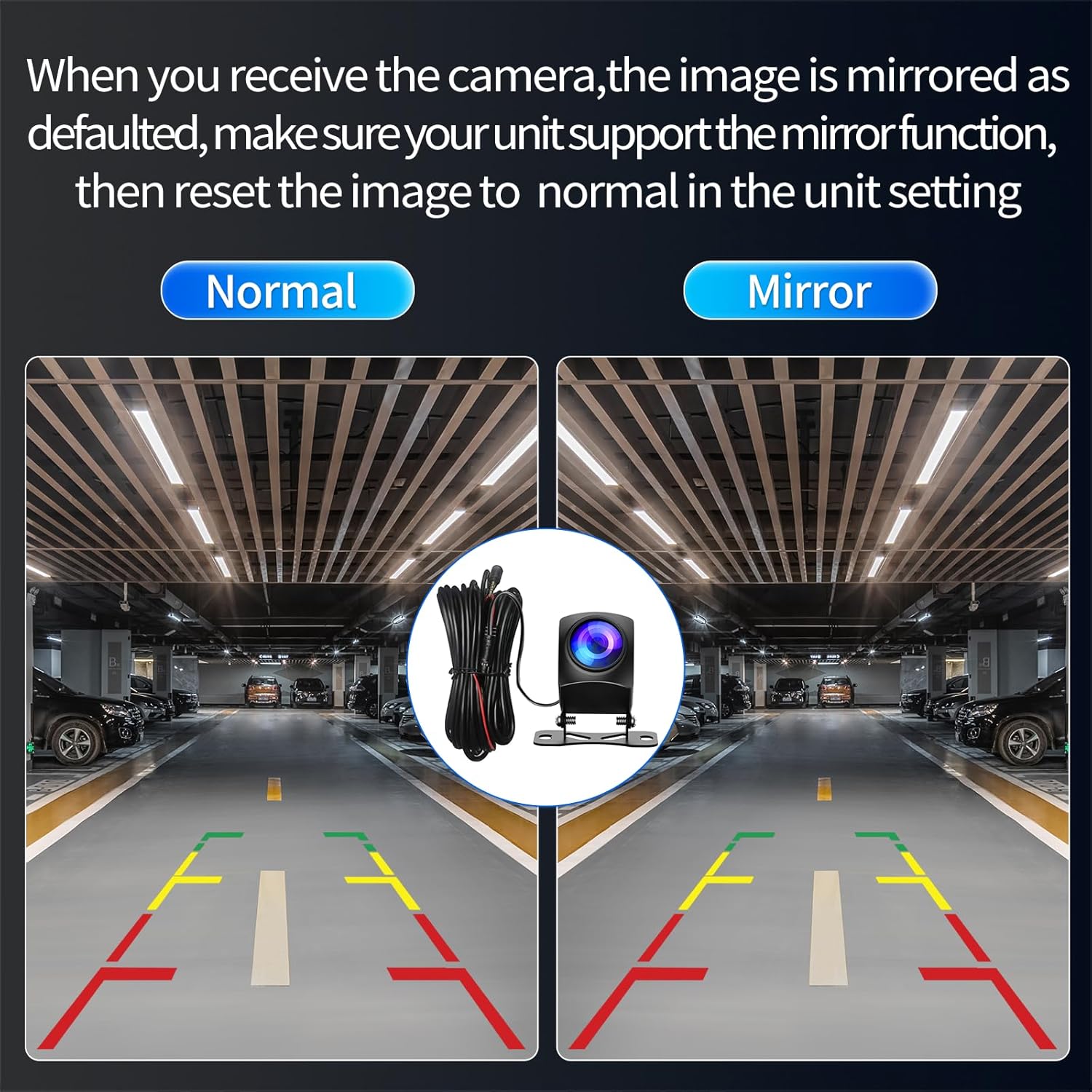
Figure 4.1: Normal vs. Mirrored Camera View.
This visual compares a normal camera view with a mirrored view, indicating the need for adjustment if the image is not correctly oriented.
5. Apkope
To ensure the longevity and clear performance of your backup camera, follow these simple maintenance guidelines:
- Notīriet objektīvu: Regulāri tīriet kameras objektīvu ar mīkstu,amp drānu, lai notīrītu netīrumus, putekļus vai ūdens traipus, kas var aizsprostot viewIzvairieties no abrazīviem tīrīšanas līdzekļiem.
- Pārbaudiet kabeļus: Periodically check the cables for any signs of wear, damage, or loose connections. Ensure all connections remain secure.
- Aizsardzība pret laikapstākļiem: While the camera is designed to be waterproof, extreme weather conditions can still affect performance. Ensure the camera is securely mounted to minimize exposure to direct impacts or prolonged submersion.
6. Traucējummeklēšana
This section addresses common issues you might encounter with your Imagebon Backup Camera.
6.1 No Image or Black/White Image
- Pārbaudiet savienojumus: Ensure all cable connections (4-pin, 2.5mm, and reverse trigger wire) are secure and correctly plugged in.
- Incompatible Format: If the image appears black and white or shows "No Signal," it may be due to an incompatible video format (e.g., your monitor defaults to 720P while the camera is 1080P). Some cameras have a white wire that can be cut to switch between formats.
Video 6.1: Operating Instruction & Troubleshooting.
This video provides detailed operating instructions and troubleshooting steps, specifically addressing issues like black and white images or "No Signal" by demonstrating how to adjust the video format by cutting or reconnecting the white wire on the camera cable.
6.2 Mirrored Image
- As mentioned in the operation section, if the image is mirrored, access your display unit's settings. For Imagebon Carplay, go to 'Settings' > 'Video' > 'Rear Cam Reverse' to correct the orientation.
6.3 Camera Not Activating in Reverse
- Verify that the red trigger wire is correctly connected to the positive (+) terminal of your vehicle's reverse light. A loose or incorrect connection will prevent automatic activation.
- Check your display unit's settings to ensure that the reverse camera input is enabled and configured correctly.
7. Specifikācijas
| Funkcija | Detaļas |
|---|---|
| Produkta izmēri | 6.69 x 1.97 x 1.58 collas |
| Preces svars | 7.4 unces |
| Zīmols | Imagebon |
| Saderīgas ierīces | Monitor (Dash Cam, Carplay, Mirror Cam) |
| Optisko sensoru tehnoloģija | CMOS |
| Objektīva tips | Platleņķis |
| Reālais leņķis View | 120 grādi |
| Savienotāja veids | 4-Pin Male (to camera), 2.5mm Male (to monitor) |
| Kabeļa garums | 33 pēdas |
8. Garantija un atbalsts
For any questions, technical assistance, or support regarding your Imagebon Backup Camera, please contact our customer service team.
- E-pasta atbalsts: Imagebons@outlook.com
- Our support team is available to assist you with any inquiries or issues you may encounter.
Please retain your proof of purchase for warranty claims. Specific warranty details may vary; refer to the product packaging or contact support for more information.


