1. Darba sākšana
1.1. Iepakojuma saturs
Pirms sākat, lūdzu, pārliecinieties, vai iepakojumā ir visi nepieciešamie priekšmeti:
- 2 x QCY T13X Earbuds
- 1x uzlādes futrālis
- 3 x Pairs of Eartips (Small, Medium - pre-installed, Large)
- 1 x USB-C lādēšanas kabelis
- 1 x Lietotāja rokasgrāmata
1.2. Sākotnējā uzlāde
The earbuds must be fully charged before first use. Place both earbuds into the charging case. Connect the USB-C cable to the charging case and a power source. A full charge takes approximately 120 minutes. If the earbuds are not used for more than two weeks, charge them regularly to maintain battery health.
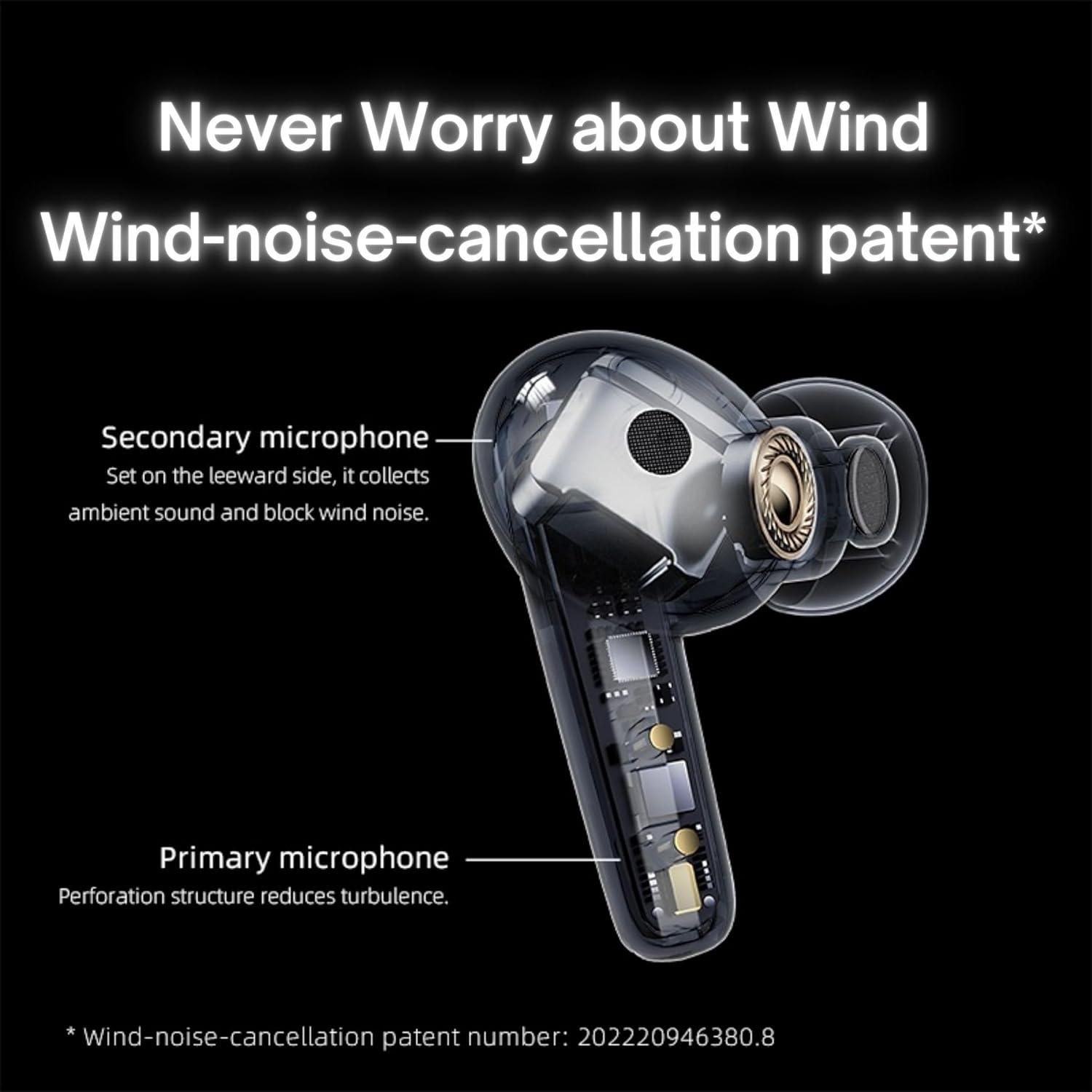
Image: QCY T13X Earbuds in their charging case, connected with a USB-C cable for charging. The image illustrates the charging process and the compact design of the case and earbuds.
1.3 Ausu uzgaļu izvēle
For optimal sound quality and comfort, choose the eartips that best fit your ears. The package includes small, medium, and large sizes. The medium size is pre-installed. A proper seal is crucial for bass response and noise isolation.
1.4 Savienošana pārī ar jūsu ierīci
- Pārliecinieties, vai austiņas ir uzlādētas un ievietotas uzlādes futrālī.
- Atveriet uzlādes futrāļa vāku. Austiņas automātiski pārslēgsies pārī savienošanas režīmā.
- Viedtālrunī vai Bluetooth ierīcē atveriet Bluetooth iestatījumus.
- Meklēt available devices and select "QCY T13X" from the list.
- Kad savienojums būs izveidots, jūs dzirdēsiet apstiprinājuma signālu.

Image: QCY T13X Earbuds and their charging case, highlighting the Bluetooth 5.3 connectivity. This image demonstrates the wireless technology used for pairing.
2. Austiņu lietošana
2.1 Ieslēgšana/izslēgšana
- Ieslēgšana: Open the charging case, and the earbuds will automatically power on. Alternatively, press and hold the touch panel on both earbuds for 1-2 seconds.
- Izslēgt: Place the earbuds back into the charging case and close the lid. They will automatically power off and begin charging. Alternatively, disconnect them from your device, and they will power off after a few minutes of inactivity.
2.2 Mūzikas atskaņošanas vadīklas
The QCY T13X earbuds feature touch controls for easy management of your audio:
- Atskaņot/pauzēt: Veiciet dubultskārienu skārienpanelim uz jebkuras austiņas.
- Nākamais ieraksts: Trīsreiz pieskarieties labajai austiņai.
- Iepriekšējais ieraksts: Trīsreiz pieskarieties kreisajai austiņai.

Image: A person wearing a QCY T13X earbud, demonstrating the discreet design and the area for touch controls. This image helps visualize how the earbuds are worn and interacted with.
2.3 Zvanu pārvaldība
- Atbildēt/beigt zvanu: Veiciet dubultskārienu skārienpanelim uz jebkuras austiņas.
- Noraidīt zvanu: Nospiediet un 1.5 sekundes turiet nospiestu skārienpaneli uz jebkuras austiņas.
2.4 Skaļuma kontrole
Volume control is managed through the QCY application on your smartphone. Download the QCY app to customize settings and adjust volume levels directly.
2.5 QCY Application
For enhanced features and customization, download the official QCY app from your device's app store. The app allows you to:
- Pielāgojiet skaļumu.
- Pielāgojiet skārienvadības ierīces.
- Select from various EQ presets (e.g., Pure Vocals, Boosted Original, Soft and Immersive).
- Atjauniniet programmaparatūru.

Image: QCY T13X Earbuds with a graphic indicating three default EQ settings: Pure Vocals, Boosted Original, and Soft and Immersive. This highlights the sound customization options available through the app.
2.6 Vairāku ierīču savienojamība
The QCY T13X supports seamless switching between multiple paired devices. Once paired with several devices, the earbuds can intelligently connect to the active audio source.

Image: QCY T13X Earbuds shown connected to both a smartphone and a tablet, illustrating the multi-device connectivity feature. This image demonstrates the flexibility of using the earbuds with different devices.
3. Apkope un kopšana
3.1 Austiņu un maciņa uzlāde
The charging case has a capacity of 350 mAh, with each earbud having a 45 mAh battery. A single charge provides up to 8 hours of playback, and the charging case extends total playback time to up to 30 hours. The earbuds support fast charging. Ensure regular charging if not used for extended periods.
3.2. Tīrīšana
Regularly clean your earbuds and charging case to ensure optimal performance and hygiene. Use a soft, dry, lint-free cloth. For eartips, remove them and gently wipe with a damp drānu un rūpīgi nosusiniet pirms atkārtotas piestiprināšanas.
3.3. Uzglabāšana
Store your QCY T13X earbuds in their charging case when not in use. Avoid exposing them to extreme temperatures, such as below 10 degrees Celsius (50°F) or above 60 degrees Celsius (140°F), to prevent battery damage and ensure longevity.
4. Traucējummeklēšana
4.1 Rūpnīcas atiestatīšana
If you experience persistent connection or functionality issues, a factory reset may resolve them:
- Delete the previous connection record for "QCY T13X" from your phone's Bluetooth settings.
- Ievietojiet abas austiņas uzlādes futrālī un pārliecinieties, vai tās uzlādējas.
- Nospiediet un 10 sekundes turiet pogu uz uzlādes korpusa.
- The red and blue LED indicators will flash alternately 3 times, indicating a successful reset.
4.2 Savienojuma problēmas
- Pārliecinieties, vai jūsu ierīcē ir iespējots Bluetooth.
- Make sure the earbuds are charged and within the 10-meter Bluetooth range.
- Mēģiniet restartēt ierīci un austiņas.
- Veiciet rūpnīcas atiestatīšanu, kā aprakstīts iepriekš.
4.3 Skaņas problēmas
- Check the volume levels on both your device and through the QCY app.
- Ensure the eartips provide a proper seal in your ear.
- Notīriet austiņu skaļruņus no visiem gružiem.
- If only one earbud is working, try placing both back in the case, closing the lid, and then reopening to re-establish the connection between them.
5. Specifikācijas
| Funkcija | Specifikācija |
|---|---|
| Modeļa nosaukums | T13X (BH23QT26A) |
| Vadītāja izmērs | 7.2 mm dinamiskais draiveris |
| Mikrofoni | 4 (ENC Noise Reduction, Mic Amplification, Echo Cancellation) |
| Bluetooth versija | 5.3 |
| Bluetooth diapazons | Līdz 10 metriem |
| Atbalstītie protokoli | HFP / A2DP / AVRCP |
| Audio kodeki | AAC, SBC |
| Austiņu akumulatora jauda | 45 mAh (katrs) |
| Uzlādes korpusa akumulatora ietilpība | 350 mAh |
| Kopējais atskaņošanas laiks | Līdz 30 stundām (ar uzlādes korpusu) |
| Single Use Playback Time | Līdz 8 stundām |
| Uzlādes laiks (ietvars) | Apm. 120 minūtes |
| Ūdensizturība | IPX5 |
| Svars (austiņas) | 6.34g |
| Kopējais svars (vāciņš + austiņas) | 48.15g |
| Kontroles metode | Pieskarieties |
| Trokšņa kontrole | Aktīva trokšņu atcelšana (ANC) |
| Frekvences reakcija | 20000 KHz |
| Jutīgums | 105 dB |
| Impedance | 100 omi |

Image: An exploded diagram of a QCY T13X earbud, illustrating the internal 7.2mm dynamic driver. This image provides insight into the audio technology within the earbud.

Image: A detailed diagram of a QCY T13X earbud, highlighting the placement of its multiple microphones for Environmental Noise Cancellation (ENC) and wind noise reduction. This image explains the technology behind clear calls.
6. Garantija un atbalsts
6.1 Ražotāja garantija
The QCY T13X Bluetooth Earbuds come with a 1 gada ražotāja garantijaLūdzu, saglabājiet pirkuma apliecinājumu jebkādu garantijas prasību gadījumā. Garantija attiecas uz materiālu un ražošanas defektiem normālas lietošanas apstākļos.
6.2 Klientu atbalsts
Lai saņemtu papildu palīdzību, tehnisko atbalstu vai garantijas jautājumus, lūdzu, apmeklējiet oficiālo QCY vietni. website or contact their customer service. You can also refer to the QCY app for additional resources and FAQs.


