1. Ievads
Thank you for choosing the Defender Enjoy S200 Portable Bluetooth Speaker. This manual provides essential information for setting up, operating, and maintaining your speaker to ensure optimal performance and longevity. Please read this manual thoroughly before use.
The Defender Enjoy S200 is a versatile portable speaker featuring Bluetooth 5.3 connectivity, True Wireless Stereo (TWS) pairing, an integrated FM radio, and MP3 playback capabilities via USB flash drive or microSD card. It also includes an LED light and supports hands-free calling. Designed for portability, it offers up to 9 hours of playback on a single charge and convenient USB Type-C charging.
2. Produkts beidziesview
2.1 Galvenās funkcijas
- Bluetooth 5.3: For stable and efficient wireless audio streaming.
- Patiess bezvadu stereo (TWS): Connect two Enjoy S200 speakers for a stereo sound experience.
- Vairāki atskaņošanas režīmi: Bluetooth, FM Radio, USB Flash Drive, MicroSD Card (up to 32GB).
- Integrēta LED gaisma: Provides visual ambiance.
- Brīvroku zvani: Iebūvēts mikrofons tālruņa zvaniem.
- Ilgs akumulatora darbības laiks: Līdz pat 9 stundām nepārtrauktas mūzikas atskaņošanas.
- USB tipa C uzlāde: Moderna un ērta uzlādes pieslēgvieta.
- Pārnēsājams dizains: Compact and lightweight with a carrying strap.
2.2. Iepakojuma saturs
- Defender Enjoy S200 Portable Bluetooth Speaker
- C tipa lādēšanas kabelis
- Īsā lietošanas pamācība
- Pārnēsāšanas siksna

Image: The Defender Enjoy S200 Portable Bluetooth Speaker, showcasing its compact design and front grille with an illuminated LED ring.

Image: An infographic highlighting key features such as multi-colored LED lighting, True Wireless Stereo (TWS) pairing, Bluetooth 5.3, MP3 player, FM receiver, and hands-free calling.
3. Iestatīšana
3.1 Skaļruņa uzlāde
- Locate the Type-C charging port on the back of the speaker.
- Connect the provided Type-C charging cable to the speaker and the other end to a USB power adapter (not included) or a computer's USB port.
- LED indikators rādīs uzlādes statusu. Pilnīga uzlāde parasti aizņem aptuveni 3–4 stundas.
- Atvienojiet kabeli, kad ierīce ir pilnībā uzlādēta.
3.2 Ieslēgšana/izslēgšana
- To power on, slide the ON/OFF switch located on the back of the speaker to the 'ON' position.
- Lai izslēgtu, pabīdiet ieslēgšanas/izslēgšanas slēdzi pozīcijā “IZSLĒGTS”.
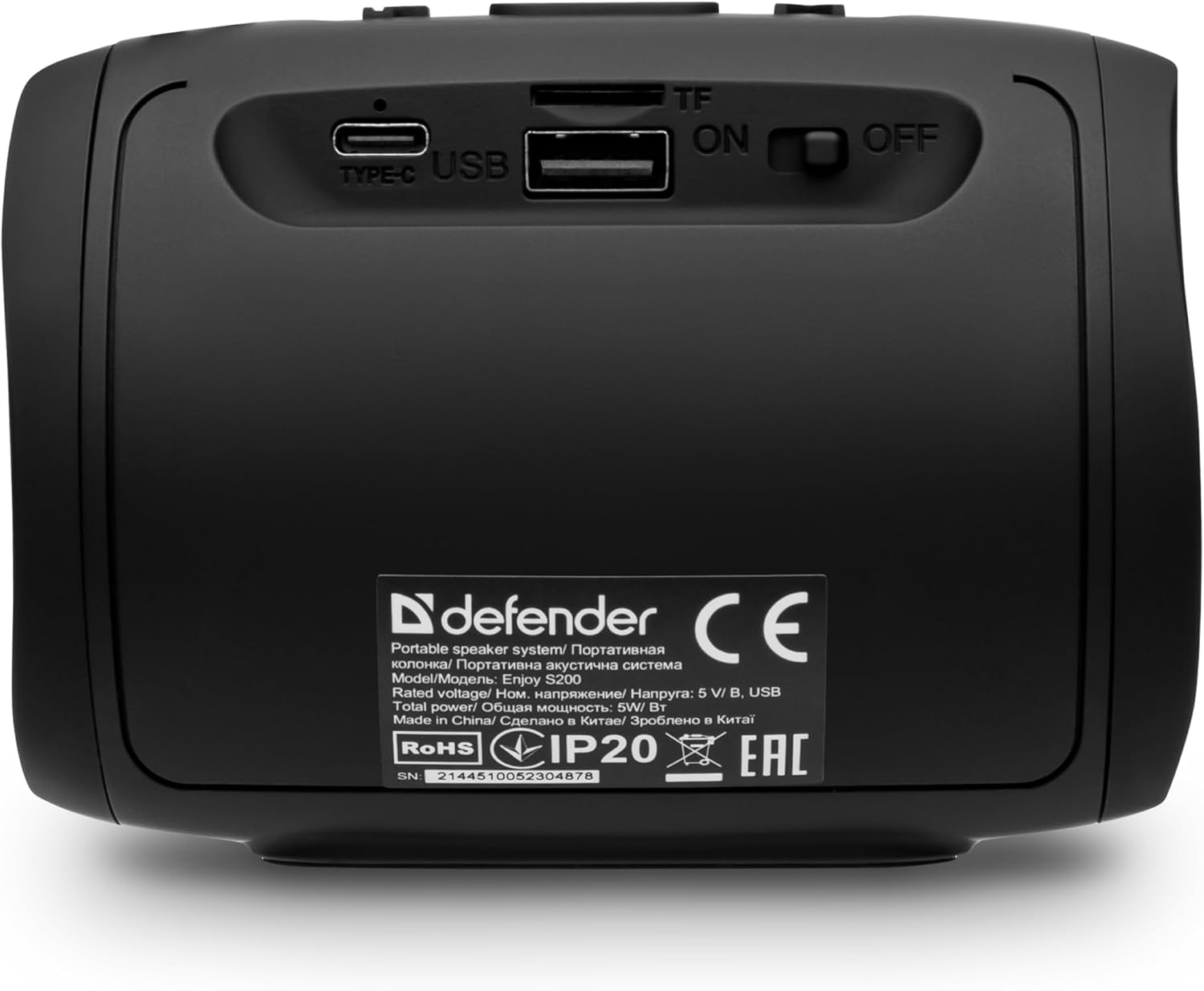
Attēls: Aizmugure view of the Defender Enjoy S200 speaker, showing the Type-C charging port, USB port, TF (microSD) card slot, and the ON/OFF power switch.
3.3 Bluetooth savienošana pārī
- Pārliecinieties, vai skaļrunis ir ieslēgts un atrodas Bluetooth savienošanas pārī režīmā (norāda mirgojoša LED indikators).
- Savā ierīcē (viedtālrunī, planšetdatorā utt.) iespējojiet Bluetooth un meklējiet pieejamās ierīces.
- Select "Defender Enjoy S200" from the list of devices.
- Once paired, the speaker will emit a confirmation sound, and the LED will stop flashing.
3.4 Patiesi bezvadu stereo (TWS) savienošana pārī
To pair two Defender Enjoy S200 speakers for stereo sound:
- Pārliecinieties, vai abi skaļruņi ir ieslēgti un nav savienoti ar nevienu Bluetooth ierīci.
- On one speaker (this will be the primary speaker), press and hold the TWS button (often indicated by a double-arrow icon) until you hear a pairing tone.
- The two speakers will automatically search and connect to each other. A confirmation tone will sound once connected.
- Tagad pievienojiet ierīci galvenajam skaļrunim, izmantojot Bluetooth, kā aprakstīts 3.3. sadaļā. Audio tiks atskaņots stereo režīmā caur abiem skaļruņiem.

Image: A visual representation of two Defender Enjoy S200 speakers pairing wirelessly to create a True Wireless Stereo system, alongside icons for Bluetooth 5.3, MP3 player, FM receiver, and hands-free calling.
4. Lietošanas instrukcijas
4.1 Button Functions (Refer to top panel controls)
- Barošanas poga: Long press to power on/off. Short press to play/pause in music mode, or answer/end calls.
- Skaļuma palielināšana (+): Īsi nospiediet, lai palielinātu skaļumu. Ilgi nospiediet, lai pārslēgtos uz nākamo dziesmu/staciju.
- Skaļums uz leju (-): Īsi nospiediet, lai samazinātu skaļumu. Ilgi nospiediet, lai pārslēgtos uz iepriekšējo dziesmu/staciju.
- Režīma (M) poga: Short press to switch between Bluetooth, FM Radio, USB, and MicroSD modes.
- LED gaismas poga: Short press to cycle through LED light modes or turn off the LED.
4.2 Bluetooth atskaņošana
After successful Bluetooth pairing (Section 3.3), open your music application on your device and begin playback. Use the speaker's volume buttons or your device's volume controls to adjust the audio level.
4.3 FM radio režīms
- Press the 'M' (Mode) button until you hear the FM radio prompt.
- Ilgi nospiediet pogu Atskaņot/Pauze, lai automātiski skenētu un saglabātu pieejamās FM stacijas.
- Lai pārvietotos starp saglabātajām stacijām, izmantojiet skaļuma palielināšanas (+) un skaļuma samazināšanas (-) pogas (ilgi nospiežot).
4.4 USB/MicroSD atskaņošana
- Ievietojiet USB zibatmiņas disku vai microSD karti (līdz 32 GB), kurā ir MP3 audio. files into the respective port on the back of the speaker.
- Press the 'M' (Mode) button until the speaker automatically switches to USB or MicroSD mode and begins playback.
- Use the speaker's control buttons for play/pause, next track, and previous track.
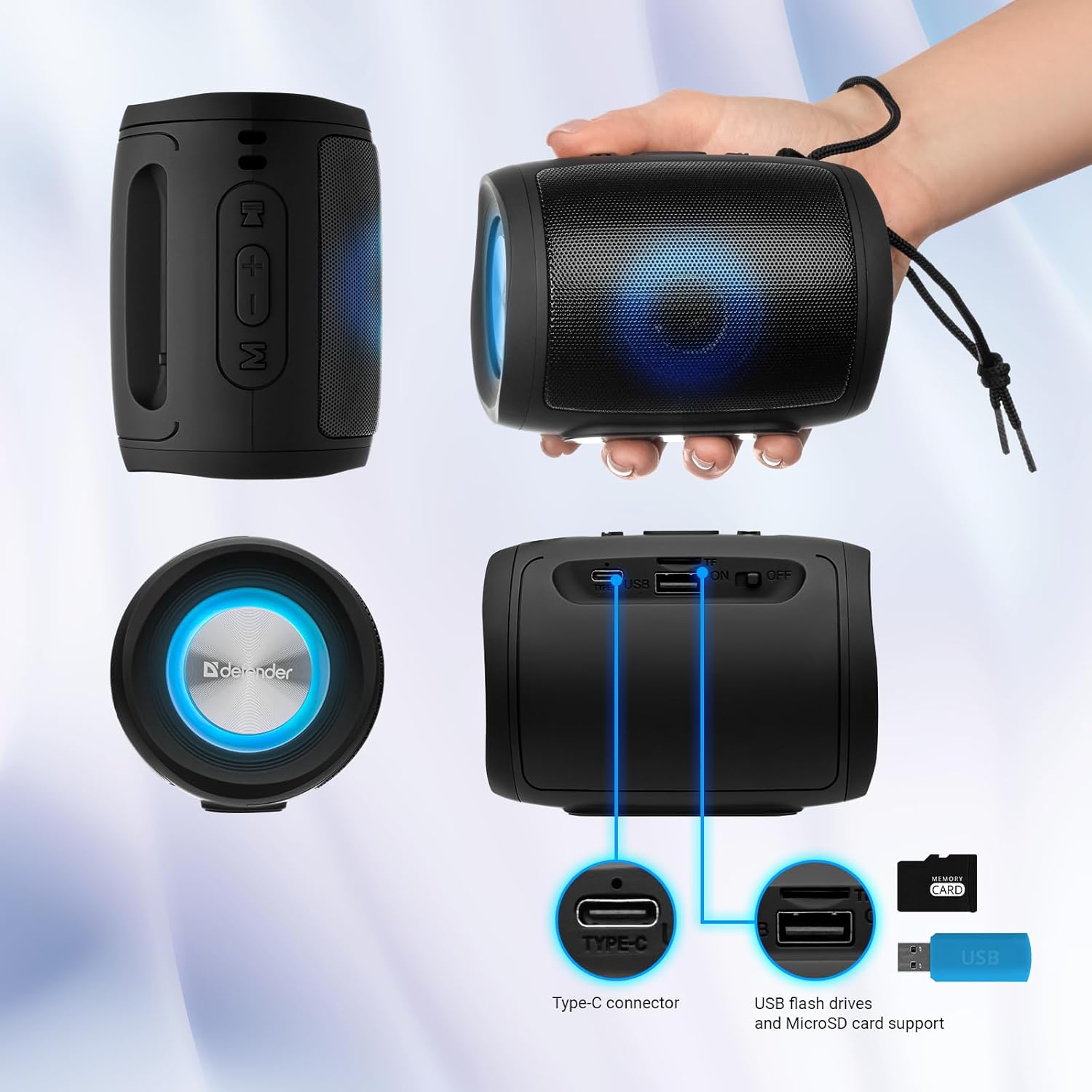
Image: A detailed diagram illustrating the Type-C connector, USB flash drive port, and MicroSD card slot on the Defender Enjoy S200 speaker.
4.5 Zvanīšana brīvroku režīmā
When connected to your smartphone via Bluetooth, the speaker's built-in microphone allows for hands-free calls.
- Atbildēt uz zvanu: Īsi nospiediet atskaņošanas/pauzes pogu.
- Beigt zvanu: Īsi nospiediet atskaņošanas/pauzes pogu.
- Noraidīt zvanu: Turiet nospiestu atskaņošanas/pauzes pogu.
5. Apkope
- Tīrīšana: Skaļruņa virsmas tīrīšanai izmantojiet mīkstu, sausu drānu. Nelietojiet abrazīvus tīrīšanas līdzekļus vai šķīdinātājus.
- Uzglabāšana: Uzglabājiet skaļruni vēsā, sausā vietā, pasargājot to no tiešiem saules stariem un ekstremālām temperatūrām.
- Ūdens izturība: The speaker has an IP20 rating, meaning it is protected against solid objects larger than 12.5mm but has no protection against water. Avoid exposure to rain, splashes, or immersion in water.
- Akumulatora kopšana: Lai paildzinātu akumulatora darbības laiku, pirms pirmās lietošanas reizes pilnībā uzlādējiet skaļruni un, ja to nelietojat regulāri, uzlādējiet to vismaz reizi trijos mēnešos.
6. Traucējummeklēšana
- Nav jaudas: Ensure the speaker is charged. Connect the Type-C cable and allow it to charge for a few minutes before attempting to power on again.
- Nav skaņas: Check the volume levels on both the speaker and your connected device. Ensure the speaker is in the correct mode (Bluetooth, FM, USB, MicroSD).
- Bluetooth savienošanas pārī problēmas: Ensure the speaker is in pairing mode. Turn off Bluetooth on your device and turn it back on. Try unpairing and re-pairing the speaker. Move closer to the speaker to ensure you are within the 10-meter range.
- Slikta FM radio uztveršana: Ensure you are in an area with good signal. The charging cable can sometimes act as an antenna; try connecting it for improved reception.
- USB/MicroSD Not Playing: Nodrošiniet audio files are in a compatible format (e.g., MP3). Check that the USB drive or microSD card is inserted correctly and is not corrupted.
7. Specifikācijas
| Modeļa nosaukums | Izbaudiet S200 |
| Preces modeļa numurs | 65200 |
| Zīmols | Aizstāvis |
| Savienojamības tehnoloģija | Bluetooth 5.3, USB |
| Bezvadu sakaru tehnoloģija | Bluetooth, Radio Frequency |
| Skaļruņa tips | Multivide |
| Skaļruņa izmērs | 2 collas |
| Jaudas izvade | 5 vati |
| Audio izvades režīms | Stereo |
| Barošanas avots | Darbojas ar akumulatoru (1 litija jonu akumulators iekļauts komplektā) |
| Īpašas funkcijas | Integrated Microphone, USB Port, Portable Bluetooth, LED Light, FM Radio, MicroSD Card Support, TWS |
| Produkta izmēri (G x P x A) | 8 x 11 x 8 cm |
| Svars | 330 grami |
| Maksimālais diapazons | 10 metri |
| IP reitings | IP20 |
8. Garantija un atbalsts
8.1 Informācija par garantiju
Konkrēta garantijas informācija parasti ir sniegta kopā ar pirkuma dokumentāciju vai ražotāja oficiālajā... website. Please refer to these resources for information regarding warranty coverage and duration.
8.2 Klientu atbalsts
For technical assistance, troubleshooting beyond this manual, or inquiries about your Defender Enjoy S200 speaker, please contact Defender Global customer support. Contact information can usually be found on the product packaging, the manufacturer's webvietnē vai pirkuma čekā.


