1. Ievads
This manual provides essential instructions for the safe operation, setup, maintenance, and troubleshooting of your CREATE THERA MATIC TOUCH automatic coffee machine. Please read this manual thoroughly before first use and retain it for future reference.
Drošības informācija
Always observe basic safety precautions when using electrical appliances to reduce the risk of fire, electric shock, and injury. Ensure the appliance is placed on a stable, level surface. Do not immerse the appliance, power cord, or plug in water or other liquids. Keep out of reach of children. Unplug the machine before cleaning or when not in use for extended periods.
2. Produkts beidziesview
The CREATE THERA MATIC TOUCH is a fully automatic coffee machine designed to deliver fresh coffee from whole beans. It features a 20-bar pressure system, an integrated grinder, a 1.5-liter water tank, and a steam wand for milk frothing and hot water dispensing. The touch control panel allows for easy operation and customization of coffee intensity and volume.
Galvenās sastāvdaļas
- Coffee Bean Hopper with integrated grinder
- Ūdens tvertne (1.5 l tilpums)
- Pieskarieties pie Vadības panelis
- Kafijas krāns
- Steam Wand / Hot Water Dispenser
- Pilienu paplāte un kafijas biezumu trauks

2.1. attēls. Priekšpuse view of the coffee machine, showing the coffee spout, drip tray, and touch control panel.

2.2. attēls: Leņķis view of the coffee machine, illustrating the removable water tank.

2.3. Attēls: beidziesview of the machine's removable parts for cleaning and maintenance.
3. Iestatīšana
3.1 Izpakošana un sākotnējā tīrīšana
- Uzmanīgi noņemiet visus iepakojuma materiālus no kafijas automāta.
- Wash the water tank, drip tray, and coffee grounds container with warm soapy water, then rinse thoroughly and dry.
- Noslaukiet iekārtas ārpusi ar reklāmuamp audums.
3.2 Ūdens tvertnes uzpildīšana
- Noņemiet ūdens tvertni no ierīces sāniem.
- Piepildiet tvertni ar svaigu, aukstu dzeramo ūdeni līdz MAX līmeņa atzīmei.
- Ievietojiet ūdens tvertni atpakaļ tai paredzētajā vietā, pārliecinoties, ka tā ir droši nostiprināta.
3.3 Kafijas pupiņu pievienošana
- Open the lid of the coffee bean hopper located on top of the machine.
- Pour whole coffee beans into the hopper. The hopper has a capacity of 180g.
- Cieši aizveriet vāku, lai saglabātu pupiņu svaigumu.

Figure 3.1: Adding coffee beans to the integrated hopper.
3.4 Pirmā lietošanas reize / Sagatavošana
- Pievienojiet ierīci iezemētai strāvas kontaktligzdai.
- Press the power button on the touch control panel. The machine will perform an initial rinse cycle.
- Place a container under the coffee spout and steam wand to collect the water.
- Once the rinse cycle is complete, the machine is ready for use.
4. Lietošanas instrukcijas
4.1 Pieskarieties vienumam Vadības panelis
The touch control panel provides access to all machine functions. Indicators will illuminate to show status or warnings such as 'no beans', 'no water', 'cleaning required', or 'drip tray full'.
4.2 Kafijas pagatavošana
- Ensure the water tank is filled and the bean hopper contains enough coffee beans.
- Novietojiet tasi zem kafijas padeves krāna.
- Select your desired coffee type (e.g., Espresso, Lungo) from the touch panel.
- You can adjust the coffee intensity and volume via the touch panel before brewing.
- Press the start button. The machine will grind the beans, brew, and dispense the coffee.
4.3 Tvaika padeves caurulītes lietošana
The steam wand can be adjusted between 0° and 42° for optimal milk frothing or hot water dispensing.
4.3.1 Piena putošana
- Piepildiet piena krūzi ar aukstu pienu.
- Novietojiet tvaika caurulīti pienā, tieši zem virsmas.
- Select the steam function on the touch panel.
- Pārvietojiet krūzi uz augšu un uz leju, lai izveidotu putas.
- Once desired foam is achieved, turn off the steam function.
- Immediately clean the steam wand after use.
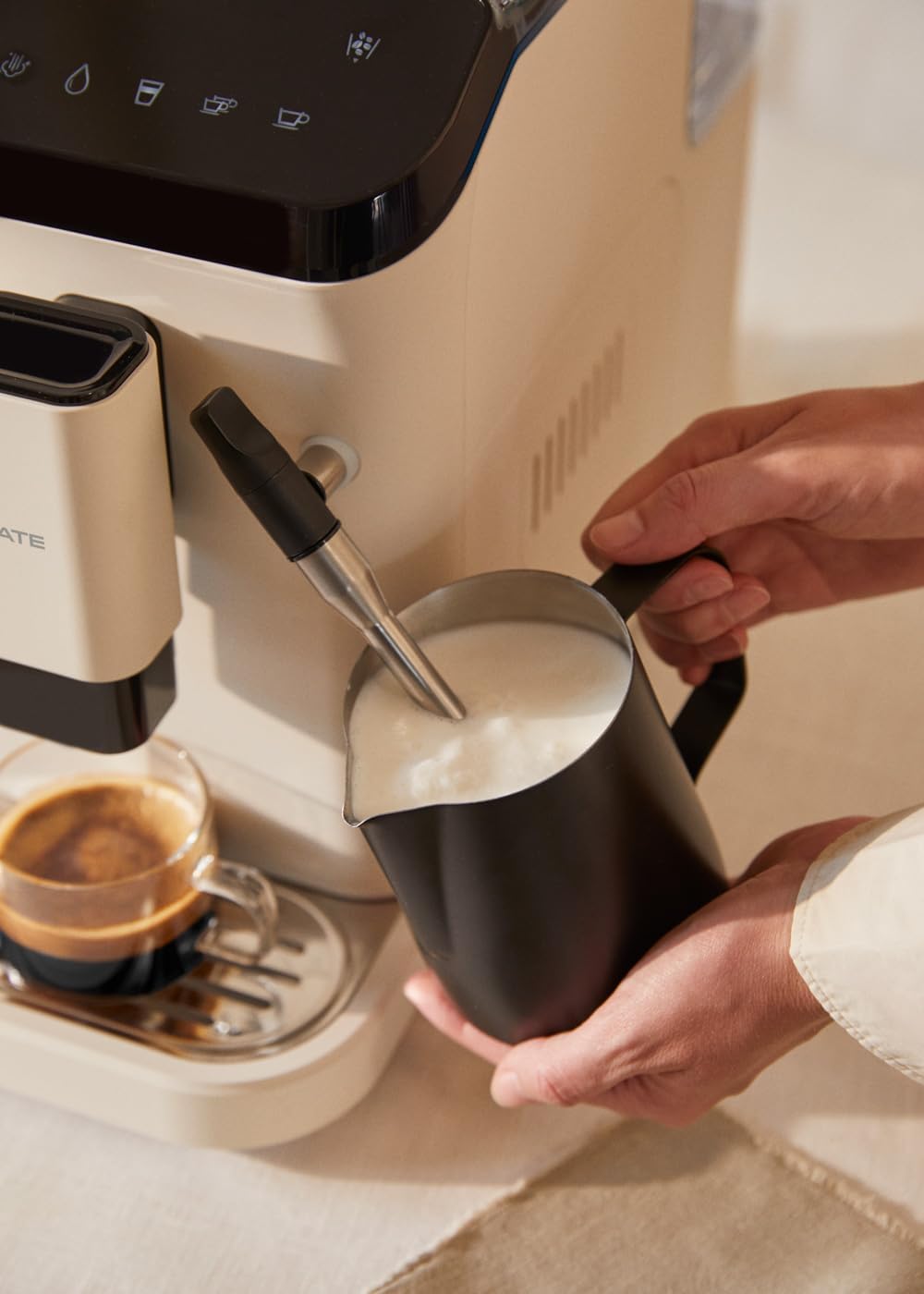
Figure 4.1: Frothing milk using the adjustable steam wand.
4.3.2. Karstā ūdens padeve
- Novietojiet krūzi zem tvaika spieķa.
- Select the hot water function on the touch panel.
- The machine will dispense hot water for teas or other infusions.

Figure 4.2: Dispensing hot water for beverages.
5. Apkope un tīrīšana
Regulāra tīrīšana un apkope nodrošina jūsu kafijas automāta optimālu veiktspēju un ilgmūžību.
5.1 Pašattīrīšanās funkcija
The machine is equipped with a self-cleaning function. Follow the prompts on the touch control panel when the cleaning indicator illuminates. This cycle helps maintain internal hygiene.
5.2 Pilienu savākšanas paplāte un kafijas biezumu tvertne
- When the 'drip tray full' indicator appears, carefully remove the drip tray.
- Empty the liquid from the drip tray and the used coffee grounds from the container.
- Wash both components with warm soapy water, rinse, and dry before reinserting.
5.3 Tvaika padeves caurulītes tīrīšana
Pēc katras lietošanas reizes noslaukiet tvaika caurulīti ar slotiņuamp cloth to remove any milk residue. Periodically, remove the outer nozzle and rinse it under running water to prevent blockages.
5.4 Atkaļķošana
Over time, mineral deposits can build up in the machine. The machine will indicate when descaling is required. Use a suitable descaling solution designed for coffee machines and follow the instructions provided with the descaling product and the machine's display prompts.
6. Traucējummeklēšana
Biežāk sastopamās problēmas un to risinājumus skatiet šajā sadaļā. Ja problēma joprojām pastāv, sazinieties ar klientu atbalsta dienestu.
| Problēma | Iespējamais cēlonis | Risinājums |
|---|---|---|
| Kafija netiek izsniegta | Water tank empty / No coffee beans / Clogged coffee spout | Refill water tank / Add coffee beans / Clean coffee spout |
| Vāja kafija | Insufficient coffee quantity / Coarse grind setting | Adjust coffee intensity setting / Adjust grinder to a finer setting |
| Mašīna neieslēdzas | Not plugged in / Power outage | Check power connection / Check circuit breaker |
| 'No water' indicator | Water tank empty or not properly inserted | Refill water tank and ensure it is correctly seated |
| 'No beans' indicator | Pupiņu tvertne tukša | Refill coffee bean hopper |
| 'Cleaning' indicator | Self-cleaning cycle required | Initiate the self-cleaning program as per display instructions |
| 'Drip tray full' indicator | Drip tray or coffee grounds container is full | Empty and clean the drip tray and coffee grounds container |
7. Specifikācijas
| Funkcija | Specifikācija |
|---|---|
| Zīmols | IZVEIDOT |
| Modeļa nosaukums | THERA MATIC TOUCH |
| Modeļa numurs | 161966_361774 |
| Krāsa | Cream-white |
| Produkta izmēri (G x P x A) | 32.5 x 19 x 44 cm |
| Svars | 9.05 kg |
| Ūdens tvertnes ietilpība | 1.5 litri |
| Kafijas pupiņu tvertnes ietilpība | 180 grami |
| Spiediens | 20 bāri |
| Jauda/vattage | 1350 vati |
| Voltage | 240 volts |
| Materiāls | AS + ABS |
| Īpašas funkcijas | Removable tank, Milk frother, Integrated grinder, Self-cleaning function, Touch control panel |
8. Garantija un atbalsts
8.1 Informācija par garantiju
Your CREATE THERA MATIC TOUCH coffee machine is covered by a manufacturer's warranty. Please refer to the warranty card included with your purchase for specific terms, conditions, and duration. Retain your proof of purchase for warranty claims.
8.2 Klientu atbalsts
For technical assistance, spare parts, or any questions regarding your product, please contact CREATE customer support. Contact details can typically be found on the manufacturer's webvietnē vai uz produkta iepakojuma.
Note: Specific contact information is not provided in this manual. Please refer to your product packaging or the official CREATE webvietne, lai iegūtu informāciju par atbalstu.


