1. Ievads
Thank you for choosing the Genesis 80GMVS Multi-Functional Vacuum Sealer. This appliance is designed to preserve food, liquids, and dry goods efficiently, making it suitable for food preservation, meal preparation, and sous vide cooking. Please read this manual thoroughly before operating the device to ensure safe and optimal performance.
Svarīgi drošības norādījumi
- Pirms lietošanas izlasiet visas instrukcijas.
- Neiegremdējiet ierīci, strāvas vadu vai kontaktdakšu ūdenī vai citos šķidrumos.
- Sargāt no bērniem. Šī ierīce nav paredzēta lietošanai personām ar ierobežotām fiziskām, sensoriskām vai garīgām spējām, ja vien tās netiek uzraudzītas.
- Atvienojiet to no kontaktligzdas, kad to nelietojat un pirms tīrīšanas.
- Nedarbiniet ierīci ar bojātu vadu vai kontaktdakšu, kā arī pēc ierīces darbības traucējumiem vai jebkāda veida bojājumiem.
- Izmantojiet tikai ražotāja ieteiktos stiprinājumus.
- Nelietot ārpus telpām.
- Vienmēr novietojiet ierīci uz stabilas, līdzenas un karstumizturīgas virsmas.
- Izvairieties no saskares ar kustīgām daļām.
- Do not use for purposes other than its intended use.
2. Produkta sastāvdaļas
Familiarize yourself with the main parts of your Genesis 80GMVS Vacuum Sealer:
- Vadības panelis: Buttons for various sealing modes (Normal, Soft, Seal, External) and Stop.
- Blīvējuma sloksne: Uzkarsē, lai izveidotu stingru hermētiskumu vakuuma maisiņos.
- Vakuuma kanāls: Zona, kur no maisa tiek izsūknēts gaiss.
- Lid Latch: Secures the lid during operation.
- Piederumu ports: For connecting an external vacuum hose (not included) for containers.
- Strāvas vads: Connects the unit to an electrical outlet.
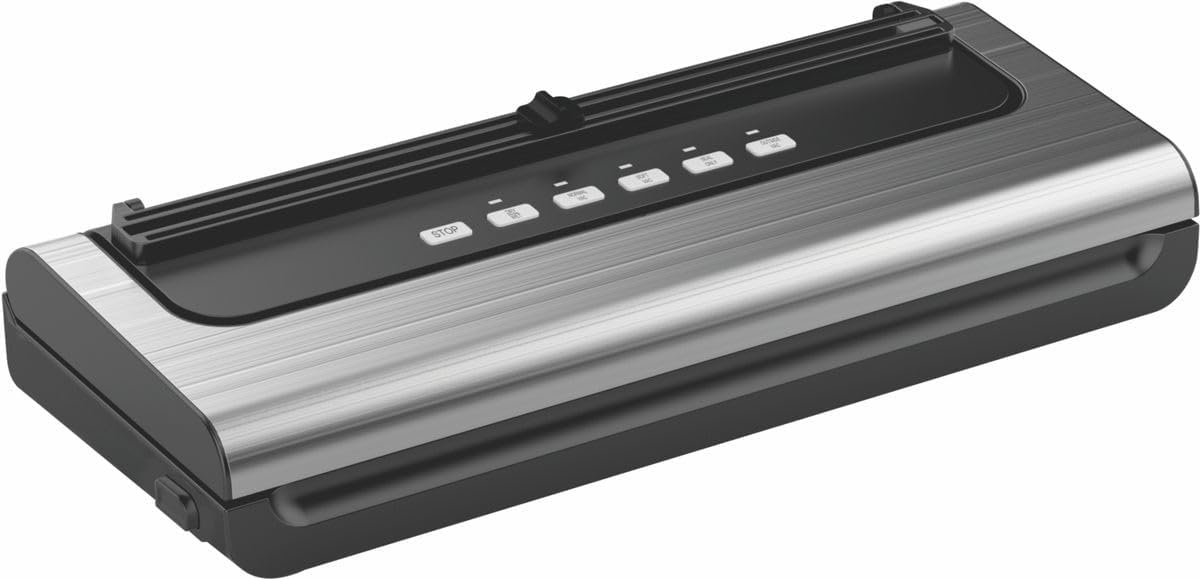
2.1. Attēls: beidziesview of the Genesis 80GMVS Multi-Functional Vacuum Sealer. This image displays the top view of the vacuum sealer, highlighting its sleek design and the control panel with various function buttons.
3. Iestatīšana
- Izpakošana: Carefully remove the vacuum sealer from its packaging. Retain packaging for future storage or transport.
- Pārbaudīt: Pārbaudiet ierīci, vai nav bojājumu pazīmju. Nelietojiet to, ja tā ir bojāta.
- Izvietojums: Place the vacuum sealer on a dry, flat, and stable surface, ensuring adequate space around the unit for ventilation.
- Strāvas pieslēgums: Plug the power cord into a standard electrical outlet. The indicator light may illuminate, indicating the unit is ready.
4. Lietošanas instrukcijas
This section details how to use your vacuum sealer for various food types and sealing methods.
4.1 Maisu un ēdiena sagatavošana
- Izmantojiet tikai šai ierīcei paredzētos vakuuma maisiņus.
- Ensure the bag is clean and dry inside the sealing area.
- Leave at least 7-10 cm of space between the food and the top of the bag for proper sealing.
- For moist foods, pre-freeze or place a paper towel inside the bag to absorb excess moisture.
4.2 Vacuum Sealing (Dry Mode)
- Place the open end of the bag into the vacuum channel. Ensure it lies flat and smooth over the sealing strip.
- Close the lid firmly until the latches click into place.
- Nospiediet pogu NORMĀLI button for standard vacuum and seal. The appliance will automatically vacuum the air and then seal the bag.
- Once the process is complete, the indicator light will turn off. Press the lid release buttons (if present) or gently lift the lid to open.
- Noņemiet aizzīmogoto maisiņu.
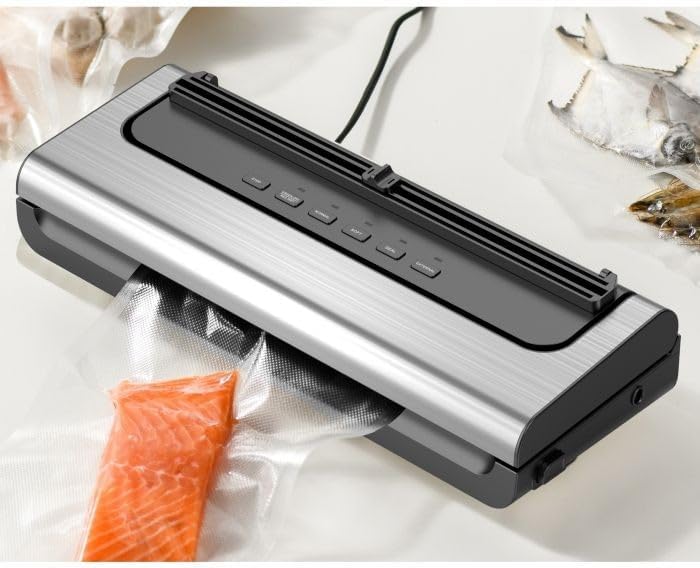
Figure 4.1: The Genesis 80GMVS vacuum sealer in operation, sealing a bag containing salmon. This image demonstrates the appliance actively extracting air from a bag, preparing it for preservation.
4.3 Vacuum Sealing (Wet/Moist Mode)
For foods with moisture, use the MITRAS setting (often combined with Normal/Soft depending on model, or indicated by a specific button if available). This mode adjusts the vacuum pressure and sealing time to accommodate liquids, preventing them from being drawn into the vacuum pump.
- Follow steps 1 and 2 from "Vacuum Sealing (Dry Mode)".
- Nospiediet pogu MITRAS button (if available) or select the appropriate setting for moist food.
- The appliance will proceed with vacuuming and sealing.
- Kad tas ir pabeigts, atveriet vāku un izņemiet aizzīmogoto maisiņu.
4.4 Soft Vacuum Mode
For delicate items like bread, chips, or pastries, use the MĪKSTS mode to prevent crushing. This mode reduces the vacuum pressure.
- Follow steps 1 and 2 from "Vacuum Sealing (Dry Mode)".
- Nospiediet pogu MĪKSTS pogu.
- Monitor the vacuum process. When the desired air removal is achieved, press the zīmogs button immediately to stop vacuuming and initiate sealing.
- Kad tas ir pabeigts, atveriet vāku un izņemiet aizzīmogoto maisiņu.

4.2. attēls: Tuvplāns view of the Genesis 80GMVS control panel and the sealing area with meat inside a bag. This image highlights the various control buttons, including 'STOP', 'NORMAL', 'SOFT', 'SEAL', and 'EXTERNAL', providing a clear view of the user interface during operation.
4.5 Tikai blīvējuma funkcija
Izmantojiet zīmogs button to create a seal without vacuuming. This is useful for making custom-sized bags from a roll or for resealing bags of snacks.
- Novietojiet maisiņa atvērto galu virs blīvējuma lentes.
- Cieši aizveriet vāku.
- Nospiediet pogu zīmogs button. The sealing indicator light will illuminate.
- Once the light turns off, the seal is complete. Open the lid and remove the bag.
4.6 Ārējā vakuuma funkcija
The ĀRĒJĀ function is used with an external vacuum hose (sold separately) to vacuum seal canisters, jars, or wine stoppers.
- Connect one end of the external vacuum hose to the accessory port on the vacuum sealer.
- Connect the other end of the hose to the port on your vacuum-sealable container.
- Nospiediet pogu ĀRĒJĀ pogu. Ierīce sāks izsūkt gaisu.
- The vacuuming will stop automatically or when you press STOP.
- Remove the hose from the container and the appliance.

4.3. attēls: Piemamples of various food items, including sliced meat, fish, and dried goods, successfully vacuum-sealed in transparent bags. This image illustrates the effectiveness of the vacuum sealer in preserving different types of food.
5. Apkope un tīrīšana
Regular cleaning and maintenance will extend the life of your vacuum sealer.
- Pirms tīrīšanas: Vienmēr atvienojiet ierīci no strāvas kontaktligzdas.
- Ārpuse: Noslaukiet ierīces ārpusi ar reklāmuamp drānu un maigām ziepēm. Nelietojiet abrazīvus tīrīšanas līdzekļus un neiegremdējiet ierīci ūdenī.
- Vakuuma kanāls: Clean any food residue or liquids from the vacuum channel using a damp drānu. Pirms nākamās lietošanas reizes pārliecinieties, ka tā ir pilnībā sausa.
- Blīvējuma sloksne: Gently wipe the sealing strip with a soft, dry cloth. Do not scratch or damage the strip, as this can affect sealing performance.
- Uzglabāšana: Store the appliance in a clean, dry place with the lid unlatched to prevent compression of the sealing gaskets, which can lead to poor seals over time.
6. Traucējummeklēšana
Ja rodas problēmas ar vakuuma iepakošanas ierīci, skatiet tālāk norādītās bieži sastopamās problēmas un risinājumus.
| Problēma | Iespējamais cēlonis | Risinājums |
|---|---|---|
| Ierīce neieslēdzas. | Nav pievienots strāvas avotam; strāvas kontaktligzdas darbības traucējumi. | Pārliecinieties, vai strāvas vads ir droši pievienots strādājošai kontaktligzdai. |
| Maisiņš nepareizi sūknē. | Lid not properly closed; bag not positioned correctly; bag is damaged; moisture in vacuum channel. | Ensure lid is latched; reposition bag so opening is flat in vacuum channel; check bag for holes; clean and dry vacuum channel. |
| Soma neaizveras. | Sealing strip is dirty or damaged; bag is wrinkled; too much moisture. | Clean sealing strip; ensure bag is flat; pre-freeze moist foods or use paper towel. |
| Pēc aizlīmēšanas maisiņā ieplūst gaiss. | Improper seal; sharp objects in bag; bag material defect. | Re-seal the bag; ensure no sharp edges on food; use high-quality vacuum bags. |
7. Specifikācijas
| Funkcija | Detaļas |
|---|---|
| Zīmols | Genesis |
| Modeļa numurs | 80GMVS |
| Materiāls | Plastmasa |
| Darbības režīms | Rokasgrāmata |
| Produkta izmēri | 44L x 18.5W x 10.5H centimetri |
| Preces svars | 1.4 kg |
| Krāsa | Daudzkrāsains |
8. Garantija un atbalsts
For warranty information and customer support, please refer to the documentation provided with your purchase or contact Genesis customer service. Keep your proof of purchase for warranty claims.
Ražotājs: Genesis


