Lietotāja rokasgrāmata
AXIS M5000-G 5 Megapixel Network Camera
Model: M5000-G | Brand: AXIS
1. Ievads
This manual provides comprehensive instructions for the installation, operation, and maintenance of the AXIS M5000-G 5 Megapixel Network Camera. Please read this manual thoroughly before using the product to ensure proper functionality and safety.
The AXIS M5000-G is a high-performance network camera designed for surveillance applications, offering 5-megapixel resolution and PTZ capabilities for enhanced monitoring.
2. Drošības informācija
Lai novērstu produkta bojājumus vai savainojumus sev, ievērojiet šādus drošības pasākumus:
- Pārliecinieties, vai barošanas avots atbilst kameras prasībām.
- Do not expose the camera to extreme temperatures or humidity.
- Izvairieties no tiešas spēcīgas gaismas avotu iedarbības, jo tas var sabojāt attēla sensoru.
- Uzstādīšanu drīkst veikt tikai kvalificēti darbinieki saskaņā ar vietējiem elektrības noteikumiem.
- Pirms tīrīšanas vai apkopes atvienojiet strāvu.
3. Iepakojuma saturs
Pārliecinieties, vai iepakojumā ir visi priekšmeti:
- AXIS M5000-G Network Camera Unit
- Montāžas komplekts (skrūves, enkuri)
- Installation Guide (Quick Start)
- Barošanas adapteris (ja iekļauts komplektā)
Note: Specific components may vary based on region or package version.
4. Produkts beidziesview
The AXIS M5000-G is a dome-style network camera designed for discreet and effective surveillance. It features a robust housing suitable for outdoor use and a PTZ (Pan-Tilt-Zoom) mechanism for flexible viewleņķi.

4.1. attēls: Priekšpuse view of the AXIS M5000-G Network Camera. This image shows the camera's dome shape, with the lens visible through the dark transparent cover. The main body is white.
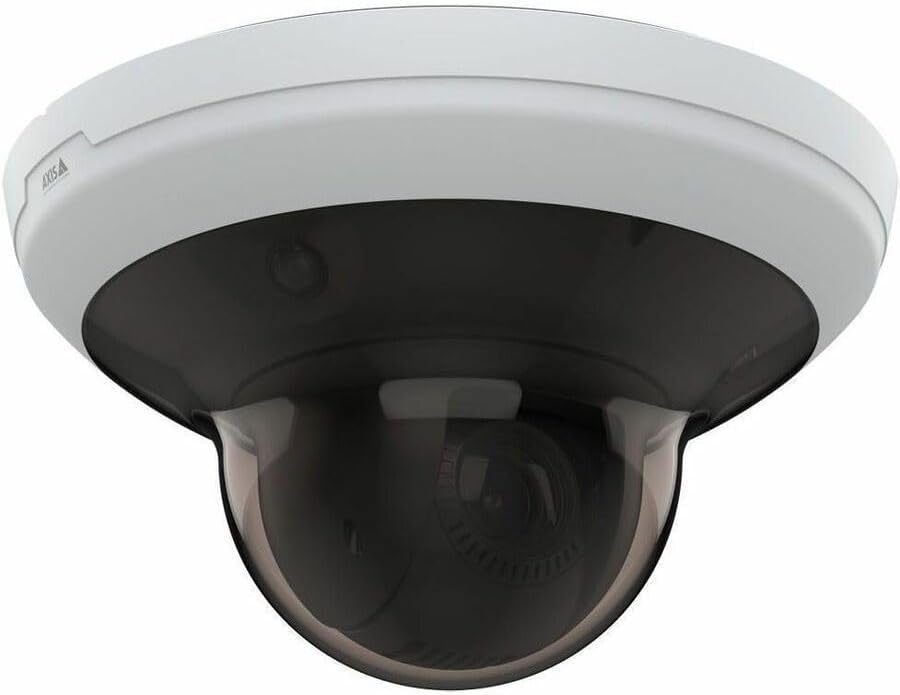
4.2. attēls: Leņķveida view of the AXIS M5000-G Network Camera. This perspective highlights the camera's compact design and the subtle AXIS logo on the side of the white base.

4.3. attēls: Vēl viens leņķisks view of the AXIS M5000-G Network Camera. Similar to Figure 4.2, this image provides a slightly different angle, emphasizing the smooth contours of the camera's housing.
5. Iestatīšana un instalēšana
The AXIS M5000-G is designed for wall mount installation and requires a wired connection for network and power.
5.1 Kameras uzstādīšana
- Izvēlieties atrašanās vietu: Select an outdoor location that provides the desired field of view and is within reach of a power source and network connection. Ensure the mounting surface is sturdy enough to support the camera's weight (approximately 5.7 pounds).
- Atzīmējiet urbšanas punktus: Use the provided mounting template (if applicable) or the camera base to mark the drilling points on the wall.
- Urbt caurumus: Izurbiet vadcaurumus atzīmētajos punktos. Ja nepieciešams, ievietojiet sienas enkurus.
- Nostipriniet bāzi: Attach the camera's mounting base to the wall using the provided screws.
- Attach Camera Unit: Secure the main camera unit to the mounted base, ensuring it clicks into place or is fastened according to the quick start guide.
5.2 Barošanas un tīkla pievienošana
- Strāvas pieslēgums: Connect the provided power adapter to the camera's power input and then to a suitable electrical outlet. The camera operates on corded electric power.
- Tīkla savienojums: Connect an Ethernet cable from your network router or switch to the camera's network port. The camera uses wired connectivity technology.
- Sākotnējā palaišana: Allow the camera a few minutes to power on and establish a network connection.
6. Kameras lietošana
The AXIS M5000-G camera is controlled primarily through a dedicated application or network video recorder (NVR) software.
6.1. Sākotnējā konfigurācija
- Atklājiet kameru: Use the AXIS IP Utility or your network's device discovery tools to find the camera's IP address on your network.
- Piekļuve Web Interfeiss: Atveriet a web pārlūkprogrammā un ievadiet kameras IP adresi, lai piekļūtu tās web saskarne.
- Pieteikšanās: Enter the default username and password (refer to the quick start guide or manufacturer's documentation for default credentials). Change default credentials immediately for security.
- Tīkla iestatījumi: Configure network settings (e.g., static IP, DHCP) as required by your network environment.
- Datums un laiks: Set the correct date and time for accurate video timestamps.
6.2. Tiešraide View un PTZ vadība
- Tiešraidē View: Access the live video feed through the web interface or a compatible surveillance application. The camera provides 1080p video capture resolution and 5 MP effective still resolution.
- Pan, Tilt, Zoom (PTZ): Utilize the PTZ controls within the application to adjust the camera's viewing angle and zoom level. This feature allows for dynamic monitoring of large areas.
- Iepriekš iestatītās pozīcijas: Configure and save specific PTZ positions for quick navigation to frequently monitored areas.
6.3 Kustību noteikšana un brīdinājumi
- Motion Only Alert Type: Konfigurējiet kustības noteikšanas zonas un jutības iestatījumus kameras saskarnē.
- Brīdinājuma darbības: Set up actions to be triggered upon motion detection, such as recording video, sending email notifications, or uploading images to an FTP server.
7. Apkope
Regular maintenance ensures optimal performance and longevity of your AXIS M5000-G camera.
- Objektīva tīrīšana: Gently wipe the camera lens and dome cover with a soft, clean, lint-free cloth. For stubborn dirt, use a mild lens cleaning solution applied to the cloth, not directly to the lens.
- Programmaparatūras atjauninājumi: Periodiski pārbaudiet AXIS website for firmware updates. Keeping the firmware updated ensures access to the latest features and security patches.
- Kabeļa pārbaude: Regularly inspect all cables (power and network) for any signs of wear, damage, or corrosion, especially in outdoor installations.
- Vides pārbaudes: Pārliecinieties, ka kameras vide paliek norādītajā darba temperatūras un mitruma diapazonā.
8. Traucējummeklēšana
This section addresses common issues you might encounter with the AXIS M5000-G camera.
| Problēma | Iespējamais cēlonis | Risinājums |
|---|---|---|
| Nav video plūsmas | Atvienota strāva, tīkla problēma, nepareiza IP adrese. | Check power connection. Verify network cable is securely connected. Confirm camera's IP address and network settings. Restart camera. |
| Slikta attēla kvalitāte | Dirty lens, low light, incorrect resolution settings. | Clean the lens. Ensure adequate lighting. Adjust video resolution settings in the camera's web saskarne. |
| PTZ vadības ierīces nereaģē | Network latency, software issue, camera malfunction. | Check network connection stability. Restart the camera and the control application. If issue persists, contact support. |
| Kustības noteikšana nedarbojas | Incorrect sensitivity settings, detection zones not configured. | Review and adjust motion detection sensitivity. Ensure detection zones are properly defined in the camera's settings. |
9. Specifikācijas
| Funkcija | Detaļas |
|---|---|
| Modeļa nosaukums | M5000-G Network Camera |
| Zīmols | ASS |
| Lietošana iekštelpās/ārā | Ārā |
| Barošanas avots | Elektrība ar vadu |
| Savienojamības tehnoloģija | Vadu |
| Video uzņemšanas izšķirtspēja | 1080p |
| Efektīva nekustīga izšķirtspēja | 5 MP |
| Montāžas veids | Sienas stiprinājums |
| Brīdinājuma veids | Tikai kustība |
| Vienuma izmēri (G x P x A) | 11.9 x 12 x 8.4 collas |
| Preces svars | 5.7 mārciņas |
| Ražotājs | AXIS COMMUNICATION INC |
10. Garantija un atbalsts
For warranty information, please refer to the documentation included with your purchase or visit the official AXIS website. AXIS provides support resources, including FAQs, troubleshooting guides, and contact information for technical assistance.
You can typically find more information and support on the AXIS Store on Amazon vai ražotāja oficiālais pārstāvis webvietne.


