1. Ievads
The Pronomic DX-50 USB MKII is a professional 4-channel DJ mixer designed for a wide range of applications, including discos, parties, restaurants, and presentations. Its user-friendly design ensures that both experienced and less experienced users can fully utilize its features. This manual provides detailed instructions for setting up, operating, and maintaining your mixer.
Key features include a recording function, integrated Bluetooth interface, USB player with transport controls, and multiple input channels.
2. Svarīgi drošības norādījumi
- Izlasiet instrukcijas: Read all safety and operating instructions before using the product.
- Saglabājiet instrukcijas: Saglabājiet drošības un lietošanas instrukcijas turpmākai uzziņai.
- Ievērojiet brīdinājumus: Ievērojiet visus brīdinājumus uz izstrādājuma un lietošanas instrukcijā.
- Izpildiet norādījumus: Ievērojiet visas darbības un lietošanas instrukcijas.
- Ūdens un mitrums: Do not use this apparatus near water (e.g., bathtub, washbowl, kitchen sink, laundry tub, wet basement, or swimming pool).
- Ventilācija: Neaizbloķējiet ventilācijas atveres. Uzstādiet saskaņā ar ražotāja norādījumiem.
- Siltums: Neuzstādiet tuvu siltuma avotiem, piemēram, radiatoriem, siltuma reģistriem, krāsnīm vai citām ierīcēm (tostarp amppacēlāji), kas ražo siltumu.
- Barošanas avoti: Use only power sources specified by the manufacturer.
- Strāvas vadu aizsardzība: Aizsargājiet strāvas vadu no uzkāpšanas vai saspiešanas, jo īpaši pie kontaktdakšām, kontaktligzdām un vietā, kur tie iziet no ierīces.
- Tīrīšana: Tīriet tikai ar sausu drānu.
- Apkope: Nemēģiniet pats apkopt šo izstrādājumu, jo, atverot vai noņemot vākus, jūs varat pakļaut bīstamam tilpumamtage vai citi apdraudējumi. Visus apkopes darbus nododiet kvalificētam apkopes personālam.
3. Iepakojuma saturs
Please check that all items listed below are included in your package. If any items are missing or damaged, contact your dealer immediately.
- Pronomic DX-50 USB MKII DJ Mixer
- Strāvas adapteris (maiņstrāva 12 V)
- USB Stick (32 GB, if included in your specific bundle)
- Lietotāja rokasgrāmata (šis dokuments)
4. Produkts beidziesview
Familiarize yourself with the various controls and connections on your DX-50 USB MKII mixer.
4.1 Priekšējā paneļa vadīklas
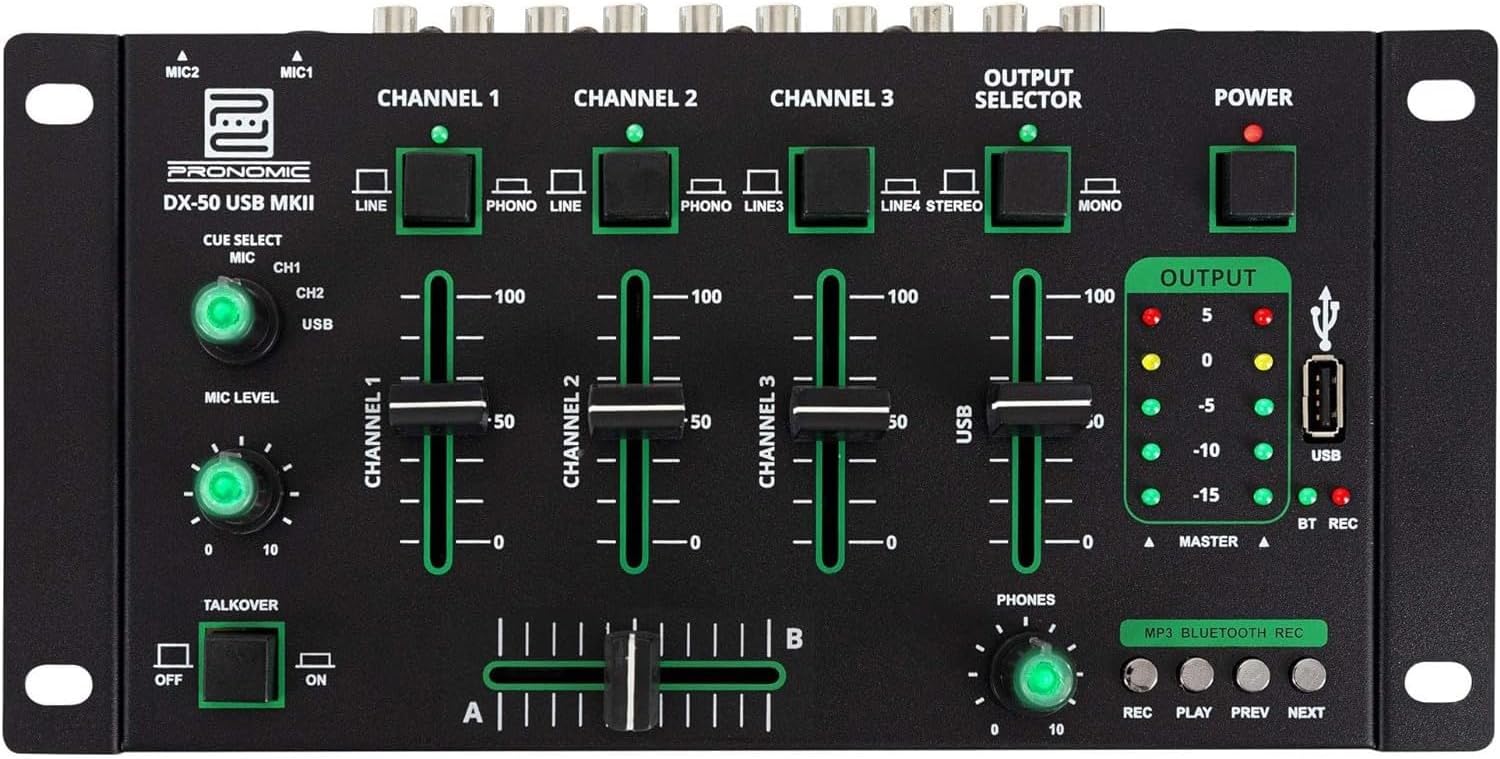
- MIC 1/2 Inputs: Connect microphones.
- Channel 1-4 Input Selectors: Switch between LINE, PHONO, or USB/Bluetooth inputs for each channel.
- Kanāla faderi: Adjust the volume level for each channel.
- CUE Select Buttons: Route specific channels to the headphone output for monitoring.
- MIC Level Knob: Adjust the volume of the microphone inputs.
- Talkover Switch: Activates the talkover function, which automatically lowers music volume when speaking into the microphone.
- Output Selector: Choose between Stereo or Mono master output.
- Strāvas slēdzis: Ieslēdz/izslēdz mikseri.
- Izvades līmeņa mērītāji: LED indicators showing the master output level.
- USB ports: Connect a USB drive for MP3 playback and recording.
- MP3/Bluetooth/REC Player Controls: Buttons for Play/Pause, Previous, Next, and Record functions for the integrated player.
- Phones Level Knob: Regulē austiņu izejas skaļumu.
- Crossfader (A/B): Blends between channels assigned to A and B.
4.2 Aizmugurējā paneļa savienojumi

- AC 12V Power Input: Pievienojiet šeit komplektā iekļauto strāvas adapteri.
- Austiņu izeja: 6.3 mm ligzda austiņu pievienošanai.
- MASTER OUT L/R (RCA): Connect to your main amppacēlājs vai skaļruņi ar barošanu.
- Channel 1 & 2 Inputs (RCA Line/Phono): Connect turntables (Phono) or other line-level devices (CD players, media players). Use the front panel selector to switch.
- Channel 3 & 4 Inputs (RCA Line): Connect line-level devices.
- MIC 1 & 2 Inputs (6.3mm Jack): Connect microphones.
5. Iestatīšana
Follow these steps to set up your Pronomic DX-50 USB MKII mixer:
- Strāvas pieslēgums: Ensure the mixer's power switch is in the OFF position. Connect the supplied AC 12V power adapter to the "AC 12V" input on the rear panel of the mixer. Plug the adapter into a suitable power outlet.
- Master Output Connection: Connect the "MASTER OUT L/R" RCA outputs on the rear panel to the inputs of your amppacēlājs vai skaļruņi ar barošanu.
- Ievadierīces savienojums:
- Vinila atskaņotāji: Connect turntables to the "CHANNEL 1" or "CHANNEL 2" RCA inputs. Set the corresponding input selector on the front panel to "PHONO".
- CD atskaņotāji/līnijas ierīces: Connect CD players, media players, or other line-level devices to "CHANNEL 1", "CHANNEL 2", "CHANNEL 3", or "CHANNEL 4" RCA inputs. Set the corresponding input selector on the front panel to "LINE".
- Mikrofoni: Connect microphones to the "MIC 1" or "MIC 2" 6.3mm jack inputs on the rear panel.
- Austiņu savienojums: Connect your headphones to the "PHONES" 6.3mm jack on the rear panel.
- USB Drive (Optional): If using a USB drive for playback or recording, insert it into the "USB" port on the front panel.
- Ieslēgšana: Once all connections are made, switch the mixer's power switch to the ON position. The power indicator LED will illuminate.
6. Lietošanas instrukcijas
6.1 Pamata sajaukšana
- Izvēlieties ievadi: For each channel, use the input selector switch (LINE/PHONO/USB/BT) to choose the desired audio source.
- Kanāla skaļuma regulēšana: Use the vertical faders for each channel to adjust its individual volume level.
- Galvenā izvade: Monitor the "OUTPUT" LED meters and adjust the master volume knob (if present, otherwise rely on channel faders and amplifier volume) to achieve a suitable overall output level without clipping.
- Crossfader: Use the crossfader to smoothly transition between channels assigned to A and B. Channels 1 and 2 are typically assigned to the crossfader.
6.2 Mikrofona lietošana
- Connect your microphone to one of the MIC inputs on the rear panel.
- Adjust the "MIC LEVEL" knob on the front panel to control the microphone's volume.
- Talkover Function: Activate the "TALKOVER" switch to automatically reduce the volume of the music when you speak into the microphone. This is useful for announcements.
6.3 USB atskaņošana un ierakstīšana
- USB atskaņošana: Ievietojiet USB disku, kurā ir MP3 files into the "USB" port. Select "USB" as the input source for the dedicated USB channel. Use the "PLAY/PAUSE", "PREV", and "NEXT" buttons to control playback.
- USB ierakstīšana: Press the "REC" button to start recording the master output to the connected USB drive. Press "REC" again to stop recording. Ensure your USB drive has sufficient free space and is formatted correctly (FAT32 is commonly supported).
6.4 Bluetooth savienojamība
- Aktivizējiet Bluetooth: Select "BT" as the input source for the dedicated Bluetooth channel. The mixer will enter pairing mode.
- Savienot pārī ierīci: On your Bluetooth-enabled device (smartphone, tablet, etc.), search for available Bluetooth devices. Select "Pronomic DX-50 USB MKII" (or similar name) from the list to pair.
- Atskaņot audio: Once paired, you can play audio from your device through the mixer. Control playback from your device or using the mixer's transport controls (if supported by your device).
6.5 Monitoring with Headphones
- Connect headphones to the "PHONES" output.
- Use the "CUE SELECT" buttons to choose which channels you want to monitor in your headphones without affecting the main output.
- Adjust the "PHONES" level knob to set your desired headphone volume.
7. Apkope
- Tīrīšana: Disconnect the power before cleaning. Use a soft, dry cloth to wipe the surface of the mixer. Do not use liquid cleaners, aerosols, or solvents.
- Uzglabāšana: Uzglabājiet mikseri vēsā, sausā vietā, prom no tiešiem saules stariem un ekstremālām temperatūrām.
- Fadera un kloķa kopšana: Avoid excessive force when operating faders and knobs. Periodically check for dust or debris accumulation around moving parts.
- Kabeļu vadība: Ensure cables are not kinked or strained, which can lead to damage.
8. Traucējummeklēšana
| Problēma | Iespējamais cēlonis | Risinājums |
|---|---|---|
| Nav jaudas | Power adapter not connected; Power switch off; Faulty power outlet. | Check power adapter connection; Ensure power switch is ON; Try a different power outlet. |
| Nav skaņas no galvenās izejas | Master volume too low; Amplifier/speakers off or disconnected; Incorrect input selection; Channel faders down. | Increase master volume; Check amplifier/speaker connections and power; Verify correct input selected for channels; Raise channel faders. |
| Nav skaņas no austiņām | Headphone volume too low; Headphones not connected; No CUE selected. | Increase PHONES level; Connect headphones properly; Press CUE button for desired channel. |
| Bluetooth netiek savienots pārī | Mixer not in pairing mode; Device too far; Interference. | Ensure BT input is selected; Bring device closer; Restart mixer and device. |
| USB atskaņošana nedarbojas | USB disks nav pareizi ievietots; Nepareizi file formāts; USB disks nav pareizi formatēts. | Re-insert USB drive; Ensure files are MP3; Format USB drive to FAT32. |
9. Specifikācijas
| Modelis | Pronomic DX-50 USB MKII |
| Kanālu skaits | 4 |
| Savienojamības tehnoloģija | Bluetooth, USB |
| Audio ieeja | RCA (line/phono), 6.3mm microphone, Bluetooth, USB |
| Izvades savienotāja tips | RCA (Master Out), 6.3mm (Phones) |
| Barošanas avots | Electric Cable (AC 12V adapter) |
| Dimensions (without corner brackets and controls) | 222 x 129 x 28 mm (platums x dziļums x augstums) |
| Total Dimensions (with corner brackets and controls) | 267 x 136 x 51 mm (platums x dziļums x augstums) |
| Svars | 790 g |
10. Garantija un atbalsts
Lai saņemtu informāciju par garantiju un tehnisko atbalstu, lūdzu, skatiet pirkumam pievienoto dokumentāciju vai sazinieties ar izplatītāju. Saglabājiet pirkuma apliecinājumu jebkādu garantijas prasību gadījumā.
For further assistance, you may also visit the official Pronomic webvietnē vai sazinieties ar klientu apkalpošanas nodaļu.


