1. Ievads
Welcome to the user manual for your Natec FURY SHOBO SH4F RGB MIDI TOWER PC Case. This guide provides essential information for the proper assembly, installation, operation, and maintenance of your new computer chassis. Please read this manual thoroughly before beginning installation to ensure optimal performance and longevity of your components.
2. Drošības vadlīnijas
- Always disconnect the power supply from the wall outlet before installing or removing any components inside the PC case.
- Rīkojieties ar komponentiem uzmanīgi, lai izvairītos no elektrostatiskās izlādes (ESD) radītiem bojājumiem. Apsveriet antistatiskas aproces izmantošanu.
- Keep small parts, such as screws, away from children.
- Nodrošiniet atbilstošu ventilāciju ap datora korpusu, lai novērstu pārkaršanu.
- Do not expose the case to extreme temperatures, humidity, or direct sunlight.
- Izvairieties novietot smagus priekšmetus uz korpusa.
3. Iepakojuma saturs
Lūdzu, pārliecinieties, vai jūsu iepakojumā ir visas preces:
- Natec FURY SHOBO SH4F RGB MIDI TOWER PC Case
- Accessory box (containing screws, cable ties, and other small parts)
- Lietotāja rokasgrāmata (šis dokuments)
4. Produkts beidziesview
The Natec FURY SHOBO SH4F is a MIDI TOWER PC case designed for gaming and general-purpose computing, offering ample space for components and efficient cooling. It features a modern design with RGB lighting.
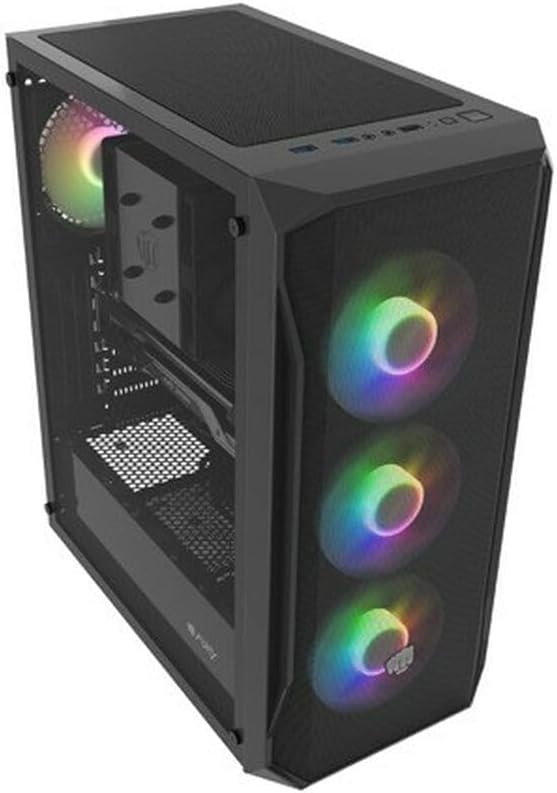
4.1. attēls: Leņķis view of the Natec FURY SHOBO SH4F RGB MIDI TOWER PC Case, showcasing its black metal and tempered glass construction. The front panel features a mesh design with three illuminated RGB fans, and a single RGB fan is visible at the rear exhaust. The top panel includes I/O ports and a mesh filter.
4.1 Priekšējais I/O panelis
- Barošanas poga
- Atiestatīšanas poga
- USB 2.0 ports (x1)
- Audio Jacks (Headphone/Microphone)
- RGB Control Button (if applicable)
4.2 Iekšējais izkārtojums
The case supports Micro ATX and Mini ATX motherboards and features a bottom-mounted power supply bay. It includes dedicated areas for storage drives and efficient cable management.
5. Uzstādīšana un komponentu instalēšana
Follow these steps to install your PC components into the FURY SHOBO SH4F case.
5.1 Lietas sagatavošana
- Novietojiet korpusu uz līdzenas, stabilas virsmas.
- Remove the side panels. Typically, the tempered glass side panel is secured with thumbscrews.
5.2 Mātesplates uzstādīšana
- Install the I/O shield (if not pre-installed on your motherboard) into the rear opening of the case.
- Ensure the motherboard standoffs are correctly aligned for your Micro ATX or Mini ATX motherboard. Adjust or install additional standoffs if necessary.
- Uzmanīgi novietojiet mātesplati uz starplikām, izlīdzinot skrūvju caurumus.
- Secure the motherboard with the provided screws. Do not overtighten.
5.3 Barošanas avota uzstādīšana
- Locate the power supply bay at the bottom rear of the case.
- Slide your power supply unit (PSU) into the bay from the rear of the case, ensuring the fan faces downwards (if the case has a bottom vent) or upwards.
- Piestipriniet barošanas bloku ar skrūvēm no korpusa aizmugures.
5.4 Krātuves diska instalēšana
Refer to your case's specific drive bay design for 2.5" SSDs and 3.5" HDDs. Typically, these involve trays or direct screw mounting.
5.5 Expansion Card Installation (e.g., Graphics Card)
- Noņemiet nepieciešamos PCI-E slotu pārsegus no korpusa aizmugures.
- Insert your expansion card into the corresponding PCI-E slot on the motherboard.
- Nostipriniet karti ar skrūvi vai korpusa fiksācijas mehānismu.
5.6. Kabeļu pārvaldība
Izmantojiet izgriezumus un nostiprināšanas punktus aiz mātesplates paplātes, lai novirzītu un nostiprinātu kabeļus. Tas uzlabo gaisa cirkulāciju un estētiku.
5.7 Connecting RGB Fans
The pre-installed RGB fans typically connect to a central RGB controller or directly to your motherboard's RGB headers. Consult your motherboard manual for specific RGB header locations and software control. Ensure all fan power cables are connected to appropriate fan headers on the motherboard or a fan hub.
6. Datora korpusa darbība
6.1 Ieslēgšana/izslēgšana
After all components are installed and cables connected, plug your power supply into a wall outlet. Press the power button on the front I/O panel to turn on your system. To turn off, use the operating system's shutdown function or press and hold the power button for several seconds.
6.2 RGB apgaismojuma vadība
If your case features an RGB control button on the front I/O panel, press it to cycle through various lighting modes and colors. For advanced customization, use your motherboard's RGB software (e.g., ASUS Aura Sync, MSI Mystic Light, Gigabyte RGB Fusion) if the fans are connected to compatible headers.
7. Apkope
Regulāra apkope palīdz nodrošināt optimālu veiktspēju un pagarina datora komponentu kalpošanas laiku.
7.1 Putekļu filtra tīrīšana
The FURY SHOBO SH4F case includes dust filters (e.g., on the top and bottom). Periodically remove and clean these filters by rinsing them with water and allowing them to dry completely before re-installing. This prevents dust buildup and maintains airflow.
7.2 Ārpuses tīrīšana
Noslaukiet korpusa ārpusi ar mīkstu, damp cloth. Avoid abrasive cleaners or solvents that could damage the finish or tempered glass.
8. Traucējummeklēšana
Ja rodas problēmas, skatiet tālāk norādītās bieži sastopamās problēmu novēršanas darbības.
- Nav jaudas: Ensure the power supply is properly connected to the wall outlet and the motherboard. Check all internal power cables (24-pin ATX, 8-pin CPU, GPU power). Verify the power button cable is correctly connected to the motherboard's front panel header.
- Ventilatori negriežas: Check if fan power cables are securely connected to the motherboard or fan hub. Ensure the power supply is functioning.
- RGB apgaismojums nedarbojas: Verify RGB cables are correctly connected to the RGB controller or motherboard header. If using a button, try cycling through modes. If using software, ensure it's installed and configured correctly.
- Pārkaršana: Ensure all fans are spinning correctly and oriented for proper airflow (intake/exhaust). Clean dust filters and internal components. Verify CPU cooler and GPU cooler are properly installed.
9. Specifikācijas
| Zīmols | Natec |
| sērija | SH4F |
| Modeļa numurs | NFO-2154 |
| Lietas veids | Midi tornis |
| Mātesplates saderība | Micro ATX, Mini ATX |
| Krāsa | Melns |
| Materiāls | Metāls |
| Produkta izmēri (LxWxH) | 19.69 x 16.93 x 9.84 collas (50 x 43 x 25 cm) |
| Preces svars | 9.46 mārciņas (4.3 kilogrami) |
| Barošanas bloka montāžas veids | Apakšējais stiprinājums |
| Dzesēšanas metode | Gaiss |
| USB 2.0 portu skaits | 1 |
10. Garantija un atbalsts
Natec products are manufactured to high-quality standards. For information regarding warranty terms and conditions, please refer to the warranty card included with your product or visit the official Natec website. If you encounter any issues not covered in this manual or require further assistance, please contact Natec customer support through their official channels.
Ražotājs: Natec


