1. Ievads
Welcome to the ACwO DwOTS Fire user manual. These innovative earbuds offer a unique dual-style design, providing both in-ear and half-in-ear options within a single charging case. Designed for versatility and high-quality audio, the DwOTS Fire earbuds feature advanced connectivity, extended battery life, and intuitive controls to enhance your listening experience.

Image: ACwO DwOTS Fire earbuds showcasing both half-in-ear and in-ear styles from a single case.
2. Kas ir kastē
Lūdzu, pārliecinieties, vai jūsu iepakojumā ir visas preces:
- 2 x Set of Wireless Earbuds (one in-ear, one half-in-ear)
- 1 x C tipa ātrās uzlādes kabelis
- 4 x Extra Earmuffs (for in-ear style)
- 1x garantijas karte
- 1 x Scan Me karte

Image: The ACwO DwOTS Fire earbuds and charging case.
3. Iestatīšana un savienošana pārī
3.1 Sākotnējā savienošana pārī
- Pārliecinieties, vai austiņas ir uzlādētas.
- Atveriet uzlādes futrāli. Austiņas automātiski pārslēgsies pārī savienošanas režīmā.
- Savā ierīcē (viedtālrunī, planšetdatorā utt.) iespējojiet Bluetooth.
- Meklēt available devices and select "ACwO Fire" or "ACwO DwOTS Fire" to connect.
- Kad savienojums būs izveidots, atskanēs audio signāls, un mainīsies austiņu indikatora lampiņa.
3.2 Dual Connectivity
The ACwO DwOTS Fire earbuds offer unique dual connectivity options:
- Connect Each Pair to Two Different Devices: Ideal for sharing your listening experience.
- Connect Both Pairs to a Single Device: Perfect for watching movies or listening to music together with a loved one. This feature is available only for devices with dual audio connectivity (e.g., certain Android devices).

Image: Illustration of the dual connectivity feature, showing two pairs of earbuds.
Steps for Dual Sharing (Connecting Both Pairs to a Single Device):
- Connect both 'ACwO DwOTS Fire' and 'ACwO Fire +' with your device's Bluetooth.
- Once both pairs are connected, scroll down your device's notification panel and click on 'Media Output'.
- One pair will already be selected. Select the other pair to enable dual audio.
- You can now listen on both pairs of your earbuds simultaneously.

Image: Visual guide for setting up dual sharing on a compatible device.
4. Lietošanas instrukcijas
4.1 Intuitīva skārienvadība
The earbuds feature intuitive touch controls for easy management of music, calls, and voice assistants. Refer to the included 'Scan Me Card' for a detailed diagram of touch functions.
- Atskaņot/pauzēt: Viens pieskāriens austiņām.
- Nākamais ieraksts: Veiciet dubultskārienu labajai austiņai.
- Iepriekšējais ieraksts: Veiciet dubultskārienu kreisajā austiņā.
- Atbildēt/beigt zvanu: Viens pieskāriens austiņām.
- Noraidīt zvanu: Ilgi nospiediet uz jebkuras austiņas.
- Balss palīga aktivizēšana: Trīsreiz pieskarieties jebkurai austiņai.
4.2 EQ režīmi
Customize your audio experience with 3 preset EQ modes, offering a total of 3+3 EQ options across the two earbud styles. Switch between modes to suit your preference for deep bass, balanced sound, or enhanced treble.
- Spēļu režīms: Optimized for immersive gaming audio with low latency.
- Teātra režīms: Enhanced soundstage for movies and videos.
- Līdzsvarots režīms: Provides a neutral and clear audio profile vispārējai klausīšanai.

Image: ACwO DwOTS Fire earbuds with a visual representation of available EQ modes.
4.3 Balss palīgs
Easily access your device's voice assistant by triple-tapping either earbud. Compatible with "Ok Google" and "Hey Siri" for hands-free control.
5. Uzlāde
5.1 Earbuds and Case Charging
The ACwO DwOTS Fire earbuds provide up to 52 hours of music playtime with the charging case. The case supports both wired and wireless charging.
- Vadu uzlāde: Connect the provided Type-C fast charging cable to the charging port on the case and a power source.
- Bezvadu uzlāde: Place the charging case on a compatible wireless charging pad (wireless charger not included). The indicator light on the case will show charging status.

Image: ACwO DwOTS Fire charging case highlighting 52 hours of playtime.

Image: 'One On, One Charging' feature for extended use.
6. Apkope
6.1 Ūdens un sviedru izturība
The earbuds are IPX5 water and sweat resistant, making them suitable for workouts and outdoor activities. This rating protects against low-pressure water jets from any direction. Do not submerge the earbuds in water.

Image: ACwO DwOTS Fire earbuds demonstrating IPX5 water and sweat resistance.
6.2. Tīrīšana
Regularly clean your earbuds and charging case with a soft, dry, lint-free cloth. Avoid using abrasive materials or harsh chemicals. For the in-ear style, gently remove and clean the earmuffs with water and mild soap, ensuring they are completely dry before reattaching.
7. Specifikācijas
| Funkcija | Detaļas |
|---|---|
| Modeļa nosaukums | DwOTS uguns |
| Savienojamības tehnoloģija | Bezvadu (Bluetooth V5.3) |
| Audio draivera tips | 13mm Real Drivers |
| Trokšņa kontrole | AI-ENC with Quad Mics, Passive Noise Cancellation |
| Spēles laiks | Līdz 52 stundām (ar uzlādes futrāli) |
| Latentums | Up to 45ms (Ultra-low) |
| Ūdensizturības līmenis | IPX5 (Ūdensnecaurlaidīgs) |
| Uzlāde | Type-C Fast Charging, Wireless Charging Capability |
| Kontroles metode | Touch Controls, Voice Assistant (Ok Google, Hey Siri) |
| Austiņas forma | In-Ear, Half-in-Ear |
| Preces svars | 43 g |
| Produkta izmēri | 5.6 x 5.6 x 1.8 cm |
| Materiāls | Plastmasa |
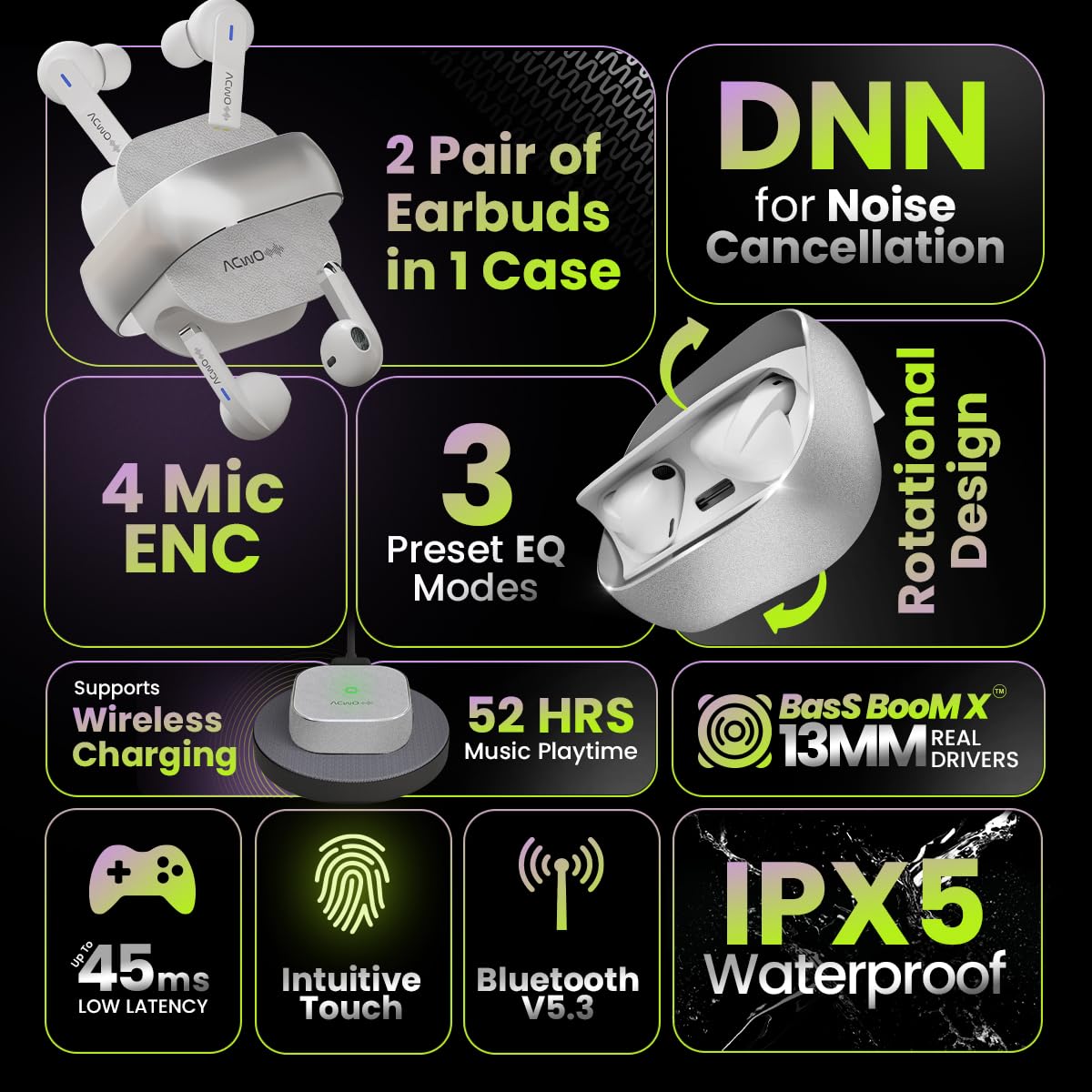
Image: Summary of ACwO DwOTS Fire key features.
8. Traucējummeklēšana
8.1 Austiņas nesavienojas pārī
- Pārliecinieties, vai austiņas ir uzlādētas un vāciņš ir atvērts.
- Izslēdziet un ieslēdziet ierīces Bluetooth.
- Aizmirstiet ierīci no Bluetooth saraksta un mēģiniet vēlreiz savienot pārī.
- Reset the earbuds (refer to the 'Scan Me Card' for specific reset instructions).
8.2 Nav skaņas vai kluss skaļums
- Pārbaudiet skaļuma līmeņus gan ierīcē, gan austiņās.
- Pārliecinieties, vai austiņas ir pareizi ievietotas ausīs.
- Notīriet visus gružus no austiņu skaļruņiem un uzlādes kontaktiem.
- Atkārtoti pievienojiet austiņas savai ierīcei.
8.3. Lādēšanas problēmas
- Pārliecinieties, vai uzlādes kabelis ir droši pievienots gan korpusam, gan strāvas avotam.
- If using wireless charging, ensure the case is correctly placed on a compatible wireless charging pad.
- Check for any obstructions on the charging contacts of the earbuds and inside the case.
- Izmēģiniet citu uzlādes kabeli vai strāvas adapteri.
9. Garantija un atbalsts
The ACwO DwOTS Fire earbuds come with a standard brand warranty. Please refer to the included Warranty Card for specific terms and conditions.
Klientu atbalsts:
Ja jums ir kādi jautājumi, tehniskā palīdzība vai garantijas prasības, lūdzu, sazinieties ar ACwO klientu atbalsta dienestu:
- E-pasts: palīdzība@acwo.com
- Tālrunis: +91 9320420001
- Ražotājs: ACWO LIFESTYLE PRIVATE LIMITED, Borivali, Mumbaja, Maharaštra — 400092, Indija


