1. Ievads un beigasview
The Ditec RM-L 1370 is a universal replacement remote control designed for a wide range of Sony Bravia televisions. This remote offers direct compatibility with various Sony LCD, LED, UHD, OLED, and QLED 4K Ultra HD Smart Android TV models, eliminating the need for complex programming or pairing. It features dedicated hotkeys for popular streaming services like YouTube and Netflix for convenient access.

Image: The Ditec RM-L 1370 remote control, highlighting its compatibility as a single remote solution for Sony TVs.
2. Iestatīšana un sākotnējā lietošana
This remote control is designed for immediate use without any setup or programming. Simply insert the required batteries, and it will be ready to operate your compatible Sony TV.
2.1 Akumulatora uzstādīšana
- Atrodiet bateriju nodalījumu tālvadības pults aizmugurē.
- Atveriet akumulatora nodalījuma vāku.
- Insert two (2) AAA batteries (not included), ensuring correct polarity (+ and - terminals).
- Droši aizveriet akumulatora nodalījuma vāku.

Attēls: Aizmugure view tālvadības pults, kas ilustrē bateriju nodalījuma atrašanās vietu.
2.2 Pirmā lietošana
Once batteries are installed, point the remote control towards your Sony TV and press the Power button. The remote should operate your TV without any further configuration.
3. Lietošanas instrukcijas
The Ditec RM-L 1370 remote control provides all standard functions for your Sony Bravia TV, along with convenient shortcut buttons.
3.1 Pamatfunkcijas
- Barošanas poga: Ieslēdz vai izslēdz televizoru.
- Ciparu pogas (0-9): Tiešai kanālu izvēlei.
- Skaļuma palielināšana/ samazināšana: Regulē televizora skaļumu.
- Kanāls uz augšu/uz leju: Pārslēdz TV kanālus.
- Navigācijas paliktnis (augšup/lejup/pa kreisi/pa labi/ievadīt): Izvēlnes navigācijai un atlasei.
- Mājas poga: Accesses the TV's Smart Home screen or main menu.
- Atgriešanās/atpakaļ poga: Atgriežas iepriekšējā ekrānā vai izvēlnē.
- Opciju poga: Parāda kontekstam atbilstošas opcijas.
3.2 Īpašas funkcijas
- YouTube Hotkey: Directly launches the YouTube application.
- Netflix Hotkey: Tieši palaiž Netflix lietojumprogrammu.
The remote features an enhanced infrared sensor for a farther transmitting distance, allowing effective control up to 50 feet.

Image: The remote control demonstrating its farther distance sensor, capable of operating up to 50 feet.
4. Saderība
The Ditec RM-L 1370 universal remote is compatible with a wide range of Sony Bravia LCD, LED, UHD, OLED, and QLED 4K Ultra HD Smart Android TVs. It is designed to replace many original Sony remote models, including but not limited to:
- RMT-TX100U, RMT-TX102U
- RMF-TX200U, RMF-TX201U, RMF-TX220U
- RMT-TX300U, RMF-TX310U
- RMT-TX500U, RMF-TX520U, RMF-TX600U
- And many other Sony TV remote models.
For a comprehensive list of compatible Sony TV remote models, please refer to the image below:
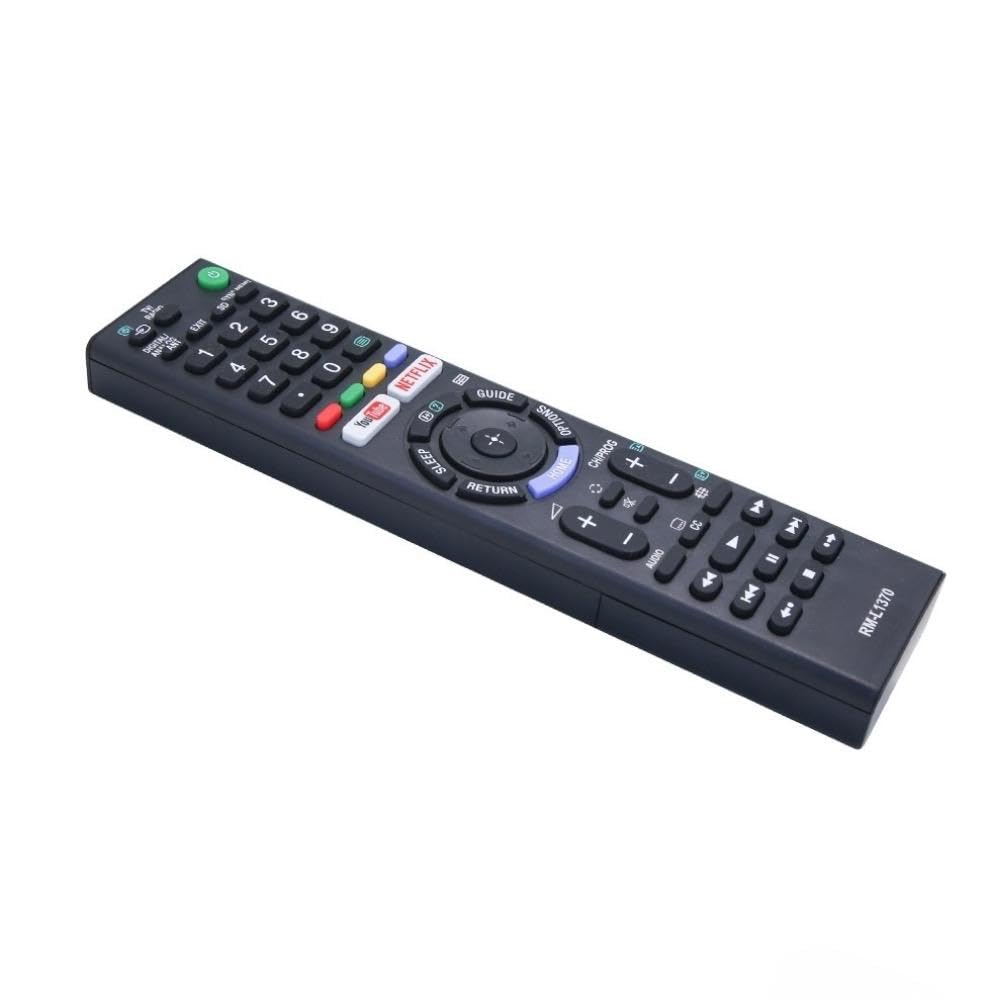
Image: A detailed list of Sony TV remote models that are compatible with the Ditec RM-L 1370.
It is recommended to compare the appearance of this remote with your original remote for visual confirmation of compatibility.
5. Apkope
5.1. Akumulatora nomaiņa
When the remote control's performance degrades or it stops responding, replace the batteries with two new AAA alkaline batteries. Always replace both batteries at the same time. Do not mix old and new batteries or different types of batteries.
5.2. Tīrīšana
To clean the remote control, use a soft, dry cloth. Do not use liquid cleaners, sprays, or abrasive materials, as these may damage the remote's surface or internal components.
6. Traucējummeklēšana
- Tālvadības pults nereaģē:
- Pārbaudiet, vai baterijas ir ievietotas pareizi, ievērojot pareizo polaritāti.
- Nomainiet vecās baterijas ar jaunām.
- Pārliecinieties, vai starp tālvadības pulti un televizora infrasarkano staru uztvērēju nav šķēršļu.
- Pārliecinieties, ka atrodaties efektīvajā darbības diapazonā (līdz 50 pēdām).
- Atsevišķas pogas nedarbojas:
- Some advanced functions or TV-specific features might not be supported by a universal replacement remote.
- Ensure the TV is powered on and functioning correctly.
7. Specifikācijas
| Funkcija | Detaļas |
|---|---|
| Zīmols | Ditec |
| Modelis | RM-L 1370 |
| Saderīgas ierīces | Sony Bravia LCD, LED, UHD, OLED, QLED 4K Ultra HD Smart Android TVs |
| Savienotāja veids | Infrasarkano (IS) |
| Nepieciešamas baterijas | 2 x AAA (nav iekļauts) |
| Īpašas funkcijas | Ergonomic design, YouTube & Netflix Hotkeys |
| Produkta izmēri | 3 x 3 x 12 cm |
| Preces svars | 80 g |
| Izcelsmes valsts | Ķīna |
8. Atbalsts
For assistance with compatibility or any questions regarding your Ditec RM-L 1370 remote control, you may contact support by sending a picture of your old remote or your device's brand name and model number to +91 9924350801. This will help in verifying compatibility or addressing specific queries.

Image: Information on how to contact support for compatibility checks or questions.


