1. Ievads
This manual provides essential information for the proper use and maintenance of your Realme 12 Plus 5G RMX3867 smartphone. Please read this guide thoroughly before operating your device to ensure optimal performance and longevity. Keep this manual for future reference.
2. Iepakojuma saraksts
Upon opening the package, verify that all items listed below are present and in good condition. If any items are missing or damaged, please contact your retailer.

Image: Contents of the Realme 12 Plus 5G RMX3867 retail box. Includes the phone, phone case, quick guide, detachable camera decoration replacement guide, safety guide, screwdriver, two screws, USB cable, and SIM card ejector.
- Realme 12 Plus 5G RMX3867 Smartphone
- Tālruņa futrālis
- Īsā rokasgrāmata
- Detachable Camera Decoration Replacement Guide
- Drošības rokasgrāmata
- Skrūvgriezis
- Skrūves (x2)
- USB kabelis
- SIM kartes izspiedējs
Note: Some accessories, such as the detachable camera decoration, may come in a separate package or require assembly. Refer to the specific guides provided.

Image: Contents of the Detachable Camera Decoration Protective Cover Set. Includes a packaging box, detachable deco case (x1), two screws, and a phone case (x1).
3. Iestatīšana
3.1. SIM kartes uzstādīšana
- Atrodiet SIM kartes paliktni ierīces sānos.
- Insert the provided SIM card ejector tool into the small hole next to the tray.
- Viegli spiediet, līdz paplāte iznirst.
- Place your Nano-SIM card(s) into the tray with the gold contacts facing down. Ensure the card is correctly oriented according to the tray's diagram.
- Uzmanīgi ievietojiet paplāti atpakaļ tālrunī, līdz tā noklikšķ.

Attēls: Apakšdaļa view of the Realme 12 Plus 5G RMX3867, showing the USB-C port, speaker grille, microphone, and SIM card tray slot.
3.2. Ieslēgšana/izslēgšana
- Lai ieslēgtu: Press and hold the Power button (located on the right side of the device) until the realme logo appears.
- Lai izslēgtu: Nospiediet un turiet ieslēgšanas/izslēgšanas pogu, līdz parādās barošanas opciju izvēlne. Pieskarieties vienumam “Izslēgt” un apstipriniet.
- Lai restartētu: Press and hold the Power button until the power options menu appears. Tap "Restart" and confirm.

Attēls: Sāns view of the Realme 12 Plus 5G RMX3867, highlighting the power button and volume rocker on the right edge of the device.
3.3. Sākotnējā iestatīšana
The first time you power on your device, you will be guided through the initial setup process. This includes:
- Valodas izvēle.
- Savienojuma izveide ar Wi-Fi tīklu.
- Google konta iestatīšana.
- Configuring screen lock (PIN, pattern, password, fingerprint, face unlock).
- Datu pārsūtīšana no vecas ierīces (pēc izvēles).
4. Ierīces lietošana
4.1. Pamata navigācija
- Pieskaršanās žesti: Your device supports various touch gestures for navigation, including tap, swipe, pinch-to-zoom, and long press.
- Sākuma ekrāns: Jūsu lietotņu un logrīku centrālais centrs. Pavelciet pa kreisi vai pa labi, lai piekļūtu papildu ekrāniem.
- Paziņojumu panelis: Lai piekļūtu paziņojumiem un ātrajiem iestatījumiem, velciet uz leju no ekrāna augšdaļas.
- Lietotņu atvilktne: Velciet augšup no ekrāna apakšas uz view visas instalētās lietojumprogrammas.

Attēls: priekšpuse view of the Realme 12 Plus 5G RMX3867, displaying its large screen with a punch-hole camera cutout at the top center.
4.2. Kameras funkcijas
The Realme 12 Plus 5G RMX3867 features a powerful 200MP main camera. To access the camera, tap the Camera icon on your home screen or app drawer.
- Fotoattēlu režīmi: Switch between various modes like Photo, Portrait, Night, Pro, and more.
- Video ierakstīšana: Record high-quality videos. Adjust resolution and frame rate in settings.
- Iestatījumi: Access camera settings to customize features such as HDR, AI enhancements, and grid lines.
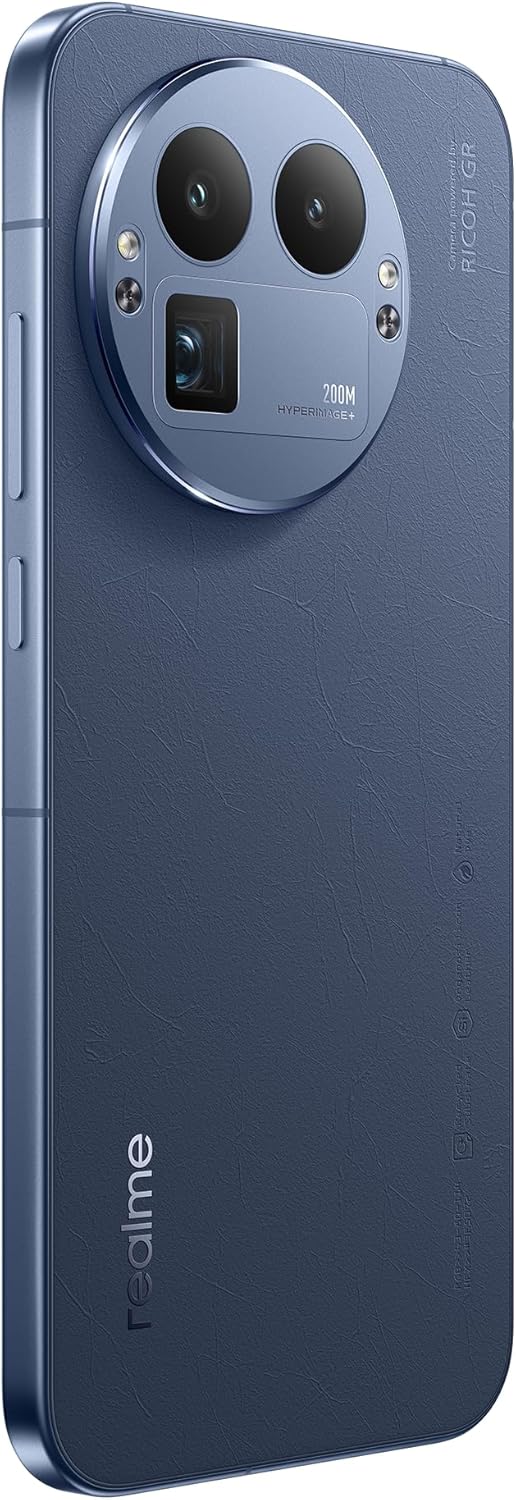
Attēls: Aizmugure view of the Realme 12 Plus 5G RMX3867, showcasing the prominent circular camera module with multiple lenses and a "200M HYPERIMAGE+" label.
4.3. Savienojamība
- 5G tīkls: Your device supports 5G connectivity for faster mobile data speeds. Ensure your SIM card and plan support 5G.
- Wi-Fi: Izveidojiet savienojumu ar bezvadu tīkliem, lai piekļūtu internetam. Lai pārvaldītu savienojumus, dodieties uz Iestatījumi > Wi-Fi.
- Bluetooth: Pair with Bluetooth devices like headphones, speakers, or car systems. Go to Settings > Bluetooth.
- USB-C: Uzlādei un datu pārsūtīšanai izmantojiet USB-C portu.
4.4. Drošības līdzekļi
- Pirkstu nospiedumu sensors: Unlock your device quickly and securely using the in-display fingerprint sensor. Register your fingerprints in Settings > Security & Privacy > Fingerprint.
- Atbloķēšana pēc sejas: Use facial recognition to unlock your phone. Set up Face Unlock in Settings > Security & Privacy > Face.
- Ekrāna bloķēšana: Choose from PIN, pattern, or password for basic screen security.
5. Apkope
5.1. Ierīces tīrīšana
- Izmantojiet mīkstu, nepūkošu drānu, lai noslaucītu tālruņa ekrānu un korpusu.
- Izvairieties no spēcīgu ķīmisku vielu, abrazīvu materiālu vai aerosolu lietošanas.
- Noturīgiem traipiem nedaudz uzdzerietampNoslaukiet drānu ar ūdeni vai ekrāna tīrīšanas līdzekli, kas īpaši paredzēts elektronikai.
5.2. Programmatūras atjauninājumi
Regularly check for and install software updates to ensure your device has the latest features, security patches, and performance improvements. Go to Settings > About device > Up to date to check for updates.
5.3. Akumulatora kopšana
- Izvairieties no ekstremālām temperatūrām, jo tās var samazināt akumulatora darbības laiku.
- Izmantojiet tikai oriģinālo lādētāju un kabeli vai sertificētus saderīgus piederumus.
- Do not let the battery drain completely frequently. It is generally recommended to keep the battery level between 20% and 80%.
6. Traucējummeklēšana
6.1. Bieži sastopamās problēmas un risinājumi
| Problēma | Risinājums |
|---|---|
| Ierīce neieslēdzas | Pārliecinieties, vai akumulators ir uzlādēts. Nospiediet un turiet ieslēgšanas/izslēgšanas pogu vismaz 10–15 sekundes. |
| Lietotnes avarē vai sasalst | Close the app and reopen it. Clear the app's cache (Settings > Apps > [App Name] > Storage > Clear cache). Restart the device. |
| Slikts akumulatora darbības laiks | Check background app usage. Reduce screen brightness. Disable unnecessary features like GPS or Bluetooth when not in use. |
| Nevar izveidot savienojumu ar Wi-Fi | Restart your router and phone. Forget the network and reconnect. Ensure Wi-Fi is enabled on your device. |
6.2. Rūpnīcas atiestatīšana
Ja rodas pastāvīgas problēmas, rūpnīcas atiestatīšana var tās novērst. Brīdinājums: Rūpnīcas datu atiestatīšana izdzēsīs visus datus jūsu tālrunī. Pirms turpināt, dublējiet svarīgos datus.
- Dodieties uz Iestatījumi > Sistēma > Atiestatīšanas opcijas.
- Pieskarieties pogai “Dzēst visus datus (rūpnīcas datu atiestatīšana)”.
- Apstipriniet savu lēmumu un, ja tiek prasīts, ievadiet PIN kodu/paroli.
- Ierīce restartēsies un sāks atiestatīšanas procesu.
7. Specifikācijas
Below are the key technical specifications for the Realme 12 Plus 5G RMX3867:
| Funkcija | Detaļas |
|---|---|
| Zīmols | realme |
| Modeļa nosaukums | Realme 12 Plus 5G (RMX3867) |
| Operētājsistēma | Android |
| Atmiņas krātuves ietilpība | 256 GB |
| Instalētās RAM atmiņas apjoms | 12 GB |
| CPU modelis | Snapdragon |
| CPU ātrums | 1200 MHz |
| Ekrāna izmērs | 6.4 collas |
| Displeja veids | AMOLED |
| Izšķirtspēja | 1440 x 2560 |
| Efektīva video izšķirtspēja | 200 MP |
| Šūnu tehnoloģija | 5G |
| Akumulatora ietilpība | 7000 miljoniamp Stundas |
| Vidējais akumulatora darbības laiks | 21 stundas |
| Cilvēka saskarnes ievade | Skārienekrāns |
| Preces modeļa numurs | GT 8 Pro (Note: Product title is Realme 12 Plus 5G RMX3867) |
Note: Some specifications may vary slightly based on region or specific product variant. The model number in the product title is RMX3867, while some specifications list 'GT 8 Pro'. Please refer to your device's packaging for the most accurate model information.
8. Garantija un atbalsts
Your Realme 12 Plus 5G RMX3867 device comes with a limited warranty. Please refer to the warranty card included in your product packaging for detailed terms and conditions, including warranty period and coverage.
Lai saņemtu tehnisko atbalstu, pakalpojumus vai papildu jautājumus, lūdzu, apmeklējiet oficiālo Realme atbalsta vietni. website or contact their customer service. Contact information can typically be found on the realme official website or in the "Safety Guide" included with your device.
Saglabājiet pirkuma apliecinājumu garantijas prasībām.


